Gpiozero: Wrong distance values when using Distance Sensor with MockFactory
Operating system: Windows 10 / macOS 10.15.4
Python version: 3.7.7
Pi model: none
Pin factory used: MockFactory
GPIO Zero version: 1.5.1
Due to the Coronavirus outbreak, my engineering students cannot use the laboratory. So I decided to build a device simulator in TkInter, using Device.pin_factory = MockFactory().
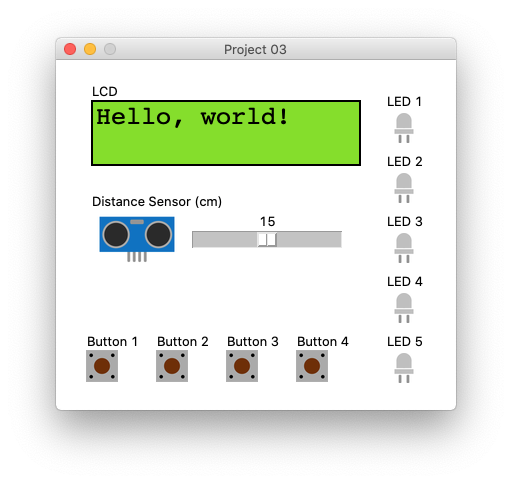
TkInter's Button acts like physical buttons, LED images react to the state of pins, etc. But when I try to use a TkInter's Scale (slider) to represent the Distance Sensor, I get terrible distance values. Here is the gist of my TkInter code:
Device.pin_factory = MockFactory()
self._echo_pin = Device.pin_factory.pin(17)
self._trigger_pin = Device.pin_factory.pin(18, pin_class=MockTriggerPin, echo_pin=self._echo_pin)
self._scale = Scale(root, from_=0, to=100, orient=HORIZONTAL, command=self._scale_changed)

def _scale_changed(self, value):
    speed_of_sound = 343.26 # m/s
    distance = float(value) / 100 # cm -> m
    self._trigger_pin.echo_time = distance * 2 / speed_of_sound
And here is the gist of gpiozero code:
from gpiozero import Buzzer, LED, Button, DistanceSensor
sensor = DistanceSensor(trigger=17, echo=18)
sensor.max_distance = 5
print(sensor.distance)
The sensor.distance value is ok-ish in macOS, but it gets really bad in Windows 10 – the minimum value is around 2.5 meters.
So I started to study gpiozero's classes. After some tests, I think I found the problem:
class LocalPiFactory(PiFactory):
    @staticmethod
    def ticks():
        return monotonic() # <-- PROBLEM!!!

class MockTriggerPin(MockPin):
    def _echo(self):
        sleep(0.001)
        self.echo_pin.drive_high()
        sleep(self.echo_time)  # <-- PROBLEM!!!
        self.echo_pin.drive_low()
In my tests, I found out that monotonic() and sleep() are not very precise for small intervals, specially on Windows. Instead of that, I think we should use clock() (deprecated) or perf_counter() (starting on Python 3.3), both from time library.
Here is a proposed solution (I can create a pull request if you so wish):
class LocalPiFactory(PiFactory):
    @staticmethod
    def ticks():
        return perf_counter()

class MockTriggerPin(MockPin):
    def _echo(self):
        sleep(0.001)
        self.echo_pin.drive_high()

        init_time = perf_counter()
        while True:
            if perf_counter() - init_time >= self.echo_time:
                break

        self.echo_pin.drive_low()
We could also fix ticks() in MockFactory instead of LocalPiFactory.
 wallysalami
All 5 comments
Wow, that's really cool.
I'll let @waveform80 know.
 bennuttall
on 24 Jul 2020
bennuttall
on 24 Jul 2020
Love the simulator! I've been wanting to make a GUI-style layer on top of MockFactory for some time but there's been too many other pressing things to deal with.
On the suggestions: I certainly have no problem with adding a Windows-specific implementation of the ticks() method to MockFactory. That doesn't affect the operation of anything on the primary platform (the Pi), and makes MockFactory more useful on other platforms, so definitely +1 there.
On changing the use of sleep(), that I'd have to test on various Pi models (especially the low end ones like the zero) to see whether it's as accurate as sleep (which is pretty accurate, albeit maybe not on Windows - although frankly that surprises me). If there's a major difference on Pi I'd have to be -1 on that.
However, it does occur to me that, given we've made time effectively "pin-specific" by implementing it in the factory, that really sleep ought to be pin-specific too. In other words, there really ought to be a sleep_ticks method or something similar which could then have a Windows-specific variant in MockFactory. Obviously that's rather more work (off the top of my head it'd mean adding Factory.sleep_ticks, LocalPiFactory.sleep_ticks, PiGPIOFactory.sleep_ticks, MockFactory.sleep_ticks and replacing all occurrences of sleep() in the library with calls to self._factory.sleep_ticks) but it seems the "right" design in my head.
Unfortunately I doubt I've got the time for all that right now, but if you or Ben (or anyone else!) wants to have a crack at it, I'd love to see the results!
 waveform80
on 24 Jul 2020
waveform80
on 24 Jul 2020
I'm glad you guys liked my little simulator! I was pretty happy when I found out that MockFactory existed (it really helped me a lot, thank you!), but also surprised that no one has used it in a GUI. I'm probably going to open source it later on, after some basic refactoring – I'm programming all this stuff in a rush, a few hours before my remote classes, hehe.
I've benchmarked this sleep() / monotonic() vs perf_counter() on some platforms.
Test 1: sleep / monotonic
import time

sleep_time = 0.004
iterations = 100

sum_of_durations = 0
for i in range(0, iterations):
    t1 = time.monotonic()

    time.sleep(sleep_time)

    t2 = time.monotonic()
    sum_of_durations += t2 - t1

average = sum_of_durations / iterations
print("Average duration: %.10f" % average)
Results:
| Plataform | Average duration |
| ---------------------------------- | ----------------- |
| Windows 10 | 0.0157800000 |
| macOS 10.15 | 0.0046089222 |
| Raspbian Jessie (Raspberry Pi 3B) | 0.0041226530 |
Look at that Windows time, yikes! Raspberry's time is better, but still has with some error.
Test 2: perf_counter
import time

sleep_time = 0.004
iterations = 100

sum_of_durations = 0
for i in range(0, iterations):
    t1 = time.perf_counter()

    init_time = time.perf_counter()
    while True:
        if time.perf_counter() - init_time >= sleep_time:
            break

    t2 = time.perf_counter()
    sum_of_durations += t2 - t1

average = sum_of_durations / iterations
print("Average duration: %.10f" % average)
Results:
| Plataform | Average duration |
| ---------------------------------- | ----------------- |
| Windows 10 | 0.0040064110 |
| macOS 10.15 | 0.0040012991 |
| Raspbian Jessie (Raspberry Pi 3B) | 0.0040087477 |
Much better! But you should test it with different sleep times on different Raspberrys / Raspbians.
About that sleep_ticks suggestion, I'm not that familiar with gpiozero's architecture to give an informed opinion. By now, I'm just subclassing MockTriggerPin and MockFactory to solve this issue.
wallysalami
on 24 Jul 2020
V.
 anamorph
on 30 Aug 2020
anamorph
on 30 Aug 2020
Hii,
"""DistanceSensorNoEcho: no echo received warnings.warn(DistanceSensorNoEcho('no echo received'))"""
I got this message when operating distance sensor.I am using Linux Mint 19.1 Tessa.How can i get accurate values of distance sensor
 HHARITHA
on 12 Oct 2020
HHARITHA
on 12 Oct 2020
Related issues
bennuttall
·
6Comments
bennuttall
·
11Comments
waveform80
·
10Comments
 Natureshadow
·
11Comments
Natureshadow
·
11Comments
 tombennet
·
12Comments
tombennet
·
12Comments
Most helpful comment
I'm glad you guys liked my little simulator! I was pretty happy when I found out that MockFactory existed (it really helped me a lot, thank you!), but also surprised that no one has used it in a GUI. I'm probably going to open source it later on, after some basic refactoring – I'm programming all this stuff in a rush, a few hours before my remote classes, hehe.
I've benchmarked this
sleep()/monotonic()vsperf_counter()on some platforms.Test 1: sleep / monotonic
Results:
| Plataform | Average duration |
| ---------------------------------- | ----------------- |
| Windows 10 |
0.0157800000|| macOS 10.15 |
0.0046089222|| Raspbian Jessie (Raspberry Pi 3B) |
0.0041226530|Look at that Windows time, yikes! Raspberry's time is better, but still has with some error.
Test 2: perf_counter
Results:
| Plataform | Average duration |
| ---------------------------------- | ----------------- |
| Windows 10 |
0.0040064110|| macOS 10.15 |
0.0040012991|| Raspbian Jessie (Raspberry Pi 3B) |
0.0040087477|Much better! But you should test it with different sleep times on different Raspberrys / Raspbians.
About that
sleep_tickssuggestion, I'm not that familiar with gpiozero's architecture to give an informed opinion. By now, I'm just subclassingMockTriggerPinandMockFactoryto solve this issue.