Googleplayservicescomponents: GoogleServicesJson BuildAction missing
Xamarin.Android Version ( 6.0):
Operating System & Version (Windows 10 VisualStudio 2015)
Google Play Services Version (9.4.0)
Describe your Issue:
If I use the FirebaseMessaging quickstart sample I see GoogleServicesJson BuildAction is available when I selecet the google-services.json file in the project.
However, according to @Redth 's comment in this thread I just need to add the nuget package for Xamarin.GoogleServices.Basement and it should be available. I have tried this in new projects but I have been unsuccesful. Is there something else I need to do?
Steps to Reproduce (with link to sample solution if possible):
-Create a new project
-Add your google-services.json to the project
-Add the nuget package for Xamarin.GoogleServices.Basement
-Click on google-services.json and go to properties. The buildaction is not available and if you try to enter it manually an error appears saying "Property value is not valid"
 tallkid10
All 12 comments
The build actions can be a bit finicky right after you install a nuget package. Here are a few things to try:
- Try cleaning/rebuilding your project
- Try restarting Visual Studio
- Make sure that your .csproj has an entry which includes
Xamarin.GooglePlayServices.Basement.targets
 Redth
on 8 Sep 2016
Redth
on 8 Sep 2016
Rebuilding solved the problem, thanks again @Redth !
tallkid10
on 8 Sep 2016
Easy way is to modify .csproj file in TextEdit by adding the following line
<ItemGroup>
    <GoogleServicesJson Include="google-services.json" />
 </ItemGroup>
PS: I tried to clean/rebuild project or restart Xamarin IDE many times, but the results are not consistent.
 ghost
on 22 Dec 2016
ghost
on 22 Dec 2016
would there be a .csproj in Xamarin.Forms? or would it be in my specific AppName.Android and Appname.iOS? I'm trying to use the Firebase Auth in both my iOS and Android versions of my app
 runawayGoblin
on 13 Apr 2017
runawayGoblin
on 13 Apr 2017
download this Packages und restart 👍

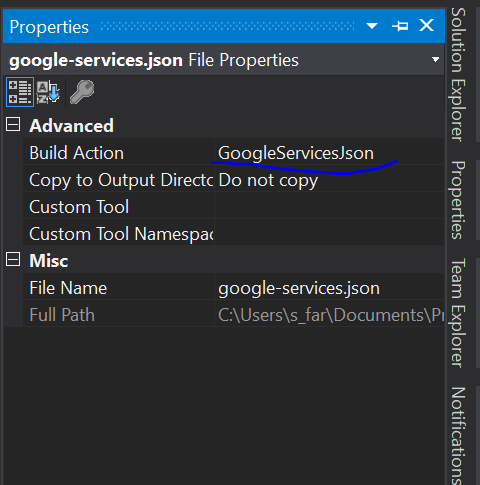
 sulimanfarzat
on 28 Oct 2017
sulimanfarzat
on 28 Oct 2017
@sulimanfarzat Thanks! Works for me!
 juanagu
on 31 Oct 2017
juanagu
on 31 Oct 2017
I have error, but all Packages has been installed
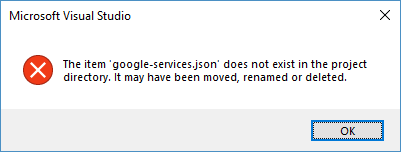

 VitalinaMoskalenko
on 22 Jan 2018
VitalinaMoskalenko
on 22 Jan 2018
@vitalina
Make sure build Action is GoogleServicesJson
sulimanfarzat
on 22 Jan 2018
I am unable to add the Xamarin.Firebase packages. It tells me it is incompatible with MonoAndroid 7.1. If I try to replace the Mono.Andoid.dll with the 8.0 version, it still just adds the 7.1 version.
 geedsen
on 26 Jan 2018
geedsen
on 26 Jan 2018
@geedsen Try lowing the version of the Xamarin.Firebase package. That worked for me. Best of luck :)
 Dylan-Jefferies
on 12 Feb 2018
Dylan-Jefferies
on 12 Feb 2018
Clean/Rebuild + VS Restart fixed it for me
 ahoefling
on 17 Mar 2018
ahoefling
on 17 Mar 2018
I added the section in csproj
 vlkam
on 5 Feb 2019
vlkam
on 5 Feb 2019
Related issues
 tony98789
·
6Comments
tony98789
·
6Comments
 aliusman
·
12Comments
aliusman
·
12Comments
 aoershov
·
5Comments
aoershov
·
5Comments
 thisisthekap
·
12Comments
thisisthekap
·
12Comments
 a-imai
·
10Comments
a-imai
·
10Comments
Most helpful comment
The build actions can be a bit finicky right after you install a nuget package. Here are a few things to try:
Xamarin.GooglePlayServices.Basement.targets