Googleads-mobile-unity: Google Mobile Ads Unity Plugin v6.0.0
Exception: Failed running /Applications/Unity/Hub/Editor/2021.1.4f1/Unity.app/Contents/il2cpp/build/deploy/netcoreapp3.1/UnityLinker @"/Unity/Temp/StagingArea/assets/bin/Data/Managed/response.rsp"
stdout:
Fatal error in Unity CIL Linker
Mono.Linker.LinkerFatalErrorException: ILLink: error IL1005: GoogleMobileAds.Api.MobileAds.GetClientFactory(): Error processing method 'GoogleMobileAds.Api.MobileAds.GetClientFactory()' in assembly 'GoogleMobileAds.dll'
---> System.InvalidOperationException: No action for the assembly GoogleMobileAds.Unity, Version=0.0.0.0, Culture=neutral, PublicKeyToken=null defined
at Mono.Linker.AnnotationStore.GetAction(AssemblyDefinition assembly) in /Users/bokken/build/output/unity/il2cpp/repos/monolinker/src/linker/Linker/Annotations.cs:line 112
at Mono.Linker.Steps.MarkStep.MarkCustomAttributes(ICustomAttributeProvider provider, DependencyInfo& reason, IMemberDefinition sourceLocationMember) in /Users/bokken/build/output/unity/il2cpp/repos/monolinker/src/linker/Linker.Steps/MarkStep.cs:line 574
at Mono.Linker.Steps.MarkStep.MarkType(TypeReference reference, DependencyInfo reason, IMemberDefinition sourceLocationMember) in /Users/bokken/build/output/unity/il2cpp/repos/monolinker/src/linker/Linker.Steps/MarkStep.cs:line 1447
at Mono.Linker.Dataflow.ReflectionMethodBodyScanner.<>c__DisplayClass20_4.
at Mono.Linker.Dataflow.ReflectionPatternContext.RecordRecognizedPattern(IMemberDefinition accessedItem, Action mark) in /Users/bokken/build/output/unity/il2cpp/repos/monolinker/src/linker/Linker.Dataflow/ReflectionPatternContext.cs:line 79
at Mono.Linker.Dataflow.ReflectionMethodBodyScanner.HandleCall(MethodBody callingMethodBody, MethodReference calledMethod, Instruction operation, ValueNodeList methodParams, ValueNode& methodReturnValue) in /Users/bokken/build/output/unity/il2cpp/repos/monolinker/src/linker/Linker.Dataflow/ReflectionMethodBodyScanner.cs:line 811
at Mono.Linker.Dataflow.MethodBodyScanner.HandleCall(MethodBody callingMethodBody, Instruction operation, Stack`1 currentStack) in /Users/bokken/build/output/unity/il2cpp/repos/monolinker/src/linker/Linker.Dataflow/MethodBodyScanner.cs:line 859
at Mono.Linker.Dataflow.MethodBodyScanner.Scan(MethodBody methodBody) in /Users/bokken/build/output/unity/il2cpp/repos/monolinker/src/linker/Linker.Dataflow/MethodBodyScanner.cs:line 530
at Mono.Linker.Dataflow.ReflectionMethodBodyScanner.ScanAndProcessReturnValue(MethodBody methodBody) in /Users/bokken/build/output/unity/il2cpp/repos/monolinker/src/linker/Linker.Dataflow/ReflectionMethodBodyScanner.cs:line 69
at Unity.Linker.Steps.UnityMarkStep.MarkReflectionLikeDependencies(MethodBody body, Boolean requiresReflectionMethodBodyScanner) in /Users/bokken/build/output/unity/il2cpp/UnityLinker/Linker.Steps/UnityMarkStep.cs:line 356
at Mono.Linker.Steps.MarkStep.MarkMethodBody(MethodBody body) in /Users/bokken/build/output/unity/il2cpp/repos/monolinker/src/linker/Linker.Steps/MarkStep.cs:line 2810
at Unity.Linker.Steps.UnityMarkStep.MarkMethodBody(MethodBody body) in /Users/bokken/build/output/unity/il2cpp/UnityLinker/Linker.Steps/UnityMarkStep.cs:line 362
at Mono.Linker.Steps.MarkStep.ProcessMethod(MethodDefinition method, DependencyInfo& reason) in /Users/bokken/build/output/unity/il2cpp/repos/monolinker/src/linker/Linker.Steps/MarkStep.cs:line 2432
at Unity.Linker.Steps.UnityMarkStep.ProcessMethod(MethodDefinition method, DependencyInfo& reason) in /Users/bokken/build/output/unity/il2cpp/UnityLinker/Linker.Steps/UnityMarkStep.cs:line 227
at Mono.Linker.Steps.MarkStep.ProcessQueue() in /Users/bokken/build/output/unity/il2cpp/repos/monolinker/src/linker/Linker.Steps/MarkStep.cs:line 391
--- End of inner exception stack trace ---
at Mono.Linker.Steps.MarkStep.ProcessQueue() in /Users/bokken/build/output/unity/il2cpp/repos/monolinker/src/linker/Linker.Steps/MarkStep.cs:line 393
at Mono.Linker.Steps.MarkStep.ProcessPrimaryQueue() in /Users/bokken/build/output/unity/il2cpp/repos/monolinker/src/linker/Linker.Steps/MarkStep.cs:line 377
at Mono.Linker.Steps.MarkStep.Process()
at Mono.Linker.Steps.MarkStep.Process(LinkContext context) in /Users/bokken/build/output/unity/il2cpp/repos/monolinker/src/linker/Linker.Steps/MarkStep.cs:line 188
at Unity.Linker.Steps.UnityMarkStep.Process(LinkContext context) in /Users/bokken/build/output/unity/il2cpp/UnityLinker/Linker.Steps/UnityMarkStep.cs:line 260
at Unity.Linker.UnityPipeline.ProcessStep(LinkContext context, IStep step) in /Users/bokken/build/output/unity/il2cpp/UnityLinker/Linker/UnityPipeline.cs:line 23
at Mono.Linker.Pipeline.Process(LinkContext context) in /Users/bokken/build/output/unity/il2cpp/repos/monolinker/src/linker/Linker/Pipeline.cs:line 129
at Unity.Linker.UnityDriver.UnityRun(ILogger customLogger) in /Users/bokken/build/output/unity/il2cpp/UnityLinker/Linker/UnityDriver.cs:line 106
at Unity.Linker.UnityDriver.RunDriverWithoutErrorHandling(ILogger customLogger) in /Users/bokken/build/output/unity/il2cpp/UnityLinker/Linker/UnityDriver.cs:line 72
at Unity.Linker.UnityDriver.RunDriver() in /Users/bokken/build/output/unity/il2cpp/UnityLinker/Linker/UnityDriver.cs:line 54
stderr:
 MeAtPros
All 17 comments
Can confirm this, any fix planned?
Also Unity is complaining that the assembly can not be the same name as the dll.
 NilokiloxD
on 18 May 2021
NilokiloxD
on 18 May 2021
Got the same error using Unity version 2021.1.6
Solution will be a great help.
Thanks
 adnanse-hadali
on 18 May 2021
adnanse-hadali
on 18 May 2021
Got the same error.
Unity version: 2021.1.5f1
Hope this gets fixed soon.
Screenshot of Player Settings:

 rajabilal555
on 19 May 2021
rajabilal555
on 19 May 2021
Hey everybody, I'm tackling the issue with our team. I'm able to reproduce the issue only on 2021.1 version (2020.2 works fine) Does anyone have issue on Unity 2020?
 JillSong
on 20 May 2021
JillSong
on 20 May 2021
For a quick fix, you can import the source code Asset into your project. https://github.com/googleads/googleads-mobile-unity/tree/master/source/plugin/Assets This will get rid of the exception.
JillSong
on 20 May 2021
Hey everybody, I'm tackling the issue with our team. I'm able to reproduce the issue only on 2021.1 version (2020.2 works fine) Does anyone have issue on Unity 2020?
I don't have this compile error in 2020.3.8f1.
In 2020, there just seems to be a build error (#1616)
 shirokurohitsuji
on 21 May 2021
shirokurohitsuji
on 21 May 2021
Got the same error using Unity version 2021.1.6
Please fix this.
 nomibuilder
on 22 May 2021
nomibuilder
on 22 May 2021
I have the same problem. Q口Q
Unity version 2021.1.9f1
 horoeil
on 3 Jun 2021
horoeil
on 3 Jun 2021
2021.1.10f. Same problem
 p-inemu
on 7 Jun 2021
p-inemu
on 7 Jun 2021
Hey everybody, I'm tackling the issue with our team. I'm able to reproduce the issue only on 2021.1 version (2020.2 works fine) Does anyone have issue on Unity 2020?
Unity developer here - @JillSong It sounds like this is a change in behavior in Unity, so we would like to understand and correct this, even if you have a work around on your end. Can you drop us a bug report with a Unity project that causes this issue?
 joshpeterson
on 8 Jun 2021
joshpeterson
on 8 Jun 2021
Closing the issue. The fix will be in the next release.
JillSong
on 10 Jun 2021
Closing the issue. The fix will be in the next release.
Hi I am very new here for solving this problem.
I was wondering if you can tell me how to fix this issue for me?
I was trying to follow exactly your instruction.
however, it is just my luck of my knowledge, I could not figure out how where I can change and how to change it.
especially (source/plugin/Assets/GoogleMobileAds/Api/Core/AdRequest.cs).
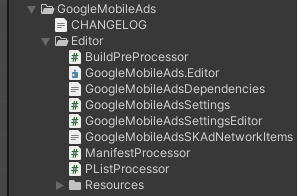
in Unity, I could only find these .cs files...
with your instruction, I was supposed to change 6.0.0 => 6.0.1, but I could not find anywhere in my project.
could you please kindly advise?
My Unity version is 2021.2.0a21.2949
Thank you so much.
Shota
 Makizume
on 19 Jun 2021
Makizume
on 19 Jun 2021
Closing the issue. The fix will be in the next release.
Please tell me when the update will be released?
 Hetagkaty
on 19 Jun 2021
Hetagkaty
on 19 Jun 2021
Do we have an ETA on the fixed release?
 Zamaroht
on 23 Jun 2021
Zamaroht
on 23 Jun 2021
I still have the same problem with builds after updating to 6.0.1 SDK.
Exception: Failed running /Applications/Unity/2021.1.10f1/Unity.app/Contents/il2cpp/build/deploy/netcoreapp3.1/UnityLinker @"/Users/zamaroht/Documents/splabs/blackboard/Temp/StagingArea/Data/Managed/response.rsp"

stdout:
Fatal error in Unity CIL Linker
Mono.Linker.LinkerFatalErrorException: ILLink: error IL1005: GoogleMobileAds.Api.MobileAds.GetClientFactory(): Error processing method 'GoogleMobileAds.Api.MobileAds.GetClientFactory()' in assembly 'GoogleMobileAds.dll'
 ---> System.InvalidOperationException: No action for the assembly GoogleMobileAds.Android, Version=0.0.0.0, Culture=neutral, PublicKeyToken=null defined
   at Mono.Linker.AnnotationStore.GetAction(AssemblyDefinition assembly) in /Users/bokken/build/output/unity/il2cpp/repos/monolinker/src/linker/Linker/Annotations.cs:line 112
   at Mono.Linker.Steps.MarkStep.MarkCustomAttributes(ICustomAttributeProvider provider, DependencyInfo& reason, IMemberDefinition sourceLocationMember) in /Users/bokken/build/output/unity/il2cpp/repos/monolinker/src/linker/Linker.Steps/MarkStep.cs:line 574
I tried building with Unity 2021.1.4f1 and 2021.1.10f1, both give me the same problem. I'm on Mac.
Zamaroht
on 30 Jun 2021
I still have the same problem with builds after updating to 6.0.1 SDK.
macBook M1
 davit87yeghoyan
on 1 Jul 2021
davit87yeghoyan
on 1 Jul 2021
I still have the same problem with builds after updating to 6.0.1 SDK.
Exception: Failed running /Applications/Unity/2021.1.10f1/Unity.app/Contents/il2cpp/build/deploy/netcoreapp3.1/UnityLinker @"/Users/zamaroht/Documents/splabs/blackboard/Temp/StagingArea/Data/Managed/response.rsp"

stdout:
Fatal error in Unity CIL Linker
Mono.Linker.LinkerFatalErrorException: ILLink: error IL1005: GoogleMobileAds.Api.MobileAds.GetClientFactory(): Error processing method 'GoogleMobileAds.Api.MobileAds.GetClientFactory()' in assembly 'GoogleMobileAds.dll'
 ---> System.InvalidOperationException: No action for the assembly GoogleMobileAds.Android, Version=0.0.0.0, Culture=neutral, PublicKeyToken=null defined
   at Mono.Linker.AnnotationStore.GetAction(AssemblyDefinition assembly) in /Users/bokken/build/output/unity/il2cpp/repos/monolinker/src/linker/Linker/Annotations.cs:line 112
   at Mono.Linker.Steps.MarkStep.MarkCustomAttributes(ICustomAttributeProvider provider, DependencyInfo& reason, IMemberDefinition sourceLocationMember) in /Users/bokken/build/output/unity/il2cpp/repos/monolinker/src/linker/Linker.Steps/MarkStep.cs:line 574
I tried building with Unity 2021.1.4f1 and 2021.1.10f1, both give me the same problem. I'm on Mac.
After a few days of trial and error, I found what was wrong and don't have this linker error any more.
My use case was as follows: I was trying to create a package with this plugin inside, which is then uploaded to a package registry. Then, I was importing the package inside my project from the package registry and trying to compile. Compiling failed with the linker error in the quoted message.
To fix it, I copied the link.xml and link.xml.meta files from the package directly into the project's Assets directory. After doing this the error is gone. Looks like Unity is not reading this link.xml file if it is inside a package from a package registry.
Zamaroht
on 2 Jul 2021
Related issues
 pacoelayudante
·
6Comments
pacoelayudante
·
6Comments
 can-keskin
·
8Comments
can-keskin
·
8Comments
 perseus25
·
4Comments
perseus25
·
4Comments
 AdnanNazir
·
4Comments
AdnanNazir
·
4Comments
 crSudo
·
4Comments
crSudo
·
4Comments
Most helpful comment
Got the same error using Unity version 2021.1.6
Please fix this.