Googleads-mobile-unity: plugin 5.4.0 crashed the app by newing an instance of abstract com.google.android.gms.ads.rewarded.RewardedAd class
Using 2020.3.3f1, import AdMob unity plugin 5.4.0, also Android Resolver resolved forcefully.
still get the following message and app crashed.
it seems that UnityRewardedAd tried to new an abstract com.google.android.gms.ads.rewarded.RewardedAd instance. Any workaround?
2021-04-11 02:35:05.115 10922-10922/? E/AndroidRuntime: FATAL EXCEPTION: main
Process: com.moonriver.divination, PID: 10922
java.lang.InstantiationError: com.google.android.gms.ads.rewarded.RewardedAd
at com.google.unity.ads.UnityRewardedAd$1.run(UnityRewardedAd.java:53)
at android.os.Handler.handleCallback(Handler.java:914)
at android.os.Handler.dispatchMessage(Handler.java:100)
at android.os.Looper.loop(Looper.java:224)
at android.app.ActivityThread.main(ActivityThread.java:7551)
at java.lang.reflect.Method.invoke(Native Method)
at com.android.internal.os.RuntimeInit$MethodAndArgsCaller.run(RuntimeInit.java:539)
at com.android.internal.os.ZygoteInit.main(ZygoteInit.java:995)
 swswggg
All 33 comments
Same problem
I have the exact same problem the game crashes with:
FATAL EXCEPTION: main
Error AndroidRuntime java.lang.InstantiationError: com.google.android.gms.ads.rewarded.RewardedAd
Error AndroidRuntime at com.google.unity.ads.UnityRewardedAd$1.run(UnityRewardedAd.java:53)
Error AndroidRuntime at android.os.Handler.handleCallback(Handler.java:883)
Error AndroidRuntime at android.os.Handler.dispatchMessage(Handler.java:100)
Error AndroidRuntime at android.os.Looper.loop(Looper.java:237)
Error AndroidRuntime at android.app.ActivityThread.main(ActivityThread.java:7948)
Error AndroidRuntime at java.lang.reflect.Method.invoke(Native Method)
Error AndroidRuntime at com.android.internal.os.RuntimeInit$MethodAndArgsCaller.run(RuntimeInit.java:493)
Error AndroidRuntime at com.android.internal.os.ZygoteInit.main(ZygoteInit.java:1075)
I have followed every step exactly as guided in documentation but after I click on the ad button, the game crashes with the log noted on top. It's been about 5-6 days that I have this problem and it is stopping us to release necessary updates for our game.
I'm using unity 2020.3.2f1 LTS version
google mobile ads package version 5.4.0
Firebase version 7.1.0 (and also tried 7.0.2)
we were using legacy version of rewarded ads and since last week we encountered class not found exception for the rewardbasead class then I came to conclusion that it may be because of the deprecation of legacy version, so I followed the documentation to implement the new rewarded ads API but the issue reproduced as instantiation Error.
 ali-pjx
on 11 Apr 2021
ali-pjx
on 11 Apr 2021
same here. game crash after unity splash screen with fatal exception
 saeedasadsh
on 11 Apr 2021
saeedasadsh
on 11 Apr 2021
I ran into same thing. please inform me if you find any solution...
 zero0sight
on 11 Apr 2021
zero0sight
on 11 Apr 2021
solved. It is basically a package versioning problem. admob unity 5.4.0 uses play-service 19.5.0 and old google package managers have a bug on solving it, always grab the latest play-service 20.0.0. Donot use and delete other google package managers included in other unitypackages. Just use the one included in admob unity 5.4.0.
(https://user-images.githubusercontent.com/19384188/114303841-b3941b80-9b02-11eb-91bf-0967f945e694.png)
swswggg
on 11 Apr 2021
solved. It is basically a package versioning problem. admob unity 5.4.0 uses play-service 19.5.0 and old google package managers have a bug on solving it, always grab the latest play-service 20.0.0. Donot use and delete other google package managers included in other unitypackages. Just use the one included in admob unity 5.4.0.
(https://user-images.githubusercontent.com/19384188/114303841-b3941b80-9b02-11eb-91bf-0967f945e694.png)
Its interesting, this problem only happens when I force resolve the android packages and it switches to 20.0.0, So before this problem was produced, the package was set to com.google.android.gms.play-services-ads-19.5.0 and everything was fine but when it decides to use com.google.android.gms.play-services-ads-20.0.0 this crash comes up.
ali-pjx
on 11 Apr 2021
solved. It is basically a package versioning problem. admob unity 5.4.0 uses play-service 19.5.0 and old google package managers have a bug on solving it, always grab the latest play-service 20.0.0. Donot use and delete other google package managers included in other unitypackages. Just use the one included in admob unity 5.4.0.
(https://user-images.githubusercontent.com/19384188/114303841-b3941b80-9b02-11eb-91bf-0967f945e694.png)Its interesting, this problem only happens when I force resolve the android packages and it switches to 20.0.0, So before this problem was produced, the package was set to com.google.android.gms.play-services-ads-19.5.0 and everything was fine but when it decides to use com.google.android.gms.play-services-ads-20.0.0 this crash comes up.
the new package manager changed its located path that we are not familiar with, not Assets->Play Services Resolver->Android Resolver->Force Resolve, in this case, wrong old package manager might be used, said old one imported with FB Audience network. As mentioned at last post, deleting other google package managers located in your unity project helps to avoid such a misuse,
swswggg
on 11 Apr 2021
solved. It is basically a package versioning problem. admob unity 5.4.0 uses play-service 19.5.0 and old google package managers have a bug on solving it, always grab the latest play-service 20.0.0. Donot use and delete other google package managers included in other unitypackages. Just use the one included in admob unity 5.4.0.
(https://user-images.githubusercontent.com/19384188/114303841-b3941b80-9b02-11eb-91bf-0967f945e694.png)Its interesting, this problem only happens when I force resolve the android packages and it switches to 20.0.0, So before this problem was produced, the package was set to com.google.android.gms.play-services-ads-19.5.0 and everything was fine but when it decides to use com.google.android.gms.play-services-ads-20.0.0 this crash comes up.
the new package manager changed its located path that we are not familiar with, not Assets->Play Services Resolver->Android Resolver->Force Resolve, in this case, wrong old package manager might be used, said old one imported with FB Audience network. As mentioned at last post, deleting other google package managers located in your unity project helps to avoid such a misuse,
Not sure that I understood what you are trying to say, but I am using External dependency manager that is included in the GMS package itself, and I'm 100% sure that its on of the mediations that changes gms ads (dependency) version from 19.5 to 20 and produces this crashes. However, I've been challenging with this problem since last week and for some reason one of these packages is trying to use the 20th version of GMS ads. Also, when I was looking at maven repository which is the main google repository for such packages, I have checked that version 20 is neither associated to firebase nor to any other related api's such as Unity ....
So I'm not absolutely sure how they decided to upgrade to version 20, but we are losing revenue every single day with such problem.
ali-pjx
on 11 Apr 2021
solved. It is basically a package versioning problem. admob unity 5.4.0 uses play-service 19.5.0 and old google package managers have a bug on solving it, always grab the latest play-service 20.0.0. Donot use and delete other google package managers included in other unitypackages. Just use the one included in admob unity 5.4.0.
(https://user-images.githubusercontent.com/19384188/114303841-b3941b80-9b02-11eb-91bf-0967f945e694.png)
I have done as you said (force resolving and checking packages version) and the issue is still there. The crash happens when ever I try to request for a new rewarded video ad. The play-service plugin version is 20.0.0
 ivan7012
on 11 Apr 2021
ivan7012
on 11 Apr 2021
solved. It is basically a package versioning problem. admob unity 5.4.0 uses play-service 19.5.0 and old google package managers have a bug on solving it, always grab the latest play-service 20.0.0. Donot use and delete other google package managers included in other unitypackages. Just use the one included in admob unity 5.4.0.
(https://user-images.githubusercontent.com/19384188/114303841-b3941b80-9b02-11eb-91bf-0967f945e694.png)I have done as you said (force resolving and checking packages version) and the issue is still there. The crash happens when ever I try to request for a new rewarded video ad. The play-service plugin version is 20.0.0
i think the simplest solution is replace these play services by hand, if you just had this problem only.
Also, remove the package manager to stop it from resolving wrong version automatically.
swswggg
on 11 Apr 2021
solved. It is basically a package versioning problem. admob unity 5.4.0 uses play-service 19.5.0 and old google package managers have a bug on solving it, always grab the latest play-service 20.0.0. Donot use and delete other google package managers included in other unitypackages. Just use the one included in admob unity 5.4.0.
(https://user-images.githubusercontent.com/19384188/114303841-b3941b80-9b02-11eb-91bf-0967f945e694.png)I have done as you said (force resolving and checking packages version) and the issue is still there. The crash happens when ever I try to request for a new rewarded video ad. The play-service plugin version is 20.0.0
i think the simplest solution is replace these play services by hand, if you just had this problem only.
Also, remove the package manager to stop it from resolving wrong version automatically.
Could you please mention what you have done exactly that you stopped this issue?
Also, are you sure deleting package manager would not mess up the dependencies and other required stuff?
ali-pjx
on 11 Apr 2021
solved. It is basically a package versioning problem. admob unity 5.4.0 uses play-service 19.5.0 and old google package managers have a bug on solving it, always grab the latest play-service 20.0.0. Donot use and delete other google package managers included in other unitypackages. Just use the one included in admob unity 5.4.0.
(https://user-images.githubusercontent.com/19384188/114303841-b3941b80-9b02-11eb-91bf-0967f945e694.png)I have done as you said (force resolving and checking packages version) and the issue is still there. The crash happens when ever I try to request for a new rewarded video ad. The play-service plugin version is 20.0.0
i think the simplest solution is replace these play services by hand, if you just had this problem only.
Also, remove the package manager to stop it from resolving wrong version automatically.Could you please mention what you have done exactly that you stopped this issue?
Also, are you sure deleting package manager would not mess up the dependencies and other required stuff?
Firstly answer the deleting package manager question, i think package manager is a help tool(plugin) for you to download the right version libs into your unity project. it reads all prepared xxxxxDependencies.xmls(by other plugins what need) in your project, resolves conflicts and downloads them all. If you remove package manager, you just lose the automatic resolving function, not making your project broken.
Anyway, BACKUP YOUR PROJECTS BEFORE you do somethings what you never done BEFORE.
the way i imported admob is as following pics shown:

after importing, admob's google package asked me dialogs,
i just first click "enabled" at upper dialog, then await its doing jobs.
when it finished, i just click the "text area" right below the "After" Label, then click "Add selected Registries".
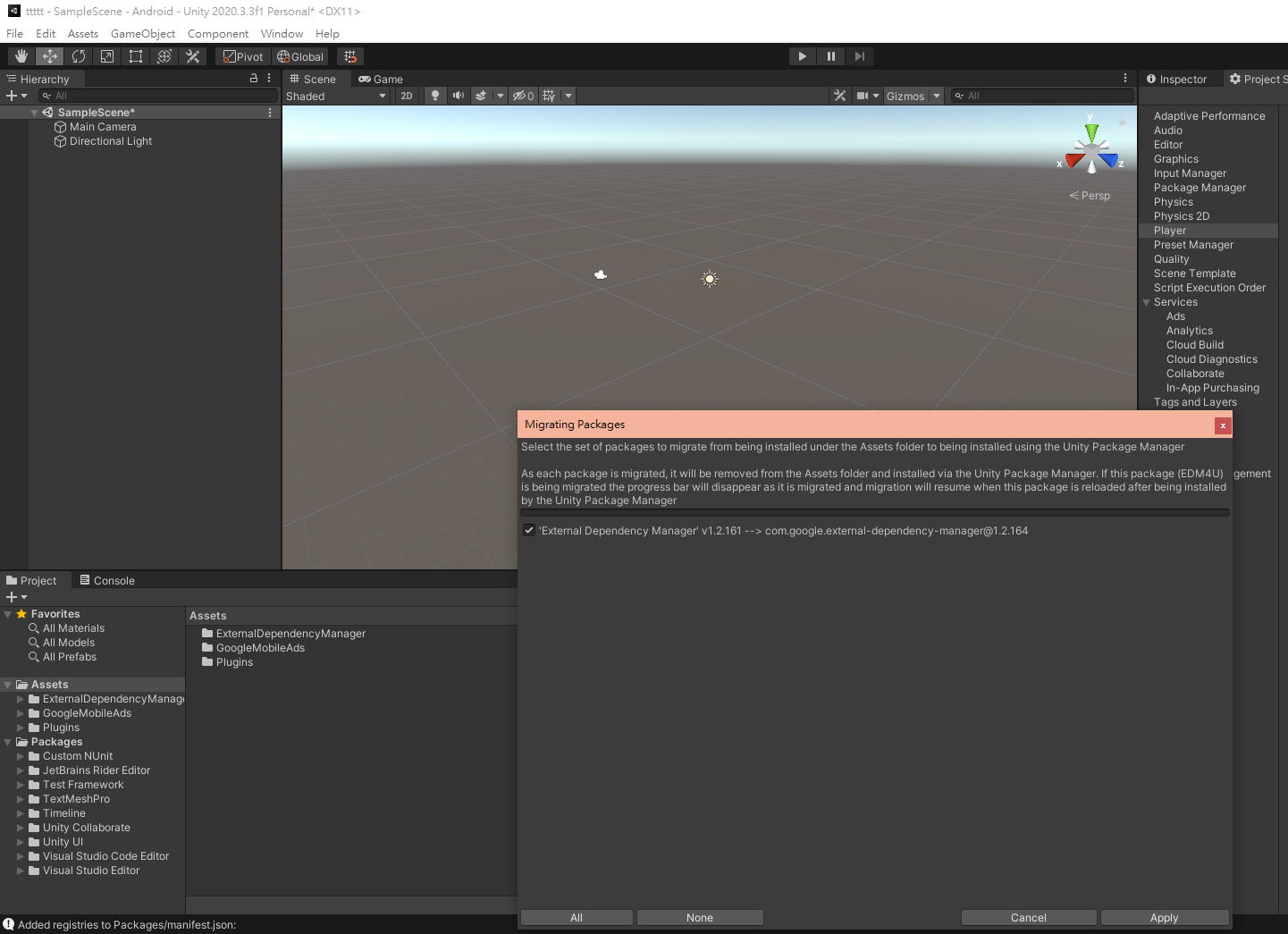
ok, google want you to upgrade, then i click "Apply".
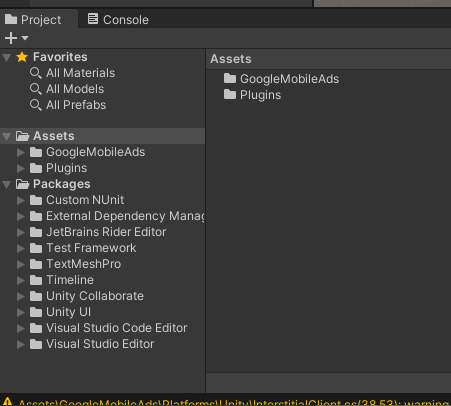
you will see the the folder "External Dependency Manager" underneath Asset folder went down the below of folder "Packages".
you done.
And the errata is here.
once you get this done, then you import another plugin(ex. FB Audiencd Network) include another old package manager without excluding the old one.
your manager might go mad and give you wrong version libs.
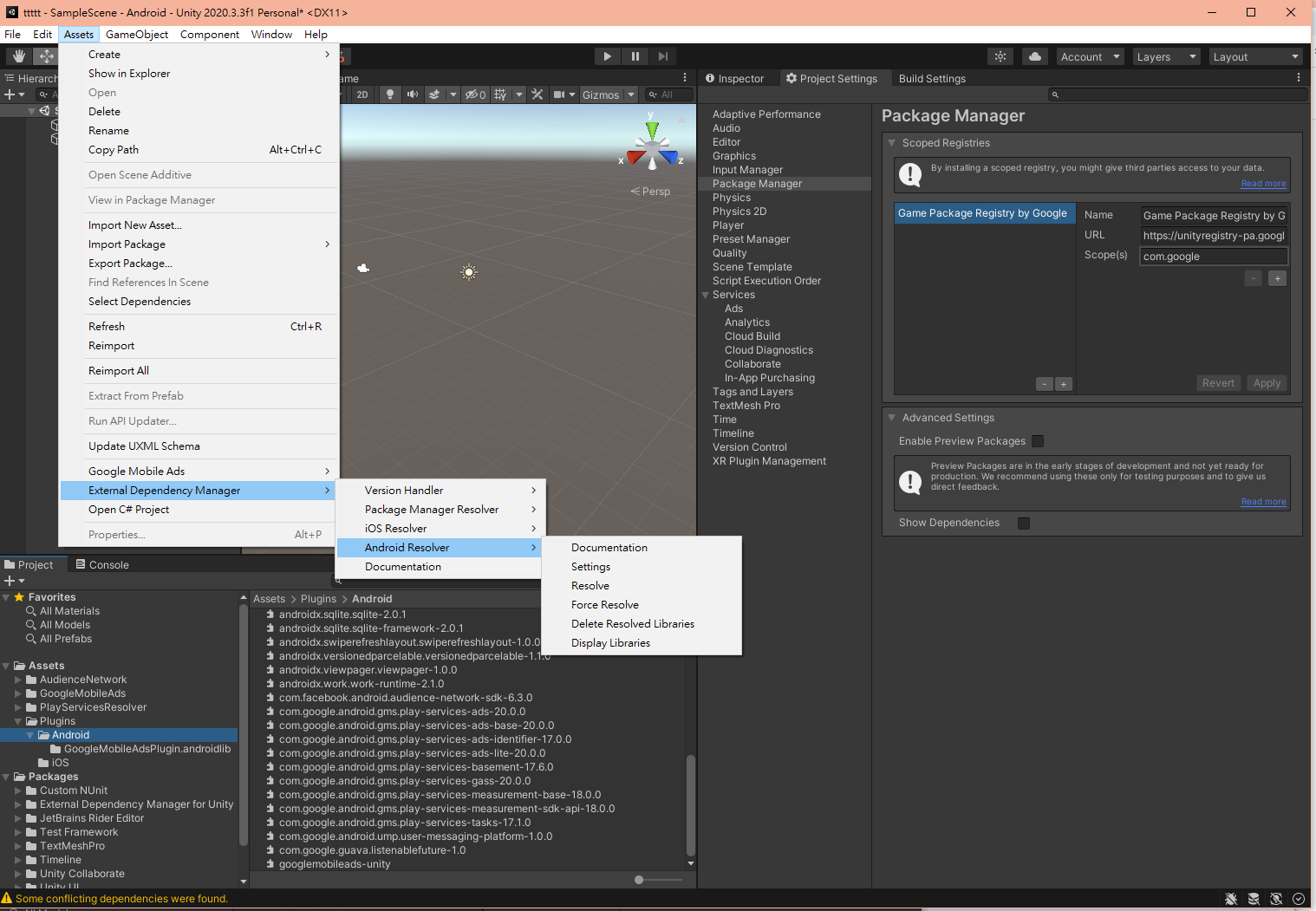
as shown in this pic, you got additional old package manager "PlayServiceResolver" in Asset folder, and wrong libs in Plugins/Android folder.
swswggg
on 11 Apr 2021
in this situation, remove the whole related plugins, including uninstalling/deleting all package managers, then import all again with cautions. this works for me.
Anyway, BACKUP YOUR PROJECTS BEFORE you do somethings what you never done BEFORE.
swswggg
on 11 Apr 2021
Besides package manager, the supreme ultra solution is copy corresponding libs to your Plugins/Android from maven repository by your own hands. It is an try-and-error to "guess" what libs your plugin(s) need and annoyingly crazy.
i done this before google package manager shows up.
swswggg
on 11 Apr 2021
Hello, today I encountered this problem. After finding out t has determined the cause of the conflict between Facebook Audience Network v6.2.1 (requires play-service 20.0.0 to use bidding feature with admob) vs Admob v5.4.0 (requires play- service 19.5.0), while play-service 20.0.0 removed many reward functions so this error was generated.
While waiting for google to release the update to support play-service 20.0.0, you can use the following: in the build settings, check the custom build gradle (unity 2018.4) then resolve again, t used still see normal ads without errors.
 DacNV95
on 22 Apr 2021
DacNV95
on 22 Apr 2021
After finding out t has determined the cause of the conflict between Facebook Audience Network v6.2.1 (requires play-service 20.0.0 to use bidding feature with admob) vs Admob v5.4.0 (requires play- service 19.5.0)
Does Facebook require play-services 20 for bidding?? We've been using FB Open Bidding for several months now, including the latest 6.2.1.0 version against play-services-19.7.0 without any issues.
We recently ran into this threads issue after we attempted to update Firebase to the latest, since they are removing support for the Unity Package Manager.
We tried using both the External Dependency Managers included with latest Firebase as well as Admob 5.4.0 but both resolved to v20. In the end we simply had to manually downgrade the play-services ads files back to our previous 19.7.0 to get both Firebase and Admob working correctly again.
I'm guessing this won't be resolved until Admob release a new version that also supports v20, so recommend you avoid updating Firebase to latest unless you have to.
 mdobele
on 23 Apr 2021
mdobele
on 23 Apr 2021
After finding out t has determined the cause of the conflict between Facebook Audience Network v6.2.1 (requires play-service 20.0.0 to use bidding feature with admob) vs Admob v5.4.0 (requires play- service 19.5.0)
Does Facebook require play-services 20 for bidding?? We've been using FB Open Bidding for several months now, including the latest 6.2.1.0 version against play-services-19.7.0 without any issues.
We recently ran into this threads issue after we attempted to update Firebase to the latest, since they are removing support for the Unity Package Manager.
We tried using both the External Dependency Managers included with latest Firebase as well as Admob 5.4.0 but both resolved to v20. In the end we simply had to manually downgrade the play-services ads files back to our previous 19.7.0 to get both Firebase and Admob working correctly again.
I'm guessing this won't be resolved until Admob release a new version that also supports v20, so recommend you avoid updating Firebase to latest unless you have to.
Yes, both admob latest version and some of mediations from admob are forcing to use v20.
However, This is pretty awkward since this problem is causing users almost three weeks, and not only there is not any answers from official support but also it is being reproduced every single day.
ali-pjx
on 24 Apr 2021
solved. It is basically a package versioning problem. admob unity 5.4.0 uses play-service 19.5.0 and old google package managers have a bug on solving it, always grab the latest play-service 20.0.0. Donot use and delete other google package managers included in other unitypackages. Just use the one included in admob unity 5.4.0.
(https://user-images.githubusercontent.com/19384188/114303841-b3941b80-9b02-11eb-91bf-0967f945e694.png)I have done as you said (force resolving and checking packages version) and the issue is still there. The crash happens when ever I try to request for a new rewarded video ad. The play-service plugin version is 20.0.0
i think the simplest solution is replace these play services by hand, if you just had this problem only.
Also, remove the package manager to stop it from resolving wrong version automatically.Could you please mention what you have done exactly that you stopped this issue?
Also, are you sure deleting package manager would not mess up the dependencies and other required stuff?Firstly answer the deleting package manager question, i think package manager is a help tool(plugin) for you to download the right version libs into your unity project. it reads all prepared xxxxxDependencies.xmls(by other plugins what need) in your project, resolves conflicts and downloads them all. If you remove package manager, you just lose the automatic resolving function, not making your project broken.
Anyway, BACKUP YOUR PROJECTS BEFORE you do somethings what you never done BEFORE.the way i imported admob is as following pics shown:
after importing, admob's google package asked me dialogs,
i just first click "enabled" at upper dialog, then await its doing jobs.
when it finished, i just click the "text area" right below the "After" Label, then click "Add selected Registries".
ok, google want you to upgrade, then i click "Apply".
you will see the the folder "External Dependency Manager" underneath Asset folder went down the below of folder "Packages".you done.
And the errata is here. once you get this done, then you import another plugin(ex. FB Audiencd Network) include another old package manager without excluding the old one. your manager might go mad and give you wrong version libs.
as shown in this pic, you got additional old package manager "PlayServiceResolver" in Asset folder, and wrong libs in Plugins/Android folder.
Thank you so much.
ali-pjx
on 24 Apr 2021
solved. It is basically a package versioning problem. admob unity 5.4.0 uses play-service 19.5.0 and old google package managers have a bug on solving it, always grab the latest play-service 20.0.0. Donot use and delete other google package managers included in other unitypackages. Just use the one included in admob unity 5.4.0.
(https://user-images.githubusercontent.com/19384188/114303841-b3941b80-9b02-11eb-91bf-0967f945e694.png)I have done as you said (force resolving and checking packages version) and the issue is still there. The crash happens when ever I try to request for a new rewarded video ad. The play-service plugin version is 20.0.0
i think the simplest solution is replace these play services by hand, if you just had this problem only.
Also, remove the package manager to stop it from resolving wrong version automatically.Could you please mention what you have done exactly that you stopped this issue?
Also, are you sure deleting package manager would not mess up the dependencies and other required stuff?Firstly answer the deleting package manager question, i think package manager is a help tool(plugin) for you to download the right version libs into your unity project. it reads all prepared xxxxxDependencies.xmls(by other plugins what need) in your project, resolves conflicts and downloads them all. If you remove package manager, you just lose the automatic resolving function, not making your project broken.
Anyway, BACKUP YOUR PROJECTS BEFORE you do somethings what you never done BEFORE.
the way i imported admob is as following pics shown:
after importing, admob's google package asked me dialogs,
i just first click "enabled" at upper dialog, then await its doing jobs.
when it finished, i just click the "text area" right below the "After" Label, then click "Add selected Registries".
ok, google want you to upgrade, then i click "Apply".
you will see the the folder "External Dependency Manager" underneath Asset folder went down the below of folder "Packages".
you done.
And the errata is here. once you get this done, then you import another plugin(ex. FB Audiencd Network) include another old package manager without excluding the old one. your manager might go mad and give you wrong version libs.
as shown in this pic, you got additional old package manager "PlayServiceResolver" in Asset folder, and wrong libs in Plugins/Android folder.Thank you so much.
You just need to check the custom main gradle, the libraries will be configured by you in the gradle file, not needing to depend on PlayServiceResolver to automatically resolve for you.

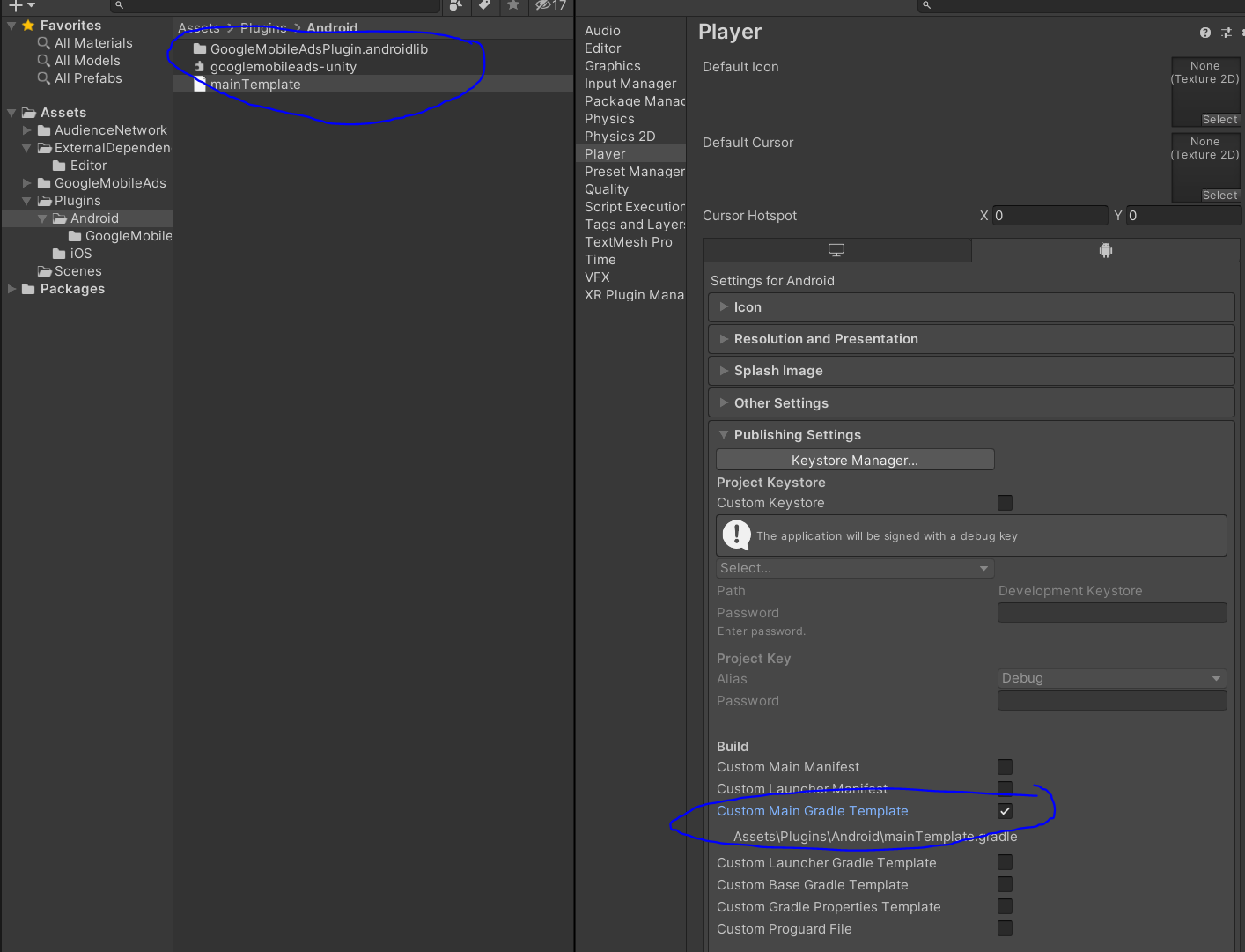
DacNV95
on 26 Apr 2021
In my project, many build errors appear when applying mainTemplate.gradle.
I think the goal of Unity is simplicity.
However, it seems that the more temporary settings are applied in Unity to avoid SDK issues, the more complex it is than using Android Studio and there are too many build errors. Like twisted spaghetti.
 jasons-codes
on 26 Apr 2021
jasons-codes
on 26 Apr 2021
I want to use com.google.android.gms.play-services-ads-19.5.0.
So I put com.google.android.gms.play-services-ads-20.0.0 in the trash and tried to build with com.google.android.gms.play-services-ads-19.5.0.
The result is that at build time, the External Dependency Manager regenerates com.google.android.gms.play-services-ads-20.0.0 and generates a build error.
The best thing is to solve the dependency problem automatically by the External Dependency Manager, but it doesn't work as it should now.
It's hopeless. My production Unity project has a lot of SDKs installed and the dependencies are complex, so putting in a custom gradle is quite an adventure, and modifying one keeps causing problems elsewhere.
When will this issue be officially resolved?
Currently, the combination of GoogleMobileAds-v5.4.0.unitypackage + audience-network-unity-sdk-6.3.0.unitypackage is 100% buggy. At this point, many developers who have updated to the latest version to apply mediation and FAN open bidding will have problems.
Therefore, I hope that it will be resolved as soon as possible.
jasons-codes
on 26 Apr 2021
Any updates on this? We're facing the same problem. Has anyone had any luck with downgrading the Facebook Audience Network adapter, or is that unadvisable?
 TarmoJussila
on 26 Apr 2021
TarmoJussila
on 26 Apr 2021
We're using latest FB Adapter which gave us v6.2.0.1 of their SDK along with Admob 5.4.0. We manually downgraded the required play-services files to the 19.7.0 version (Since 20 doesn't work) and are able to build / get adverts fine with them. We've had no issues with our Open Bidding setup on either. Using Unity 2020.2.1f1 at the moment.

mdobele
on 27 Apr 2021
I don't solve the problem.
The plugins in use are as follows.
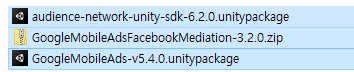
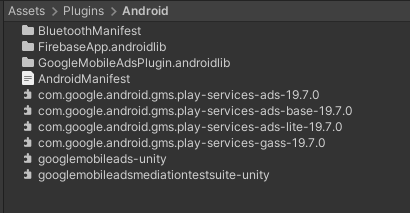
I prepared com.google.android.gms.play-services-ads-19.7.0 in advance and installed it in the Assets/Plugins/Android folder.

The dependencies are also as follows.
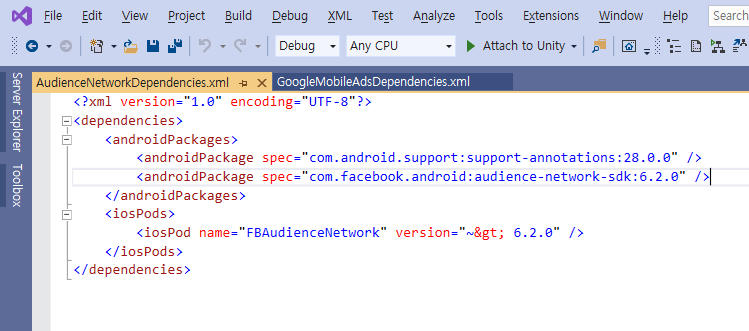
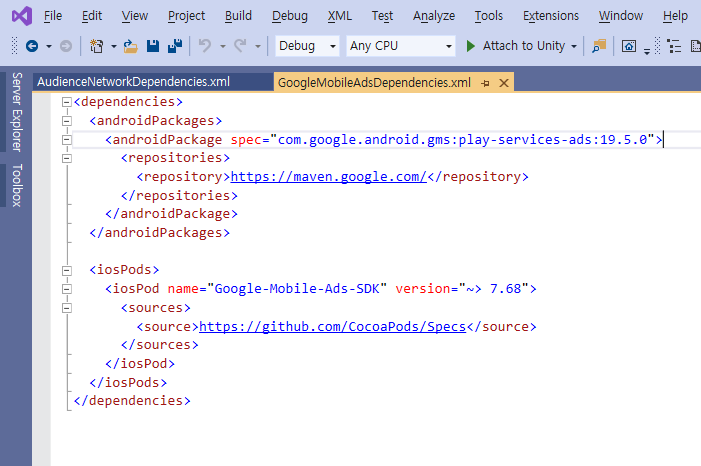
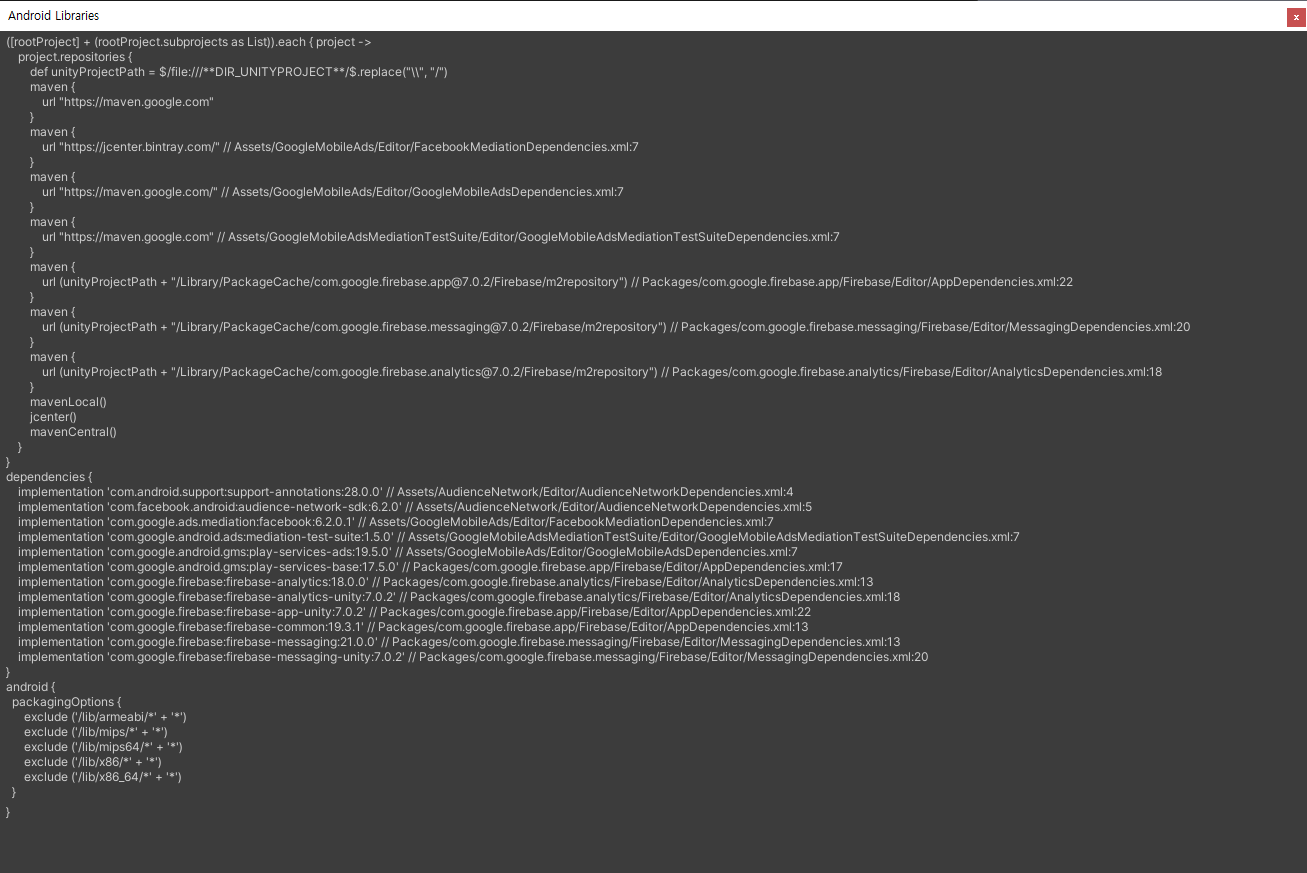
The actual result is that instead of com.facebook.android.audience-network-sdk-6.2.0, com.facebook.android.audience-network-sdk-6.4.0 is installed, and the play-services-ads libraries are duplicated.

jasons-codes
on 27 Apr 2021
Tried with Audience-network-unity-sdk-6.2.1.unitypackage and the problem was the same.
Next, I turned off the'Enable Resolution On Build' option in the Android setting of the External Dependency Manager, and then placed the play-services-ads library in the Assets/Plugins/Android folder without duplicates. (Try both versions 19.7.0 and 19.5.0)
Finally, AdMob ad loading succeeded, but crashes in Mediation Test Suite. (Both versions 19.7.0 and 19.5.0 conflict)
I am worried if it can be applied to my service project as it is.
jasons-codes
on 27 Apr 2021
Same Problem. I think Google Mobile Ads Unity Plugin should be updated and compatible with Play-Services-20.0.0 version.
https://groups.google.com/g/google-admob-ads-sdk/c/auTJZ7dWdZs/m/GuqGEb_EAgAJ
 aceloq
on 27 Apr 2021
aceloq
on 27 Apr 2021
I believe unity support for 20.0.0 will be coming soon. Since we currently only use rewarded ads we ended up reworking the RewardedAdClient to target the new API ourselves to get around the issue.
 mohammaddabiri
on 27 Apr 2021
mohammaddabiri
on 27 Apr 2021
I believe unity support for 20.0.0 will be coming soon. Since we currently only use rewarded ads we ended up reworking the
RewardedAdClientto target the new API ourselves to get around the issue.
I'm afraid not. They don't think there is such a problem
aceloq
on 27 Apr 2021
We were able to work around this issue by using the tips by @mdobele. So manually downgrading play services .aar files to 19.7.0 instead of 20.0.0. Also had to disable "Auto resolve on build" feature to avoid automatically resolving back to 20.0.0.
For us the 20.0.0 files (with latest ad mediation adapters) with AdMob 5.4.0 totally crashed the app when attempting to initialize RewardedAd:s. So hopefully this will be fixed in an upcoming AdMob update, so we can use the resolve feature again.
TarmoJussila
on 27 Apr 2021
Similarly to others, I was able to get the game working again by disabling "auto-resolve on build" (don't forget to save, the button is not visible without scrolling). Then I restored the following files from source control to replace the 20.0.0 version in the Plugin/Android folder:
- com.google.android.gms.play-services-gass-19.8.0.aar
- com.google.android.gms.play-services-ads-19.8.0.aar
- com.google.android.gms.play-services-ads-base-19.8.0.aar
- com.google.android.gms.play-services-ads-lite-19.8.0.aar
Those 4 files were enough to prevent the crash and still get admod ads, admob mediation, facebook ads and play games services to work.
 adbourdages
on 27 Apr 2021
adbourdages
on 27 Apr 2021
AdMob works unless it is com.google.android.gms.play-services-ads-20.0.0.aar.
But in my case, when I run the Mediation Test suite, I get this crash.
- java.lang.IllegalStateException: MobileAds.initialize() must be called prior to getting initialization status.
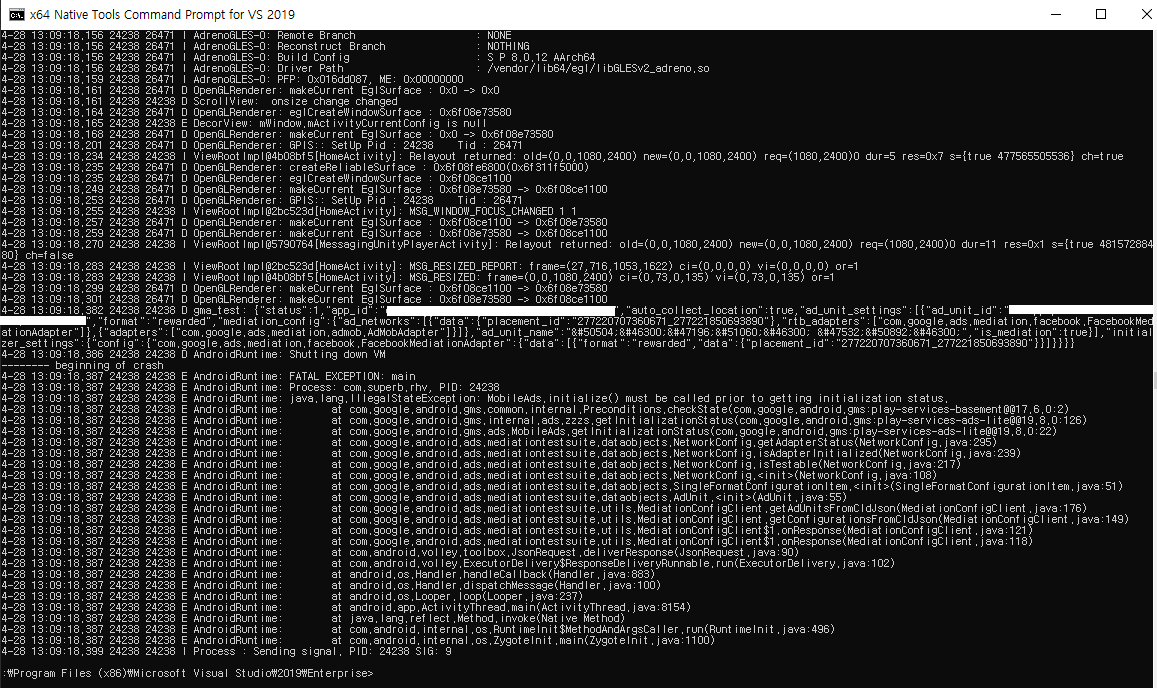
The plugin I used is:
- GoogleMobileAds-v5.4.0.unitypackage
- GoogleMobileAdsMediationTestSuite.unitypackage
- GoogleMobileAdsFacebookMediation-3.2.0.zip/GoogleMobileAdsFacebookMediation.unitypackage
- (And firebase 7.0.2)
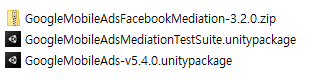
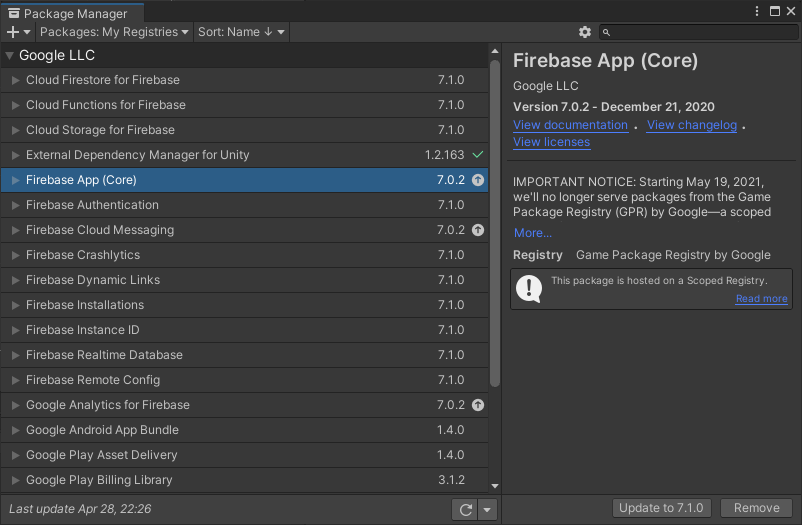
If I remove GoogleMobileAdsFacebookMediation-3.2.0 and run Mediation Test Suite with the combination below, then it works.
- GoogleMobileAds-v5.4.0.unitypackage
- GoogleMobileAdsMediationTestSuite.unitypackage
- (And firebase 7.0.2)
The result is as follows because the FAN plug-in is missing.
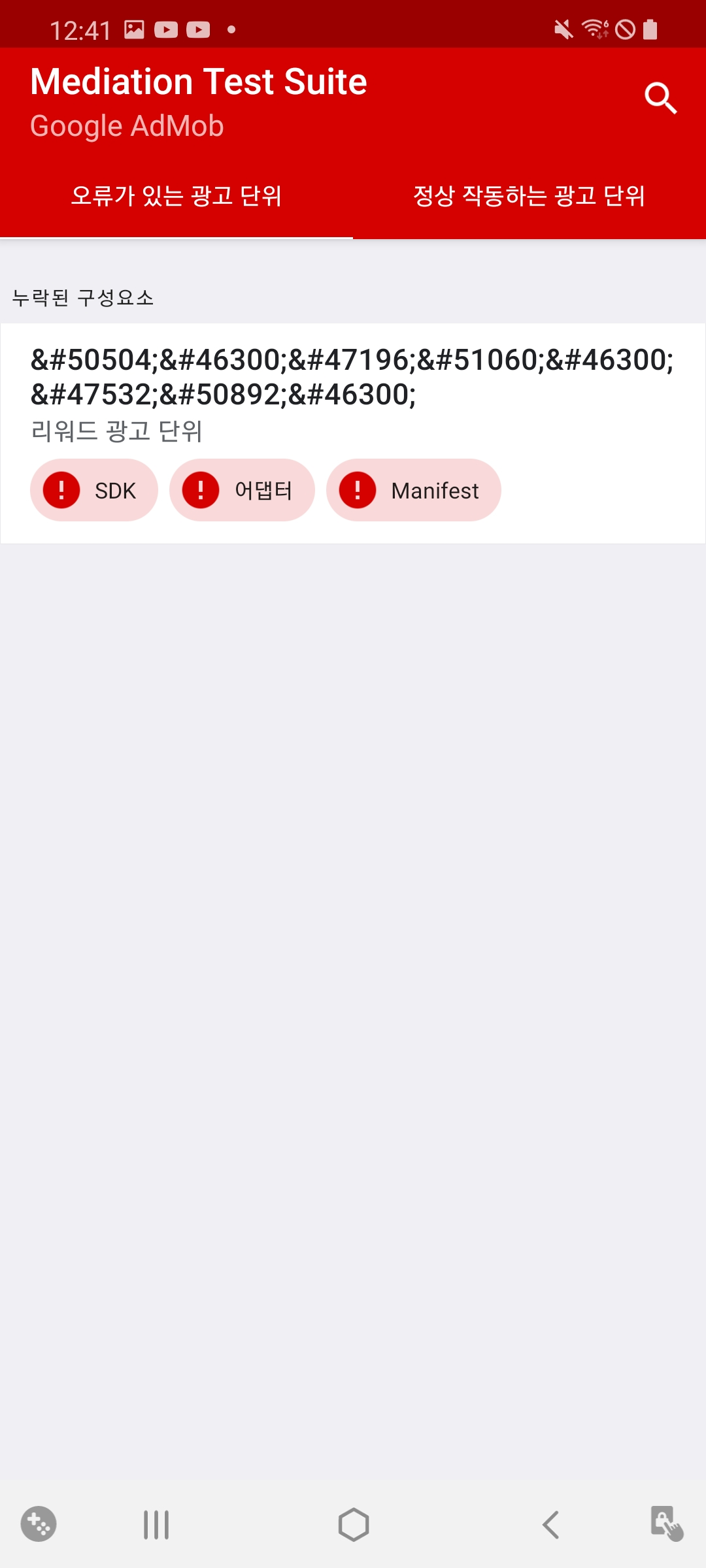
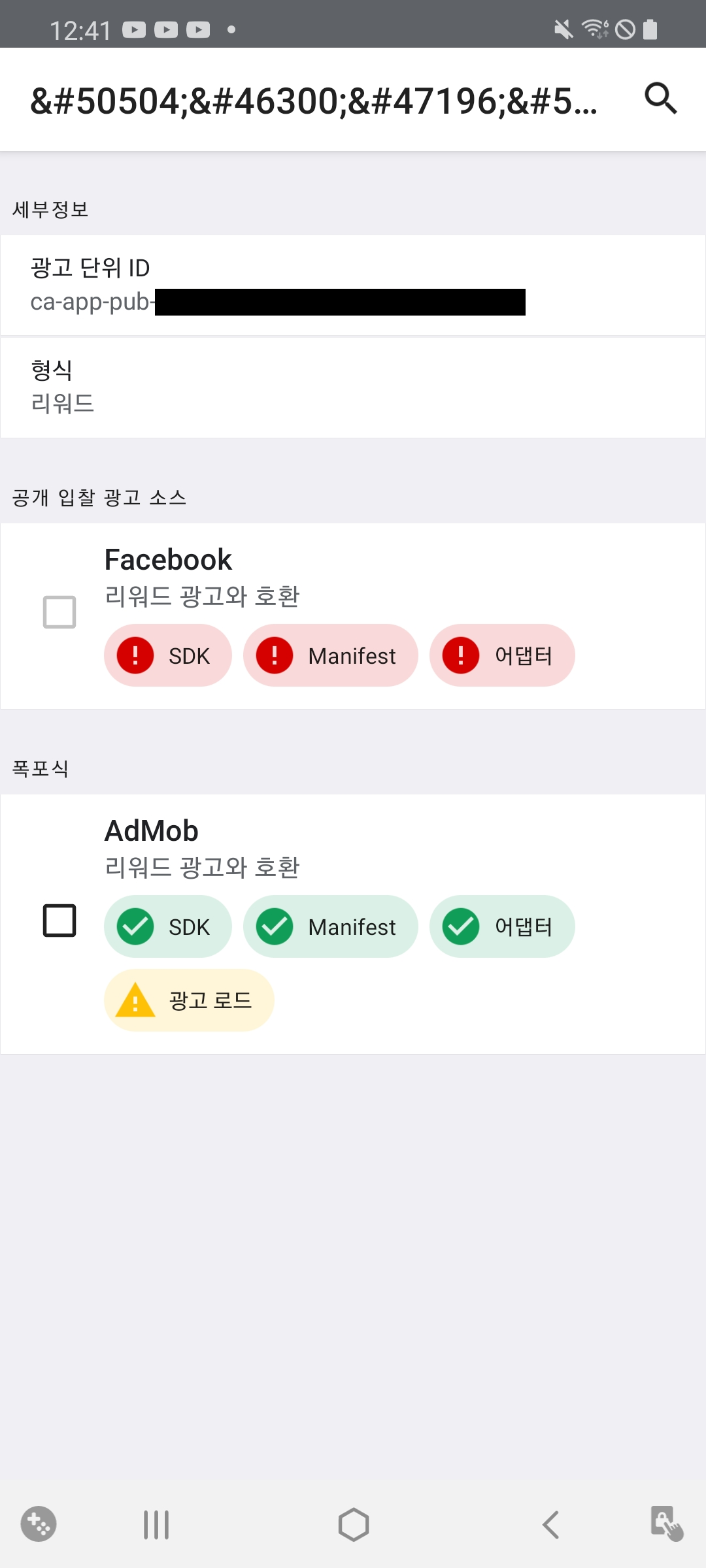
The point is that when importing GoogleMobileAdsFacebookMediation-3.2.0 in GoogleMobileAds-v5.4.0 environment, Mediation Test Suite does not work. I don't know why.
Additionally, the build process also becomes spaghetti at this time.
It is required to remove com.google.android.gms.play-services-ads-20.0.0.aar created by External Dependency Manager and place one of the following 3 versions in the Assets/Plugins/Android folder.
play-services-ads-19.5.0
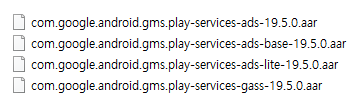
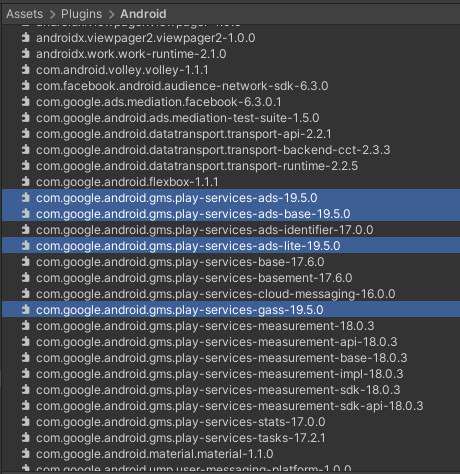
play-services-ads-19.7.0
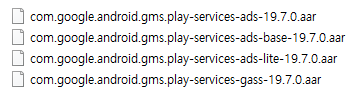
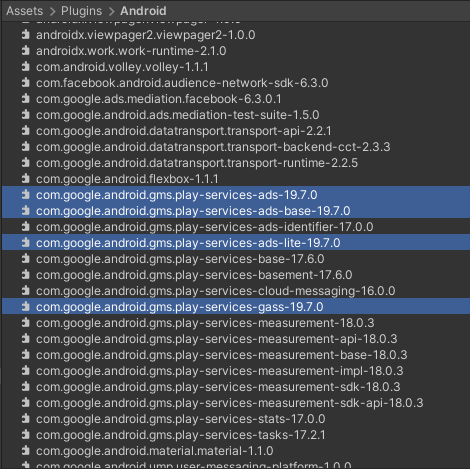
play-services-ads-19.8.0
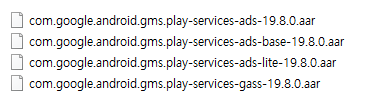
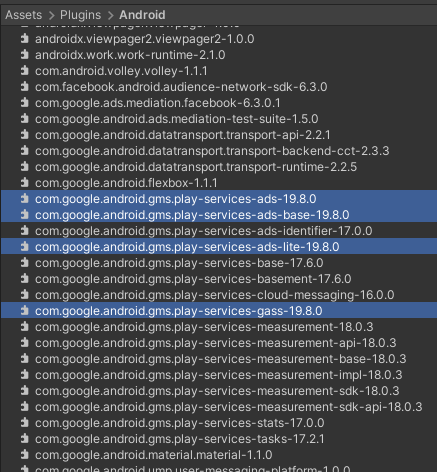
I've tested all of these, but they all get crashes in the Mediation Test Suite.
And in my case, the External Dependency Manager creates com.facebook.android.audience-network-sdk-6.3.0 and com.google.ads.mediation.facebook-6.3.0.1.
jasons-codes
on 28 Apr 2021
Same issue here. Resolver adds services-ads-20.0 and it isn't compatible with 5.4.0.
Adding 19.8 manually fixes the issue. Fixing this should be a top priority of Admob so continue bumping this until someone from Admob officialy responds.
 y0rshl
on 6 May 2021
y0rshl
on 6 May 2021
@y0rshl @adbourdages @mohammaddabiri @TarmoJussila @aceloq
Seems like this issue is reproduced again but now with gms version 20.1. When I saw the update, I thought that finally, they have decided to update the gms in order to finish this madness. But it seems like AdMob does not care a bit about their customers.
We are being forced to change our mobile advertising platform when this issue is not being handled by AdMob.
ali-pjx
on 15 May 2021
The Unity plugin version 6.0.0 has been updated for Google Mobile Ads Android SDK 20.x.x and Google Mobile Ads iOS SDK 8.x.x. I recommend getting 6.0.1 at this point.
 ericleich
on 24 Jun 2021
ericleich
on 24 Jun 2021
Related issues
 jaceks454
·
5Comments
jaceks454
·
5Comments
 perseus25
·
4Comments
perseus25
·
4Comments
 Epiczzor
·
8Comments
Epiczzor
·
8Comments
 AdnanNazir
·
4Comments
AdnanNazir
·
4Comments
 Seanm07
·
3Comments
Seanm07
·
3Comments
Most helpful comment
Same issue here. Resolver adds services-ads-20.0 and it isn't compatible with 5.4.0.
Adding 19.8 manually fixes the issue. Fixing this should be a top priority of Admob so continue bumping this until someone from Admob officialy responds.