Googleads-mobile-unity: java.lang.ClassNotFoundException: com.google.android.gms.ads.MobileAds
This is what I get in logcat on an android device. I tried everything. Reimporting Google Play Games plugin, resolving jars, setting up play games services again, reimporting AdMob, nothing helps.
I am using gradle build from Unity, and Proguard. When I tried the regular build system, I got the dex error: too many field references, off course, because one obviously can't use Google Play Games plugin with almost anything else, because of this issue.
So the logcat is giving me this:
01-09 16:48:24.717 19093 19114 I Unity : AdMob init
01-09 16:48:24.717 19093 19114 I Unity :
01-09 16:48:24.717 19093 19114 I Unity : (Filename: ./artifacts/generated/common/runtime/DebugBindings.gen.cpp Line: 51)
01-09 16:48:24.717 19093 19114 I Unity :
01-09 16:48:24.778 19093 19114 E Unity : AndroidJavaException: java.lang.ClassNotFoundException: com.google.android.gms.ads.MobileAds
01-09 16:48:24.778 19093 19114 E Unity : java.lang.ClassNotFoundException: com.google.android.gms.ads.MobileAds
01-09 16:48:24.778 19093 19114 E Unity : at java.lang.Class.classForName(Native Method)
01-09 16:48:24.778 19093 19114 E Unity : at java.lang.Class.forName(Class.java:400)
01-09 16:48:24.778 19093 19114 E Unity : at java.lang.Class.forName(Class.java:326)
01-09 16:48:24.778 19093 19114 E Unity : at com.unity3d.player.UnityPlayer.nativeRender(Native Method)
01-09 16:48:24.778 19093 19114 E Unity : at com.unity3d.player.UnityPlayer.c(Unknown Source)
01-09 16:48:24.778 19093 19114 E Unity : at com.unity3d.player.UnityPlayer$c$1.handleMessage(Unknown Source)
01-09 16:48:24.778 19093 19114 E Unity : at android.os.Handler.dispatchMessage(Handler.java:98)
01-09 16:48:24.778 19093 19114 E Unity : at android.os.Looper.loop(Looper.java:154)
01-09 16:48:24.778 19093 19114 E Unity : at com.unity3d.player.UnityPlayer$c.run(Unknown Source)
01-09 16:48:24.778 19093 19114 E Unity : Caused by: java.lang.ClassNotFoundException: Didn't find class "com.google.android.gms.ads.MobileAds" on path: DexPathList[[zip file "/data/app/com.makonda.colorbounce-1/base.apk"],nativeLibraryDirectories=[/data/app/com.makonda.colorbounce-1/lib/arm, /data/app/com.makonda.colorbounce-1/base.apk!/lib/armeabi-v7a, /system/lib, /vendor/lib]]
01-09 16:48:24.778 19093 19114 E Unity : at dalvik.system.BaseDexClassLoader.fi
01-09 16:48:25.018 19093 19114 I Unity : [Play Games Plugin DLL] 01/09/18 16:48:24 +01:00 DEBUG: Activating PlayGamesPlatform.
01-09 16:48:25.018 19093 19114 I Unity :
01-09 16:48:25.018 19093 19114 I Unity : (Filename: ./artifacts/generated/common/runtime/DebugBindings.gen.cpp Line: 51)
01-09 16:48:25.018 19093 19114 I Unity :
01-09 16:48:25.019 19093 19114 I Unity : [Play Games Plugin DLL] 01/09/18 16:48:25 +01:00 DEBUG: Instance was not initialized, using default configuration.
01-09 16:48:25.019 19093 19114 I Unity :
01-09 16:48:25.019 19093 19114 I Unity : (Filename: ./artifacts/generated/common/runtime/DebugBindings.gen.cpp Line: 51)
01-09 16:48:25.019 19093 19114 I Unity :
01-09 16:48:25.020 19093 19114 W Unity : !!! [Play Games Plugin DLL] 01/09/18 16:48:25 +01:00 WARNING: Creating new PlayGamesPlatform
01-09 16:48:25.020 19093 19114 W Unity :
01-09 16:48:25.020 19093 19114 W Unity : (Filename: ./artifacts/generated/common/runtime/DebugBindings.gen.cpp Line: 51)
01-09 16:48:25.020 19093 19114 W Unity :
01-09 16:48:25.020 19093 19114 I Unity : [Play Games Plugin DLL] 01/09/18 16:48:25 +01:00 DEBUG: PlayGamesPlatform activated: GooglePlayGames.PlayGamesPlatform
01-09 16:48:25.020 19093 19114 I Unity :
01-09 16:48:25.020 19093 19114 I Unity : (Filename: ./artifacts/generated/common/runtime/DebugBindings.gen.cpp Line: 51)
01-09 16:48:25.020 19093 19114 I Unity :
01-09 16:48:25.020 19093 19114 I Unity : [Play Games Plugin DLL] 01/09/18 16:48:25 +01:00 DEBUG: Creating platform-specific Play Games client.
I am using the latest Google Play Games and AdMob plugins.
Help me if you can, please, because the Google Play and AdMob integration has become an agony.
android6.txt
 SlobodanNikolic
All 17 comments
@SlobodanNikolic it looks like you're not including the required Google Play dependencies in your Unity project. Ensure the required AAR and JAR files are located in the Assets/Plugins/Android directory. You can perform dependency resolution by selecting Assets -> Play Services Resolver -> Android Resolver ->Resolve in the Unity editor. However, as this issue is not related to a bug in this plugin or a feature request, I would recommend you reach out on the Google Mobile Ads Technical Support Forum for further support.
 rampara
on 9 Jan 2018
rampara
on 9 Jan 2018
Hi. As I stated above, I already did the resolve jars, and it didnt solve the problem.
SlobodanNikolic
on 9 Jan 2018
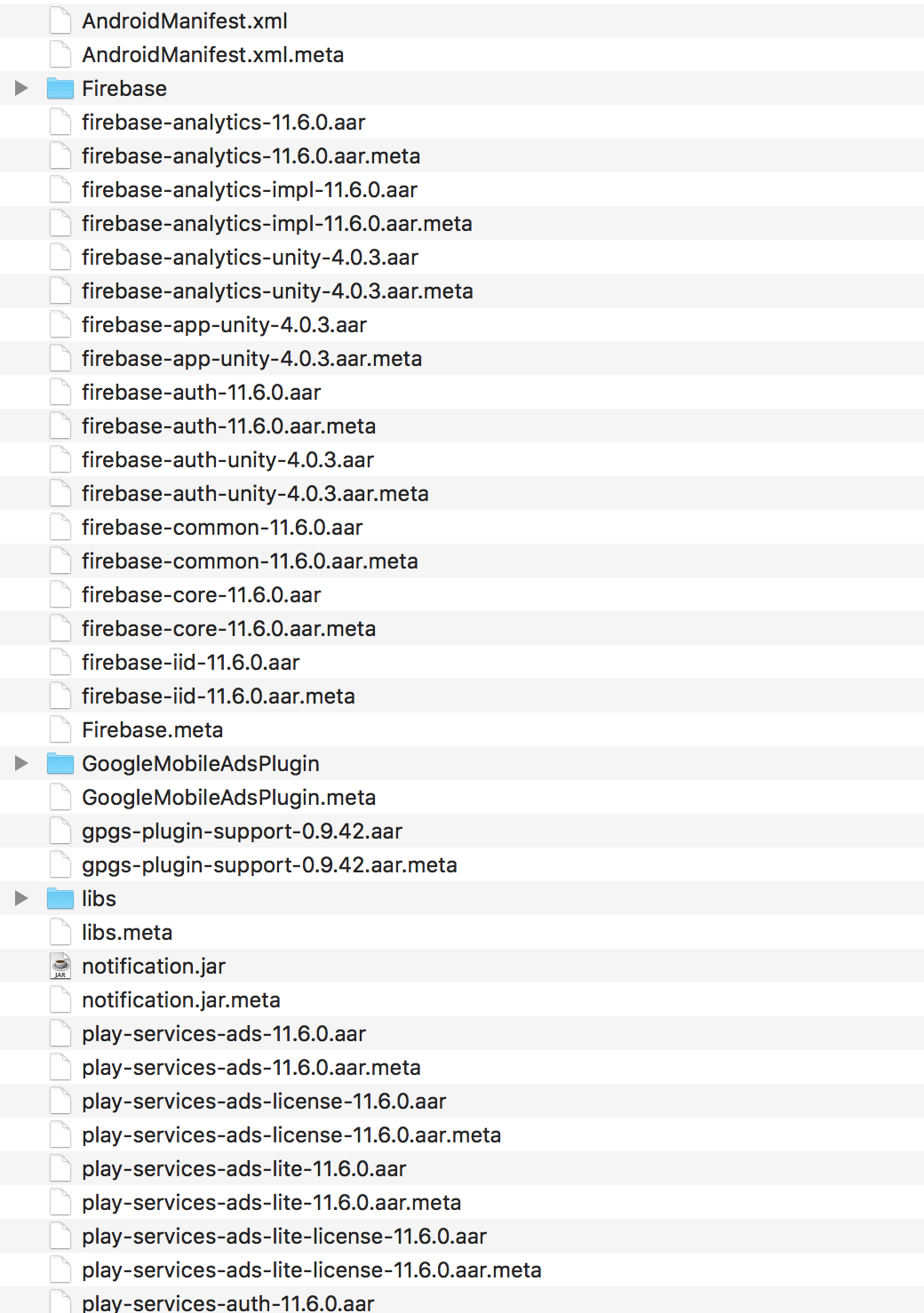
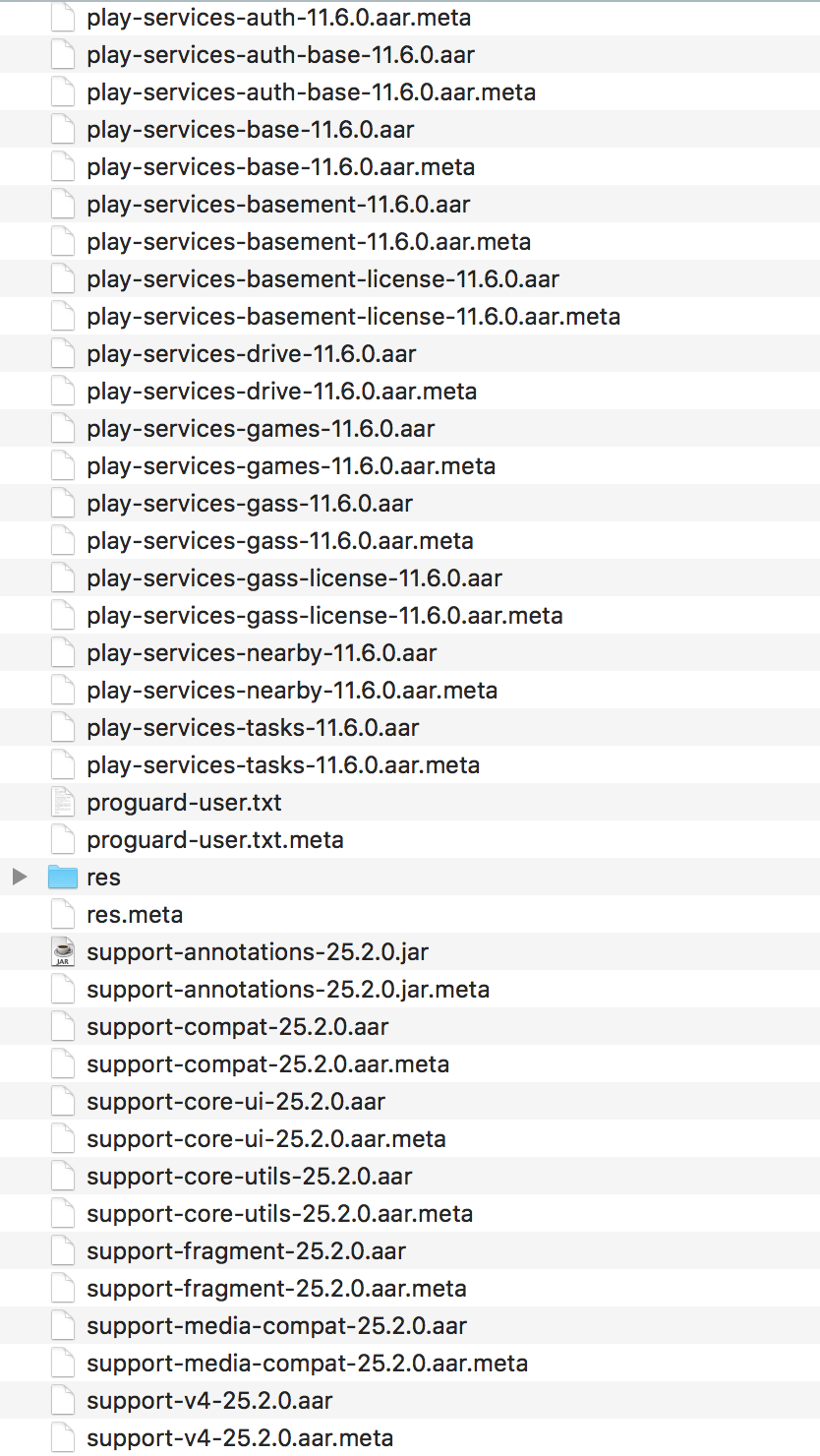
@SlobodanNikolic can you post the contents of your Assets/Plugins/Android directory?
rampara
on 9 Jan 2018
Hi, here are the contents of my Assets/Plugins/Android directory. Thanks
SlobodanNikolic
on 9 Jan 2018
@SlobodanNikolic can you ensure the AARs are being included in Android builds by checking if the Android platform is selected within the Unity inspector as shown below.

rampara
on 9 Jan 2018
Yes, its like that.

SlobodanNikolic
on 10 Jan 2018
I think the problem is with the Gradle build system and Proguard. When I build the project without Gradle, just using Internal build system, and without AdMob, only Google Play Services, Facebook and Firebase, GPGS works fine. When I build it with Gradle and Proguard, GPGS wont work anymore, and maybe Proguard also has something to do with AdMob not working?
SlobodanNikolic
on 10 Jan 2018
If you're using the minify option of the Unity gradle build system you will have to include Proguard rules to ensure GMA SDK specific classes are not stripped from your app by adding a proguard-user.txt file to the Assets/Plugins/Android directory of your project.
rampara
on 12 Jan 2018
@SlobodanNikolic Hi, did you solve the problem? I have the same issue, I need to add firebase push notifications, when I add this plugin and try to build apk with Internal build system, i have problem with overlimit dex file (too many fields), then i try to build with Gradle and set multidex, but I have this error AndroidJavaException: java.lang.ClassNotFoundException unitydirectionkit.universalmediaplayer.UniversalMediaPlayer, then i add to proguard file line -keep public class unitydirectionkit.universalmediaplayer.* { *; }, and now when I move to scene where I'm used this plugin the app shutdown, maybe u know how can I fix this?
 VladNazar
on 6 Mar 2018
VladNazar
on 6 Mar 2018
@VladNazar yes I have solved my problem by using -keep ... and it compiled and is working. I dont know what your problem could be, with the crashing, but maybe you should try to do the keep command with a little wider range, like: -keep unitydirectionkit.* Maybe something else is missing? Log says nothing?
SlobodanNikolic
on 6 Mar 2018
@SlobodanNikolic log says nothing( Now I tried -keep class unitydirectionkit.universalmediaplayer.UniversalMediaPlayer, and app not crashed, log said AndroidJavaException: java.lang.NoSuchMethodError: no non-static method "Lunitydirectionkit/universalmediaplayer/UniversalMediaPlayer;.
Maybe u saw some documentation about commands in proguard (such as -keep etc)?
VladNazar
on 6 Mar 2018
I googled it and found the commands in an answer on stackoverflow somewhere
I think. I’m pretty busy today, but tomorow or tonight I will send you my
proguard file, so you can see what I did and how it looks. I’ll post it
here.
On Tue, Mar 6, 2018 at 12:17 PM VladNazar notifications@github.com wrote:
@SlobodanNikolic https://github.com/slobodannikolic log says nothing(
Now I tried -keep class
unitydirectionkit.universalmediaplayer.UniversalMediaPlayer, and app not
crashed, log said AndroidJavaException: java.lang.NoSuchMethodError: no
non-static method
"Lunitydirectionkit/universalmediaplayer/UniversalMediaPlayer;.(IZLjava/lang/String;)V"
Maybe u saw some documentation about commands in proguard (such as -keep
etc)?—
You are receiving this because you were mentioned.
Reply to this email directly, view it on GitHub
https://github.com/googleads/googleads-mobile-unity/issues/598#issuecomment-370748821,
or mute the thread
https://github.com/notifications/unsubscribe-auth/AJvJeBvRgcaO-82VlJO6LFMxn9EVy2U2ks5tbnAvgaJpZM4RYFu-
.
SlobodanNikolic
on 6 Mar 2018
@SlobodanNikolic it sounds great, THX)
VladNazar
on 6 Mar 2018
@VladNazar Hey, this is my proguard file, I realy hope it helps you in some way. I know how it is with these bugs, very frustrating.
-dontwarn com.google.vr.ndk.base.DaydreamApi
-keep class com.facebook.** {
   *;
}
-keep class com.google.unity.** {
   *;
}
-keep public class com.google.android.gms.ads.**{
   public *;
}
-keep public class com.google.ads.**{
   public *;
}
-keepattributes *Annotation*
-dontobfuscate
I had similar issue and was able to solve it (or at least work around it).
If interested feel free to take a look over my blogpost: https://medium.com/@radicho/how-to-implement-admob-in-unity-a-bit-more-detailed-guide-4baed2821cce
 radi-cho
on 5 Feb 2019
radi-cho
on 5 Feb 2019
Hi there,
I have a similar problem with my application. I followed the steps presented above but it didn't yield the expected results. Maybe my specific situation requires additional or broader Keep instructions or maybe there is something specific I am missing here.
To give you a little context:
- My problem appeared when I included AdMob in the project
- I am using gradle and proguard
- I followed rai-cho's blog and the steps it contains
- The error reads as follows:
Error AndroidRuntime: FATAL EXCEPTION: main Error AndroidRuntime: Process: com.kongregate.mobile.burritobison3.google, PID: 378 Error AndroidRuntime: java.lang.Error: FATAL EXCEPTION [main] Error AndroidRuntime: Unity version : 2019.1.5f1 Error AndroidRuntime: Device model : OnePlus ONEPLUS A3010 Error AndroidRuntime: Device fingerprint: OnePlus/OnePlus3/OnePlus3T:7.1.1/NMF26F/10122113:user/release-keys Error AndroidRuntime: Error AndroidRuntime: Caused by: java.lang.NoClassDefFoundError: Failed resolution of: Lcom/google/android/gms/ads/initialization/OnInitializationCompleteListener; Error AndroidRuntime: at java.lang.Class.classForName(Native Method) Error AndroidRuntime: at java.lang.Class.forName(Class.java:400) Error AndroidRuntime: at java.lang.Class.forName(Class.java:326) Error AndroidRuntime: at com.ironsource.mediationsdk.integration.IntegrationHelper.getIntegrationData(IntegrationHelper.java:245) Error AndroidRuntime: at com.ironsource.mediationsdk.integration.IntegrationHelper.isAdapterValid(IntegrationHelper.java:68) Error AndroidRuntime: at com.ironsource.mediationsdk.integration.IntegrationHelper.validateIntegration(IntegrationHelper.java:39) Error AndroidRuntime: at com.ironsource.unity.androidbridge.AndroidBridge.validateIntegration(AndroidBridge.java:513) Error AndroidRuntime: at com.unity3d.player.UnityPlayer.nativeRender(Native Method) Error AndroidRuntime: at com.unity3d.player.UnityPlayer.c(Unknown Source) Error AndroidRuntime: at com.unity3d.player.UnityPlayer$e$1.handleMessage(Unknown Source) Error AndroidRuntime: at android.os.Handler.dispatchMessage(Handler.java:98) Error AndroidRuntime: at android.os.Looper.loop(Looper.java:154) Error AndroidRuntime: at com.unity3d.player.UnityPlayer$e.run(Unknown Source) Error AndroidRuntime: Caused by: java.lang.ClassNotFoundException: Didn't find class "com.google.android.gms.ads.initialization.OnInitializationCompleteListener" on path: DexPathList[[zip file "/data/app/com.kongregate.mobile.burritobison3.google-2/base.apk"],nativeLibraryDirectories=[/data/app/com.kongregate.mobile.burritobison3.google-2/lib/arm, /data/app/com.kongregate.mobile.burritobison3.google-2/base.apk!/lib/armeabi-v7a, /system/lib, /vendor/lib, /data/downloads, /data/priv-downloads]] Error AndroidRuntime: at dalvik.system.BaseDexClassLoader.findClass(BaseDexClassLoader.java:56) Error AndroidRuntime: at java.lang.ClassLoader.loadClass(ClassLoader.java:380) Error AndroidRuntime: at java.lang.ClassLoader.loadClass(ClassLoader.java:312) Error AndroidRuntime: ... 13 more - My proguard-user file reads as follows:
`
-keepattributes Signature,InnerClasses,Exceptions,Annotation
-keep public class com.applovin.sdk.AppLovinSdk{ ; }
-keep public class com.applovin.sdk.AppLovin { public protected ; }
-keep public class com.applovin.nativeAds.AppLovin { public protected ; }
-keep public class com.applovin.adview. { public protected ; }
-keep public class com.applovin.mediation. { public protected ; }
-keep public class com.applovin.mediation.ads. { public protected ; }
-keep public class com.applovin.impl..AppLovin { public protected ; }
-keep public class com.applovin.impl..Impl { public protected ; }
-keepclassmembers class com.applovin.sdk.AppLovinSdkSettings { private java.util.Map localSettings; }
-keep class com.applovin.mediation.adapters. { *; }
-keep class com.applovin.mediation.adapter.*{ *; }
-keepattributes SourceFile,LineNumberTable
-keepattributes JavascriptInterface
-keep class android.webkit.JavascriptInterface { ; }
-keep class com.unity3d.ads.* { ; }
-keep class com.unity3d.services.* { ; }
-dontwarn com.google.ar.core.*
-dontwarn com.unity3d.services.*
-dontwarn com.ironsource.adapters.unityads.*
-keep class com.chartboost.** { *; }
-keep class com.google.unity.* { *; }
-keep public class com.google.android.gms.ads.{ public *; }
-keep public class com.google.ads.{ public *; }
-keepattributes *Annotation
-dontobfuscate
`
Is there something I am missing?
Tanks,
 f-juicy
on 22 Nov 2019
f-juicy
on 22 Nov 2019
Hello everyone,
I found a solution for the following error
java.lang.ClassNotFoundException: com.ironsource.unity.androidbridge.AndroidBridge
A clean Ironsource install puts this file here

Somehow Unity does not recognize this file as a valid jar file. Even the icon shows a different or wrong file.
After I put the file under the plugins folder, error was gone and ironsource worked as expected.

Used Ironsource Plugin Version 7.1.14.1
Unity 2021.8.2
I also tried using proguard as well and many settings with gradle, none of them worked. Hope this helps someone.
 SuperKLA
on 24 Jan 2022
SuperKLA
on 24 Jan 2022
Related issues
 JameNguyen1994
·
5Comments
JameNguyen1994
·
5Comments
 qbit86
·
6Comments
qbit86
·
6Comments
 pacoelayudante
·
6Comments
pacoelayudante
·
6Comments
 perseus25
·
4Comments
perseus25
·
4Comments
 Kendja
·
6Comments
Kendja
·
6Comments
Most helpful comment
@VladNazar Hey, this is my proguard file, I realy hope it helps you in some way. I know how it is with these bugs, very frustrating.