Google-signin: idToken is Null GoogleSignin.getTokens()
Hi, I am getting null for idToken from
const userInfo = await GoogleSignin.signIn();
const getToken = await GoogleSignin.getTokens()
I am receiving the access token but null for idToken.
*userInfo>>>*
{"idToken": null, "scopes": ["https://www.googleapis.com/auth/userinfo.email", "https://www.googleapis.com/auth/userinfo.profile"], "serverAuthCode": null, "user": {"email": "s......[email protected]", "familyName": "dx", "givenName": "Sime", "id": "113XXXXXXXXXX4580", "name": "Sime", "photo": null}}
*getToken>>>*
{"accessToken": "ya29.a0Adw1xeWvmJKgsdyVMB6jB1yeHEFQPS8roQKSMlo7QVhx...........................................gbHhYP-eFqOB-V8gUWfH6U75zgL_hz_l6Msz8", "idToken": null}
GoogleSignin.configure({
scopes: [ 'https://www.googleapis.com/auth/drive.photos.readonly'],
webClientId:"332991050857-mbue3k5tcickt8aeooe5h122a5gbsu8t.apps.googleusercontent.com",
offlineAccess: true, // if you want to access Google API on behalf of the user FROM YOUR SERVER
});
I have tried by removing offline access or making it true/false but still the same issue.
I have added the debug fingerprints
I am using the WebClientid for config
GoogleSignin.configure({
scopes: [ 'https://www.googleapis.com/auth/drive.photos.readonly'],
webClientId:"332991050857-mbue3k5tc..........22a5gbsu8t.apps.googleusercontent.com",
offlineAccess: true,
});
@react-native-community/google-signin": "^4.0.0",
react-native-cli: 2.0.1
react-native: 0.61.5
Is there is something which i missed?
 osamausmani
All 18 comments
I'm also having this problem. Seems to only happen on Android for me.
EDIT: I'm not using the webClientId either. Just the default config.
 NuclearKev
on 13 Mar 2020
NuclearKev
on 13 Mar 2020
My mistake, you are required to have webClientId for Android to work. I receive the error code 10 now. Looking into fixing it
NuclearKev
on 13 Mar 2020
Any Fix?
osamausmani
on 15 Mar 2020
I had the same issue.
When I activated Google Signin in firebase (was not required for iOS), it worked!
 Mokto
on 26 Mar 2020
Mokto
on 26 Mar 2020
const { idToken } = await GoogleSignin.signIn();
This worked for me, while
const userInfo = await GoogleSignin.signIn()
const getToken = await GoogleSignin.getTokens()
gave me undefined on getToken.idToken
 angelobl
on 23 Apr 2020
angelobl
on 23 Apr 2020
@Mokto
I had the same issue.
When I activated Google Signin in firebase (was not required for iOS), it worked!
Could you elaborate, please? Where/how do you enable it?
Thanks
EDIT:
I found it out. It is under Develop > Authentication > Sign-in method
However, my issue was different, I was indeed missing the webClientId.
It is required and why? Shouldn't google-service-json suffice?
 bboure
on 14 May 2020
bboure
on 14 May 2020
@NuclearKev is webclientid required only in android? if so, Can you please let me know the reason?
 Yandamuri
on 13 Jul 2020
Yandamuri
on 13 Jul 2020
My mistake, you are required to have
webClientIdfor Android to work. I receive the error code 10 now. Looking into fixing it
https://github.com/react-native-community/google-signin/blob/b7a70b8de054a504e7a7806db491a19d9d543f64/docs/android-guide.md#getting-developer_error-or-code-10-error-message-on-android-when-trying-to-login says that
sure that your SHA certificate fingerprint and package name you entered in Firebase are correct.
To add the SHA1:
Sign in to Firebase and open your project.
Click the Settings icon and select Project settings.
In the Your apps card, select the package name of the app you need a to add SHA1 to.
Click "Add fingerprint".
Then re-download the google-services.json file, put it into your project (usually, the path is android/app/google-services.json) and rebuild your project. --> This line was under the screenshot and I missed it :)
 anandchakru
on 24 Sep 2020
anandchakru
on 24 Sep 2020
I use expo SDK38.
The error message is idToken return null
I add webClientId to work.
  initAsync = async () => {
    await GoogleSignIn.initAsync({
      webClientId: "",
      clientId: "",
    })
    this._syncUserWithStateAsync()
  }
 bnmghjtyu0
on 24 Sep 2020
bnmghjtyu0
on 24 Sep 2020
My mistake, you are required to have
webClientIdfor Android to work. I receive the error code 10 now. Looking into fixing ithttps://github.com/react-native-community/google-signin/blob/b7a70b8de054a504e7a7806db491a19d9d543f64/docs/android-guide.md#getting-developer_error-or-code-10-error-message-on-android-when-trying-to-login says that
sure that your SHA certificate fingerprint and package name you entered in Firebase are correct.To add the SHA1:
Sign in to Firebase and open your project.
Click the Settings icon and select Project settings.
In the Your apps card, select the package name of the app you need a to add SHA1 to.
Click "Add fingerprint".
Then re-download the google-services.json file, put it into your project (usually, the path is android/app/google-services.json) and rebuild your project. --> This line was under the screenshot and I missed it :)
I tried this but still idToken is null. Is this take time to take full effect?
 arunkmoury
on 24 Sep 2020
arunkmoury
on 24 Sep 2020
My mistake, you are required to have
webClientIdfor Android to work. I receive the error code 10 now. Looking into fixing ithttps://github.com/react-native-community/google-signin/blob/b7a70b8de054a504e7a7806db491a19d9d543f64/docs/android-guide.md#getting-developer_error-or-code-10-error-message-on-android-when-trying-to-login says that
sure that your SHA certificate fingerprint and package name you entered in Firebase are correct.
To add the SHA1:
Sign in to Firebase and open your project.
Click the Settings icon and select Project settings.
In the Your apps card, select the package name of the app you need a to add SHA1 to.
Click "Add fingerprint".
Then re-download the google-services.json file, put it into your project (usually, the path is android/app/google-services.json) and rebuild your project. --> This line was under the screenshot and I missed it :)I tried this but still idToken is null. Is this take time to take full effect?
it was right away for me
anandchakru
on 25 Sep 2020
I'm creating credentials using google's developer console.
According to guide, I've created OAuth credentials and paste client_id to strings.xml inside android folder.
Authorization worked but IdToken still returned null.
If you want idToken to be returned you should add webClientId to GoogleSignIn.config` options:
GoogleSignin.configure({
  webClientId:
    'YOUR_CLIENT_ID',
});
And then (in my case) idToken is begun to return.
 v-bondarenko364
on 3 Oct 2020
v-bondarenko364
on 3 Oct 2020
Yes can confirm webclient id is necessary for GoogleSignin to work on android
 enriquesalas506
on 30 Oct 2020
enriquesalas506
on 30 Oct 2020
Do you use com.google.gms.google-services plugin in your android Gradle setup? If yes maybe this idea may help you:
My google-services.json does not contain any type: 3 client for some reason, even if I create that manually, I checked and it looks like I manually removed it.
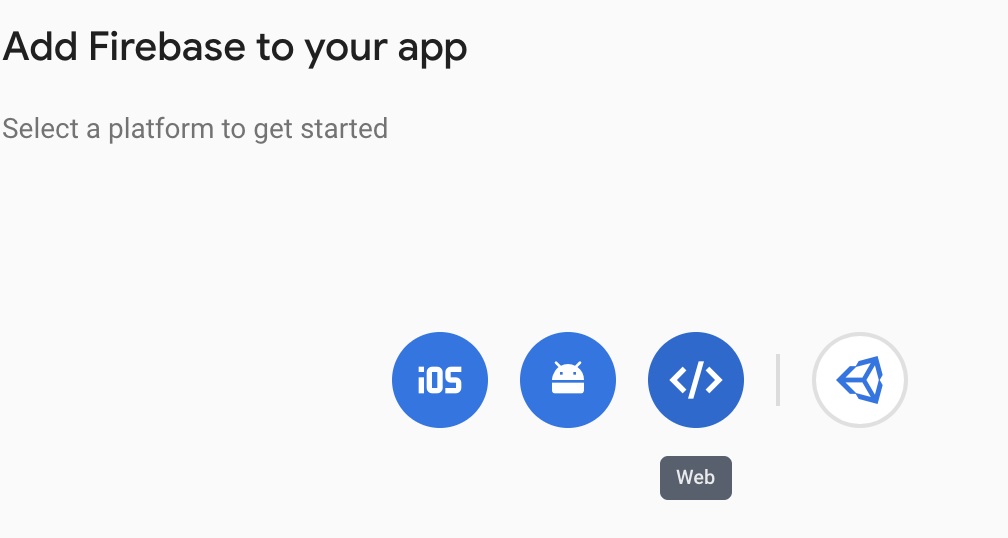
To fix it just create one web app in your firebase console, and then it will create that web OAuth client in console.developers.google.com, and redownload your google-services.json, now it will contain that web OAuth client id, and the android plugin will be able to find it.

 danielgomezrico
on 23 Dec 2020
danielgomezrico
on 23 Dec 2020
Same issue here even after enabling Google Sign-in in the firebase console. I get all the information I need but idToken is still null. iOS works fine.
It's better to change the title and mention that this problem only exists on android.
UPDATE
Adding web client id from the sign-in method in the firebase console fixed the problem for android. iOS not required!
 matinzd
on 11 Apr 2021
matinzd
on 11 Apr 2021
+1
 AmirDiafi
on 8 Jul 2021
AmirDiafi
on 8 Jul 2021
Hey folks, same issue here
I did the following
- Create SHA1 fingerprint using android/app/debug.keystore
- Add android project webClientId in the
GoogleSignin.configuremethod
I'm getting all the user info except tokenId
Any idea how it could be fixed?
 cruzlutor
on 18 Jul 2021
cruzlutor
on 18 Jul 2021
Hey folks, same issue here
I did the following
- Create SHA1 fingerprint using android/app/debug.keystore
- Add android project webClientId in the
GoogleSignin.configuremethodI'm getting all the user info except tokenId
Any idea how it could be fixed?
Ok, after tested it many times, for some reason it works only if I do the initialization just before the auth.GoogleAuthProvider.credential() method, like this
const Welcome = ({ navigation }: any) => {
  async function signWithGoogle() {
    await GoogleSignin.configure({ webClientId: 'myid.apps.googleusercontent.com'});
    const { idToken } = await GoogleSignin.signIn();
    const googleCredential = auth.GoogleAuthProvider.credential(idToken);
    auth().signInWithCredential(googleCredential);
  }
  ....
}
I was doing it at the beginning of my App.tsx, moving it to the login method seems to work
cruzlutor
on 18 Jul 2021
Related issues
 GrishmaM
·
3Comments
GrishmaM
·
3Comments
 thaimauit
·
4Comments
thaimauit
·
4Comments
 havinhthai
·
3Comments
havinhthai
·
3Comments
 tundak
·
4Comments
tundak
·
4Comments
 uendar
·
3Comments
uendar
·
3Comments
Most helpful comment
My mistake, you are required to have
webClientIdfor Android to work. I receive the error code 10 now. Looking into fixing it