Google-signin: Exception '-[GIDSignIn setPresentingViewController:]: unrecognized selector sent to instance 0x280e898c0' was thrown while invoking configure on target RNGoogleSignin with params
On IOS, when i triggers the signin with google it shows me the error
Exception '-[GIDSignIn setPresentingViewController:]: unrecognized selector sent to instance 0x280e898c0' was thrown while invoking configure on target RNGoogleSignin with params
Steps to Reproduce
https://github.com/waheed25/IssueFixture
Repo is been Provided as @vonovak you said in issue #781
Expected Behavior
Should appears the google SignIn View
Actual Behavior
Getting Above mentioned error
 waheed25
All 13 comments
hello, I confirm I can reproduce this, but I'm not quite sure where the problem is. setPresentingViewController is called with an instance of UIViewController and so that should be okay. Maybe it's some combination of configure() and signIn() that cause this problem.
I'll need to investigate more but I'm not sure when I can get back to this. In the mean time, anyone is welcome to try and come up with a fix.
 vonovak
on 7 Mar 2020
vonovak
on 7 Mar 2020
@waheed25 Hey I tried to build the repo you provided; however, I am getting two build errors that prevents me from testing.
error: /Users/jsafaiyeh/Downloads/fontello-d51f598e/font/Fontello.ttf: No such file or directory
error: Build input file cannot be found: '/Users/jsafaiyeh/code/GoogleService-Info.plist'
Not sure why the font file references the Download folder and plist is looking for it outside the repo. Let me know how I can resolve this so I can checkout the issue.
 safaiyeh
on 14 Mar 2020
safaiyeh
on 14 Mar 2020
@safaiyeh I have used some custom icons and that is why you are facing this error, i can provide you the Fontello.ttf file and also 'GoogleService-Info.plist' but these should be inside the repo, May be i have missed these ones.
waheed25
on 14 Mar 2020
@safaiyeh I think the problem is with the path as i am seeing these files already in the repo

You might need to set your headers search path or framework search path in Xcode to project directory
@vonovak Have you face this issue while reproduce this issue ?
waheed25
on 14 Mar 2020
@waheed25 yes, I did have some troubles building but managed to get around them. With the font, I removed Fontello.ttf from build phases -> copy bundle resources. There was still a redbox shown in the app, but I could dismiss it. But I dont remember having a problem with GoogleService-Info.plist. Try right click on the group in xcode and "add files to Wefiq" and then find the file.
vonovak
on 14 Mar 2020
fontello-d51f598e.zip
@safaiyeh If nothing works put this zip file into downloads and extract it.
I have fixed this issue, Follow these steps.
- Remove existing
Fontello.ttffile from resources folder. - Right click on the resources and add files to project.
- Add this file from the directory of the project, where it is already exist and i have shown into the above image.
And also you can do the same withGoogleService-Info.plistfile remove it and add from inside the ios directory.
waheed25
on 14 Mar 2020
Thanks @waheed25 and @vonovak, ill check it out.
safaiyeh
on 14 Mar 2020
@vonovak Any update on this?
 waheedakhtar694
on 11 May 2020
waheedakhtar694
on 11 May 2020
@appify-waheed hello, I'm sorry but other stuff is a priority for me at the moment. As I said before, I think it's well possible that this is some configuration problem because the code otherwise looked good to me, and doesn't seem like this is a common issue at all.
I suggest you revisit the setup guide, or try to get your setup running in a clean app and see if that helps. Alternatively, you can see #861.
vonovak
on 12 May 2020
@waheed25 have you solved the issue? I am facing the same problem :(
 Aung-Myint-Thein
on 9 Jul 2020
Aung-Myint-Thein
on 9 Jul 2020
@Aung-Myint-Thein Finally, I am able to fix this issue, I spent many frustrating hours with this issue and at last found the issue with previous configuration(Google SDK, Framework files).
Before RN 0.60.0, I wasn't using coco pods and since i upgraded my project to 0.60.0, I started using coco pods and i also moved my react-native-google-signin configs to coco pods but somehow my project was still pointing these google framework files and that was the main issue.
After removing these files and search paths from my project build settings, This library start working.
waheedakhtar694
on 10 Sep 2020
@Aung-Myint-Thein Finally, I am able to fix this issue, I spent many frustrating hours with this issue and at last found the issue with previous configuration(Google SDK, Framework files).
BeforeRN 0.60.0, I wasn't using coco pods and since i upgraded my project to 0.60.0, I started using coco pods and i also moved myreact-native-google-signinconfigs to coco pods but somehow my project was still pointing these google framework files and that was the main issue.
After removing these files and search paths from my project build settings, This library start working.
Great! Thanks for the tips. I will definitely try this out again. Would you mind to share the files and search paths that you removed? I remember I cleaned up too but I could be wrong. And how is your AppDelegate.m section for google-signin look like? Do you also use FB login and RNFirebase? :D Thanks in advance.
Aung-Myint-Thein
on 10 Sep 2020
@Aung-Myint-Thein I removed the framework search path from build setting or header search path if any path related to react-native-google-signin then I removed these framework files including facebook framework and google framework files.
Removed these.
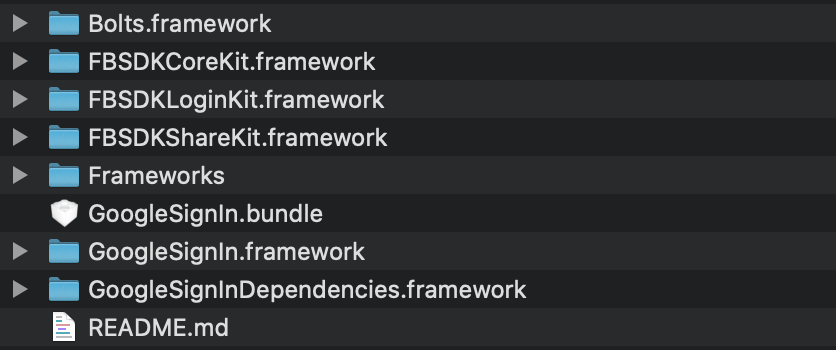
Add this in AppDelegate.m
- (BOOL)application:(UIApplication *)application openURL:(nonnull NSURL *)url options:(nonnull NSDictionary<NSString *,id> *)options {
  return [RNGoogleSignin application:application openURL:url options:options];
}
After that,
rm -rf Podspod installclean
waheedakhtar694
on 10 Sep 2020
Related issues
 thaimauit
·
4Comments
thaimauit
·
4Comments
 ghost
·
3Comments
ghost
·
3Comments
 ChaoTzuJung
·
3Comments
ChaoTzuJung
·
3Comments
 serbanstef
·
3Comments
serbanstef
·
3Comments
 goodhyun
·
3Comments
goodhyun
·
3Comments