Google-signin: developer error (error code 10)
Hi All,
I have already install react native google signin step by step and configure android side step by step base on documentation nothing left. But in actual if i try to hit GoogleSignin.signIn() and try to login using an google account, it's get an DEVELOPER ERROR and error code 10.
If i googling that cause of keystore not properly configured, but in my case i have already configured it and from A to Z, nothing left.
What should i check next?
step to produce:
- Klik button that onPress to function googlesignin
- try to signin to google account
- Success login to google account
- get response DEVELOPER ERROR, error code: 10


Actual Behavior
Environment:
- React 16.9.0
- React native 0.61.2
- emulator android Pixel_3_XL_API_29
- @react-native-community/google-signin 3.0.3
android/build.gradle:
`buildscript {
ext {
buildToolsVersion = "28.0.3"
minSdkVersion = 16
compileSdkVersion = 28
targetSdkVersion = 28
googlePlayServicesAuthVersion = "16.0.1" // <--- use this version or newer
}
repositories {
google()
jcenter()
}
dependencies {
classpath("com.android.tools.build:gradle:3.4.2")
classpath 'com.google.gms:google-services:4.3.2'
// NOTE: Do not place your application dependencies here; they belong
// in the individual module build.gradle files
}
}
allprojects {
repositories {
google()
mavenLocal()
maven {
// All of React Native (JS, Obj-C sources, Android binaries) is installed from npm
url("$rootDir/../node_modules/react-native/android")
}
maven {
// Android JSC is installed from npm
url("$rootDir/../node_modules/jsc-android/dist")
}
    jcenter()
    maven { url 'https://jitpack.io' }
}
}
`
android/app/build.gradle
`apply plugin: "com.android.application"
import com.android.build.OutputFile
/**
- The react.gradle file registers a task for each build variant (e.g. bundleDebugJsAndAssets
- and bundleReleaseJsAndAssets).
- These basically call
react-native bundlewith the correct arguments during the Android build - cycle. By default, bundleDebugJsAndAssets is skipped, as in debug/dev mode we prefer to load the
- bundle directly from the development server. Below you can see all the possible configurations
- and their defaults. If you decide to add a configuration block, make sure to add it before the
apply from: "../../node_modules/react-native/react.gradle"line.
*- project.ext.react = [
- // the name of the generated asset file containing your JS bundle
- bundleAssetName: "index.android.bundle",
* - // the entry file for bundle generation
- entryFile: "index.android.js",
* - // https://facebook.github.io/react-native/docs/performance#enable-the-ram-format
- bundleCommand: "ram-bundle",
* - // whether to bundle JS and assets in debug mode
- bundleInDebug: false,
* - // whether to bundle JS and assets in release mode
- bundleInRelease: true,
* - // whether to bundle JS and assets in another build variant (if configured).
- // See http://tools.android.com/tech-docs/new-build-system/user-guide#TOC-Build-Variants
- // The configuration property can be in the following formats
- // 'bundleIn${productFlavor}${buildType}'
- // 'bundleIn${buildType}'
- // bundleInFreeDebug: true,
- // bundleInPaidRelease: true,
- // bundleInBeta: true,
* - // whether to disable dev mode in custom build variants (by default only disabled in release)
- // for example: to disable dev mode in the staging build type (if configured)
- devDisabledInStaging: true,
- // The configuration property can be in the following formats
- // 'devDisabledIn${productFlavor}${buildType}'
- // 'devDisabledIn${buildType}'
* - // the root of your project, i.e. where "package.json" lives
- root: "../../",
* - // where to put the JS bundle asset in debug mode
- jsBundleDirDebug: "$buildDir/intermediates/assets/debug",
* - // where to put the JS bundle asset in release mode
- jsBundleDirRelease: "$buildDir/intermediates/assets/release",
* - // where to put drawable resources / React Native assets, e.g. the ones you use via
- // require('./image.png')), in debug mode
- resourcesDirDebug: "$buildDir/intermediates/res/merged/debug",
* - // where to put drawable resources / React Native assets, e.g. the ones you use via
- // require('./image.png')), in release mode
- resourcesDirRelease: "$buildDir/intermediates/res/merged/release",
* - // by default the gradle tasks are skipped if none of the JS files or assets change; this means
- // that we don't look at files in android/ or ios/ to determine whether the tasks are up to
- // date; if you have any other folders that you want to ignore for performance reasons (gradle
- // indexes the entire tree), add them here. Alternatively, if you have JS files in android/
- // for example, you might want to remove it from here.
- inputExcludes: ["android/", "ios/"],
* - // override which node gets called and with what additional arguments
- nodeExecutableAndArgs: ["node"],
* - // supply additional arguments to the packager
- extraPackagerArgs: []
- ]
*/
project.ext.react = [
entryFile: "index.js",
enableHermes: false, // clean and rebuild if changing
]
apply from: "../../node_modules/react-native/react.gradle"
/**
- Set this to true to create two separate APKs instead of one:
- An APK that only works on ARM devices
- An APK that only works on x86 devices
- The advantage is the size of the APK is reduced by about 4MB.
- Upload all the APKs to the Play Store and people will download
- the correct one based on the CPU architecture of their device.
*/
def enableSeparateBuildPerCPUArchitecture = false
/**
- Run Proguard to shrink the Java bytecode in release builds.
*/
def enableProguardInReleaseBuilds = false
/**
- The preferred build flavor of JavaScriptCore.
* - For example, to use the international variant, you can use:
def jscFlavor = 'org.webkit:android-jsc-intl:+'
*- The international variant includes ICU i18n library and necessary data
- allowing to use e.g.
Date.toLocaleStringandString.localeComparethat - give correct results when using with locales other than en-US. Note that
- this variant is about 6MiB larger per architecture than default.
*/
def jscFlavor = 'org.webkit:android-jsc:+'
/**
- Whether to enable the Hermes VM.
* - This should be set on project.ext.react and mirrored here. If it is not set
- on project.ext.react, JavaScript will not be compiled to Hermes Bytecode
- and the benefits of using Hermes will therefore be sharply reduced.
*/
def enableHermes = project.ext.react.get("enableHermes", false);
android {
compileSdkVersion rootProject.ext.compileSdkVersion
compileOptions {
    sourceCompatibility JavaVersion.VERSION_1_8
    targetCompatibility JavaVersion.VERSION_1_8
}

defaultConfig {
    applicationId "com.samplerngooglesignin"
    minSdkVersion rootProject.ext.minSdkVersion
    targetSdkVersion rootProject.ext.targetSdkVersion
    versionCode 1
    versionName "1.0"
}
splits {
    abi {
        reset()
        enable enableSeparateBuildPerCPUArchitecture
        universalApk false  // If true, also generate a universal APK
        include "armeabi-v7a", "x86", "arm64-v8a", "x86_64"
    }
}
signingConfigs {
    debug {
        storeFile file('debug.keystore')
        storePassword 'android'
        keyAlias 'androiddebugkey'
        keyPassword 'android'
    }
}
buildTypes {
    debug {
        signingConfig signingConfigs.debug
    }
    release {
        // Caution! In production, you need to generate your own keystore file.
        // see https://facebook.github.io/react-native/docs/signed-apk-android.
        signingConfig signingConfigs.debug
        minifyEnabled enableProguardInReleaseBuilds
        proguardFiles getDefaultProguardFile("proguard-android.txt"), "proguard-rules.pro"
    }
}
// applicationVariants are e.g. debug, release
applicationVariants.all { variant ->
    variant.outputs.each { output ->
        // For each separate APK per architecture, set a unique version code as described here:
        // https://developer.android.com/studio/build/configure-apk-splits.html
        def versionCodes = ["armeabi-v7a": 1, "x86": 2, "arm64-v8a": 3, "x86_64": 4]
        def abi = output.getFilter(OutputFile.ABI)
        if (abi != null) {  // null for the universal-debug, universal-release variants
            output.versionCodeOverride =
                    versionCodes.get(abi) * 1048576 + defaultConfig.versionCode
        }

    }
}
}
dependencies {
implementation fileTree(dir: "libs", include: ["*.jar"])
implementation "com.facebook.react:react-native:+" // From node_modules
if (enableHermes) {
def hermesPath = "../../node_modules/hermes-engine/android/";
debugImplementation files(hermesPath + "hermes-debug.aar")
releaseImplementation files(hermesPath + "hermes-release.aar")
} else {
implementation jscFlavor
}
}
// Run this once to be able to run the application with BUCK
// puts all compile dependencies into folder libs for BUCK to use
task copyDownloadableDepsToLibs(type: Copy) {
from configurations.compile
into 'libs'
}
apply from: file("../../node_modules/@react-native-community/cli-platform-android/native_modules.gradle"); applyNativeModulesAppBuildGradle(project)
apply plugin: 'com.google.gms.google-services' // <--- this should be the last line`
Please provide
 rusliabdulgani
All 11 comments
hello, please see https://github.com/react-native-community/react-native-google-signin/blob/master/docs/android-guide.md#getting-developer_error-error-message-on-android-when-trying-to-login
 vonovak
on 22 Oct 2019
vonovak
on 22 Oct 2019
hello, please see https://github.com/react-native-community/react-native-google-signin/blob/master/docs/android-guide.md#getting-developer_error-error-message-on-android-when-trying-to-login
Already follow that's instruction, then still get error code 10.
rusliabdulgani
on 22 Oct 2019
Hi All,
Issue solved,
note for documentation get SHA-1 debug for path is not
rusliabdulgani
on 22 Oct 2019
I install RN-google-signin correctly. I get hash SHA-1, firebase configured but the error continues :/
 oviedo97fer
on 1 Nov 2019
oviedo97fer
on 1 Nov 2019
note for documentation get SHA-1 debug for path is not
Sorry, what? I am having the same problem
 skaptox
on 2 Nov 2019
skaptox
on 2 Nov 2019
@skaptox
I had the same problem, and this article solved it all at once.
https://medium.com/fullstack-with-react-native-aws-serverless-and/google-sign-in-for-react-native-android-7d43df78c082
I hope you find it helpful if you haven't solved the problem yet.
 thumbsu
on 13 Nov 2019
thumbsu
on 13 Nov 2019
I ve solved it by replacing androidClientId to webClientId
In issue #794
In google console open project Credentials
under 2.0 client IDs there is 2 ID one android other web. I used WEB one.
clientID
In my code google config like that: enter webClientId prop.
It successfull to login with google.
 yusufdonmez
on 17 Dec 2019
yusufdonmez
on 17 Dec 2019
For anybody else who is coming across this and has gone through the steps of
- Validating correct SHA-1
- Correctly passing
webClientId
I was able to finally get past this by running gradlew clean.
 EIrwin
on 12 Jan 2020
EIrwin
on 12 Jan 2020
Can't seem to solve this issue. I have two custom keystores setup.
What I did:
- Exported the SHA-1 with
keytool -exportcert -alias KEYSTORE_ALIAS -keystore KEYSTORE_PATHand inserted this to my dev and prod app in Firebase - Also on https://console.developers.google.com/ I have two OAuth 2.0-client-ID's with the correct package names and SHA-1 fingerprints
- Copied the
webClientIdfrom Firebase Console > Authentication > GoogleSignIn and added it before the signin withGoogle.Configure - My Android build buildTypes are as following:
    buildTypes {
        debug {
            debuggable true
            productFlavors.dev.signingConfig signingConfigs.dev
            productFlavors.prod.signingConfig signingConfigs.prod
        }
        release {
            debuggable false
            minifyEnabled enableProguardInReleaseBuilds
            proguardFiles getDefaultProguardFile('proguard-android.txt'), 'proguard-rules.pro'
            proguardFiles fileTree(dir: "${project.rootDir}/proguard_libs", include: ["*.pro"]).asList().toArray()
            productFlavors.dev.signingConfig signingConfigs.dev
            productFlavors.prod.signingConfig signingConfigs.prod
        }
    }
- Downloaded my latest
google-services.json - Ran
./gradlew cleanandadb uninstall com.packagename npm run android
Still the same DEVELOPER_ERROR.
I'm really out of options.. Anyone suggestions?
 rnnyrk
on 3 Sep 2020
rnnyrk
on 3 Sep 2020
In the Google console, I had to use the web application type (which doesn't require a SHA1) instead of the android type when creating an OAuth 2.0 client id. That worked for me.
 rodolfoortiz
on 8 Oct 2020
rodolfoortiz
on 8 Oct 2020
Try adding SHA 1 key of debug to firebase in settings -> Add FingerPrint,
you can find your key by
cd android && ./gradlew signingReport
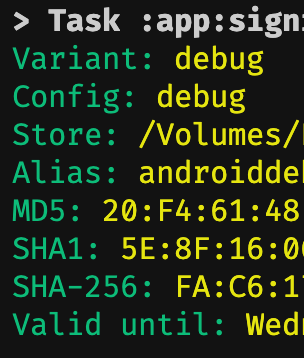
And again download googleservices.json
Cheers!
 hackrx
on 26 Dec 2020
hackrx
on 26 Dec 2020
Related issues
 serbanstef
·
3Comments
serbanstef
·
3Comments
 havinhthai
·
3Comments
havinhthai
·
3Comments
 TyLy83
·
4Comments
TyLy83
·
4Comments
 thaimauit
·
4Comments
thaimauit
·
4Comments
 guidotajan
·
4Comments
guidotajan
·
4Comments
Most helpful comment
Sorry, what? I am having the same problem