Google-signin: Autolinking support in RN 0.60
Well, not an issue (lib works great) but a request to support autolinking in react 0.6.0.
This is the error thrown by react native:
error React Native CLI uses autolinking for native dependencies, but the following modules are linked manually:
  - react-native-google-signin (to unlink run: "react-native unlink react-native-google-signin")
This is likely happening when upgrading React Native from below 0.60 to 0.60 or above. Going forward, you can unlink this dependency via "react-native unlink <dependency>" and it will be included in your app automatically. If a library isn't compatible with autolinking, disregard this message and notify the library maintainers.
Read more about autolinking: https://github.com/react-native-community/cli/blob/master/docs/autolinking.md
 rsallar
All 8 comments
You can change to Autolinking from manual link through react-native unlink react-native-google-signin
The error would happen when you link some library manually.
And do not forget pod install for iOS.
error React Native CLI uses autolinking for native dependencies, but the following modules are linked manually:
  - react-native-google-signin (to unlink run: "react-native unlink react-native-google-signin")
This is likely happening when upgrading React Native from below 0.60 to 0.60 or above. Going forward, you can unlink this dependency via "react-native unlink <dependency>" and it will be included in your app automatically. If a library isn't compatible with autolinking, disregard this message and notify the library maintainers.
Read more about autolinking: https://github.com/react-native-community/cli/blob/master/docs/autolinking.md
 JeffGuKang
on 13 Aug 2019
JeffGuKang
on 13 Aug 2019
Going forward, you can unlink this dependency via "react-native unlink
" and it will be included in your app automatically.
I think that explains it. Just run the command and it should work the same.
 vonovak
on 13 Aug 2019
vonovak
on 13 Aug 2019
Message disappeared after unlinking. Thank you guys!
rsallar
on 14 Aug 2019
@JeffGuKang what about android. without linking will the dependencies be linked directly in Android project
 saikiranoptisol
on 20 Aug 2019
saikiranoptisol
on 20 Aug 2019
@saikiranoptisol
In android, RN >0.60 has the gradle scripts to link automatically, so we do not need to think about link :)
JeffGuKang
on 21 Aug 2019
@JeffGuKang for me when ever i do npm start i'm getting warning as this library is deprecated. Please check the screenshot
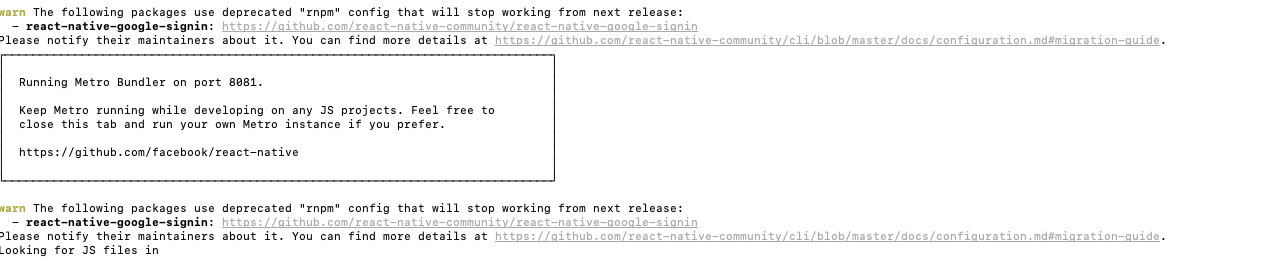
saikiranoptisol
on 22 Aug 2019
Which googlesignin version supports auto-linking? Couldn't find in changelog.
I'm getting below error in Android after run react-native unlink react-native-google-signin. Still seeing same warning as @saikiranoptisol
'RN GoogleSignin native module is not correctly linked. Please read the readme, setup and troubleshooting instructions carefully or try manual linking.'
 anniewey
on 2 Oct 2019
anniewey
on 2 Oct 2019
Which googlesignin version supports auto-linking? Couldn't find in changelog.
I'm getting below error in Android after run
react-native unlink react-native-google-signin. Still seeing same warning as @saikiranoptisol'RN GoogleSignin native module is not correctly linked. Please read the readme, setup and troubleshooting instructions carefully or try manual linking.'
I have the same issue. couldn't find the perfect solution.
 vipulchakravarthy
on 18 Apr 2020
vipulchakravarthy
on 18 Apr 2020
Related issues
 ghost
·
3Comments
ghost
·
3Comments
 guidotajan
·
4Comments
guidotajan
·
4Comments
 uendar
·
3Comments
uendar
·
3Comments
 ChaoTzuJung
·
3Comments
ChaoTzuJung
·
3Comments
 peekbyte
·
3Comments
peekbyte
·
3Comments