Google-signin: Sign in returns "CANCELED" on android and "Audience is not a valid client ID" on iOS
After following the installation guide for both platforms we managed to run the framework on both platforms without a compile issue. However when we actually try to use the google button both platforms return an error instead of user_info
On iOS the error is:
Message Error: RNGoogleSignInError: Unknown error when signing in., Error Domain=com.google.HTTPStatus Code=400 "(null)" UserInfo={data_content_type=application/json; charset=utf-8, json={
    error = "invalid_audience";
    "error_description" = "Audience is not a valid client ID.";
}, data=<7b0a2020 22657272 6f72223a 2022696e 76616c69 645f6175 6469656e 6365222c 0a202022 6572726f 725f6465 73637269 7074696f 6e223a20 22417564 69656e63 65206973 206e6f74 20612076 616c6964 20636c69 656e7420 49442e22 0a7d>}
    at createErrorFromErrorData (NativeModules.js:146)
    at NativeModules.js:95
    at MessageQueue.__invokeCallback (MessageQueue.js:397)
    at MessageQueue.js:127
    at MessageQueue.__guard (MessageQueue.js:297)
    at MessageQueue.invokeCallbackAndReturnFlushedQueue (MessageQueue.js:126)
    at debuggerWorker.js:72
On Android the error is
Message', { [Error: CANCELED]\
ReactNativeJS:   framesToPop: 1,
ReactNativeJS:   nativeStackAndroid: [],
ReactNativeJS:   userInfo: null,
ReactNativeJS:   code: '16',
ReactNativeJS:   line: 21878,
ReactNativeJS:   column: 31,
ReactNativeJS:   sourceURL: 'http://10.0.2.2:8081/index.delta?platform=android&dev=true&minify=false
Tried solutions
From all the other issues and forums we checked everything we could and made sure that the WebClientID is correct in the google-services.json file (and .plist file on iOS) and on firebase. Also generated SHA-1 fingerprints for both debug and release versions and added to firebase. But these solutions did not work.
React Versions:
- "react": "16.6.3",
- "react-native": "0.58.0",
- "react-native-google-signin": "^1.0.2"
 andrisjordan
All 21 comments
I've got the same issue.
Here is more config information.
I have tried with googlePlayServicesAuthVersion 15 and didnt work either then I read this:
https://github.com/googlesamples/google-services/issues/374
and tried the new version.
ext {
buildToolsVersion = "27.0.3"
minSdkVersion = 16
compileSdkVersion = 27
targetSdkVersion = 26
supportLibVersion = "27.1.1"
googlePlayServicesAuthVersion = "16.0.1"
}
repositories {
jcenter()
google()
}
dependencies {
classpath 'com.android.tools.build:gradle:3.1.4'
classpath 'com.google.gms:google-services:4.2.0'
}
 bl4ze
on 2 Feb 2019
bl4ze
on 2 Feb 2019
https://github.com/react-native-community/react-native-google-signin/releases
It says 1.0.3 is broken and there is new release (1.0.4) 5 minutes ago!
Edit:
Unfortunately it didn't work either.
Edit2:
Tried different versions of com.google.gms:google-services and googlePlayServicesAuthVersion - didnt work either.
Also tried using SHA1 from release certificate - didn't work either.
ps. 4 hours already - I quit for today.
bl4ze
on 2 Feb 2019
Same thing for me with the latest version afer installation Android is giving me CANCELED code 16
- "react": "16.6.1",
- "react-native": "0.58.4",
- "react-native-google-signin": "^1.1.0"
 jahglow
on 11 Feb 2019
jahglow
on 11 Feb 2019
On android, make sure you're using the correct application keystore fingerprint. Google Play store will resign your app with another key.
 ccorcos
on 15 Feb 2019
ccorcos
on 15 Feb 2019
@jahglow @bl4ze – were you able to fix this?
 felipap
on 10 Mar 2019
felipap
on 10 Mar 2019
Would also like to bump this thread: having the same problem on iOS.
 wilvancleve
on 18 Mar 2019
wilvancleve
on 18 Mar 2019
Managed to solve this by correcting webClientId in config.js.
wilvancleve
on 18 Mar 2019
I'm having the same issue on iOS (I haven't tried it on Android yet):
Audience is not a valid client ID.
My configuration:
{
  scopes: ['email', 'profile'],
  webClientId: <firebase project web api key>,
  offlineAccess: true,
  iosClientId: <GoogleService-Info.plist CLIENT_ID value>
}
Is that correct? How did you solve it?
EDIT
I got it to work.. webClientId should be the id like *.apps.googleusercontent.com. My bad
 mauriziocarella
on 19 Mar 2019
mauriziocarella
on 19 Mar 2019
My issue was that I’d left what you’ve got called
value from Firebase. (embarrassing to have missed it). Dunno if that’s true
for others.
On Tue, Mar 19, 2019 at 03:04 Maurizio Carella notifications@github.com
wrote:
I'm having the same issue on iOS (I haven't tried it on Android yet):
Audience is not a valid client ID.
My configuration:
{
scopes: ['email', 'profile'],
webClientId =,
offlineAccess = true,
iosClientId =
}Is that correct? How did you solve it?
—
You are receiving this because you commented.
Reply to this email directly, view it on GitHub
https://github.com/react-native-community/react-native-google-signin/issues/613#issuecomment-474279741,
or mute the thread
https://github.com/notifications/unsubscribe-auth/AMTtolWs_DSdmD5EL6zPvAH9AhyZwjplks5vYLZJgaJpZM4afKez
.>
You do not have to be good.
You do not have to walk on your knees
for a hundred miles through the desert repenting.
You only have to let the soft animal of your body
love what it loves.
Tell me about despair, yours, and I will tell you mine.
Meanwhile the world goes on.
Meanwhile the sun and the clear pebbles of the rain
are moving across the landscapes,
over the prairies and the deep trees,
the mountains and the rivers.
Meanwhile the wild geese, high in the clean blue air,
are heading home again.
Whoever you are, no matter how lonely,
the world offers itself to your imagination,
calls to you like the wild geese, harsh and exciting -
over and over announcing your place
in the family of things.
- Wild Geese, Mary Oliver
wilvancleve
on 19 Mar 2019
I am having a similar issue
The audience client and the client need to be in the same project
I was using the wrong webClientId inside the config.js file as explained in the example page readme
{
  scopes: ['email', 'profile'],
  webClientId: <firebase project web api key>,
  offlineAccess: true,
  iosClientId: <GoogleService-Info.plist CLIENT_ID value>
}
The page does not really include detailed explanation on how to configure firebase and the google cloud console.
Firebase should automatically create a new google cloud project, which will include the required api and oauth keys.
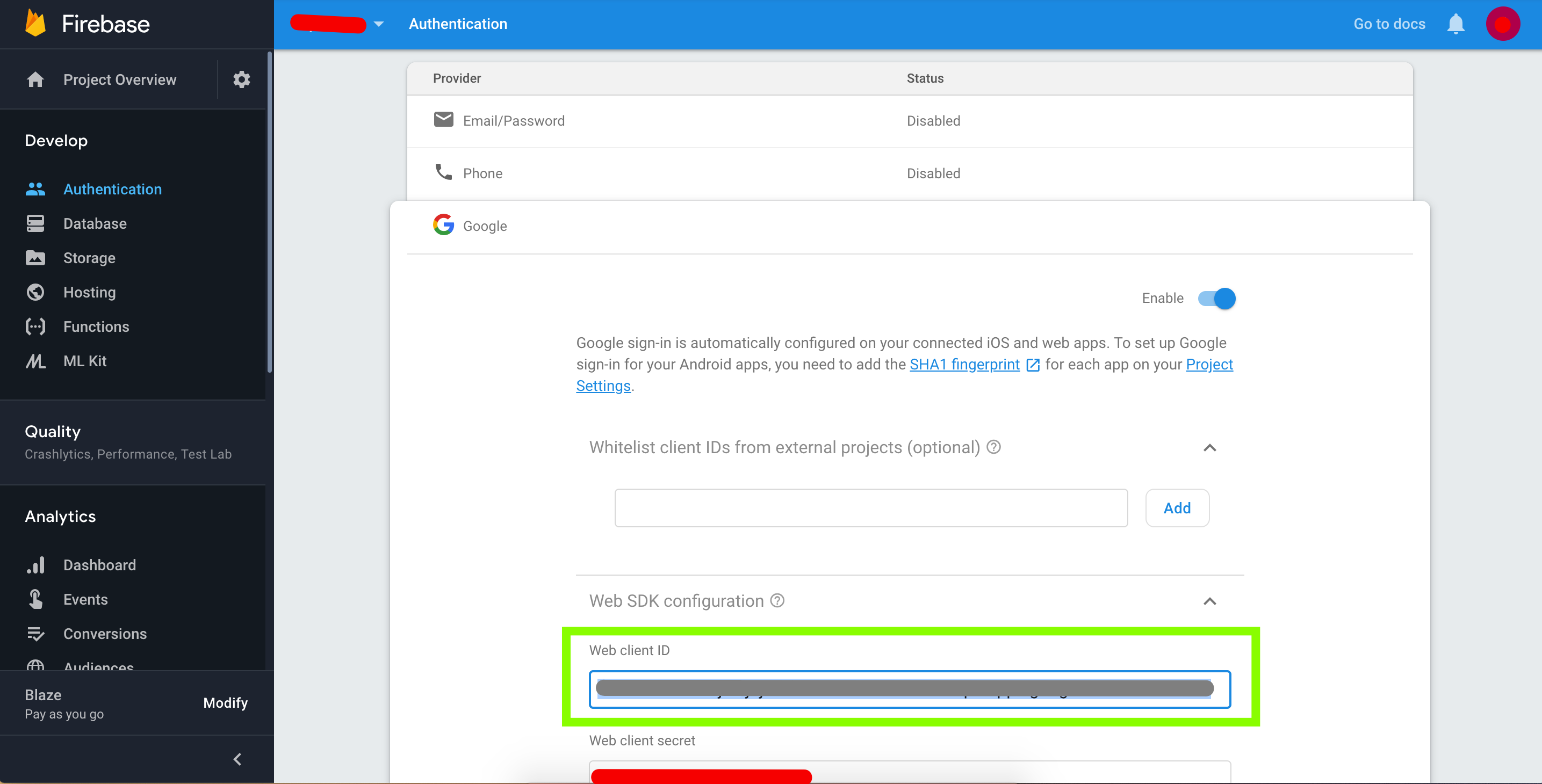
The webClientId should be the one under Oauth 2.0 and Web Client, not the android or ios keys.

I was not able to find the project inside my google cloud platform, i suggest you to research online for the Google Cloud platform specific instruction on how to manage your projects and access those automatically generated
Here a post which explains more details of the configurations how to configure it.
 fabriziobertoglio1987
on 20 Mar 2019
fabriziobertoglio1987
on 20 Mar 2019
@fabriziobertoglio1987 Thanks man, for me worked that I got webClientId directly from Firebase 👌
 durdevic
on 27 Mar 2019
durdevic
on 27 Mar 2019
Having the Android version of this issue where GoogleSignin.signIn() returns undefined, IOS is working fine
 gitstud
on 23 Apr 2019
gitstud
on 23 Apr 2019
@durdevic or @fabriziobertoglio1987 - would you be so kind and, based on your experience, update the docs in this repo with the screenshots and instructions so that integrating the lib is as easy as possible? It'd be greatly appreciated, thanks.
 vonovak
on 25 Apr 2019
vonovak
on 25 Apr 2019
@vonovak yes, sure. I will prepare a pull request in the next days if it is still required. Thanks a lot !
fabriziobertoglio1987
on 6 May 2019
@fabriziobertoglio1987 yes, it would be appreciated! :)
vonovak
on 6 May 2019
@vonovak we need docs in this repo with the screenshots and instructions so that integrating the lib is as easy as possible.
 arjunghimire
on 6 May 2019
arjunghimire
on 6 May 2019
@arjunghimire you're more than welcome to contribute to the docs too!
vonovak
on 6 May 2019
For me adding the correct webClientId does not resolve the issue. Everything works fine on iOS. On Android it just throws "canceled".
Edit: For me it was the signing keys. Follow the instructions here to get your signing keys
https://developers.google.com/android/guides/client-auth
Then add BOTH of them to the settings page of your firebase project.
 AndrewMorsillo
on 8 May 2019
AndrewMorsillo
on 8 May 2019
I'm facing same issue, Added both, but still getting error code 16.
 sandip-singh
on 10 Jul 2019
sandip-singh
on 10 Jul 2019
For me adding the correct webClientId does not resolve the issue. Everything works fine on iOS. On Android it just throws "canceled".
Edit: For me it was the signing keys. Follow the instructions here to get your signing keys
https://developers.google.com/android/guides/client-auth
Then add BOTH of them to the settings page of your firebase project.
Thanks, it helped.
 ZeerakHameem32
on 24 Aug 2019
ZeerakHameem32
on 24 Aug 2019
closing as resolved
vonovak
on 13 Nov 2019
Related issues
 yogeshpaisode
·
4Comments
yogeshpaisode
·
4Comments
 ghost
·
3Comments
ghost
·
3Comments
 serbanstef
·
3Comments
serbanstef
·
3Comments
 uendar
·
3Comments
uendar
·
3Comments
 apperside
·
4Comments
apperside
·
4Comments
Most helpful comment
@fabriziobertoglio1987 Thanks man, for me worked that I got webClientId directly from Firebase 👌