Google-signin: Do I have to use firebase?
Apologies for what I suspect is a fairly basic question... One of the steps listed for this project is to create a firebase configuration.
I might have missed it over the last while, but is this as a result of Google favouring Firebase as its primary mechanism of delivery for on-device APIs & services?
_(I'm not really opposed to using Firebase, although I'm wondering what the minimal paths are and am also curious about overlap between Visual Studio App Center, Facebook and Firebase for things like analytics.)_
If Firebase is a requirement, are there any comparisons between this library and react-native-firebase worth making clear?
 atrauzzi
All 21 comments
For Google OAuth 2.0 authentication you need firebase configuration.
react-native-firebase is not comparable with this library.
react-native-firebase suggests to use this library for Google OAuth 2.0 authentication.
docs here.
 moonstruck
on 25 Nov 2018
moonstruck
on 25 Nov 2018
I found this: https://developers.google.com/identity/choose-auth
Am I right in interpreting this as Google moving towards using firebase instead of the cloud console for certain things?
It's all a bit confusing! 😅
atrauzzi
on 26 Nov 2018
@atrauzzi this library does not depend on firebase, but to get the config file, we documented how to do it via firebase since it's fairly straightforward and many use it anyways. I don't think you need a firebase project though - I think you can just create everything - the client IDs - in the google cloud console.
 vonovak
on 27 Nov 2018
vonovak
on 27 Nov 2018
That's interesting. I wonder if it's worth making this clear in the docs or documenting both methods would help avoid potential confusion. Again, I'm only asking this because based on the instructions, I was lead to believe that I needed Firebase in some way.
If I wasn't told to go to Firebase, I'd have never thought about it.
atrauzzi
on 27 Nov 2018
@atrauzzi Agreed! From my experience following the docs, you actually need to go to the cloud console for other portions (getting the web client ID, configuring the OAuth consent screen), so we should update the docs with the simplest path. @vonovak is working on documentation now, so we can probably clean this up.
 cgilboy
on 27 Nov 2018
cgilboy
on 27 Nov 2018
I totally agree with @atrauzzi, it was confusing for me as well when I started using the library
 vforvasile
on 17 Dec 2018
vforvasile
on 17 Dec 2018
I just went to google cloud console and created my own credentials for my project
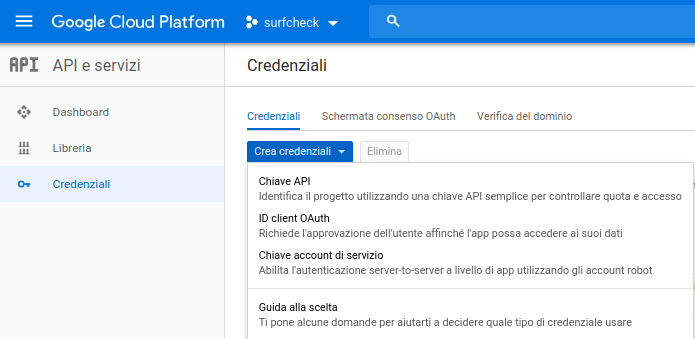
I followed the instructions from the below page and related links
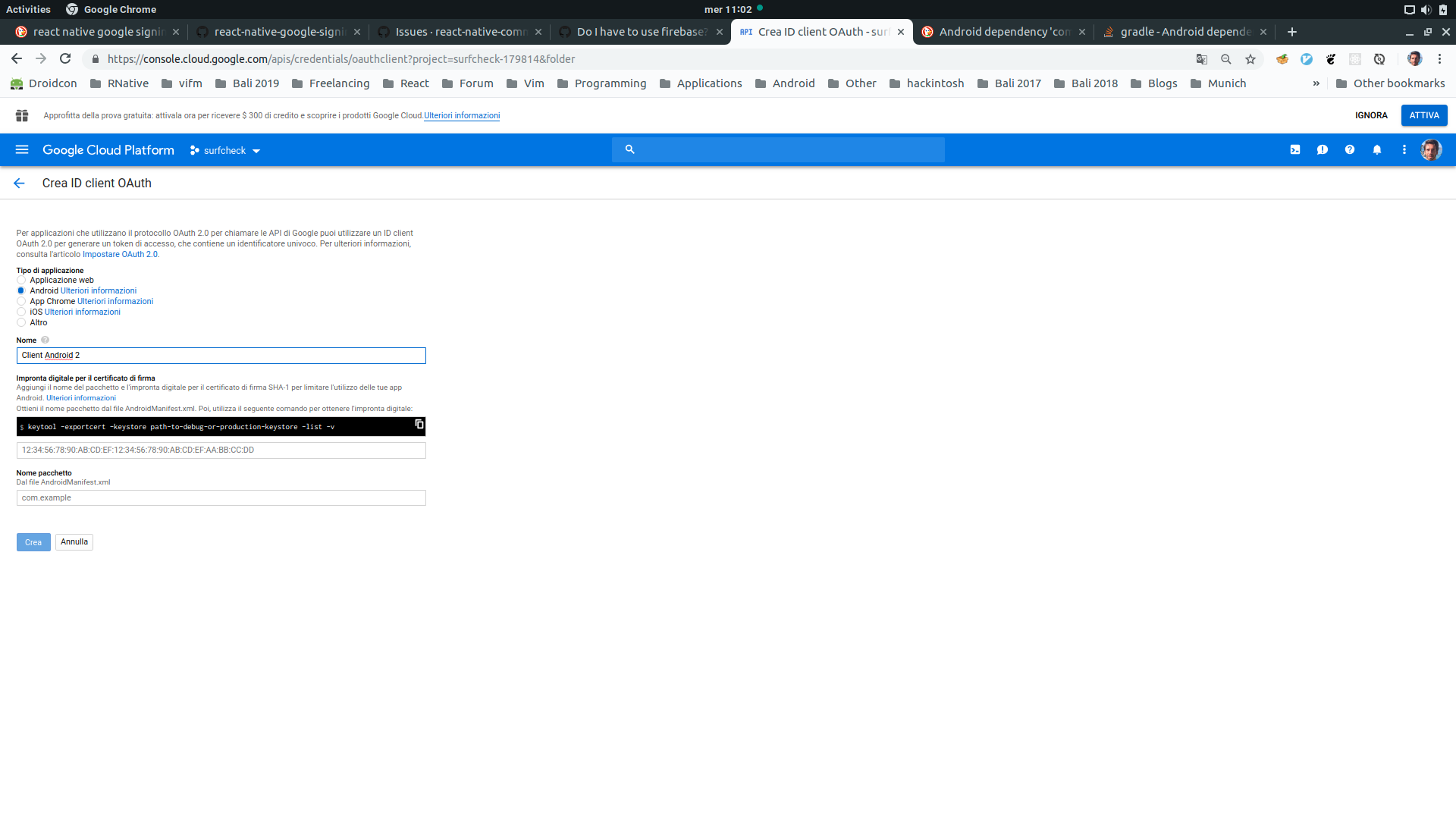
and then downloaded the json configs file

but the file downloaded has a different structure from the google-services.json file as in the following example project
{
  "project_info": {
    "project_number": "1010390097065",
    "firebase_url": "https://signinexample-17cd2.firebaseio.com",
    "project_id": "signinexample-17cd2",
    "storage_bucket": "signinexample-17cd2.appspot.com"
  },
  "client": [
    {
      "client_info": {
        "mobilesdk_app_id": "1:xxxx",
        "android_client_info": {
          "package_name": "com.googlesigninexample"
        }
      },
      "oauth_client": [
        {
          "client_id": "xxxx.apps.googleusercontent.com",
          "client_type": 1,
          "android_info": {
            "package_name": "com.googlesigninexample",
            "certificate_hash": "xxxxxxxxxxxxxxx"
          }
        },
        {
          "client_id": "xxxxx.apps.googleusercontent.com",
          "client_type": 3
        }
      ],
      "api_key": [
        {
          "current_key": "xxxxx"
        }
      ],
      "services": {
        "analytics_service": {
          "status": 1
        },
        "appinvite_service": {
          "status": 2,
          "other_platform_oauth_client": [
            {
              "client_id": "xxxx-xxxxxx.apps.googleusercontent.com",
              "client_type": 3
            }
          ]
        },
        "ads_service": {
          "status": 2
        }
      }
    }
  ],
  "configuration_version": "1"
}
I am currently experiencing different issues, I will try to manually create the google-services.json file and update this post as instructions
I ended up using firebase and I will try to configure it with may own backend.
As my understanding now, using firebase for the oauth-authentication does not exclude implementing your own server/backend.
I will update the post in the future
Thanks a lot
Fabrizio
 fabriziobertoglio1987
on 13 Mar 2019
fabriziobertoglio1987
on 13 Mar 2019
@fabriziobertoglio1987 sorry to bump an old thread, but did you ever figure out a simple process?
Is it still a case of creating the google-services.json manually from credentials supplied when you create an app in the Cloud Platform?
 matthieunelmes
on 9 Apr 2019
matthieunelmes
on 9 Apr 2019
Hello @matthieunelmes
thanks for the question
I am currently using firebase on my project. I ended up configuring it and now I have no reason to keep guessing how to manually generate the google-services.json.
In the end Firebase will generate your Google Apis credentials via api in the Google Cloud Platform as in the below screenshot.
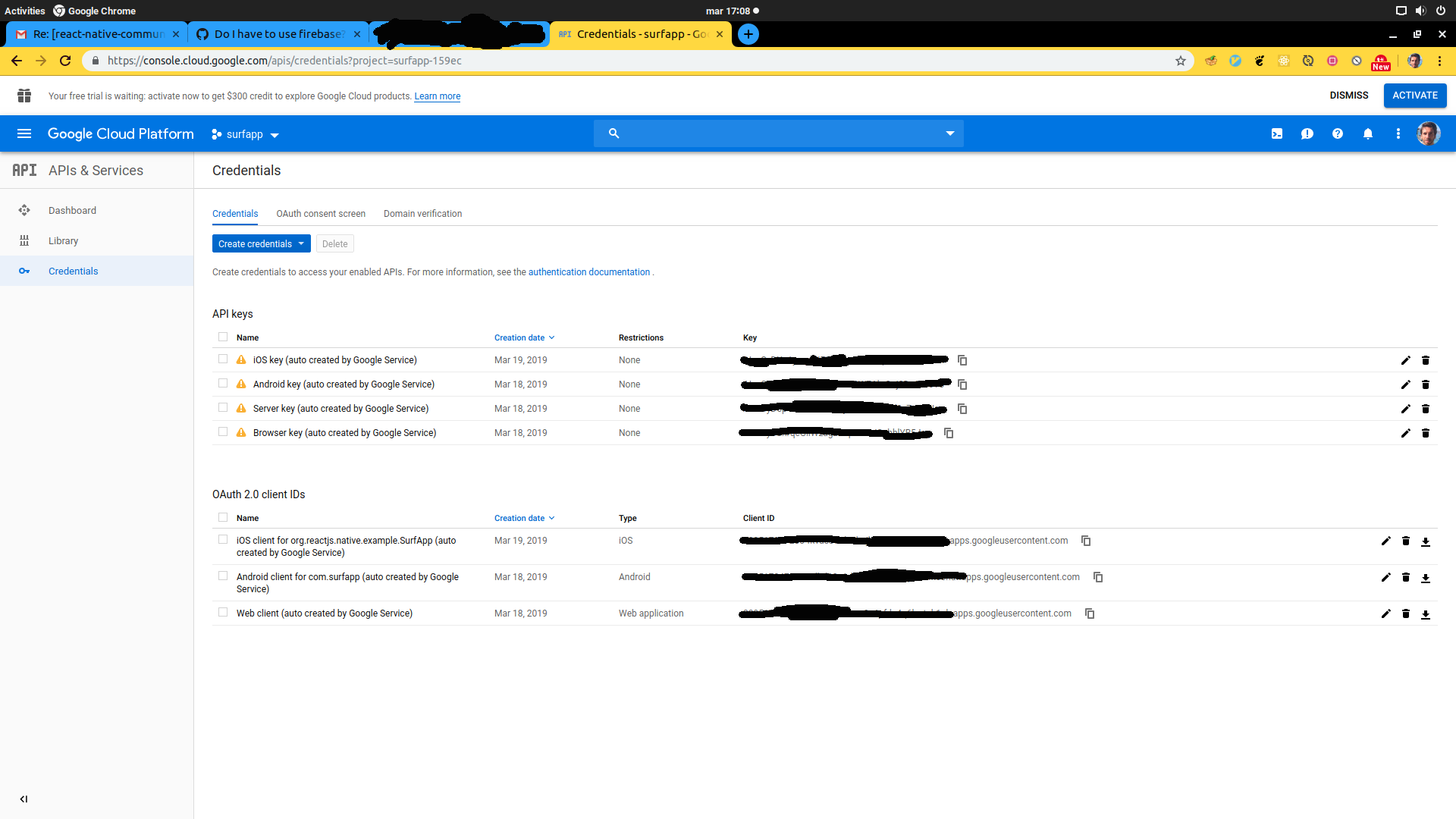
Based on my experience, I suggest you to initially configure firebase and then try to replace the values in the google-services.json so that you can delete your Firebase app and not share data with Google.
I was able to configure google authentication also with my backend and firebase, so Firebase does not exclude using your own backend.
Thanks a lot
I wish you good luck
Fabrizio
fabriziobertoglio1987
on 9 Apr 2019
@fabriziobertoglio1987 thanks,
Coincidentally I ended up doing exactly just that! I figured I'll probably end up using Firebase for the FCM notifications anyway so it made sense to create a project.
thanks for your help
matthieunelmes
on 9 Apr 2019
https://pub.flutter-io.cn/packages/google_sign_in this plugin for flutter doesnt not say to include google-services.json for google signin ... the only docs for android is
To access Google Sign-In, you'll need to make sure to register your application.

You don't need to include the google-services.json file in your app unless you are using Google services that require it. You do need to enable the OAuth APIs that you want, using the Google Cloud Platform API manager. For example, if you want to mimic the behavior of the Google Sign-In sample app, you'll need to enable the Google People API.
How is this being done without firebase?
 essuraj
on 15 Jul 2019
essuraj
on 15 Jul 2019
@fabriziobertoglio1987 I noticed your comments around the repo; please do not make unsubstantiated claims about the library not working
this library (@react-native-community) is not compatible with react-native 0.60.6
Do you have any proof for that? (a runnable reproduction of the issue)? Looking at the issues, I don't see one.
also the library does not correctly uninstall itself and causes issues. I had to remove two lines from my AppDelegate.m
Any react native library itself does not have a way to remove all of its code from the project.
The latest release is 2.1.1, but the readme says that the library is compatible with react native > 0.60
Please take a better look at the readme, it clearly states the difference between v2 and v3.
Thank you.
vonovak
on 1 Jan 2020
Is there any guide to help me to achieve this without firebase?
 Uttu316
on 5 Jun 2020
Uttu316
on 5 Jun 2020
@Uttu316 no one has created such guide yet, but you can be that person! :) I think what you need is just create the client IDs in the cloud console and then provide them to the configure() call.
this might help too https://github.com/react-native-community/google-signin/issues/883#issuecomment-635243887
vonovak
on 5 Jun 2020
If it is mentioned in the docs that we can use this plugin without firebase, there should be clear instructions on how to accomplish that otherwise you should remove the option that using this library without firebase is possible.
It keeps confusing the developers who are integrating the plugin without firebase.
 augini
on 10 Aug 2020
augini
on 10 Aug 2020
@Uttu316 no one has created such guide yet, but you can be that person! :) I think what you need is just create the client IDs in the cloud console and then provide them to the
configure()call.this might help too #883 (comment)
the option that you have mentioned does not work at all.
augini
on 10 Aug 2020
May I ask, why does some people try and implement this sign-in stuff without Firebase? Any drawbacks at sight? I always thought that to use Firebase is the way we are supposed to do to get this thing right...
Anyway, thanks in advance,
Fabricio
 FabricioGanzert
on 10 Aug 2020
FabricioGanzert
on 10 Aug 2020
Well as I said, I always thought that to use Firebase is the way we are supposed to do to get this thing working right... But now I see I was wrong. If there's a safe way to implement the google auth code _without_ having to pay for the Firebase handling stuff, I'm down for it =)
FabricioGanzert
on 21 Aug 2020
Still looking for a solution here.
 KManiKumarReddy
on 28 Nov 2020
KManiKumarReddy
on 28 Nov 2020
@KManiKumarReddy Seemingly, that person who had answered my question removed his answer - Which means its no longer a valid answer.
As you, I'm still looking for a working solution.
FabricioGanzert
on 28 Nov 2020
hello, documentation for non-firebase users was added here: https://github.com/react-native-google-signin/google-signin/commit/b7a70b8de054a504e7a7806db491a19d9d543f64
Please note that the fact this is a react native module does not make it any different from the native SDKs - and so you can always refer to their documentation.
I'm going to close this as resolved, please open a PR or issue if you find those instructions are not correct :)
Thank you!
vonovak
on 29 Nov 2020
Related issues
 ghost
·
3Comments
ghost
·
3Comments
 goodhyun
·
3Comments
goodhyun
·
3Comments
 tundak
·
4Comments
tundak
·
4Comments
 thaimauit
·
4Comments
thaimauit
·
4Comments
 ChaoTzuJung
·
3Comments
ChaoTzuJung
·
3Comments
Most helpful comment
I just went to google cloud console and created my own credentials for my project
I followed the instructions from the below page and related links
and then downloaded the json configs file
but the file downloaded has a different structure from the google-services.json file as in the following example project
I am currently experiencing different issues, I will try to manually create the
google-services.jsonfile and update this post as instructionsI ended up using firebase and I will try to configure it with may own backend.
As my understanding now, using firebase for the oauth-authentication does not exclude implementing your own server/backend.
I will update the post in the future
Thanks a lot
Fabrizio