Google-signin: Error: A non-recoverable sign in failure occurred When use webClientId
I encountered this error when used
GoogleSignin.configure({
      webClientId: env.GOOGLE_WEB_ID,
      offlineAccess: true,
    });
It works if I remove webClientId (Webclient already active in web version). But i need use serverAuthCode. How to fix it, I tried the solution at the forum but could not fix it :(
My scope in google console.
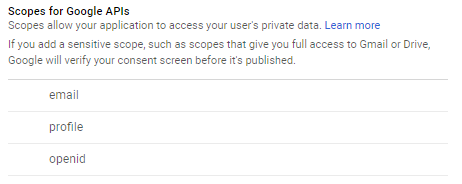
 dung-nguyentien
All 24 comments
SAME HERE!!!
 zoi-aoba
on 12 Nov 2018
zoi-aoba
on 12 Nov 2018
same here too
 kopai001
on 12 Nov 2018
kopai001
on 12 Nov 2018
hi, one of the maintainers here. I'm not using this functionality and don't have time to fix this. If there's anyone using the lib who needs this, please go ahead and provide a PR for this, I'll be available for code review and help if necessary.
Thanks.
 vonovak
on 12 Nov 2018
vonovak
on 12 Nov 2018
When creating a project, select an existing project at console.cloud.google.com. It works for me.
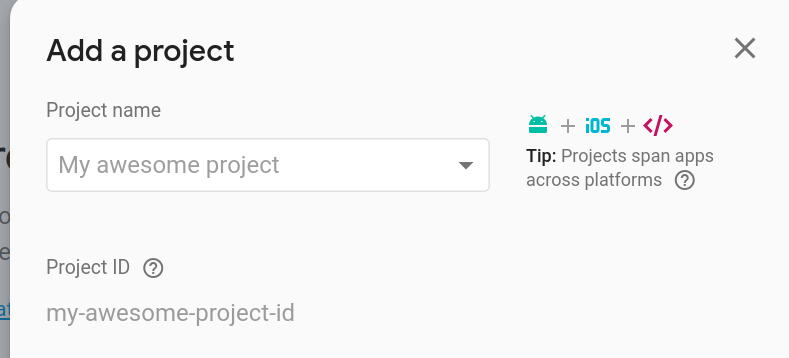
dung-nguyentien
on 13 Nov 2018
finally, I understood.
You have to go to Firebase console > authentication > google signin (make activate!) > web SDK setting.
And its "Web client SDK" would be used for GoogleSignin.configure .
zoi-aoba
on 13 Nov 2018
Hey @goleador0322, It work. I register app into firebase and configure SHA1 and app package name. after configure it work without any issue. Thanks
 kishanmundha
on 25 Nov 2018
kishanmundha
on 25 Nov 2018
sir, i did the same steps. i am getting same error. @kishanmundha , @goleador0322 sir can you help me.
componentDidMount() {
    GoogleSignin.hasPlayServices({ showPlayServicesUpdateDialog: true })
        .then(() => {

            // play services are available. can now configure library
        })
        .catch(err => {
            console.log('Play services error', err.code, err.message);
        });


        GoogleSignin.configure();


        GoogleSignin.configure({
            scopes: ['https://www.googleapis.com/auth/drive.readonly'], // what API you want to access on behalf of the user, default is email and profile
       //     //   iosClientId: '<FROM DEVELOPER CONSOLE>', // only for iOS
       //   //  webClientId: "295437555563-qh5qqili26q3hm3ggpn4d7fh887ahu30.apps.googleusercontent.com" // client ID of type WEB for your server (needed to verify user ID and offline access)
            webClientId: '438492594100-eum221fmi9m45pso1qeoieo9aje02f7t.apps.googleusercontent.com' // client ID of type WEB for your server (needed to verify user ID and offline access)

           // offlineAccess: true, // if you want to access Google API on behalf of the user FROM YOUR SERVER
           // hostedDomain: '', // specifies a hosted domain restriction
           // forceConsentPrompt: true, // [Android] if you want to show the authorization prompt at each login
           // accountName: '', // [Android] specifies an account name on the device that should be used
       });


}

googleSignIn = async () => {
    console.log('function running');
    try {
        const userInfo = await GoogleSignin.signIn();

        console.log(userInfo);
        ToastAndroid.show('user info=' + userInfo, ToastAndroid.SHORT);

        // this.setState({ userInfo });
    } catch (error) {
        if (error.code === statusCodes.SIGN_IN_CANCELLED) {
            console.log('error 1', error);
        } else if (error.code === statusCodes.IN_PROGRESS) {
            // operation (f.e. sign in) is in progress already
            console.log('error 2', error);
        } else {
            console.log('error 3', error);
            ToastAndroid.show('error=' + error, ToastAndroid.SHORT);

            // some other error happened
        }
    }
};
sir this is my code
 kalraneeraj24550
on 6 Dec 2018
kalraneeraj24550
on 6 Dec 2018
even i had the same error it took a whole day for me to solve it. It was because of the SHA -1 certificate problem. i gave the value from different keystore in the firebase ,hence google-services.json had some wrong client id which was making the request fail so i did the following steps.
1)deleted the SHA-1 key from firebase
2) generated the key (referring to this article ->[ https://developers.google.com/android/guides/client-auth ])
3)placed the key in the fire base and generated new google -services.json file
always use :- keytool -exportcert -list -v -alias androiddebugkey -keystore %USERPROFILE%\.android\debug.keystore
commond dont even change the path(in windows)
default password:-android
 ashwath20
on 29 Dec 2018
ashwath20
on 29 Dec 2018
Set Support email in firebase settings
 ogalaxy-gs
on 21 May 2019
ogalaxy-gs
on 21 May 2019
I searches and came across the following steps
- Enable OAuth on
https://console.developers.google.com - Copy and paste your SH1 while enabling
- Enable Google sign in on firebase authentication
- Add sha-256 to firebase android app settings
- Use Oauth Client_Id instead of your WebClient ID
 ckOfor
on 22 May 2019
ckOfor
on 22 May 2019
request
I get developer error
ckOfor
on 22 May 2019
Thanks all !
I solve it by doing the following steps :
- Setting both SHA1 and SHA256 in firebase from this link
- Activate Firebase console > authentication > google signin
- use web SDK setting and "Web client SDK" for GoogleSignin.configure .
- Setting Support email in firebase settings
 uchar
on 21 Jun 2019
uchar
on 21 Jun 2019
if HAVING DEVELOPER_ERROR or "non recoverable sigin error" ......
any one having issues with debug mode can watch this vedio it will satisfy you it has complete google login working with react native cli (init version )
 MuhammadUmar00
on 1 Aug 2019
MuhammadUmar00
on 1 Aug 2019
Go to https://console.developers.google.com/apis/credentials > create or use existing web OAuth 2.0 client > use client id of this web client in GoogleSignin.configure
For me, these steps fixed the problem.
 Artem-Kushch
on 10 Aug 2019
Artem-Kushch
on 10 Aug 2019
Add support email in firebase your settings 👍
1) Go to Firebase
2) Go to your Project
3) Go to Project Settings
4) In public settings support email option ( Add your email there).
 rchouhan170590
on 10 Nov 2019
rchouhan170590
on 10 Nov 2019
@uchar It worked for me. Thanks!
Setting both SHA1 & SHA256 in firebase from the given link worked well.
 deepas96
on 19 Dec 2019
deepas96
on 19 Dec 2019
@uchar Not working for me
i have tried all of the cases
?????????????
 ravi-pandit14
on 13 Jan 2020
ravi-pandit14
on 13 Jan 2020
What worked for me:
cd ./android && ./gradlew signingReport- Take the
SHA1ofTask :app:signingReport,Variant: debugAndroidTest,Config: debug - Update it the Firebase Console under
Project Settings,Android app, add theSHA1 - Download the
google-services.json, put it in./android/app - Go to
Authentication, thenSign-in method, then pressGoogle - Take the
Web client IDand use that for yourGoogleSignin.configure({ webClientId: ... }); - This
Web client IDshould be the same as listed inhttps://console.developers.google.com/apis/credentials?project=<your_project_id>->Credentials->OAuth 2 Client ID->Web Client
 jasperkuperus
on 19 Apr 2020
jasperkuperus
on 19 Apr 2020
What worked for me:
cd ./android && ./gradlew signingReport- Take the
SHA1ofTask :app:signingReport,Variant: debugAndroidTest,Config: debug- Update it the Firebase Console under
Project Settings,Android app, add theSHA1- Download the
google-services.json, put it in./android/app- Go to
Authentication, thenSign-in method, then press- Take the
Web client IDand use that for yourGoogleSignin.configure({ webClientId: ... });- This
Web client IDshould be the same as listed inhttps://console.developers.google.com/apis/credentials?project=<your_project_id>->Credentials->OAuth 2 Client ID->Web Client
This solution solved my issue. I was using a wrong sha-1 key instead. Hence I followed your instructions and used the sha-1 key under app:SigningReport instead with the variant: debugAndroidTest
 victorbruce
on 26 Dec 2020
victorbruce
on 26 Dec 2020
For my problem, I copied the application signing sha1 hash code from Application signing key certificate part of google play console > Release Management > App Signing page. Then I pasted it to Firebase settings and this solved the problem.
 srht
on 1 Feb 2021
srht
on 1 Feb 2021
At first I got the code inside 'oauth_client' but actually we should get 'client_id' in 'service' of file 'google-services'
GoogleSignin.configure({
  webClientId:
    'client_id of services'
});
 huynguyen199
on 21 Feb 2021
huynguyen199
on 21 Feb 2021
I have tried every single solution on the internet and still getting Error: A non-recoverable sign in failure occurred
 hugoh59
on 3 Mar 2021
hugoh59
on 3 Mar 2021
Tôi đã thử mọi giải pháp trên internet và vẫn nhận được
Error: A non-recoverable sign in failure occurred
metoo :(
 dfjerry
on 8 Mar 2021
dfjerry
on 8 Mar 2021
When creating a project, select an existing project at console.cloud.google.com. It works for me.
@hugoh59 @dfjerry
Did you try it? It's works for me.
dung-nguyentien
on 9 Mar 2021
Related issues
 goodhyun
·
3Comments
goodhyun
·
3Comments
 peekbyte
·
3Comments
peekbyte
·
3Comments
 GrishmaM
·
3Comments
GrishmaM
·
3Comments
 thaimauit
·
4Comments
thaimauit
·
4Comments
 guidotajan
·
4Comments
guidotajan
·
4Comments
Most helpful comment
finally, I understood.
You have to go to Firebase console > authentication > google signin (make activate!) > web SDK setting.
And its "Web client SDK" would be used for
GoogleSignin.configure.