Google-signin: A non-recoverable sign in failure occurred code 12500
I am using
- react-native 0.55.4 and 0.57.2
- [email protected] and [email protected]
- classpath 'com.android.tools.build:gradle:3.1.4'
classpath 'com.google.gms:google-services:3.2.1' - play-services-auth 16.0.1 & 9.2.1 (tried both version)
I got this error when signIn
{ [Error: A non-recoverable sign in failure occurred] framesToPop: 1,
code: '12500', line: 21326, column: 31, sourceURL: 'http://localhost:8081/index.delta?platform=android&dev=true&minify=false' }
I tried add and remove SHA1 then redownload google-service.json for both setting, still same error.
I tried client ID for web application and android client, both getting same error.
This is my google sign in code
GoogleSignin.configure({
          webClientId: 'xxxxxxx.apps.googleusercontent.com', offlineAccess: true,
        })
  GoogleSignin.hasPlayServices()
  .then(() => {

      GoogleSignin.signIn()
      .then((user) => {
        console.log(user);

      })
      .catch((err) => {
        if(err.code === 'CANCELED')
        {
          console.log('glogin canceled', err.code);
          dispatch(loginFailure(null))
        }
        else{
          console.log('error', err);
        }
      });
  }).catch(err => {
    console.log('Play services error', err.code, err.message);
  });
any idea what cause the error?
 cafeasia3
All 61 comments
Facing the same issue here !! :/
 matboud
on 10 Oct 2018
matboud
on 10 Oct 2018
 vonovak
on 11 Oct 2018
vonovak
on 11 Oct 2018
I used this http://developerextensions.com/index.php/help/230-Google-signin-returns-12500,-12501-error-code- to solve it.
I used wrong debug.keystore.
cafeasia3
on 11 Oct 2018
Hi @cafeasia3 what's the URL that you referenced ? Currently it's pointing to https://github.com/react-native-community/react-native-google-signin/issues/url
 sonlexqt
on 22 Oct 2018
sonlexqt
on 22 Oct 2018
Experiencing this issue too
 donnycrash
on 22 Oct 2018
donnycrash
on 22 Oct 2018
Anyone found a solution ? im getting this same error when i generate a release build , debug works just fine
 YazeedAsaad
on 23 Oct 2018
YazeedAsaad
on 23 Oct 2018
@YazeedAsaad release need another sha1 you can find it console.play.store
 Zurab1996
on 23 Oct 2018
Zurab1996
on 23 Oct 2018
I got stuck on this one for several days until I figured how what was wrong.
I relay with most of the situation described above :
- Works fine in debug/local
- If I build the release package and install it through adb install it works fine
- If I check the SHA1 of the package/keystore, everything is in order and matches the config in Firebase and the google-services.json
- And then, once deployed in beta or released on the store : the google signin fails miserably...
And I noticed that in the App signing part of the Google Play account :

I checked the play account (important thing to mention at this point : I did not configure the play account) : And sure enough, my package was being RE-SIGNED by google play certificate...
When you go to the Release Management > App Signing, you will see the SHA1 of the keystore being used by Google after yours. Pick it, paste it in Firebase, update your google-services.json file, redeploy and VOILA !
I really hope this help others to avoid all the hair pulling I've been doing these last few days :D
 HadrienPierart
on 26 Oct 2018
HadrienPierart
on 26 Oct 2018
I am using
- "react-native": "0.52.0",
- "react-native-google-signin": "^0.12.0",
- classpath 'com.android.tools.build:gradle:2.1.2'
- classpath 'com.google.gms:google-services:3.0.0'
i am still unable to login with google
this is my code
_handleLogin = async () => {
    await GoogleSignin.configure();
    await GoogleSignin.hasPlayServices({ autoResolve: true });
    GoogleSignin.signIn()
      .then(user => {
        console.log(user);
        const credential = firebase.auth.GoogleAuthProvider.credential(
          user.idToken,
          user.accessToken
        );
        temp_response = {
          id: user.id,
          email: user.email,
          gender: user.gender ? user.gender : "male",
          name: user.name,
          birthday: user.birthday ? user.birthday : "7/16/1987",
          picture_url: user.photo,
          login_type: "google"
        };
        frAuth(credential).then(async () => {
          await setUserLoginType("google");
          await setUserToken(user.accessToken);
          await registerAPI(temp_response);
          await setUserDataStorage(temp_response);
          await initFCMToken();

          // trigger to get all user data from updated asyncstorage and set to redux
          await this.props.rdRefreshUserData();

          this.props.globalLoading(false);
          this.props.navigation.navigate("Main");
        });
      })
      .catch(err => {
        console.log("WRONG SIGNIN", err);
      })
      .done();
  };
and then this is da error
WRONG SIGNIN Error: A non-recoverable sign in failure occurred
    at new GoogleSigninError (GoogleSignin.android.js:55)
    at GoogleSignin.android.js:131
    at RCTDeviceEventEmitter.emit (EventEmitter.js:181)
    at MessageQueue.__callFunction (MessageQueue.js:353)
    at MessageQueue.js:118
    at MessageQueue.__guardSafe (MessageQueue.js:316)
    at MessageQueue.callFunctionReturnFlushedQueue (MessageQueue.js:117)
    at t (RNDebuggerWorker.js:1)
what i was doing
- remove all SHA1 fingerprint on firebase and create new keystore and add again on Setting > project setting (not work)
- add configure options = { webClientId:
, offlineAccess: true} (not work)
this is run on debug mode, i am still develop so dont testing on release yet.
 never00miss
on 3 Nov 2018
never00miss
on 3 Nov 2018
Please see http://developerextensions.com/help/230-Google-signin-returns-12500,-12501-error-code-
 AndreiCalazans
on 3 Nov 2018
AndreiCalazans
on 3 Nov 2018
Please see http://developerextensions.com/help/230-Google-signin-returns-12500,-12501-error-code-
i was doin that on point 1, so i was add my keystore SHA1 fingerprint to > firebase, and generate new google-services.json
and the params
google-services.json
```
{
"client_id": "
"client_type": 1,
"android_info": {
"package_name": "com.
"certificate_hash": "
}
},
so this is my **gradle.properties**
android.useDeprecatedNdk=true
MYAPP_RELEASE_STORE_FILE=my-release-key.keystore
MYAPP_RELEASE_KEY_ALIAS=my-key-alias
MYAPP_RELEASE_STORE_PASSWORD=*
MYAPP_RELEASE_KEY_PASSWORD=*
```
and path to my keystore ./android/app/my-release-key.keystore
3 or 5 month ago this problem not show, idk why this bug showed this month
never00miss
on 3 Nov 2018
I can be wrong, but I think you are missing the webClientId which is required for Android @never00miss
AndreiCalazans
on 3 Nov 2018
Nope, I was doing that too on point 2.
never00miss
on 3 Nov 2018
whoever is using debug.keystore and did all config but still not working check your SHA1 signature whether you are using correct signature .
I have faced in windows .
in official document keystore is located in %USERPROFILE%.androiddebug.keystore location .
but my app is not using that keystore is it using different which is located at : %USERPROFILE%AppData\LocalAndroid\Sdk.androiddebug.keystore .
better take SHA1 signature from Android studio. (this Link may help : https://aboutreact.com/getting-sha1-fingerprint-for-google-api-console/).
hope that helps
 jeetAdhikary
on 29 Nov 2018
jeetAdhikary
on 29 Nov 2018
any updates? Still facing same issue
 HenryHengZJ
on 15 Dec 2018
HenryHengZJ
on 15 Dec 2018
i am facing the same issue, even in debug/local.
error= Error: A non-recoverable sign in failure occurred
error code = 12500
i have checked certificate_hash in googleServices.json is same as hash in firebaseconsole.
application id is also same. plz help me
 kalraneeraj24550
on 15 Dec 2018
kalraneeraj24550
on 15 Dec 2018
I found a related solution, you must add the SHA-1 certificate fingerprint from App Signing Certificate to Firebase fingerprints.

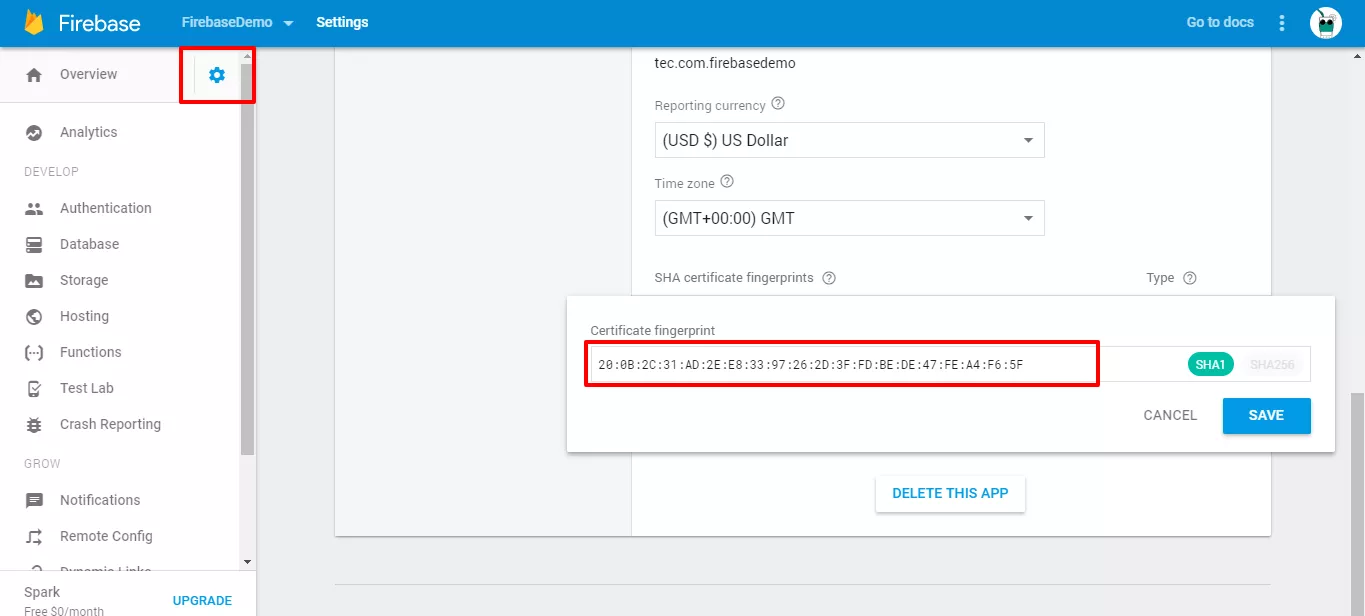
That's all, the Google SignIn authentication is done without an error 12500!
 cjjabc7
on 25 Dec 2018
cjjabc7
on 25 Dec 2018
sir, thanks sir, you came for help. sir, can you plz send the link that
from where i can get APP SIGNING CERTIFICATE.
On Tue, Dec 25, 2018 at 9:36 PM cjjabc7 notifications@github.com wrote:
I found a related solution, you must add the SHA-1 certificate fingerprint
from App Signing Certificate to Firebase fingerprints.[image: image]
https://user-images.githubusercontent.com/12590081/50424474-7244a880-0832-11e9-9d9f-65cfa3c7c034.png[image: image]
https://user-images.githubusercontent.com/12590081/50424595-a4570a00-0834-11e9-8cad-f568414e685b.pngThat's all, the Google SignIn authentication is done without an error
12500!—
You are receiving this because you commented.
Reply to this email directly, view it on GitHub
https://github.com/react-native-community/react-native-google-signin/issues/543#issuecomment-449860444,
or mute the thread
https://github.com/notifications/unsubscribe-auth/Aqkqhltu3dyYe5oAy6feBQJpgsaH5UZQks5u8k0KgaJpZM4XVGhP
.
kalraneeraj24550
on 26 Dec 2018
and sir, i am facing this issue. in even in debug mode. sir plz help me.
On Wed, Dec 26, 2018 at 10:10 AM neeraj kalra neeraj.emilence@gmail.com
wrote:
sir, thanks sir, you came for help. sir, can you plz send the link that
from where i can get APP SIGNING CERTIFICATE.On Tue, Dec 25, 2018 at 9:36 PM cjjabc7 notifications@github.com wrote:
I found a related solution, you must add the SHA-1 certificate
fingerprint from App Signing Certificate to Firebase fingerprints.[image: image]
https://user-images.githubusercontent.com/12590081/50424474-7244a880-0832-11e9-9d9f-65cfa3c7c034.png[image: image]
https://user-images.githubusercontent.com/12590081/50424595-a4570a00-0834-11e9-8cad-f568414e685b.pngThat's all, the Google SignIn authentication is done without an error
12500!—
You are receiving this because you commented.
Reply to this email directly, view it on GitHub
https://github.com/react-native-community/react-native-google-signin/issues/543#issuecomment-449860444,
or mute the thread
https://github.com/notifications/unsubscribe-auth/Aqkqhltu3dyYe5oAy6feBQJpgsaH5UZQks5u8k0KgaJpZM4XVGhP
.
kalraneeraj24550
on 26 Dec 2018
@kalraneeraj24550 if you have uploaded your app on play store you can get this sha-1 keys as @cjjabc7 has done otherwise you have to add to firebase sha-1 keys. write in terminal "keytool -list -v -keystore ~/.android/debug.keystore -alias androiddebugkey -storepass android -keypass android". second one is working only debug mode
Zurab1996
on 26 Dec 2018
i haven't uploaded the project on the play store. and i have already added SHA1 in firebase project.
kalraneeraj24550
on 26 Dec 2018
i am getting this error in debug mode. i have deleted current sha-1 present in firebase. then i regenerate certificate key and updated googleservices.json. still facing the error. i dont know where am lacking.
Anyone please help me..
kalraneeraj24550
on 3 Jan 2019
i have solved it by having sha-1 from android studio not by command line
kalraneeraj24550
on 3 Jan 2019
I am facing the same issue, even in debug/local.
Error: A non-recoverable sign-in failure occurred 12500
 pradeepchaudhari91
on 9 Jan 2019
pradeepchaudhari91
on 9 Jan 2019
i did two steps to solve this error.
- i get sha-1 from android studio and paste it on firebase console and redownloaded google-services.json.
- i configured it by android client id instead of web client id. this worked for me.
kalraneeraj24550
on 9 Jan 2019
My issue was a wrong webClientId in react native code.
I solved by referring http://developerextensions.com/help/230-Google-signin-returns-12500,-12501-error-code-
Copied Client ID of Web Client under OAuth 2.0 client IDs
https://console.developers.google.com/apis/credentials
My Configure now looks like
GoogleSignin.configure({
          webClientId: '888888888888-0eeee74ee19ee6eeeeeeeeeeeheekefe.apps.googleusercontent.com',
          offlineAccess: true
})
 ajitsen
on 18 Jan 2019
ajitsen
on 18 Jan 2019
i did two steps to solve this error.
- i get sha-1 from android studio and paste it on firebase console and redownloaded google-services.json.
- i configured it by android client id instead of web client id. this worked for me.
@kalraneeraj24550 i've already follow your steps, but i'm still get same error message... :(
 arjunsumarlan
on 5 Feb 2019
arjunsumarlan
on 5 Feb 2019
also enable "google drive" api on google developer console
On Tue, Feb 5, 2019 at 5:50 PM arjunsumarlan notifications@github.com
wrote:
i did two steps to solve this error.
- i get sha-1 from android studio and paste it on firebase console
and redownloaded google-services.json.- i configured it by android client id instead of web client id. this
worked for me.@kalraneeraj24550 https://github.com/kalraneeraj24550 i've already
follow your steps, but i'm still get same error message... :(—
You are receiving this because you were mentioned.
Reply to this email directly, view it on GitHub
https://github.com/react-native-community/react-native-google-signin/issues/543#issuecomment-460617936,
or mute the thread
https://github.com/notifications/unsubscribe-auth/AqkqhncyM30K3K1ban51AMix3jLUiMIHks5vKXcIgaJpZM4XVGhP
.
kalraneeraj24550
on 7 Feb 2019
Funny instance I'm having: it appears to work on some devices/accounts and throws this error on others. Any idea why the same keys, sha1 and configuration could have dual outcome?
Worse still, I have no idea how to troubleshoot on the devices claiming to face the error since it works fine on my end
 nmeri17
on 12 Mar 2019
nmeri17
on 12 Mar 2019
I was facing the same issue yesterday. I had the issue for debug / local mode and I tried everything posted in this thread and nothing happend. I fixed it going to firebase console -> Developement Section in the dashboard panel -> Authentication and enable google authentication. Hope this help.
I dont know why i have to do that since i was working whitout that until yesterday
 RomuloDevelop
on 12 Apr 2019
RomuloDevelop
on 12 Apr 2019
i solved this by updating
consent screen
at developer console -> Credentials -> OAuth consent screen
the login works until 3 days ago !!!
 b3hroo2
on 15 Apr 2019
b3hroo2
on 15 Apr 2019
@RomuloDevelop Thank you so much !!! I can't believe this is not told everywhere that you have to turn the Google Authentication on on Firebase console... Anyway !
I used the webClientId from GCP, debug SHA1 from ~.androiddebug.keystore, which I could access from gradle console in Android Studio or using commande line.
 Akhnaten972
on 21 Apr 2019
Akhnaten972
on 21 Apr 2019
i solved this by updating
consent screen
at developer console -> Credentials -> OAuth consent screenthe login works until 3 days ago !!!
Updating the OAuth consent screen works
 illwiz
on 28 Apr 2019
illwiz
on 28 Apr 2019
I searches and came across the following steps
- Enable OAuth on
https://console.developers.google.com - Copy and paste your SH1 while enabling
- Enable Google sign in on firebase authentication
- Use Oauth Client_Id instead of your WebClient ID
 ckOfor
on 22 May 2019
ckOfor
on 22 May 2019
So after many long hours
- Add SH-1 from your laptop to firebase console android app
- Submit the 0Auth consent screen and wait for google to confirm
ckOfor
on 22 May 2019
For me the fix was to enable Google login in firebase console and download google-services.json again. The consent screen is only required if you are using oauth2 login directly and not Google's SDK
 sourabhv
on 30 May 2019
sourabhv
on 30 May 2019
If you follow the guide for installation correctly, the only thing you really need is to save the consent screen that is given to you by default in the console. It just resolved my problem in one minute.
 thedukeatreides
on 3 Jun 2019
thedukeatreides
on 3 Jun 2019
As hard as it may be to believe, the fix was filling out the "Support email" field in Firebase!
Exact steps I took to fix 12500 error code:
- Enable Google as a Sign-In Provider under Firebase > Authentication (not sure if necessary but I did it anyways)
- Fill out the Support email field under Firebase > Project Settings (this is necessary and fixed my issue)
It appears to be related to the OAuth consent; more details in this StackOverflow. Hope this helps!
 pdsouza
on 16 Jun 2019
pdsouza
on 16 Jun 2019
Re-created app - Still does not work.
Added support email - Worked. Strange but true. Google firebase should give proper error message for this. It wastes lot of developer hours.
 hiteshagja
on 18 Jun 2019
hiteshagja
on 18 Jun 2019
I found a FIX, you just have to add SUPPORT EMAIL in firebase console.
It took me a whole day but finally found solution, hope it helps you all too.
 khwaja-abdul-ahad
on 20 Jun 2019
khwaja-abdul-ahad
on 20 Jun 2019
I found a FIX, you just have to add SUPPORT EMAIL in firebase console.
It took me a whole day but finally found solution, hope it helps you all too.
You are the hero! I tried so hard and eventually your solution worked. Thanks man!
 ruijiang
on 21 Jun 2019
ruijiang
on 21 Jun 2019
I found a FIX, you just have to add SUPPORT EMAIL in firebase console.
It took me a whole day but finally found solution, hope it helps you all too.
You just saved me a lot of hours of pointless debugging. Thanks!
 fontesrp
on 24 Jun 2019
fontesrp
on 24 Jun 2019
I faced the Same Issue but, and the reason for it in my application was because I forgot to add googlePlayServicesAuthVersion in build.gardle.
 mhmdAljefri
on 7 Jul 2019
mhmdAljefri
on 7 Jul 2019
I am getting this type of Error Code -- 12500. but I have added support url in firebase console. I did not get any response.
 SaranyaArumugam
on 15 Jul 2019
SaranyaArumugam
on 15 Jul 2019
@SaranyaArumugam i did everything bu still same problem did u find solution if u find share it ?
thanks in advance
 IbrahimCanKALYA
on 25 Jul 2019
IbrahimCanKALYA
on 25 Jul 2019
@SaranyaArumugam
config your Web SDK configuration then go to https://console.developers.google.com/
config OAuth Consent Screen
Update all your privacy policy
 Suhas404
on 25 Jul 2019
Suhas404
on 25 Jul 2019
I am also getting the same error 12500, done everything u guys told in above discussion but the result is same, help me
the app is in debug mode, I think something is wrong with OAuth Consent Screen
 Choomantar
on 1 Aug 2019
Choomantar
on 1 Aug 2019
any one having issues with debug mode can watch this vedio it will satisfy you it has complete google login working with react native cli (init version )
 MuhammadUmar00
on 1 Aug 2019
MuhammadUmar00
on 1 Aug 2019
adding privacy policy in OAuth resolved my problem
Choomantar
on 2 Aug 2019
Just verify google credentials in OAuth consent screen at console.developers.google.com and save your time
 arsalan-arshad
on 2 Aug 2019
arsalan-arshad
on 2 Aug 2019
Solved it by simply redownloading the google-services.json file from firebase console > Project Settings > General > scroll to Your Apps > select android app > Download google-service.json.
I had updating my hash in firebase console but had not re-downloaded the json file. Redownloding and replacing it in the app resource.
THEN: enabling Google auth in Firebase, which triggers the prompt to set a public name for the app (which I think it what was the real issue for Google sign in).
 qwertzguy
on 12 Sep 2019
qwertzguy
on 12 Sep 2019
Hello All, almost all solutions I have tried to resolve this problem the but unfortunately did not get any success. Finally I have deleted my
1 . Firebase registed App
- Firebase project
3.google developer console projects
And after that created new Firebase project/registered App
Now its started working.
 Qamarkh
on 10 Jan 2020
Qamarkh
on 10 Jan 2020
As hard as it may be to believe, the fix was filling out the "Support email" field in Firebase!
Exact steps I took to fix 12500 error code:
- Enable Google as a Sign-In Provider under Firebase > Authentication (not sure if necessary but I did it anyways)
- Fill out the Support email field under Firebase > Project Settings (this is necessary and fixed my issue)
It appears to be related to the OAuth consent; more details in this StackOverflow. Hope this helps!
i love you! days.....
 elirant3
on 27 Apr 2020
elirant3
on 27 Apr 2020
https://developers.google.com/identity/sign-in/android/start-integrating
You have to click on configure a project then take the web client id that this process generated
 HayderEspinoza
on 8 Jun 2020
HayderEspinoza
on 8 Jun 2020
Sign in suddenly stopped working for me and im getting A non-recoverable sign in failure occurred is there anyway i can debug this, because that error message is pretty useless, and i cant catch the error either it seems
 dakkafex
on 27 Aug 2020
dakkafex
on 27 Aug 2020
@dakkafex I had the same error like you, I followed @Choomantar comment and my problem got solved.
 davincho
on 8 Dec 2020
davincho
on 8 Dec 2020
:( Still facing the issue where I have
- A valid email address provided both in firebase and google OAuth consent screen.
- Google authentication is enabled under firebase
 jatin-codes
on 13 Dec 2020
jatin-codes
on 13 Dec 2020
I go throug all this solutions but none of them works for me. What really helped:
  scopes: ['https://www.googleapis.com/auth/drive.readonly'],  // <--- delete this line from your GoogleSignin.configure
  webClientId: '<FROM DEVELOPER CONSOLE>',
  offlineAccess: true,
Of course you should try all solutions above. But I just leave it here
 Nikita-Filonov
on 22 Jan 2021
Nikita-Filonov
on 22 Jan 2021
i have the same issue but i don't use firebase any solutions?
 abdallaemadeldin
on 26 Jan 2021
abdallaemadeldin
on 26 Jan 2021
Creating a new debug.keystore and SHA1 then updating it on firebase worked for me.
 DheerajGadwala
on 24 Jul 2021
DheerajGadwala
on 24 Jul 2021
Thanks David will check it out.
On Tue, Dec 8, 2020 at 7:52 PM David Madner @.*>
wrote:
@dakkafex https://github.com/dakkafex I had the same error like you, I
followed @Choomantar https://github.com/Choomantar comment and my
problem got solved.—
You are receiving this because you commented.
Reply to this email directly, view it on GitHub
https://github.com/react-native-google-signin/google-signin/issues/543#issuecomment-740648324,
or unsubscribe
https://github.com/notifications/unsubscribe-auth/AMSY4CKOCXTKBXLVLT3LYHLSTYZATANCNFSM4F2UNBHQ
.
Qamarkh
on 25 Jul 2021
Related issues
 havinhthai
·
3Comments
havinhthai
·
3Comments
 Decoder3-14
·
3Comments
Decoder3-14
·
3Comments
 ChaoTzuJung
·
3Comments
ChaoTzuJung
·
3Comments
 ghost
·
3Comments
ghost
·
3Comments
 peekbyte
·
3Comments
peekbyte
·
3Comments
Most helpful comment
I got stuck on this one for several days until I figured how what was wrong.
I relay with most of the situation described above :
And I noticed that in the App signing part of the Google Play account :

I checked the play account (important thing to mention at this point : I did not configure the play account) : And sure enough, my package was being RE-SIGNED by google play certificate...
When you go to the Release Management > App Signing, you will see the SHA1 of the keystore being used by Google after yours. Pick it, paste it in Firebase, update your google-services.json file, redeploy and VOILA !
I really hope this help others to avoid all the hair pulling I've been doing these last few days :D