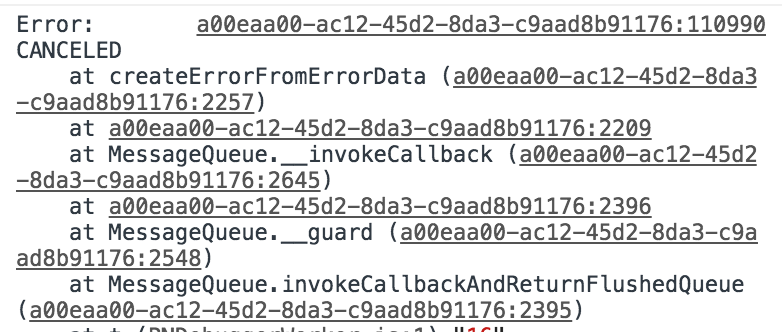
Google-signin: Android: "CANCELED" Response while choosing Account.
I am trying to activate Social Login in my app, but when I get Dialog to choose Account response in Logs is "CANCELED". And I can't proceed.
 Zurab1996
All 17 comments
I am getting the same issue. Tried multiple scopes and all have the same result. No useful information from the debugger other than "CANCELED"
 EvansMatthew97
on 13 Sep 2018
EvansMatthew97
on 13 Sep 2018
Same
 tannera
on 14 Sep 2018
tannera
on 14 Sep 2018
Same
 aohua
on 14 Sep 2018
aohua
on 14 Sep 2018
Downgrading to "^1.0.0-rc3" worked for me.
tannera
on 14 Sep 2018
Downgrading to "^1.0.0-rc3" worked for me.
not worked for me
Zurab1996
on 14 Sep 2018
same here
 mbizplus
on 14 Sep 2018
mbizplus
on 14 Sep 2018
hi everyone. Sorry to hear there is a problem. As the issue template explains, in order to fix an issue, the maintainers need a repro of the issue. Therefore I'd like to ask somebody to create a reproduction of the issue or investigate the solution. Also, please note that comments that do not add any more information (+1 / me too and etc) do not bring much value and just spam other people in this thread. Thanks.
 vonovak
on 14 Sep 2018
vonovak
on 14 Sep 2018
I'm getting the same issue as well, but only in my development builds (react-native run-android). In the production build, Google Login works fine. I'm using react-native 0.57 and react-native-google-signin 1.0.0-rc5.
 adrianocola
on 14 Sep 2018
adrianocola
on 14 Sep 2018
I tried changing the version from 1.0.0-rc5 down to rc3 as @tannera suggested, but it didn't work.
What _appears_ to have fixed it for me was Firebase not being set up correctly. The docs suggest using the web api key from project settings, but it looks like the one from authentication is meant to be used:
- Open Firebase console
- Go to Authentication under Develop in the menu
- Select the Sign-in method tab
- Enable Google in the sign-in providers
- Expand the web sdk configuration
- Use the web client ID (not the secret) shown.
As I mentioned this seems to have been the problem for me (note I haven't tried development release yet)
EvansMatthew97
on 15 Sep 2018
@EvansMatthew97 Hey, awesome that you got it working! I didn't know that webClientId can now be found directly from Firebase console. Would you like to update our documentation where to find it? :)
@Zurab1996 or anyone else having this problem please fill out our issue template. That information is required in order to start triaging the issue.
 jozan
on 15 Sep 2018
jozan
on 15 Sep 2018
Ok so for me the issue was not exporting the keystore file sha fingerprint in the firebase console
https://developers.google.com/android/guides/client-auth
&&
https://console.firebase.google.com
 Titozzz
on 17 Sep 2018
Titozzz
on 17 Sep 2018
@Titozzz Do you just mean adding the SHA fingerprint to the Firebase app and exporting the google-services.json file to /android/app/? For me, I still get this error having followed these steps....
 emadh
on 17 Sep 2018
emadh
on 17 Sep 2018
@emadh Yeah, did you do it for debug and release ? I had 4 productFlavors so I exported 8 SHA1 and 8 SHA256. Updating google-services.json was not needed on my side (It looked like it was a bad answer from google servers).
Titozzz
on 17 Sep 2018
Wow I only included the Release SHA1 not the debug... Thanks @Titozzz - problem solved!! For those still struggling with this here's what I did (I used command line, Android studio might make it easier):
1) keytool -list -v -keystore "%USERPROFILE%.androiddebug.keystore" -alias androiddebugkey -storepass android -keypass android
This will spit out the certificate including the SHA-1.
2) Copy the SHA1 and add it to the app in Firebase. Unlike @Titozzz I only had 1 productFlavor so I just needed 2 fingerprints (1 release and 1 debug)
3) I downloaded google-services.json and added it to /android/app/
4) Just in case, I deleted tmp files & cache with the command: del %appdata%Tempreact-native-* & cd android & gradlew clean & cd .. & del node_modules/ & npm cache clean --force
emadh
on 17 Sep 2018
@Titozzz 's answer is the way to go. Great job buddy 👍
On the other hand, a more explicit error would be appreciated.
 pistou
on 17 Sep 2018
pistou
on 17 Sep 2018
it works thank @Titozzz!!!!!!!!!!
Zurab1996
on 18 Sep 2018
Thanks everyone for finding the solution. This was very tricky problem for us maintainers to solve since we could not reproduce this at all. 🙏
In Firebase console when you’re creating your Android app first time it mentions in tinyprint about the SHA1 and Google Sign In but it can be easily missed. @vonovac has improved our documentation in regards to SHA1 and stuff. Should be much clearer now when setting this up. We also have FAQ about common issues and this seems to be one worth adding.
I’m closing this now since the solution is found. Feel free to open up a new issue if the same or similar issues arise. We maintainers do not have time or get notifications about closed issues since they are resolved.
jozan
on 18 Sep 2018
Related issues
 ChaoTzuJung
·
3Comments
ChaoTzuJung
·
3Comments
 Decoder3-14
·
3Comments
Decoder3-14
·
3Comments
 TyLy83
·
4Comments
TyLy83
·
4Comments
 ghost
·
3Comments
ghost
·
3Comments
 smartcris
·
3Comments
smartcris
·
3Comments
Most helpful comment
I tried changing the version from 1.0.0-rc5 down to rc3 as @tannera suggested, but it didn't work.
What _appears_ to have fixed it for me was Firebase not being set up correctly. The docs suggest using the web api key from project settings, but it looks like the one from authentication is meant to be used:
As I mentioned this seems to have been the problem for me (note I haven't tried development release yet)