Google-signin: DEVELOPER_ERROR on real device
i can success login in simulator, but when i build an alpha release for google play and test it on real device i got DEVELOPER_ERROR message in logcat
i generated a signing key
$ keytool -genkey -v -keystore my-release-key.keystore -alias my-key-alias -keyalg RSA -keysize 2048 -validity 10000i generated a SHA1 key
keytool -exportcert -keystore ~/.android/debug.keystore -list -vi added SHA1 key to firebase console
i added google-services.json in my app folder
i used this code
GoogleSignin.configure({
  iosClientId:
    "xxx-xxx.apps.googleusercontent.com"
});
i also generated a release key and added to firebase too - same error
keytool -exportcert -list -v \
-alias <your-key-name> -keystore <path-to-production-keystore>
i miss something?
 pkers87
All 19 comments
Check this link , this might help
Developer error
 ajitdas123
on 12 Jul 2018
ajitdas123
on 12 Jul 2018
@ajitdas123
thanks, all the keys generated running signin report was already in firebase console.
still no way to resolve this
pkers87
on 13 Jul 2018
hi, sorry you're having a problem. There are several issues that were opened with the same problem in the past. Please try luck with them.
 vonovak
on 13 Jul 2018
vonovak
on 13 Jul 2018
@pkers87 @vonovak faced this problem, my keys was correctly generated. I fixed it followin instructions at the bottom of android F.A.Q https://github.com/react-native-community/react-native-google-signin/blob/master/docs/android-guide.md
 Yauheni-Ihnatsyeu-EPAM
on 23 Jul 2018
Yauheni-Ihnatsyeu-EPAM
on 23 Jul 2018
it seems to work after upgrade to rc2 :)
pkers87
on 8 Aug 2018
Solved. Thanks for reporting @pkers87!
 jozan
on 8 Aug 2018
jozan
on 8 Aug 2018
I'm facing same problem and not able top solve it. I'm already on rc3 version of the app. Everything runs fine when I install from my dev environment. But after uploading it to store I get DEVELOPER_ERROR. I have tried everything. SHA1 have confirmed multiple time that my keys are proper. Tried with or without webClientId. Tried everything I could find and think of but still unable to resolve this error. Please help me.
P.S: This is happening only on Android, on iOS it's working fine.
 iyogeshjoshi
on 10 Sep 2018
iyogeshjoshi
on 10 Sep 2018
I finally found it after 2 days of hitting my head here and there 😵. Apparently google has launched new signings service where they sign your app on play store after you upload, with their key after which they give you SHA1 for the same on play store developer console. under <YOUR APP> > Release Management > App Signing take SHA-1 from there and add it to your Firebase project app. And yay! it worked for me and hopefully will work for you if you are facing same issue.
iyogeshjoshi
on 10 Sep 2018
Thanks @iyogeshjoshi. You just saved me some time on this. I think it would be nice to have in android-guide.md FAQ section on point E.
 markhomoki
on 12 Oct 2018
markhomoki
on 12 Oct 2018
@iyogeshjoshi , so you mean that the SHA1 is came from play store developer console?
not on this command line "keytool -genkey -v -keystore debug.keystore -storepass android -alias androiddebugkey -keypass android -keyalg RSA -keysize 2048 -validity 10000"?
Is it necessary to create console deveopler account while still in the development to test the google sign in?
I just have firebase console.
I generated debug.keystore and put SHA1 to firebase console also copy the client_id and put it .config as webClientId but i still have the same issue. Im using android emulator.
Thanks.
 Ethan0007
on 3 Jul 2019
Ethan0007
on 3 Jul 2019
@Ethan0007 how did you fix this. Getting the same error after upgrading to RN 0.60
 usmansbk
on 27 Jul 2019
usmansbk
on 27 Jul 2019
@usmansbk I was facing the same issue in RN 0.60. Turns out when I was running the SHA1 generation command on my Mac, the default debug.keystore on my mac was being used. But when the React Native Android App is compiled, it takes the debug.keystore from inside the project Android Folder
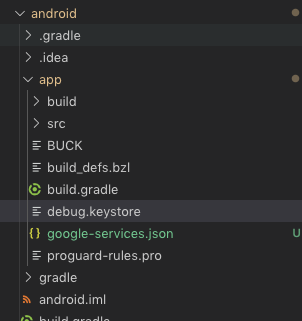
I generated SHA 1 from this Keystore and added it to Firebase, and Voila ! 🎉
 rathoreabhijeet
on 21 Aug 2019
rathoreabhijeet
on 21 Aug 2019
Note that @rathoreabhijeet’s solution will not work on production. You need to get your SHA1 from your production keystore.
Instructions creating production keystore: https://facebook.github.io/react-native/docs/signed-apk-android#generating-an-upload-key
jozan
on 21 Aug 2019
Solution: Answer by @rathoreabhijeet is working. Every app has it's own key store.
So while generating hash make sure to change the path to key store.
keytool -list -v -alias androiddebugkey -keystore ~/myprojects/yourappname/android/app/debug.keystore
keytool -list -v -alias androiddebugkey -keystore path_to_your_apps_keystore
 Kailash23
on 22 Nov 2019
Kailash23
on 22 Nov 2019
visit https://developers.google.com/identity/sign-in/android/start-integrating and click on "Configure a project" button and configure app and same SHA1 key put in firebase project works for me
 Vicky-SilverSky
on 7 May 2020
Vicky-SilverSky
on 7 May 2020
I finally found it after 2 days of hitting my head here and there 😵. Apparently google has launched new signings service where they sign your app on play store after you upload, with their key after which they give you SHA1 for the same on play store developer console. under
<YOUR APP> > Release Management > App Signingtake SHA-1 from there and add it to your Firebase project app. And yay! it worked for me and hopefully will work for you if you are facing same issue.
This really Helped me!!!
thanks a lot!!!
 allindeveloper
on 4 Jun 2020
allindeveloper
on 4 Jun 2020
Would someone like to add a note about App Signin by Google and how to get the SHA-1? You can add it here and open a new PR.
jozan
on 4 Jun 2020
For anyone landing here from React Native Firebase here , my problem was I had 3 oauth_client entries in my google-services.json file and I was picking the first one for webClientId .... which worked on iOS but not Android for some reason. I tried all of them and the last one with "client_type": 3 ended up working.
No idea why. I'd love to know though!
Hope that helps someone :-)
 vonkanehoffen
on 23 Aug 2020
vonkanehoffen
on 23 Aug 2020
@vonkanehoffen did you find any solution, I have a similar issue.
 weingenious72
on 15 Dec 2020
weingenious72
on 15 Dec 2020
Related issues
 apperside
·
4Comments
apperside
·
4Comments
 ghost
·
3Comments
ghost
·
3Comments
 pawellewandowski
·
4Comments
pawellewandowski
·
4Comments
 TyLy83
·
4Comments
TyLy83
·
4Comments
 smartcris
·
3Comments
smartcris
·
3Comments
Most helpful comment
I finally found it after 2 days of hitting my head here and there 😵. Apparently google has launched new signings service where they sign your app on play store after you upload, with their key after which they give you SHA1 for the same on play store developer console. under
<YOUR APP> > Release Management > App Signingtake SHA-1 from there and add it to your Firebase project app. And yay! it worked for me and hopefully will work for you if you are facing same issue.