Google-signin: RNGoogleSignIn.configure got 8 arguments expected 3 after upgrading to newest @next rc version
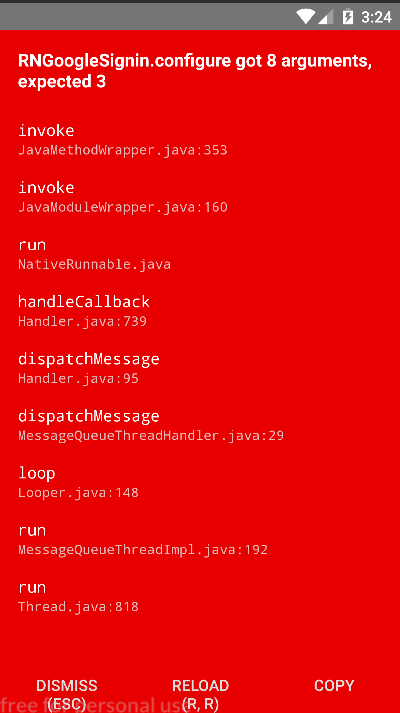
Gradle :
apply plugin: "com.android.application"
import com.android.build.OutputFile
/**
 * The react.gradle file registers a task for each build variant (e.g. bundleDebugJsAndAssets
 * and bundleReleaseJsAndAssets).
 * These basically call `react-native bundle` with the correct arguments during the Android build
 * cycle. By default, bundleDebugJsAndAssets is skipped, as in debug/dev mode we prefer to load the
 * bundle directly from the development server. Below you can see all the possible configurations
 * and their defaults. If you decide to add a configuration block, make sure to add it before the
 * `apply from: "../../node_modules/react-native/react.gradle"` line.
 *
 * project.ext.react = [
 *   // the name of the generated asset file containing your JS bundle
 *   bundleAssetName: "index.android.bundle",
 *
 *   // the entry file for bundle generation
 *   entryFile: "index.android.js",
 *
 *   // whether to bundle JS and assets in debug mode
 *   bundleInDebug: false,
 *
 *   // whether to bundle JS and assets in release mode
 *   bundleInRelease: true,
 *
 *   // whether to bundle JS and assets in another build variant (if configured).
 *   // See http://tools.android.com/tech-docs/new-build-system/user-guide#TOC-Build-Variants
 *   // The configuration property can be in the following formats
 *   //         'bundleIn${productFlavor}${buildType}'
 *   //         'bundleIn${buildType}'
 *   // bundleInFreeDebug: true,
 *   // bundleInPaidRelease: true,
 *   // bundleInBeta: true,
 *
 *   // whether to disable dev mode in custom build variants (by default only disabled in release)
 *   // for example: to disable dev mode in the staging build type (if configured)
 *   devDisabledInStaging: true,
 *   // The configuration property can be in the following formats
 *   //         'devDisabledIn${productFlavor}${buildType}'
 *   //         'devDisabledIn${buildType}'
 *
 *   // the root of your project, i.e. where "package.json" lives
 *   root: "../../",
 *
 *   // where to put the JS bundle asset in debug mode
 *   jsBundleDirDebug: "$buildDir/intermediates/assets/debug",
 *
 *   // where to put the JS bundle asset in release mode
 *   jsBundleDirRelease: "$buildDir/intermediates/assets/release",
 *
 *   // where to put drawable resources / React Native assets, e.g. the ones you use via
 *   // require('./image.png')), in debug mode
 *   resourcesDirDebug: "$buildDir/intermediates/res/merged/debug",
 *
 *   // where to put drawable resources / React Native assets, e.g. the ones you use via
 *   // require('./image.png')), in release mode
 *   resourcesDirRelease: "$buildDir/intermediates/res/merged/release",
 *
 *   // by default the gradle tasks are skipped if none of the JS files or assets change; this means
 *   // that we don't look at files in android/ or ios/ to determine whether the tasks are up to
 *   // date; if you have any other folders that you want to ignore for performance reasons (gradle
 *   // indexes the entire tree), add them here. Alternatively, if you have JS files in android/
 *   // for example, you might want to remove it from here.
 *   inputExcludes: ["android/**", "ios/**"],
 *
 *   // override which node gets called and with what additional arguments
 *   nodeExecutableAndArgs: ["node"],
 *
 *   // supply additional arguments to the packager
 *   extraPackagerArgs: []
 * ]
 */

project.ext.react = [
    entryFile: "index.js"
]

apply from: "../../node_modules/react-native/react.gradle"

/**
 * Set this to true to create two separate APKs instead of one:
 *   - An APK that only works on ARM devices
 *   - An APK that only works on x86 devices
 * The advantage is the size of the APK is reduced by about 4MB.
 * Upload all the APKs to the Play Store and people will download
 * the correct one based on the CPU architecture of their device.
 */
def enableSeparateBuildPerCPUArchitecture = true

/**
 * Run Proguard to shrink the Java bytecode in release builds.
 */
def enableProguardInReleaseBuilds = false

android {
    compileSdkVersion 26
    buildToolsVersion "26.0.1"

    defaultConfig {
        applicationId "com.jobia"
        minSdkVersion 16
        targetSdkVersion 26
        versionCode 3
        versionName "1.0.5"
        ndk {
            abiFilters "armeabi-v7a", "x86"
        }
        multiDexEnabled true
    }
   signingConfigs {
        release {
            if (project.hasProperty('MYAPP_RELEASE_STORE_FILE')) {
                storeFile file(MYAPP_RELEASE_STORE_FILE)
                storePassword MYAPP_RELEASE_STORE_PASSWORD
                keyAlias MYAPP_RELEASE_KEY_ALIAS
                keyPassword MYAPP_RELEASE_KEY_PASSWORD
            }
        }
    }
    splits {
        abi {
            reset()
            enable false
            universalApk false  // If true, also generate a universal APK
            include "armeabi-v7a", "x86"
        }
    }
    dexOptions {
        jumboMode = true
    }
    buildTypes {
        release {
            minifyEnabled enableProguardInReleaseBuilds
            proguardFiles getDefaultProguardFile("proguard-android.txt"), "proguard-rules.pro"
            signingConfig signingConfigs.release
        }
    }
    // applicationVariants are e.g. debug, release
    applicationVariants.all { variant ->
        variant.outputs.each { output ->
            // For each separate APK per architecture, set a unique version code as described here:
            // http://tools.android.com/tech-docs/new-build-system/user-guide/apk-splits
            def versionCodes = ["armeabi-v7a":1, "x86":2]
            def abi = output.getFilter(OutputFile.ABI)
            if (abi != null) {  // null for the universal-debug, universal-release variants
                output.versionCodeOverride =
                        versionCodes.get(abi) * 1048576 + defaultConfig.versionCode
            }
        }
    }
}

dependencies {
    // testing multi dex support
    implementation 'com.android.support:multidex:1.0.3'

    compile project(':react-native-radial-gradient')
    compile project(':react-native-fast-image')
    compile project(':react-native-snackbar')
    compile project(':react-native-document-picker')
    compile project(':react-native-image-picker')
    compile project(':react-native-fbsdk')
    compile(project(':react-native-firebase')) {
        transitive = false;
    }

    compile "com.google.android.gms:play-services-base:15.0.0"
    compile 'com.google.firebase:firebase-core:15.0.2'
    compile "com.google.firebase:firebase-auth:15.1.0"
    compile "com.google.firebase:firebase-firestore:16.0.0"
    compile "com.google.firebase:firebase-storage:15.0.2"

    compile(project(":react-native-google-signin")){
        exclude group: "com.google.android.gms"
    }
    compile 'com.google.android.gms:play-services-auth:15.0.0' // should be at least 15.0.0

    //compile project(':react-native-vector-icons')
    compile fileTree(dir: "libs", include: ["*.jar"])
    compile "com.android.support:appcompat-v7:26+"
    compile "com.facebook.react:react-native:+"  // From node_modules

    project.ext.vectoricons = [
        iconFontNames: [ 'FontAwesome.ttf' ] // Name of the font files you want to copy
    ]
}


// Run this once to be able to run the application with BUCK
// puts all compile dependencies into folder libs for BUCK to use
task copyDownloadableDepsToLibs(type: Copy) {
    from configurations.compile
    into 'libs'
}

apply from: "../../node_modules/react-native-vector-icons/fonts.gradle"
apply plugin: 'com.google.gms.google-services'
Build.gradle :
// Top-level build file where you can add configuration options common to all sub-projects/modules.

buildscript {
    repositories {
        google()
        jcenter()
    }
    dependencies {
        classpath 'com.android.tools.build:gradle:3.1.2'
        classpath 'com.google.gms:google-services:3.2.1'
        // NOTE: Do not place your application dependencies here; they belong
        // in the individual module build.gradle files
    }
}

allprojects {
    repositories {
        mavenLocal()
        google() // <-- Add this line above jcenter
        jcenter()
        maven {
            // All of React Native (JS, Obj-C sources, Android binaries) is installed from npm
            url "$rootDir/../node_modules/react-native/android"
        }
    }
}
React-native version: "react-native": "^0.55.4",
React-native-google-sign-in version: "react-native-google-signin": "^1.0.0-rc1",
 gugakatsi
All 13 comments
Did you rebuild your project?
 vonovak
on 3 Jul 2018
vonovak
on 3 Jul 2018
@vonovak i cleaned gradle ./gradlew clean than run react-native run-android, nothing else
gugakatsi
on 3 Jul 2018
@vonovak is there anything i could do or should i reroll to old version , i had so many issues like api is not connected yet and all that stuff
gugakatsi
on 4 Jul 2018
@gugakatsi I'm think the problem is due to some problems in your installation - the native side expected 3 arguments, but received 8 from JS. It is hard to help without a runnable reproduction though.
vonovak
on 13 Jul 2018
@vonovak thanks for response, actually i fixed it , will post some code here. explaining what was problem and etc.
gugakatsi
on 13 Jul 2018
@gugakatsi were u able to gather the tips for chasing this issue? Having now the same with RC6.
 abramenal
on 10 Oct 2018
abramenal
on 10 Oct 2018
@gugakatsi what was the issue?
i am facing the same
 shohailahm
on 22 Dec 2018
shohailahm
on 22 Dec 2018
@abramenal @shohailahm i'll check it tomorrow evening and write down probably
gugakatsi
on 22 Dec 2018
@gugakatsi please..thank you man i need it real bad
shohailahm
on 24 Dec 2018
@gugakatsi help brah?
shohailahm
on 25 Dec 2018
@shohailahm sorry for waiting , extremly busy days for me , only thing i can say now , is to clean npm cache , than gradle than just rebuild,
gugakatsi
on 25 Dec 2018
I have this issue I will try cleaning npm cache but this issue is only for the Android part. IOS works fine.
 devinceble
on 6 Feb 2019
devinceble
on 6 Feb 2019
@gugakatsi @shohailahm we are only getting this issue with the release version. Debug version is working fine. Any suggestion if you guys already solved it? We did all the steps and rebuild app as suggested in the thread above.
 figgcoder
on 30 May 2019
figgcoder
on 30 May 2019
Related issues
 serbanstef
·
3Comments
serbanstef
·
3Comments
 smartcris
·
3Comments
smartcris
·
3Comments
 havinhthai
·
3Comments
havinhthai
·
3Comments
 ChaoTzuJung
·
3Comments
ChaoTzuJung
·
3Comments
 peekbyte
·
3Comments
peekbyte
·
3Comments