Google-signin: IOS Build Failed (Utility file not found & Unknown type namespace)
I followed the installation guide as described here
I use Pod and link everything.
Environment
Pod file
# Uncomment the next line to define a global platform for your project
platform :ios, '9.0'

target 'fareqy' do
  rn_path = '../node_modules/react-native'
  rn_maps_path = '../node_modules/react-native-maps'

  # See http://facebook.github.io/react-native/docs/integration-with-existing-apps.html#configuring-cocoapods-dependencies
  pod 'yoga', path: "#{rn_path}/ReactCommon/yoga/yoga.podspec"
  pod 'React', path: rn_path, subspecs: [
    'Core',
    'CxxBridge',
    'DevSupport',
    'RCTActionSheet',
    'RCTAnimation',
    'RCTGeolocation',
    'RCTImage',
    'RCTLinkingIOS',
    'RCTNetwork',
    'RCTSettings',
    'RCTText',
    'RCTVibration',
    'RCTWebSocket',
  ]

  # React Native third party dependencies podspecs
  pod 'DoubleConversion', :podspec => "#{rn_path}/third-party-podspecs/DoubleConversion.podspec"
  pod 'glog', :podspec => "#{rn_path}/third-party-podspecs/glog.podspec"
  # If you are using React Native <0.54, you will get the following error:
  # "The name of the given podspec `GLog` doesn't match the expected one `glog`"
  # Use the following line instead:
  #pod 'GLog', :podspec => "#{rn_path}/third-party-podspecs/GLog.podspec"
  pod 'Folly', :podspec => "#{rn_path}/third-party-podspecs/Folly.podspec"

  # react-native-maps dependencies
  pod 'react-native-maps', path: rn_maps_path


  pod 'Firebase/Core'
  pod 'Firebase/Auth'

  pod 'GoogleSignIn'

  # pod 'FBSDKLoginKit'
end

post_install do |installer|
  installer.pods_project.targets.each do |target|
    if target.name == 'react-native-google-maps'
      target.build_configurations.each do |config|
        config.build_settings['CLANG_ENABLE_MODULES'] = 'No'
      end
    end
    if target.name == "React"
      target.remove_from_project
    end
  end
end
Package.json
{
"name": "MY_APP",
"version": "0.0.1",
"private": true,
"scripts": {
  "start": "node node_modules/react-native/local-cli/cli.js start",
  "ios": "react-native run-ios",
  "android": "react-native run-android",
  "refresh": "adb shell input keyevent 82",
  "android_p": "cd android && ./gradlew assembleRelease && cd ../ && react-native run-android --variant=release",
  "test": "jest"
},
"dependencies": {
  "react": "16.3.1",
  "react-native": "0.55.4",
  "react-native-elements": "^0.19.1",
  "react-native-fbsdk": "^0.7.0",
  "react-native-firebase": "^4.2.0",
  "react-native-google-signin": "^0.12.0",
  "react-native-i18n": "^2.0.12",
  "react-native-image-picker": "^0.26.10",
  "react-native-keyboard-aware-scrollview": "^2.0.0",
  "react-native-maps": "^0.21.0",
  "react-native-onesignal": "^3.2.4",
  "react-native-star-rating": "^1.0.9",
  "react-native-vector-icons": "^4.6.0",
  "react-navigation": "^1.5.11"
},
"devDependencies": {
  "babel-jest": "22.4.3",
  "babel-preset-react-native": "4.0.0",
  "jest": "22.4.3",
  "react-test-renderer": "16.3.1"
},
"jest": {
  "preset": "react-native"
},
"rnpm": {
  "assets": [
    "./src/assets/fonts"
  ]
}
}
Steps to Reproduce
Build By Xcode
Expected Behavior
I expect
Build succeeded
Actual Behavior
Build Failed showing 3 errors
1- Utility file not found
2- Unknown type namespace
3- Expected ; after top level declarator
Any ideas will be appreciated
 mg4u
mg4u
All 19 comments
Maybe your issue is related to this issue as well https://github.com/react-native-community/react-native-google-signin/issues/428.
You don't need do the set up step in the IOS guide.
I'll close this issue for now because it's not a bug and yes a difficulty with linking the library for IOS.
if you can't overcome this issue please re-open this issue with the full error message.
 AndreiCalazans
on 21 Jun 2018
AndreiCalazans
on 21 Jun 2018
@mg4u @AndreiCalazans I confirm that the latest version on the repo fix this issue
yarn add https://github.com/react-native-community/react-native-google-signin.git
react-native link react-native-google-signin
and I use the same pod file as @mg4u
 padupuy
on 21 Jun 2018
padupuy
on 21 Jun 2018
@AndreiCalazans could you release a newest version 0.12 ?
padupuy
on 22 Jun 2018
@padupuy I use the last version of react-native-google-signin as demonstrated in the package.json
mg4u
on 22 Jun 2018
@AndreiCalazans the issue is not related to #428, and I already didn't do the setup step.
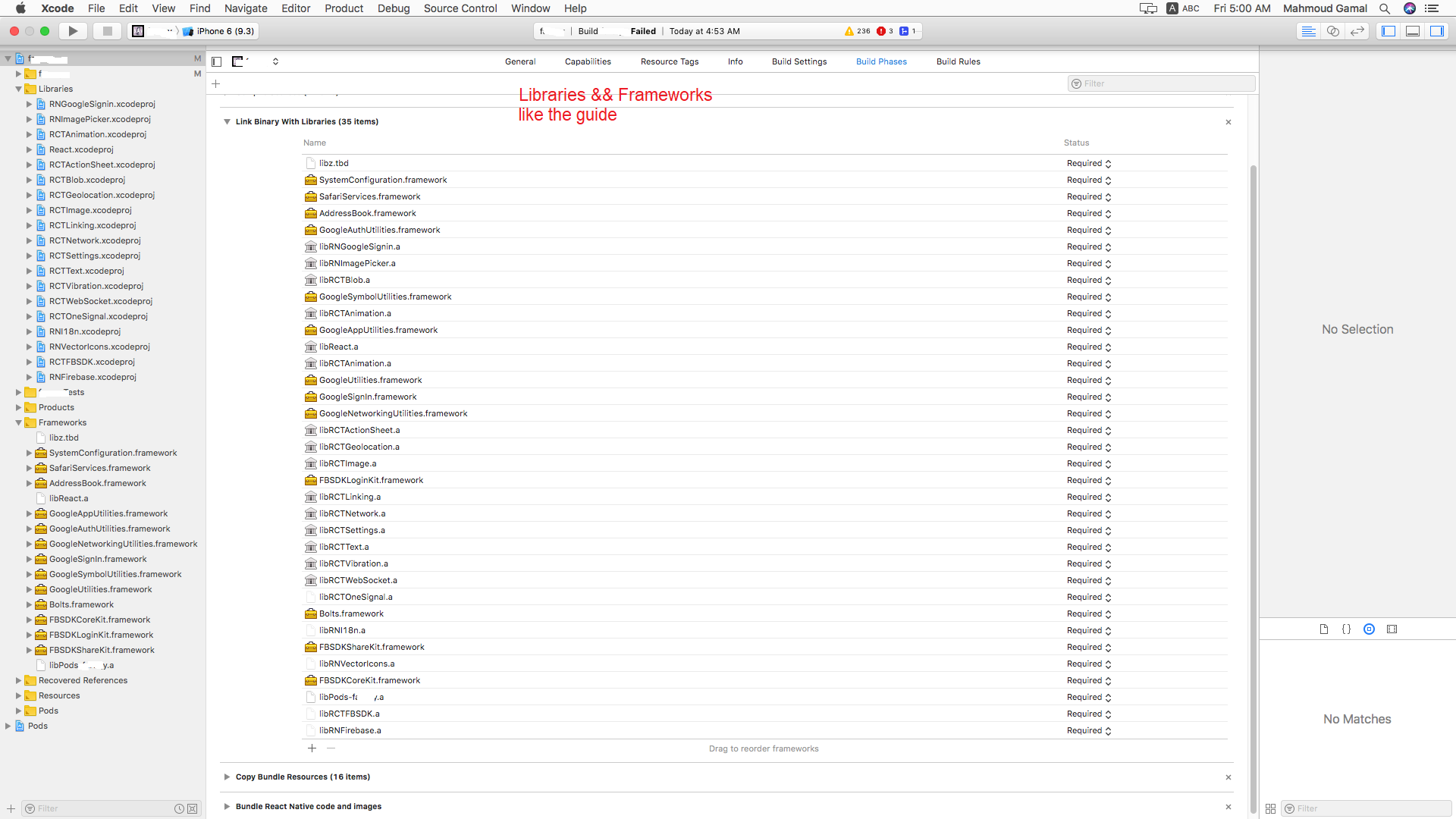
There is a screenshot demonstrats the errors and another screenshoot for the lib.

mg4u
on 22 Jun 2018
@AndreiCalazans could you please reopen the issue
mg4u
on 22 Jun 2018
@mg4u why don't you use the master version instead of 0.11 ?
Here is my package.json
  "dependencies": {
    "prop-types": "15.6.1",
    "react": "16.3.1",
    "react-native": "0.55.4",
    "react-native-fbsdk": "0.7.0",
    "react-native-firebase": "4.2.0",
    "react-native-google-signin": "https://github.com/react-native-community/react-native-google-signin.git",
    "react-native-navigation": "1.1.471",
    "react-native-restart": "0.0.6",
    "react-native-sentry": "0.37.1",
    "react-native-vector-icons": "4.6.0",
    "styled-components": "3.3.2"
  },
Ok @mg4u , I'll leave this open for now as a question since this is not a bug.
Please follow these exact steps to install this library and use the latest version.
1) yarn add react-native-google-auth
2) react-native link react-native-google-auth
3) cd ios
4) pod init
5) add GoogleSignIn pod
6) pod install
7) Add GoogleService-info.plist to project folder in xcode.
8) Add url types in Info in xcode. (bundle id and reverse client id).
Attention skip the project set up here, this unnecessary
I just tested IOS on the latest version in npm v0.12.0
here is the repo https://github.com/AndreiCalazans/googleAuthTest
@padupuy We are making some revamp to the code for both IOS and android, we are waiting to get that done before releasing a new version. Only android is missing.
AndreiCalazans
on 22 Jun 2018
@AndreiCalazans why you use react-native-google-auth , the module called react-native-google-signin is this a new package?
mg4u
on 23 Jun 2018
@padupuy i use this version "react-native-google-signin": "^0.12.0", and this is the latest version
mg4u
on 23 Jun 2018
@AndreiCalazans I got this error
https://registry.yarnpkg.com/react-native-google-auth: Not found
mg4u
on 23 Jun 2018
lol sorry that was a typo it's react-native-google-signin
AndreiCalazans
on 25 Jun 2018
The package works fine on a fresh project, so,
Is there any conflict between this package and others packages I use?
mg4u
on 25 Jun 2018
@mg4u can you create a repo that reproduces this error, that way we can try to test it here and see if we can find a solution to your problem.
AndreiCalazans
on 27 Jun 2018
Looking forward to see the Android example. I am getting this error when I try to run on Android:
/node_modules/react-native-google-signin/android/src/main/java/co/apptailor/googlesignin/RNGoogleSigninPackage.java:25: error: method does not override or implement a method from a supertype
    @Override
    ^
1 error
:react-native-google-signin:compileReleaseJavaWithJavac FAILED
I am using:
"npm": "^6.0.0",
"react": "^16.3.1",
"react-native": "^0.55.4",
"react-native-google-signin": "^0.10.0",
 Aung-Myint-Thein
on 27 Jun 2018
Aung-Myint-Thein
on 27 Jun 2018
@Aung-Myint-Thein can you try the latest release, if you continue to have an issue with it feel free to open your own issue.
AndreiCalazans
on 28 Jun 2018
Hi @AndreiCalazans Yes, it is working now that I am using 0.12.0, it is working fine. I was following the documentation and it said following:
If you use React Native < v0.40 stick with v0.8.1 (npm install [email protected] --save).

If you use React Native < v0.47 stick with v0.10.0 (npm install [email protected] --save).
Same problem.
Here is trace

Here is my Podfile

I am using react-native-maps and it needs folly and boost-for-react-native which cause this error.
When I use GoogleSignIn in clear project - all good
 deema089786
on 3 Jul 2018
deema089786
on 3 Jul 2018
@deema089786 Thanks for your hint.
The only solution works for me is:
1- delete node_modules
2- delete ios/pods
3- delete ios/ProjectName.xcworkspace
4- delete ios/build
5- delete ios/podfile.lock
6- remove react-native-maps frome package.json and any line belongs to it in the ios/Podfile
7- npm install && cd ios && pod install
8- follow react-native-google-signin install instructions
9- ensure every thing works fine
10- start install react-native-maps
Hope this helps
mg4u
on 8 Jul 2018
Related issues
 ghost
·
4Comments
ghost
·
4Comments
 goodhyun
·
3Comments
goodhyun
·
3Comments
 Decoder3-14
·
3Comments
Decoder3-14
·
3Comments
 rami-amar
·
4Comments
rami-amar
·
4Comments
 peekbyte
·
3Comments
peekbyte
·
3Comments
Most helpful comment
Ok @mg4u , I'll leave this open for now as a question since this is not a bug.
Please follow these exact steps to install this library and use the latest version.
1) yarn add react-native-google-auth
2) react-native link react-native-google-auth
3) cd ios
4) pod init
5) add GoogleSignIn pod
6) pod install
7) Add GoogleService-info.plist to project folder in xcode.
8) Add url types in Info in xcode. (bundle id and reverse client id).
Attention skip the project set up here, this unnecessary
I just tested IOS on the latest version in npm v0.12.0
here is the repo https://github.com/AndreiCalazans/googleAuthTest
@padupuy We are making some revamp to the code for both IOS and android, we are waiting to get that done before releasing a new version. Only android is missing.