Google-signin: Play Store release does not work
My dependencies:
"react": "16.0.0",
"react-native": "0.51.0",
"react-native-fabric": "^0.5.1",
"react-native-firebase": "^4.2.0",
"react-native-google-signin": "^0.11.0",
- When I run in debug all work fine. react-native run-android -> OK
When I run a release in local work fine. react-native run-android variant=release -> OK
When I run the release uploaded to Play Store in the segment of internal tests, silently fail.
It shows the modal to choose the gmail account to login, but after hang out and nothing happens.
I was working previously with
"react-native-google-signin": "^0.12.0"
but nothing changes with one version or another.
My google-services.json
{
"project_info": {
"project_number": "xxxxxx",
"firebase_url": "https://xxxxxx.firebaseio.com",
"project_id": "xxxxxx",
"storage_bucket": "xxxxxxx.appspot.com"
},
"client": [
{
"client_info": {
"mobilesdk_app_id": "1:xxxxxxxx",
"android_client_info": {
"package_name": "com.wetdog.xxxxxx"
}
},
"oauth_client": [
{
"client_id": "xxxxxxx-xxxxxx.apps.googleusercontent.com",
"client_type": 1,
"android_info": {
"package_name": "com.wetdog.xxxxx",
"certificate_hash": "xxxxxxxx"
}
},
{
"client_id": "xxxxxx-xxxxxx.apps.googleusercontent.com",
"client_type": 1,
"android_info": {
"package_name": "com.wetdog.xxxx",
"certificate_hash": "xxxxxxxxx"
}
},
// THIS IS THE WEBID THAN I USE:
{
"client_id": "xxxxxxx-xxxxxxx.apps.googleusercontent.com",
"client_type": 3
},
{
"client_id": "xxxxxx-xxxxxxx.apps.googleusercontent.com",
"client_type": 3
}
],
"api_key": [
{
"current_key": "xxxxxx-xxxx-xxxxx"
}
],
"services": {
"analytics_service": {
"status": 1
},
"appinvite_service": {
"status": 2,
"other_platform_oauth_client": [
{
"client_id": "xxxxx-xxxxx.apps.googleusercontent.com",
"client_type": 3
}
]
},
"ads_service": {
"status": 2
}
}
}
],
"configuration_version": "1"
}
My build.gradle:
implementation(project(':react-native-firebase')) {
transitive = false
}
implementation 'com.android.support:multidex:1.0.0'
implementation project(':react-native-admob')
implementation fileTree(dir: "libs", include: ["*.jar"])
implementation "com.android.support:appcompat-v7:23.0.1"
implementation "com.facebook.react:react-native:+" // From node_modules
implementation project(':react-native-fabric')
implementation('com.crashlytics.sdk.android:crashlytics:2.5.5@aar') {
transitive = true;
}
//Google-Sigin
implementation (project(":react-native-google-signin")){
exclude group: "com.google.android.gms" // very important
}
implementation 'com.google.android.gms:play-services-auth:15.0.0'
// Firebase dependencies
implementation "com.google.android.gms:play-services-base:15.0.0"
implementation "com.google.firebase:firebase-core:15.0.2"
implementation "com.google.firebase:firebase-messaging:15.0.2"
implementation 'me.leolin:ShortcutBadger:1.1.21@aar'
 albertosantiago
All 14 comments
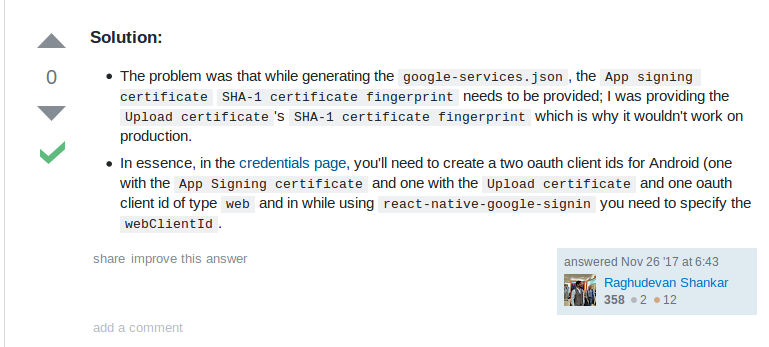
It was a problem with the fingerprints of the app, you have to add the SHA1 App fingerprint provided by Google to your firebase project like this answer in stackoverflow say:
albertosantiago
on 12 Jun 2018
@AndreiCalazans
I have the same issue! (GoogleSignin.signIn() method works well in debug build, but not on Play Market version)!
Please, add @siglo-xxi solution to docs, it's a very important part. This solution works for me. Thx!
 Baskerville42
on 23 Aug 2018
Baskerville42
on 23 Aug 2018
Docs are improved in #503! Thanks for suggestions! :)
 jozan
on 1 Sep 2018
jozan
on 1 Sep 2018
I config all file on Firebase and Play Console but it's still not work, really stuck right now 🗡
 hoangvuanhdevelopervn
on 12 Oct 2018
hoangvuanhdevelopervn
on 12 Oct 2018
+1. only Play store version doesn't work. Debug and signed APK work fine
 pearlismylove
on 19 Dec 2018
pearlismylove
on 19 Dec 2018
Guys I m using 'react-native-google-signin: ^1.2.1' and seem to stuck with the same issue, apk file not working everything else works fine when used with 'react-native run-android'
 nikhilmeria
on 1 Apr 2019
nikhilmeria
on 1 Apr 2019
@pearlismylove did you find any solution ?
 xhirazi
on 28 May 2019
xhirazi
on 28 May 2019
Just for anyone coming to this. I have the play store managing my app signing, so I had to go grab the sha1 from there under: Release Management -> App Signing -> App Signing Certificate. Then copy the sha1 and add it to your android firebase console app.
 Vednus
on 11 Mar 2020
Vednus
on 11 Mar 2020
Hey guys, maybe it will help someone. I had the same issue. After switching form debug signing Config to release google-signin was stopped working. I resolve this issue by generation new SHA1 App fingerprint using my release keystore and adding SHA1 to firebase console.
keytool -list -v -keystore {keystore_name} -alias {alias_name}
And after I upload new google-services.json and added to my project ~android/app
 OlegYakub
on 29 Apr 2020
OlegYakub
on 29 Apr 2020
Hey Guys,
I don't Have a Firebase project Just i got credentials from here
https://console.developers.google.com/apis/credentials
then added it to
iosClientId,
webClientId
In development, it's work very well, but after release the app to Stores it does not work,
So in my case what should i do after copy the SHA1 from google play console?
 anastely
on 5 Jun 2020
anastely
on 5 Jun 2020
@anastely that’s how others have got it working, I believe.
jozan
on 5 Jun 2020
@jozan yes I know that's, but my question is where I put the SHA?
anastely
on 5 Jun 2020
@anastely check out the screenshot here: https://github.com/react-native-community/google-signin/blob/master/docs/android-guide.md#getting-developer_error-or-code-10-error-message-on-android-when-trying-to-login
 vonovak
on 5 Jun 2020
vonovak
on 5 Jun 2020
tried everything added sha1 still not working also created OAuth in Google Coud Apis Credentials
 atharv1033
on 20 Jul 2020
atharv1033
on 20 Jul 2020
Related issues
 havinhthai
·
3Comments
havinhthai
·
3Comments
 ChaoTzuJung
·
3Comments
ChaoTzuJung
·
3Comments
 BigPun86
·
4Comments
BigPun86
·
4Comments
 goodhyun
·
3Comments
goodhyun
·
3Comments
 GrishmaM
·
3Comments
GrishmaM
·
3Comments
Most helpful comment
It was a problem with the fingerprints of the app, you have to add the SHA1 App fingerprint provided by Google to your firebase project like this answer in stackoverflow say:
https://stackoverflow.com/questions/47107297/google-sign-in-not-working-from-app-downloaded-from-playstore