Google-signin: Build fails in android
I checked the documentation, downloaded the example from the repo and no matter how hard I've tried to build the package it fails saying this:
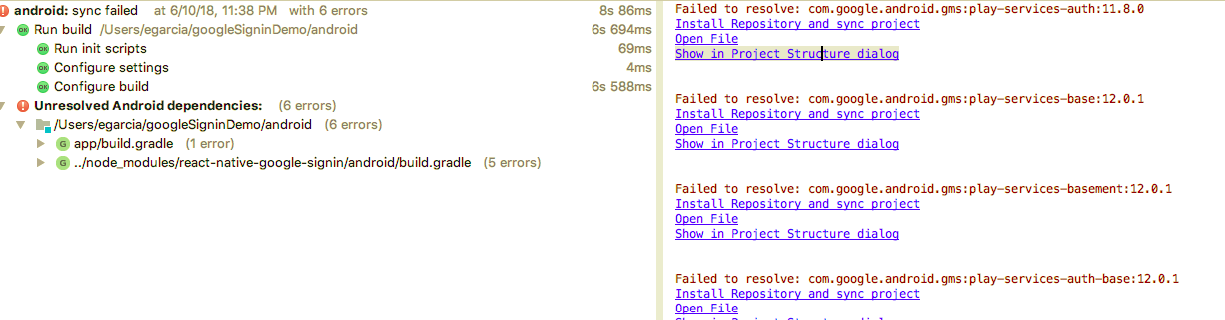
Environment
mac os
```
"react": "16.3.1",
"react-native": "0.55.4",
"react-native-google-signin": "^0.12.0"
## Steps to Reproduce
just install the dependency itself

1. install the following dependencies in android sdk manager:
1.1 Android SDK Build-Tools: 23.01, 24.01
1.2 Android SDK Platform-Tools 28.0.0
1.3 Android SDK Tools 26.1.1
1.4 Android 6.0 SDK Platform, Google Ais
1.5 Andoroid 5.1.1 SDK Platform, Google Apis
1.6 Android Support Repository

2. edit /android/app/build.gradle add:
 ```
compile(project(':react-native-google-signin')){
        exclude group: "com.google.android.gms"
    }
compile "com.google.android.gms:play-services-auth:11.8.0"

// at the end of the file add this
apply plugin: 'com.google.gms.google-services'
- edit /android/build.gradle and add this line:
apply plugin: 'com.google.gms:google-services:3.0.0'
Expected Behavior
compile succesfully
Actual Behavior
Got an error when compiling:
Scanning folders for symlinks in /Users/egarcia/googleSigninDemo/node_modules (43ms)
JS server already running.
Building and installing the app on the device (cd android && ./gradlew installDebug)...
File /Users/egarcia/.android/repositories.cfg could not be loaded.
FAILURE: Build failed with an exception.
- What went wrong:
A problem occurred configuring project ':app'.
> Could not resolve all dependencies for configuration ':app:_debugApk'.
> A problem occurred configuring project ':react-native-google-signin'.
> Could not resolve all dependencies for configuration ':react-native-google-signin:_debugPublishCopy'.
> Could not find com.google.android.gms:play-services-auth-api-phone:12.0.1.
Searched in the following locations:
file:/Volumes/ERICK-USB/erick/sdk/extras/google/m2repository/com/google/android/gms/play-services-auth-api-phone/12.0.1/play-services-auth-api-phone-12.0.1.pom
 erick2014
All 13 comments
@erick2014 Same issue here.!!
 ujjwalagrawal17
on 11 Jun 2018
ujjwalagrawal17
on 11 Jun 2018
@erick2014 same here!
 appai
on 11 Jun 2018
appai
on 11 Jun 2018
Here is the fix, replace your android/build.gradle with this i.e in your project level gradle with this
buildscript {
    repositories {
        jcenter()
    }
    dependencies {
        classpath 'com.android.tools.build:gradle:2.2.3'
        classpath 'com.google.gms:google-services:3.0.0'

        // NOTE: Do not place your application dependencies here; they belong
        // in the individual module build.gradle files
    }
}

allprojects {
    repositories {
        mavenLocal()
        maven {url "https://maven.google.com"} //<---- this should be added and should be aboce jcenter
        maven {url "$rootDir/../node_modules/react-native/android"}
        jcenter()
    }
}
After that clear your gradle going inside android folder from cmd/terminal
gradlew clean
Then run the react native application
 ajitdas123
on 11 Jun 2018
ajitdas123
on 11 Jun 2018
@ajitdas123 yeah it worked for me man thx a lot I jus want to say if you dont have the jcenter() at the end you will get this error, so keep that in mind :
* What went wrong:
A problem occurred configuring project ':app'.
> Could not resolve all dependencies for configuration ':app:_debugApk'.
   > A problem occurred configuring project ':react-native-google-signin'.
      > Could not find runtime.jar (android.arch.lifecycle:runtime:1.0.0).
        Searched in the following locations:
            https://jcenter.bintray.com/android/arch/lifecycle/runtime/1.0.0/runtime-1.0.0.jar
this is my build android/build.gradle file:
buildscript {
    repositories {
        jcenter()
    }
    dependencies {
        classpath 'com.android.tools.build:gradle:2.2.3'
        classpath 'com.google.gms:google-services:3.0.0'
        // NOTE: Do not place your application dependencies here; they belong
        // in the individual module build.gradle files
    }
}

allprojects {
    repositories {
        mavenLocal()
        maven {url "https://maven.google.com"}
        maven {
            // All of React Native (JS, Obj-C sources, Android binaries) is installed from npm
            url "$rootDir/../node_modules/react-native/android"
        }
        jcenter()
    }
}
and this is my /android/app/build.gradle file:
dependencies {

    compile fileTree(dir: "libs", include: ["*.jar"])
    compile "com.android.support:appcompat-v7:23.0.1"
    compile "com.facebook.react:react-native:+"  // From node_modules
    compile(project(':react-native-google-signin')){
       exclude group: "com.google.android.gms"
   }
   compile "com.google.android.gms:play-services-auth:11.8.0"
}
@ajitdas123 thanks! it worked on ./gradlew clean but later on i tried to run-android i have an error :app:compileDebugJavaWithJavac FAILED https://github.com/react-native-community/react-native-google-signin/issues/420
 ergxpr0xy
on 11 Jun 2018
ergxpr0xy
on 11 Jun 2018
@ergxpr0xy check if you have this line apply plugin: 'com.google.gms.google-services' and remove it and try again
erick2014
on 11 Jun 2018
I also record a video about how to compile de dependency, maybe it could help
https://www.youtube.com/watch?v=mi9jBPGcwO0&t=6s
erick2014
on 12 Jun 2018
maven {url "https://maven.google.com"} //<---- this should be added and should be aboce jcenter
fixed this issue for me: https://github.com/react-native-community/react-native-google-signin/issues/417
 antoniuschan99
on 12 Jun 2018
antoniuschan99
on 12 Jun 2018
It seems like we need to update the example docs:
https://github.com/react-native-community/react-native-google-signin/blob/master/android/build.gradle
 allenmanning
on 12 Jun 2018
allenmanning
on 12 Jun 2018
@erick2014 @ujjwalagrawal17 @appai
Hey I got same issue. Make sure your graddle-wrapper version should be 4.4, gradle version should be 3.1.2 and play-service-auth version should be 15.0.0. If it is not then follow three steps to upgrade.
- Update Distribution Url to 4.4 in android/app/gradle/wrapper/gradle-wrapper.properties File.
- Update Build Gradle Version to 3.1.2 in android/build.gradle File.
- Update compile 'com.google.android.gms:play-services-auth:15.0.0' in android/app/build file
P.S : I'm using React-native Google Signin version v0.10.0.
 shahchaitanya
on 29 Jul 2018
shahchaitanya
on 29 Jul 2018
I am using same version of RN Google Signin in 0.12.0 and I am able to build it successful. My advice is to you is that always Use same version of google play Services as in your case it is 12.8 and 11.8 at another place.
- From project folder go to android by using cd android.
- run ./gradlew app:dependencies
- Observe carefully the version of Google play Services just before and after -> you may find 10.2.8 ->15.0.0 if so open project in android studio and go to every library which is using Google play Services and open build file and hard code the play services version like this.
**compile 'com.google.android.gms:play-services-auth:11.8.0'**replace 11.8.0 version with you want to go but only condition is that it must be same in all libraries which are having gms:play-services or firebase-messaging firebase-core keywords. - Go to tools and rebuild project.
- run npm start --reset-cache and open another terminal and go to project path and run react-native run-android
I _am pretty sure this will work, It will not only work here it will also work in all problem like FCM not working and many unexpected crashes. Feel Free to ask if you are still having this issue._
 sanjeevmoga
on 11 Aug 2018
sanjeevmoga
on 11 Aug 2018
The solution is provided and reflected to our Android guide. Thanks everyone finding solutions! :)
 jozan
on 13 Aug 2018
jozan
on 13 Aug 2018
@sanjeevmoga Your solution worked like a charm for my integration of react-native-facebook-account-kit! Thank you for that!
 cassianomon
on 19 Mar 2019
cassianomon
on 19 Mar 2019
Related issues
 guidotajan
·
4Comments
guidotajan
·
4Comments
 ghost
·
3Comments
ghost
·
3Comments
 BigPun86
·
4Comments
BigPun86
·
4Comments
 peekbyte
·
3Comments
peekbyte
·
3Comments
 yogeshpaisode
·
4Comments
yogeshpaisode
·
4Comments
Most helpful comment
Here is the fix, replace your
android/build.gradlewith this i.e in your project level gradle with thisAfter that clear your gradle going inside android folder from cmd/terminal
gradlew cleanThen run the react native application