Google-signin: Can't sign in when adding Google account
My Android hasn't connected with my Google account
I click Sign In button
Android asks me to login to Google. I log in
Android ask me to grant permission to my app. I grant it
The following screen appears and nothing happens as in this screenshot
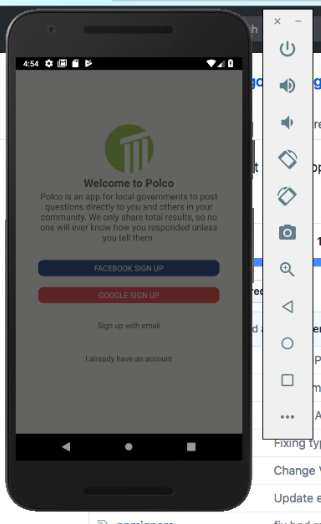
Here is my code:
    GoogleSignin.hasPlayServices({ autoResolve: true }).then(() => {
      GoogleSignin.configure()
      .then(() => {
        GoogleSignin.signIn()
        .then((user) => {
          this.props.login(user.accessToken);
        })
        .catch((err) => {
          console.log('WRONG SIGNIN', err);
        })
        .done();
      });
    })
    .catch((err) => {
      console.log("Play services error", err.code, err.message);
    })
 tranngocsam
All 17 comments
Have same error on Android simulator, and my console show me GoogleSigninError: DEVELOPER_ERROR
 ChaoTzuJung
on 15 May 2018
ChaoTzuJung
on 15 May 2018
You probably linked the wrong webClientID in your configure, you need to get the android version from your google-services.json and set your SHA-1 certificate fingerprints in your firebase.google.com console @ChaoTzuJung
 qin-guan
on 19 May 2018
qin-guan
on 19 May 2018
@tranngocsam is it a problem with your this.props.login
qin-guan
on 19 May 2018
@QinGuan2004 I have the same issue with @tranngocsam . Given that you have used the correct configuration, this issue only happens if you're logging in a new user (didn't login yet in android). If you try to login an already logged in google account, it continues. I've a tried a couple of digging and it seems that the promise is not resolved for a new google login.
 jaimehing
on 19 May 2018
jaimehing
on 19 May 2018
Thanks @QinGuan2004, I traced the code and saw that it's not called when I tried to log in with new user. If I remember correctly, it had worked before.
tranngocsam
on 20 May 2018
Are you using React Native 0.55?
 jozan
on 20 May 2018
jozan
on 20 May 2018
Thanks @jozan, I'm trying to re-create the app using React Native 0.55.4, but I'm having trouble after adding react-native-google-signin. My app stops working without any clues. I'm still investigating.
tranngocsam
on 22 May 2018
@tranngocsam if you login with a new user sometimes the emulator lags out a lot and the usual add new user option wouldnt show so that may be a reason why i think try running it on an actual device, which android ver r u on?
recently there is a bug i think with the latest push if you add scopes: [ 'email'] it would crash the entire app but its for android only somehow
there is already an issue for that somewhere in 2015 iirc but its closed
qin-guan
on 25 May 2018
GoogleSigninError: DEVELOPER_ERROR is a credential error. Verify that your credentials are right.
check out the [example app] to make sure you got the configuration correct we also created a get config guide
 AndreiCalazans
on 27 May 2018
AndreiCalazans
on 27 May 2018
Thanks @QinGuan2004 our user reported that he/she has problem with it, so I checked on the emulator. I deleted my source code that has package-lock.json (I didn't added to git), for now I'm having problem with compiling the source, I tried to start everything from the beginning but I'm having problem with using react-native-fcm and react-native-google-signin together (Can't use both together). I'm in vacation now. I'll check this issue again when I get back.
tranngocsam
on 28 May 2018
I am having the same issue while I didnt get a DEVELOPER_ERROR but an INTERNAL_ERROR.
2018-06-13 18:08:58.137 28315-28414/com.altrapp E/ReactNativeJS: { [GoogleSigninError: INTERNAL_ERROR] name: 'GoogleSigninError', code: 8 }
any solutions?
 hctangaa
on 13 Jun 2018
hctangaa
on 13 Jun 2018
I'm also facing the same error as @hctangaa
{ [GoogleSigninError: INTERNAL_ERROR] name: 'GoogleSigninError', code: 8 }
Any solutions?
 gongdao123
on 3 Jul 2018
gongdao123
on 3 Jul 2018
I'm also facing the same error as @hctangaa and @gongdao123
Whenever a new account is added the google sign in flow ends with a slightly shadowed screen like in the original post. Then if I press the android back button the shadow disappears and I receive the following error in logcat:
{ [GoogleSigninError: INTERNAL_ERROR] name: 'GoogleSigninError', code: 8 }
When I try to login again, the google user is already added to the account list.
 smaorus
on 3 Jul 2018
smaorus
on 3 Jul 2018
Is there any solution, I am facing the same issue?
 dev-pacific22
on 6 Jul 2018
dev-pacific22
on 6 Jul 2018
For me also have this issue, as @jaimehing states. it only happens when trying to a new account that is not yet signed in the android device.
Any workaround for this ..?
 007arunwilson
on 7 Jul 2018
007arunwilson
on 7 Jul 2018
happens when trying to add a new account that is not yet signed in the android device.
Why Plz help me to get rid of this error.
Thanks in advance.
 princepardeep
on 11 Jul 2018
princepardeep
on 11 Jul 2018
I locked the conversation because the issue has become a mix of two errors - the developer error message and internal error message, where the original issue is resolved. Please open a new issue according to the template if you're experiencing problems. Thanks.
 vonovak
on 11 Jul 2018
vonovak
on 11 Jul 2018
Related issues
 yogeshpaisode
·
4Comments
ChaoTzuJung
·
3Comments
yogeshpaisode
·
4Comments
ChaoTzuJung
·
3Comments
 ghost
·
3Comments
ghost
·
3Comments
 rami-amar
·
4Comments
rami-amar
·
4Comments
 Decoder3-14
·
3Comments
Decoder3-14
·
3Comments
Most helpful comment
You probably linked the wrong webClientID in your configure, you need to get the android version from your google-services.json and set your SHA-1 certificate fingerprints in your firebase.google.com console @ChaoTzuJung