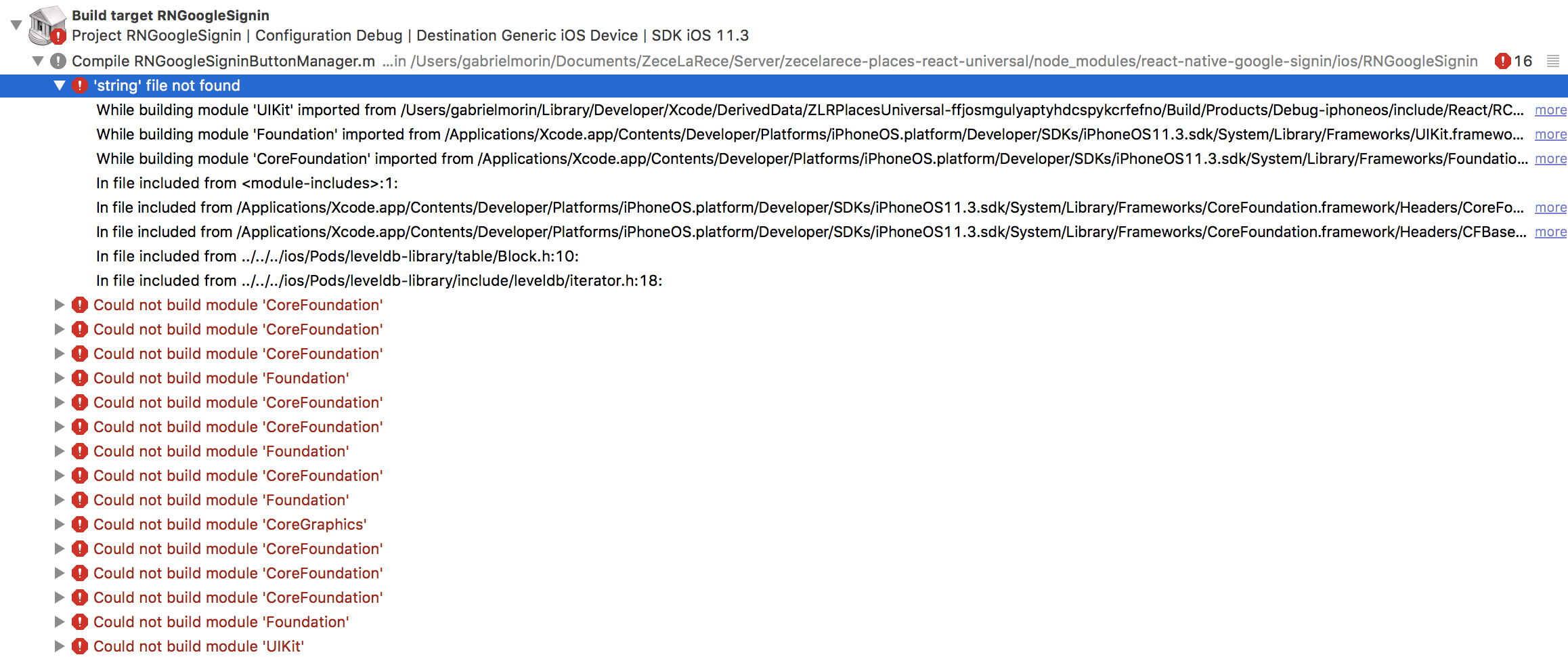
Google-signin: 'string' file not found , Could not build module 'CoreFoundation' , etc
Hello, I followed all the steps of the iOS instructions, even tried to replace the ios folder with the one from github to have the latest version, but the result is the following as soon as I add the libRNGoogleSignin.a to my build phase:
 graphee-gabriel
All 16 comments
 Moverloia
on 5 Apr 2018
Moverloia
on 5 Apr 2018
This is not an answer.
It was working until i cleaned my npm modules, and I didn't manage to
reinstall it.
On Thu, Apr 5, 2018, 18:58 Moverloia notifications@github.com wrote:
Use this #360
https://github.com/devfd/react-native-google-signin/issues/360—
You are receiving this because you authored the thread.
Reply to this email directly, view it on GitHub
https://github.com/devfd/react-native-google-signin/issues/361#issuecomment-378986132,
or mute the thread
https://github.com/notifications/unsubscribe-auth/ANY-XQdnxq__Jxypsm8g3AbOjDWAfITuks5tlj8WgaJpZM4TIrTH
.
graphee-gabriel
on 5 Apr 2018
Do you use cocoapods?
Moverloia
on 5 Apr 2018
@Moverloia
same issue,
Do you use cocoapods?
yes, I do.
 konstantin-mohin
on 5 Apr 2018
konstantin-mohin
on 5 Apr 2018
Finally, found the fix:
Go to the RNGoogleSignin project included in your own project (click on its blue icon)
Then go to Build Settings an search for Compile Source As
Set it to Objective-C++
Took me the whole day.
Hopefully next time I face this problem I'll stumble upon my own github issue here and save myself a day >.<

graphee-gabriel
on 5 Apr 2018
@graphee-gabriel Changing this made no difference for me. Was there anything else that you changed along the way that might have caused things to work?
Edit: Whoops, never mind. Apparently I had it set to Objective-C rather than Objective-C++. Those errors are fixed and now I just have other errors to deal with :D.
 cdunkel
on 9 Apr 2018
cdunkel
on 9 Apr 2018
@cdunkel I know the feeling :-).
I keep fixing modules on android and iOS it's a nightmare.
It works in the end, but everytime I fix a module it breaks another one, and when I fix the other one on iOS, it breaks the one on Android, etc etc. Shouldn't be so messy. But yeah in the end it works, so...
graphee-gabriel
on 9 Apr 2018
@graphee-gabriel just out of curiosity, have you found any good resources for adding React-Native to an existing iOS/Android project where the iOS app is using both ObjC and Swift? We're having a _ton_ of issues and it seems like it might all be due to us using use_frameworks! in our Podfile. Right now we're down to either writing a bunch of post-install scripts to go fix the #import statements that are broken, or trying to install all of RN, RN-Firebase, and RN-Google-Signin manually. If you have any wisdom or guidance I would be immensely grateful! 😃
cdunkel
on 10 Apr 2018
Sadly I have never done anything like this. I either did starting straight
native with swift of java, or straight with react native, but never a
transition like the one you're trying to do.
Le mar. 10 avr. 2018 à 17:09, cdunkel notifications@github.com a écrit :
@graphee-gabriel https://github.com/graphee-gabriel just out of
curiosity, have you found any good resources for adding React-Native to an
existing iOS/Android project where the iOS app is using both ObjC and
Swift? We're having a ton of issues and it seems like it might all be
due to us using use_frameworks! in our Podfile. Right now we're down to
either writing a bunch of post-install scripts to go fix the #import
statements that are broken, or trying to install all of RN, RN-Firebase,
and RN-Google-Signin manually. If you have any wisdom or guidance I would
be immensely grateful! 😃—
You are receiving this because you were mentioned.
Reply to this email directly, view it on GitHub
https://github.com/devfd/react-native-google-signin/issues/361#issuecomment-380112639,
or mute the thread
https://github.com/notifications/unsubscribe-auth/ANY-XRk_7nIcrm9ArqcdkbS6GKONDe00ks5tnL0tgaJpZM4TIrTH
.
graphee-gabriel
on 10 Apr 2018
Ahh, alas. It was worth a shot. Thank you for your helpful answer from earlier!
cdunkel
on 10 Apr 2018
Thanks for the answer :) @graphee-gabriel you saved tons of hours.!
 OculusMode
on 17 Apr 2018
OculusMode
on 17 Apr 2018
Okay got it follow guid https://github.com/devfd/react-native-google-signin/blob/master/ios-guide.md
change pod Google/Signin to pod GoogleSignin
Go to the RNGoogleSignin project included in your own project (click on its blue icon)
Then go to Build Settings an search for Compile Source As
Set it to Objective-C++
also change the header search path in that project to
$(inherited)
$(SRCROOT)/../../react-native/React (recursive)
${SRCROOT}/../../../ios/RNGoogleSignin (non-recursive)
${SRCROOT}/../../../ios/GoogleSdk (non-recursive)
clean and build,
Note: I also have react-google-maps, react-native-navagation, react-native-firebase, and react-native-fcm both on android and IOS
Thank you all for your comments that led me to resolving these issues
 Elijah23Johnson
on 14 May 2018
Elijah23Johnson
on 14 May 2018
@graphee-gabriel You saved my day!!
 guigrpa
on 25 May 2018
guigrpa
on 25 May 2018
As soon I set Compile Source As to Objective-C++ , I got many No member named 'strncat' in the global namespace errors
Using this solution (adding build rule) was a better option for me

 MujtabaFR
on 21 Jul 2018
MujtabaFR
on 21 Jul 2018
@MujtabaFR You can use @next version.
yarn remove react-native-google-signin
yarn add react-native-google-signin@next
 usagizmo
on 29 Jul 2018
usagizmo
on 29 Jul 2018
Thank you so much man @graphee-gabriel!!!!
 alittletf
on 20 May 2019
alittletf
on 20 May 2019
Related issues
 uendar
·
3Comments
uendar
·
3Comments
 havinhthai
·
3Comments
havinhthai
·
3Comments
 ghost
·
3Comments
ghost
·
3Comments
 pawellewandowski
·
4Comments
pawellewandowski
·
4Comments
 ChaoTzuJung
·
3Comments
ChaoTzuJung
·
3Comments
Most helpful comment
Finally, found the fix:
Go to the RNGoogleSignin project included in your own project (click on its blue icon)
Then go to Build Settings an search for Compile Source As
Set it to Objective-C++
Took me the whole day.
Hopefully next time I face this problem I'll stumble upon my own github issue here and save myself a day >.<