Google-signin: #import <RNGoogleSignin/RNGoogleSignin.h> file not found
I have tried following the iOS guide several different times and each time I get this same error. I am linking and running pod install and then get the following error:
"Non-portable path to file '"RNGoogleSignin.h"'; specified path differs in case from file name on disk"
Running:
RN 0.48
react-native-google-signin 0.12
Any help is appreciated!
 jacobbodkin
All 21 comments
@jacobbodkin are you using pods?
I had that issue, go to the ios folder on terminal and do pod init, then open the pod file and add your pods (firebase or google sign in), then run pod install. Then close your Xcode project and in the iOS folder open the workspace. you should see two "projects" yours and then Pods
 CamiloVega
on 17 Oct 2017
CamiloVega
on 17 Oct 2017
same here, manually install, how can I fix it?
 xralphack
on 17 Oct 2017
xralphack
on 17 Oct 2017
stuck in here for 3 days and I can finally make google signin work using the module below
https://github.com/joonhocho/react-native-google-sign-in
I guess no one is maintaining this module now?
 calvinkei
on 17 Oct 2017
calvinkei
on 17 Oct 2017
@CamiloVega can you be more specific towards the end? I have followed your steps, but what do I do with the two "projects"?
@calcal12 thanks for the recommendation. I think I lost nearly 3 days too. Will give the module you mentioned a try instead
 jaschaio
on 6 Nov 2017
jaschaio
on 6 Nov 2017
Same issue here with manual install. @xralphack were you able to solve it?
 jslok
on 28 Nov 2017
jslok
on 28 Nov 2017
@jslok yes, I can use it. I had copied node_modules/react-native-google-signin/ios/GoogleSdk to ios folder
xralphack
on 28 Nov 2017
@xralphack I copied node_modules/react-native-google-signin/ios/GoogleSdk into ios folder, but it does not help. Could you please describe thoroughly what had you done to solve the problem? Thanks in advance
 DavitVosk
on 27 Feb 2018
DavitVosk
on 27 Feb 2018
@DavitVosk Rebuilding the project solved that error for me (Product -> Build).
 kaladivo
on 22 Mar 2018
kaladivo
on 22 Mar 2018
In file included from /Users/XXX/AppDelegate.m:16:
/Users/XXX/ios/build/Build/Products/Debug-iphonesimulator/include/RNGoogleSignin/RNGoogleSignin.h:7:9: fatal error: 'GoogleSignIn/GoogleSignIn.h' file not found
import
^~~~~~~~~~~~~~~~~~~~~~~~~~~~~
1 error generated.
I'm still having issues.
building is successful using xcode but fails with react-native.
 rjamag
on 1 Apr 2018
rjamag
on 1 Apr 2018
You can check this https://github.com/devfd/react-native-google-signin/issues/316 and follow the steps described there. It should help
DavitVosk
on 4 Apr 2018
It seems no one is maintaining this project. I'm getting this issue 3 days. Can't fix at all. May someone help me?
 andyngdz
on 3 May 2018
andyngdz
on 3 May 2018
@itanhduy I cannot find a stable standalone google sign in module till now. you can try using expo. they provide google sign in sdk
calvinkei
on 3 May 2018
@kaladivo very strange but it worked :| Rebuild the project and error went away
 empitechathu
on 19 May 2018
empitechathu
on 19 May 2018
copy ./node_modules/react-native-google-signin/ios/GoogleSdk to react-native's ios folder
drag all files in GoogleSdk to Frameworks folder as following
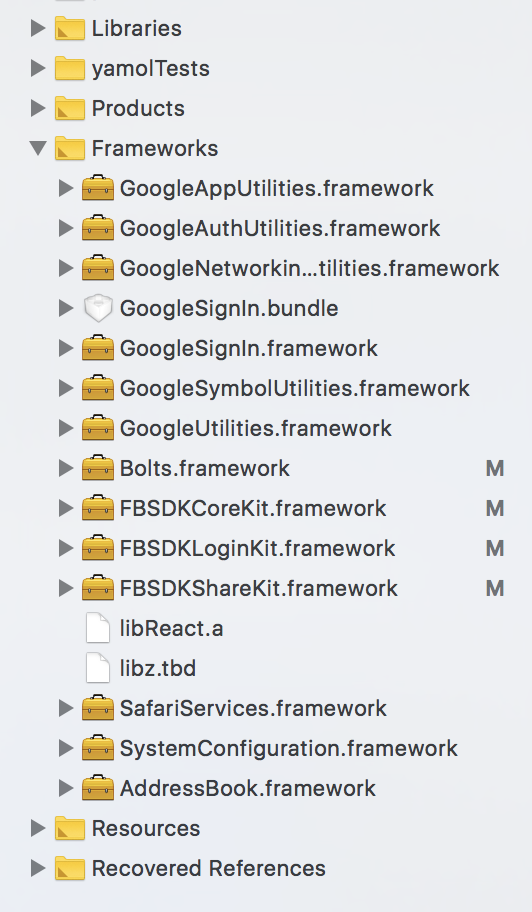
- clean and build
xralphack
on 21 May 2018
Try adding the framework files from react-native-google-signin into the Framework search paths (in Build Settings for Targets) as follows:
$(SRCROOT)/../node_modules/react-native-google-signin/ios/GoogleSdk

 briank621
on 24 May 2018
briank621
on 24 May 2018
The fix is now in master and will be included in the next release.
 jozan
on 26 May 2018
jozan
on 26 May 2018
When will the next release be out and how can we fix this in the meantime..? Thanks :)
 Aung-Myint-Thein
on 9 Jul 2018
Aung-Myint-Thein
on 9 Jul 2018
@Aung-Myint-Thein did you try 1.0.0-rc1 ?
 AndreiCalazans
on 9 Jul 2018
AndreiCalazans
on 9 Jul 2018
I am just 0.12.0 and actually it is working fine. In one of the files, I just happened to type "-" :( .. Sorry for wrong alert. :D
Aung-Myint-Thein
on 9 Jul 2018
@jacobbodkin Looks like you haven't added libRNGoogleSignin.a to the Build Phases -> Link binary with libraries:

Please check it.
 valerybodak
on 25 Jul 2018
valerybodak
on 25 Jul 2018
We have fixed this again in #458 (not release yet). Please open a new issue if the problems still persist.
jozan
on 5 Aug 2018
Related issues
 thaimauit
·
4Comments
thaimauit
·
4Comments
 Decoder3-14
·
3Comments
Decoder3-14
·
3Comments
 ghost
·
4Comments
ghost
·
4Comments
 BigPun86
·
4Comments
BigPun86
·
4Comments
 ChaoTzuJung
·
3Comments
ChaoTzuJung
·
3Comments
Most helpful comment
@xralphack I copied node_modules/react-native-google-signin/ios/GoogleSdk into ios folder, but it does not help. Could you please describe thoroughly what had you done to solve the problem? Thanks in advance