Google-signin: access_token audience is not for this project
So I'm trying to signIn with but I'm getting the following error: access_token audience is not for this project
Here is my code:
GoogleSignin.signIn()
      .then((user) => {
        const credential = this.props.firebase.auth.GoogleAuthProvider.credential(null, user.accessToken);
        this.props.firebase.auth().signInWithCredential(credential)
            .then((user) => {
                alert("We did it!!")
                console.log('User successfully signed in', user)
            })
            .catch((err) => {
                alert("Fuck!! " + err)
                console.error(err);
            });
      })
      .catch((err) => {
         alert("err " + err)
      })
      .done()
 NathHorrigan
All 9 comments
It is because the firebase u r using and the client ID (OAuth) that u generated from google developer are related to different project, make sure both are from same project.
 gokulkulkarni1987
on 3 Nov 2017
gokulkulkarni1987
on 3 Nov 2017
@gokulkulkarni1987 Hi, I have the same issue, can you explain properly, please?
What do you mean "firebase u r using"?
I'm using same google-services.json file to setup firebase module and google-signin module.
What can be the diff here?
Thanks in advance!
 igor-bv
on 27 Jan 2018
igor-bv
on 27 Jan 2018
Me too, can anyone help?
 egunsoma
on 13 Apr 2018
egunsoma
on 13 Apr 2018
SOLVED for me. I have two Firebase projects, one for development, and one for production. The development config has the SHA-1 for the _debug build_, and the production config has the SHA-1 for the _release build_. This error only occurred when I was using the the debug build with the prod config.
So the problem was that my build's SHA-1 fingerprint didn't match the one in Firebase project, but not because of the config. It was my build variant.
Hope this helps you.
egunsoma
on 14 Apr 2018
In an effort to clean the issues up, this is being closed. Please open a new issue with a reproduction if you're still experiencing a problem.
 vonovak
on 18 May 2018
vonovak
on 18 May 2018
@egunsoma how did you create 2 different SHA-1 each projects?
 Buwaneka-Sumanasekara
on 5 Jun 2018
Buwaneka-Sumanasekara
on 5 Jun 2018
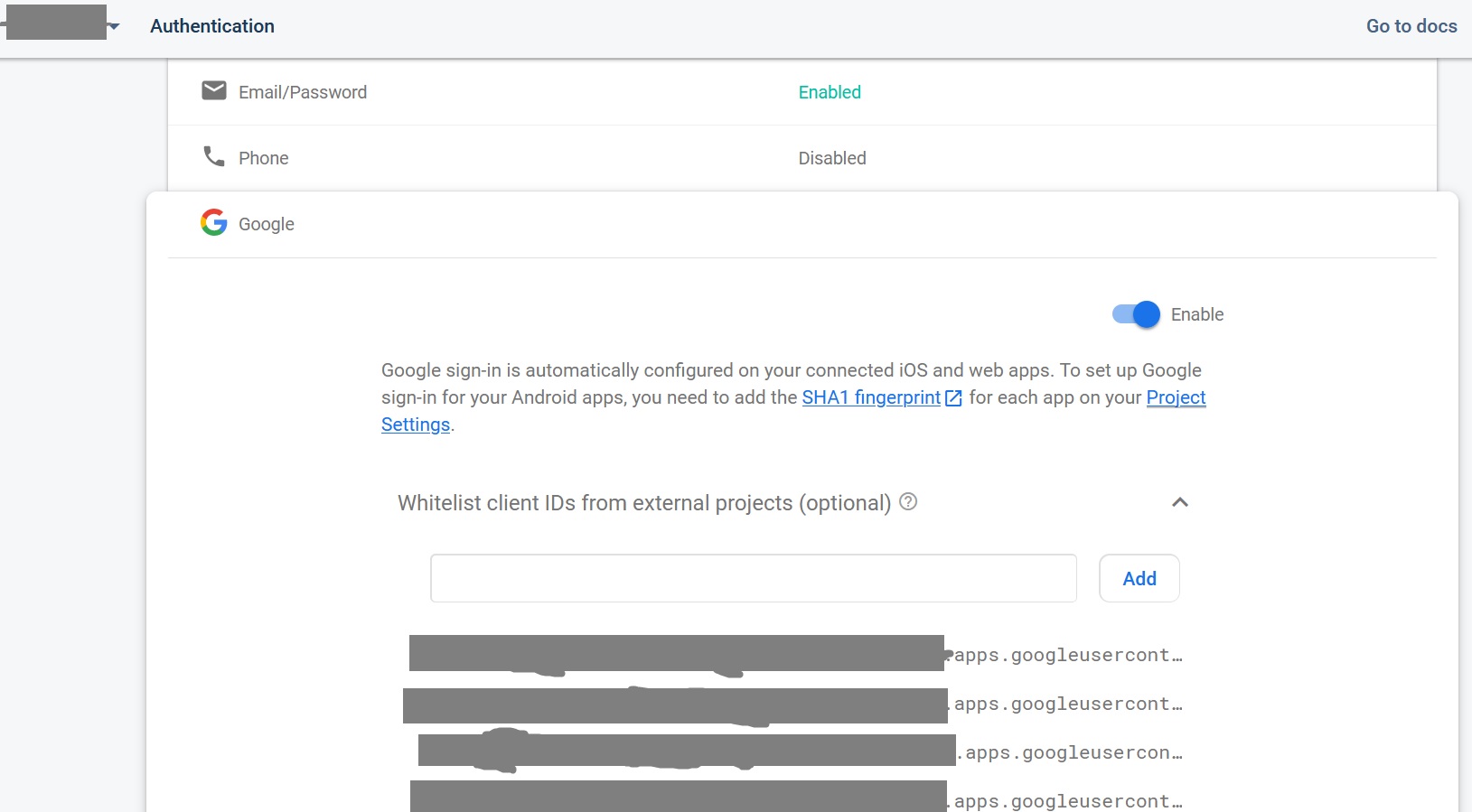
Hi guys, in case anyone is still having this error "access token is not for this project", mine was fixed by adding Whitelist client IDs in Firebase Console with that found in the google-services.json file. Hope this helps someone.
 gunsym
on 10 Aug 2020
gunsym
on 10 Aug 2020
Hi guys, in case anyone is still having this error "access token is not for this project", mine was fixed by adding Whitelist client IDs in Firebase Console with that found in the google-services.json file. Hope this helps someone.
@gunsym oh my god. After hours of searching your comment just saved my ass. I would never have thought of that and I already thought that I am too stupid to sign my APK. Thank you very much!
 NLueg
on 4 Sep 2020
NLueg
on 4 Sep 2020
Hi guys, in case anyone is still having this error "access token is not for this project", mine was fixed by adding Whitelist client IDs in Firebase Console with that found in the google-services.json file. Hope this helps someone.
Thank God after hours of trial and even deleting the app finally this solution worked. Thank you
 Codeaamy
on 5 Apr 2021
Codeaamy
on 5 Apr 2021
Related issues
 serbanstef
·
3Comments
serbanstef
·
3Comments
 GrishmaM
·
3Comments
GrishmaM
·
3Comments
 peekbyte
·
3Comments
peekbyte
·
3Comments
 uendar
·
3Comments
uendar
·
3Comments
 thaimauit
·
4Comments
thaimauit
·
4Comments
Most helpful comment
Hi guys, in case anyone is still having this error "access token is not for this project", mine was fixed by adding Whitelist client IDs in Firebase Console with that found in the google-services.json file. Hope this helps someone.