Google-signin: Cannot ready property 'BUTTON_SIZE_ICON' of undefined.
Thanks for giving this tutorial.
I have gone through this tutorial and did everything as this tutorial instruction.
But while running in iOS simulator. i found below issue.
"Cannot ready property 'BUTTON_SIZE_ICON' of undefined."
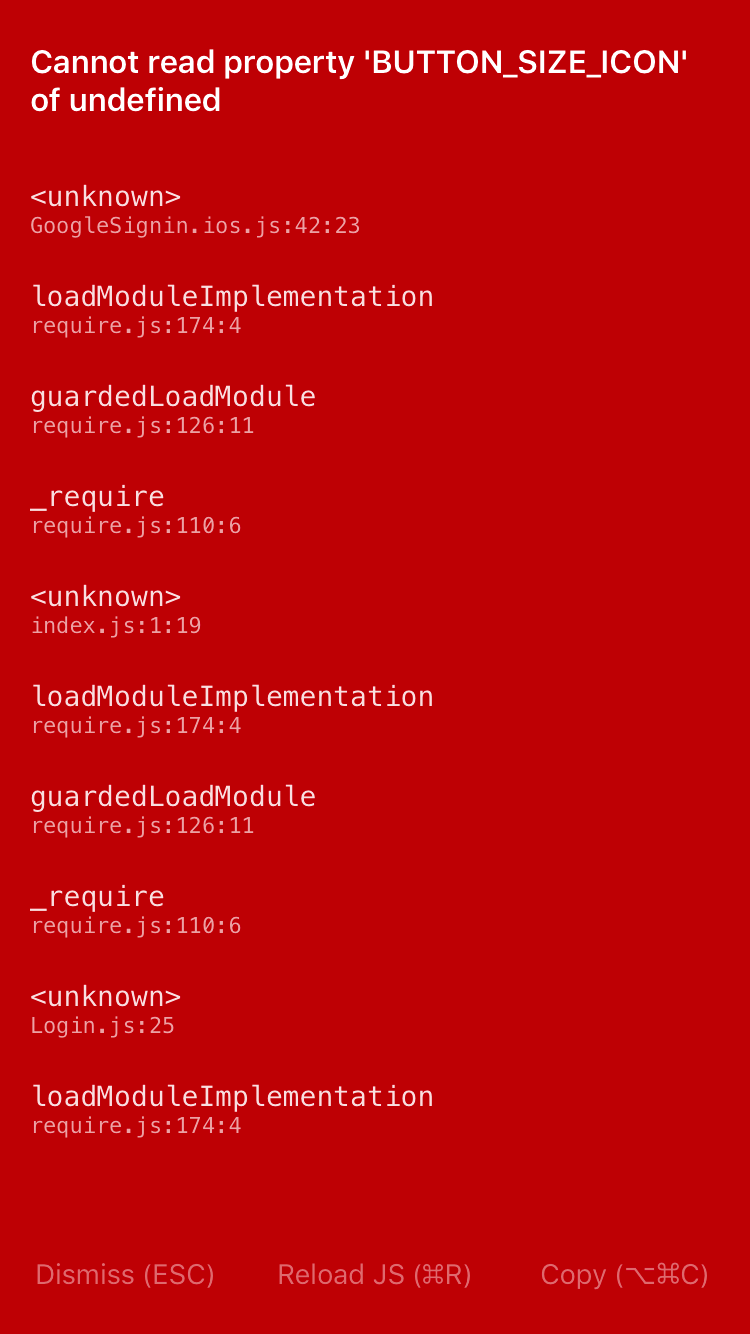
Please help me...
 SambitPrakash
All 17 comments
I had the same issue, I'd just forgotten to do:
react-native link react-native-google-signin
if that doesn't work try to unlink and relink.
 JackThomson2
on 9 Aug 2017
JackThomson2
on 9 Aug 2017
Installing with CocoaPods fixed the issue
https://github.com/devfd/react-native-google-signin/blob/master/ios-guide.md
 raphaelhovsepyan
on 10 Aug 2017
raphaelhovsepyan
on 10 Aug 2017
Hello, @JackThomson2 and @raphaelhovsepyan no luck for me. Its not working. I am using CocoaPods only. But same result.
SambitPrakash
on 11 Aug 2017
@SambitPrakash were you able to fix issue?
 hhsadiq
on 16 Aug 2017
hhsadiq
on 16 Aug 2017
No @hhsadiq, are you also facing this issue?
SambitPrakash
on 16 Aug 2017
Yeah, similar error in the simulator. I just followed the instructions given in https://github.com/devfd/react-native-google-signin/blob/master/ios-guide.md. Now getting this error in console fatal error: 'GoogleSignIn/GoogleSignIn.h' file not found. Now following this https://github.com/devfd/react-native-google-signin/issues/108 to fix it.
hhsadiq
on 16 Aug 2017
i have commented out the 'GoogleSigninButton.Size' 'GoogleSigninButton.Color' in googlesignin.ios.js and its working for me now and use your own button
 tharzeez
on 23 Aug 2017
tharzeez
on 23 Aug 2017
Yes custom button fixed the problem.
raphaelhovsepyan
on 24 Aug 2017
Watch this video please, works for me.
 diegomelo182
on 19 Sep 2017
diegomelo182
on 19 Sep 2017
Unlink and relink worked for me as well. Don t forget to compile before running the app.
 dancomanlive
on 7 Mar 2018
dancomanlive
on 7 Mar 2018
https://github.com/devfd/react-native-google-signin/blob/master/ios-guide.md told me to Scroll down and click Get a configuration file button, the button does not exist. Unlinking and relinking does not work either.
 aprilmintacpineda
on 27 Mar 2018
aprilmintacpineda
on 27 Mar 2018
Facing same issue. Any leads?
 poojapi
on 2 May 2018
poojapi
on 2 May 2018
This is very likely cause by the module not being linked correctly.
In an effort to clean the issues up, this is being closed. Please open a new issue with a reproduction if you're still experiencing a problem.
 vonovak
on 20 May 2018
vonovak
on 20 May 2018
For me running "react-native link" fixed the issue.
 ujjwalagrawal17
on 31 May 2018
ujjwalagrawal17
on 31 May 2018
Replacing
GoogleSigninButton.Size = {
  Icon: RNGoogleSignin.BUTTON_SIZE_ICON,
  Standard: RNGoogleSignin.BUTTON_SIZE_STANDARD,
  Wide: RNGoogleSignin.BUTTON_SIZE_WIDE
};

GoogleSigninButton.Color = {
  Auto: RNGoogleSignin.BUTTON_COLOR_AUTO,
  Light: RNGoogleSignin.BUTTON_COLOR_LIGHT,
  Dark: RNGoogleSignin.BUTTON_COLOR_DARK
};
with
GoogleSigninButton.Size = {
    Icon: '48 x 48',
    Standard: '230 x 48',
    Wide: '312 x 48'
};

GoogleSigninButton.Color = {
    Auto: 'white',
    Light: 'blue',
    Dark: 'grey'
};
in GoogleSinging.android.js and GoogleSingin.ios.js resolved the issue.
You can find this file in /node_modules/react-native-google-signin/src
 tasneembohra
on 5 Jun 2018
tasneembohra
on 5 Jun 2018
@tasneembohra please help me, i applied your solution it gives me this error..
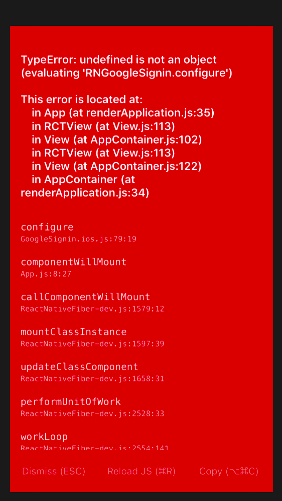 my react native version is 0.50.4 and google-signin version is 0.12.0. IOS
 Uzairrrr
on 10 Sep 2018
Uzairrrr
on 10 Sep 2018
Hi Everybody I was having the same issue which just got resolved.
My react-native version is 0.50.4
react-natve-google-sign-in version is 0.12.0
I followed this link only automatic linking not mannual
https://github.com/react-native-community/react-native-google-signin/blob/master/ios-guide.md
and one more change in
node_modules/react-native-google-signin/src/
replace the below constants
GoogleSigninButton.Size = {
Icon: RNGoogleSignin.BUTTON_SIZE_ICON,
Standard: RNGoogleSignin.BUTTON_SIZE_STANDARD,
Wide: RNGoogleSignin.BUTTON_SIZE_WIDE
};
GoogleSigninButton.Color = {
Auto: RNGoogleSignin.BUTTON_COLOR_AUTO,
Light: RNGoogleSignin.BUTTON_COLOR_LIGHT,
Dark: RNGoogleSignin.BUTTON_COLOR_DARK
};
with
GoogleSigninButton.Size = {
Icon: '48 x 48',
Standard: '230 x 48',
Wide: '312 x 48'
};
GoogleSigninButton.Color = {
Auto: 'white',
Light: 'blue',
Dark: 'grey'
};
Uzairrrr
on 11 Sep 2018
Related issues
 smartcris
·
3Comments
smartcris
·
3Comments
 TyLy83
·
4Comments
TyLy83
·
4Comments
 BigPun86
·
4Comments
BigPun86
·
4Comments
 ChaoTzuJung
·
3Comments
ChaoTzuJung
·
3Comments
 thaimauit
·
4Comments
thaimauit
·
4Comments
Most helpful comment
i have commented out the 'GoogleSigninButton.Size' 'GoogleSigninButton.Color' in googlesignin.ios.js and its working for me now and use your own button