Google-signin: How to get idToken and what to put in webClientId?
Hello, I'm trying to authenticate with firebase auth using react-native-firebase library but seems like there are lots of issues coming in, I have not initialized webClientId or defined it and what I'm doing right now is that I'm currently sending my accessToken like this:
 GoogleSignin.signIn().then((user) => {
            console.log(user);
            this.setState({user: user});
            console.log(user.token+" token");
            const credential = {
                provider: 'google',
                token: user.accessToken,
                secret: user.id, //I do not know what to send in secret
            };
            Authentication.googleLogin(credential);
        })
            .catch((err) => {
               alert('WRONG SIGNIN'+ err);
            })
            .done();
and here is my authentication firebase code:
static googleLogin(getCredentials) {
        //this.setState({user: user});
        firebase.auth().signInWithCredential(getCredentials)
            .then((user) => {
                console.log('User successfully signed in', user)
            })
            .catch((err) => {
                console.error('User signin error', err);
            });
    }
Upon running, it throws me this error:
> User signin error Error: An internal error has occurred. [ Unable to parse Google id_token: -accessToken-
And then I did some research on how I can fix this and turns out that some articles said that I need idToken which I do not know how to get, I have not initialized my webClientId yet so that is the reason I think I'm currently getting null at, I do not know how to set that up so I tried to edit my config method like this which did not give me any tokenId:
_configureOauth(clientId, scopes=[]) {
        GoogleSignin.configure(
            "myIdhere",
            [], // I do not know what to put here either
            "https://my-app.firebaseio.com/auth" //I also tried without auth
        );
}
so after all these attempts and seaching up the whole github I was not able to find any solution so this is the last thing but I since there are 74 issues which are open I don't think that this will be solved here so easily but please if you know the solution to this please answer. Thank you!
 ShariqMush
All 13 comments
Hey, I will try to explain my solution because I was in similar situation minutes ago and I just solved it.
Using _react-native-firebase_ and _react-native-google-signin_
In your login component you should setup GoogleSignin.configure() first:

Here you should have only this line, if you use offlineAccess: true, the idToken would be null, reference #223
The next thing is Sign in and create object with credential info for react-native-firebase

In console.log(user) you should have now idToken and you can apply it in credentials and log in successfully.
 evgenitsn
on 4 Aug 2017
evgenitsn
on 4 Aug 2017
@evgeni-tsn Thank you for replying!! I just want to know now that what link or id am I supposed to give in the configure if I want to login or register with google??
ShariqMush
on 7 Aug 2017
You have to get your webClientId from google-services.json from your Firebase project.
The id that you need is
client>oauth_client>client_id

evgenitsn
on 7 Aug 2017
@evgeni-tsn Do you have to put the client id for the iOS?
ShariqMush
on 7 Aug 2017
I'm not sure but I think you should. I develop my app only for Android, but you can try.
evgenitsn
on 7 Aug 2017
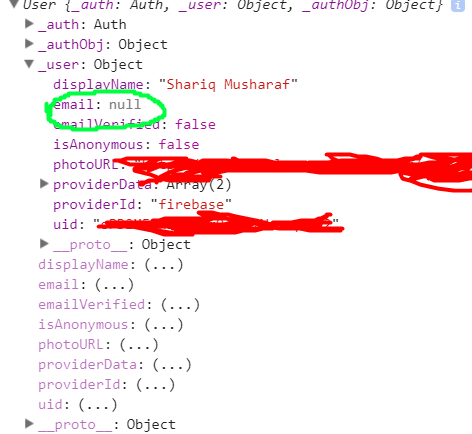
@evgeni-tsn Thank you so much!! Now I can sign in but I did console log on user from firebase when it is logged in but it is not returning me the email but otherwise I can get everything else
ShariqMush
on 7 Aug 2017
@evgeni-tsn u saved me man!!
 DhrubajitPC
on 19 Oct 2017
DhrubajitPC
on 19 Oct 2017
We added a guide for getting the configuration file.
 AndreiCalazans
on 27 May 2018
AndreiCalazans
on 27 May 2018
@AndreiCalazans is the webClientId mentioned by @evgeni-tsn the same one for iOS?
You have to get your webClientId from google-services.json from your Firebase project.
The id that you need is
client>oauth_client>client_id
The docs say to get the webCleintId from https://console.developers.google.com/, but one I generated there and added as a param gave an error on iOS (projects don't match).
It seems to be working for me in iOS (and Android), but I haven't tested it in production yet. If this is the correct way to get the webClientId, I can make a PR and update the docs.
 pcooney10
on 22 Jun 2018
pcooney10
on 22 Jun 2018
You can check on StackOverflow with the following link. I posted in detail with code.
(https://stackoverflow.com/questions/40088741/google-sign-in-error-statusstatuscode-developer-error-resolution-null/55039664#55039664)
 kaushal9678
on 7 Mar 2019
kaushal9678
on 7 Mar 2019
for anybody experiencing issues with malformed credentials from evgenitsn code:
//let credential = {token:user.idToken, secret:user.serverAuthCode, provider:'google', providerId: 'google'}
  // build a valid credentials object from the user token
     var credential = firebase.auth.GoogleAuthProvider.credential(user.idToken);

   // then do the magic
   firebase.auth().signInWithCredential(credential)
 tkoolhoven
on 23 Jun 2019
tkoolhoven
on 23 Jun 2019
@evgenitsn evgenitsn. Thanks a lot.I have spent a lot time to find the web client Id
 gwl002
on 22 Jul 2020
gwl002
on 22 Jul 2020
Working in correct manner when running in debug mode but app is crashing in production @tkoolhoven
 tomNjerry
on 1 Oct 2020
tomNjerry
on 1 Oct 2020
Related issues
 ghost
·
3Comments
ghost
·
3Comments
 havinhthai
·
3Comments
havinhthai
·
3Comments
 smartcris
·
3Comments
smartcris
·
3Comments
 GrishmaM
·
3Comments
GrishmaM
·
3Comments
 rami-amar
·
4Comments
rami-amar
·
4Comments
Most helpful comment
You have to get your webClientId from google-services.json from your Firebase project.

The id that you need is
client>oauth_client>client_id