Google-signin: WRONG SIGNIN Error: DEVELOPER_ERROR at new GoogleSigninError
I can press the button and select a google profile, but get this error.
It looks like the user is null at the point of sign in. I followed the tutorial pretty closely, is there something I'm doing wrong?
My code:
  _signIn() {
    GoogleSignin.signIn()
    .then((user) => {
      console.log(user);
      this.setState({user: user});
      this.props.navigator.push({
        component: Account
      });
    })
    .catch((err) => {
      console.log('WRONG SIGNIN', err);
    })
    .done();
  }
async _setupGoogleSignin() {
    try {
      await GoogleSignin.hasPlayServices({ autoResolve: true });
      await GoogleSignin.configure({
        webClientId: 'MY-CLIENT-ID',
        offlineAccess: false
      });

      const user = await GoogleSignin.currentUserAsync();
      console.log(user);
      this.setState({user});
    }
    catch(err) {
      console.log("Play services error", err.code, err.message);
    }
  }


md5-6e1a68f69e05c913413378252e93ce0e


<GoogleSigninButton
    style={{width: 312, height: 48}}
    size={GoogleSigninButton.Size.Wide}
    color={GoogleSigninButton.Color.Light}
    onPress={() => { this._signIn(); }}/>
 rrajasek92
All 21 comments
Any solution to this?
 hustlerism
on 11 Jun 2017
hustlerism
on 11 Jun 2017
In my case I was using the android webClientId generating this error you need user the web webClientId it is generated in the console!
 devarthurribeiro
on 14 Jun 2017
devarthurribeiro
on 14 Jun 2017
I'm getting the same error! My webClientId is correct. It's fine on one computer but it's not when I copy the debug.keystore and google-services.json to the other computer.
 kdenz
on 15 Jun 2017
kdenz
on 15 Jun 2017
@kdenz copy paste will not work. generate new debug.keystore on "other computer" .
for more learning got to https://developer.android.com/studio/publish/app-signing.html#expdebug
 vinny3273
on 15 Jul 2017
vinny3273
on 15 Jul 2017
I had the same problem, was using the wrong client Id ie."oauth_client": [
{
"client_id": "first client_id",//was using this right here<--
"client_type": 1,
"android_info": {
"package_name": "com.myap",
"certificate_hash": "*********"
}
},
{
"client_id": "when i used this one, it worked",//use this right here <---
"client_type": 3
}
],
This is code from the exported google-services json file
 muganwas
on 13 Jan 2018
muganwas
on 13 Jan 2018
@vinnyHero Hi Vinny, can you guide me thru this?
hustlerism
on 6 Feb 2018
Also getting this error. Any idea where to find the "Server Client ID" on Firebase to use on Android ? Going crazy here :)
 gesf
on 28 Feb 2018
gesf
on 28 Feb 2018
Hi muganwas. thanks a ton!
 akshg05
on 15 Mar 2018
akshg05
on 15 Mar 2018
@hustlerism
sure, look into your build.gradle in app folder.
android {
...
signingConfigs {
debug {
storeFile file('path to your debug.keystore')
storePassword "abc"
keyAlias "abc"
keyPassword "abc"
}
release {
storeFile file('path to your debug.keystore')
storePassword "releaseStorePassHere"
keyAlias "releaseAliasHere"
keyPassword "releaseKeyPassHere"
}
}
....
}
just provide path for debug.keystore . copy paste debug.keystore to exact same folder structure, and you are good to go .
vinny3273
on 17 Mar 2018
Still having this issue. Nothing in this thread works.
 Anees-Raja
on 29 Mar 2018
Anees-Raja
on 29 Mar 2018
@Anees-Raja
I just added a debug section too . I copied/pasted from release
signingConfigs {
debug {
if (project.hasProperty('MYAPP_RELEASE_STORE_FILE')) {
storeFile file(MYAPP_RELEASE_STORE_FILE)
storePassword MYAPP_RELEASE_STORE_PASSWORD
keyAlias MYAPP_RELEASE_KEY_ALIAS
keyPassword MYAPP_RELEASE_KEY_PASSWORD
}
}
release {
if (project.hasProperty('MYAPP_RELEASE_STORE_FILE')) {
storeFile file(MYAPP_RELEASE_STORE_FILE)
storePassword MYAPP_RELEASE_STORE_PASSWORD
keyAlias MYAPP_RELEASE_KEY_ALIAS
keyPassword MYAPP_RELEASE_KEY_PASSWORD
}
}
}
This is described there :
https://github.com/devfd/react-native-google-signin/blob/master/android-guide.md#e-getting-developer_error-error-message-on-android-when-trying-to-login
 Kisepro
on 9 Apr 2018
Kisepro
on 9 Apr 2018
@muganwas Thank you, it working 😁
Do you know why?
 havinhthai
on 26 Apr 2018
havinhthai
on 26 Apr 2018
@havinhthai it worked because you used the correct client Id, I doubt there's anything more to it but I could be wrong.
muganwas
on 26 Apr 2018
@havinhthai I think it worked because android was providing .keystore to only release version and after adding the above fix by @Kisepro we are providing it to debug version as well. so now sign in can recognize the SHA1 id which was provided you during client id creation on google console.
 AtulKondekar
on 11 May 2018
AtulKondekar
on 11 May 2018
seems fixed
 AndreiCalazans
on 15 May 2018
AndreiCalazans
on 15 May 2018
Getting same issues there is SHA1 issues, Now it has fixed in testing android use default Keystore so go to default path (~/.android/) and get debug.keystore SHA1 Code. Use the below command
keytool -exportcert -keystore Path_of_your_default_keystore_file -list -v
 rawatrob
on 21 May 2018
rawatrob
on 21 May 2018
So the solution to this problem form me were two things, firstly the answer by @Kisepro and then the answer by @muganwas after that rebuild and your app should run smoothly.
 thecodecafe
on 26 Jun 2018
thecodecafe
on 26 Jun 2018
I am getting a differente error Message API_NOT_CONNECTED, after i provide my credentials
 ghost
on 1 Mar 2019
ghost
on 1 Mar 2019
I experienced the DEVELOPER_ERROR 10 as I was using the wrong web client id.
Firebase was not creating the client is in my google apis console, but it was generating it's own web client id inside firebase. The problem was solved once I added that web client id to my android app inside
```
export const config = { 'webClientId': '1234567889.apps.googleusercontent.com', };
````
Head to your firebase app, Authentication -> Sign-in methods -> Google
You will find the list of Whitelisted clients ids and the option to add new ids
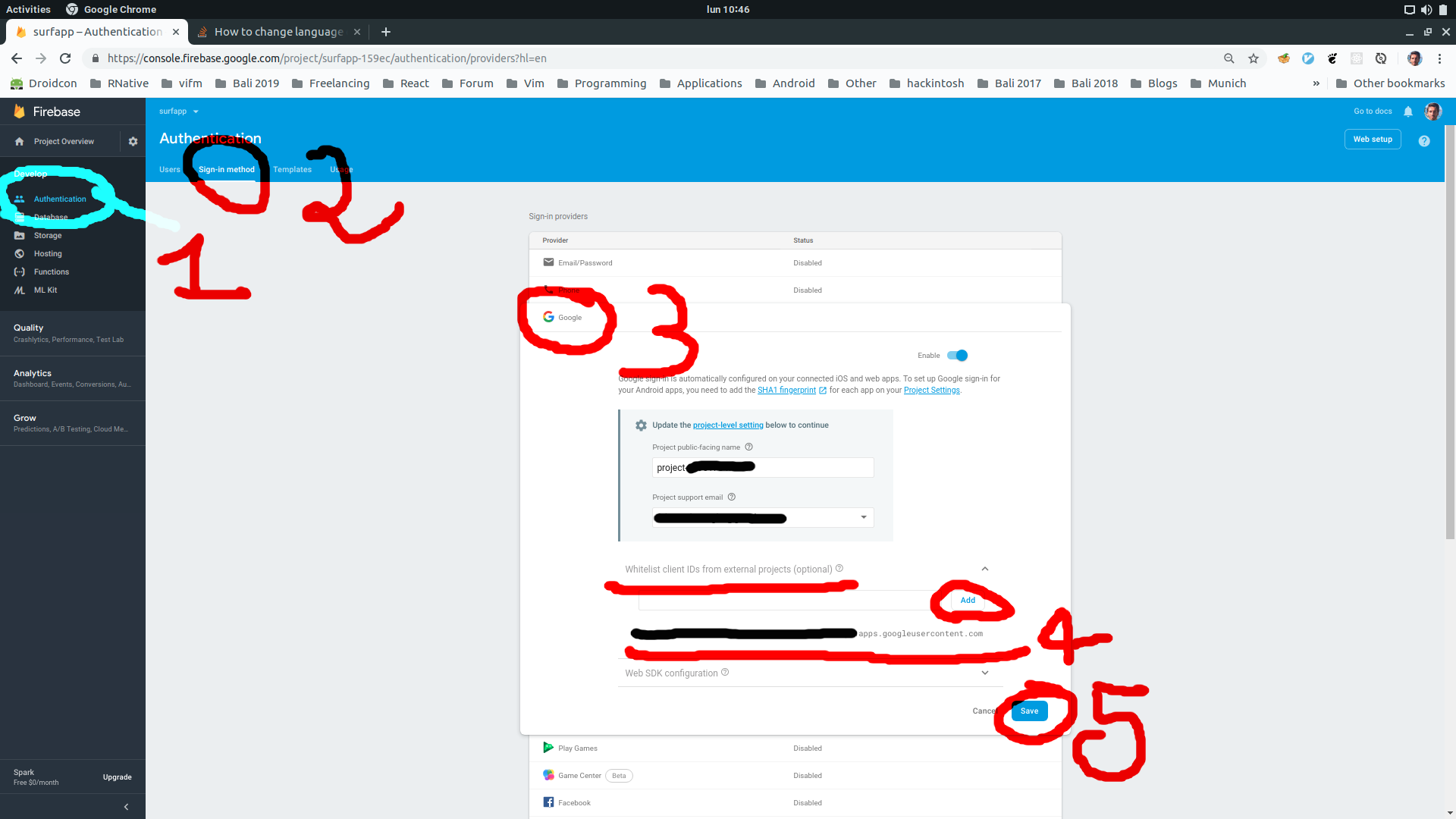
 fabriziobertoglio1987
on 18 Mar 2019
fabriziobertoglio1987
on 18 Mar 2019
1. Create a firebase project
2. Create a android app with SH-1 key (
1. Go to Android studio click on gradle by your top right
2. click on App
3. click on Android
4. click on signingReport
5. Copy SHA1 key and use it to create the firebase android app
3. Go to the authentication part of your firebase app (Left side menu)
1. Click on sign in method
2. Web SDK configuration under Google and copy the key paste it in your Web Client ID config
4. Head back to android firebase app and download `google-service.json`
1. it should contain the SH1 just added as `certificate_hash`
This is debug
 ckOfor
on 22 May 2019
ckOfor
on 22 May 2019
1. Create a firebase project 2. Create a android app with SH-1 key ( 1. Go to Android studio click on gradle by your top right 2. click on App 3. click on Android 4. click on signingReport 5. Copy SHA1 key and use it to create the firebase android app 3. Go to the authentication part of your firebase app (Left side menu) 1. Click on sign in method 2. Web SDK configuration under Google and copy the key paste it in your Web Client ID config 4. Head back to android firebase app and download `google-service.json` 1. it should contain the SH1 just added as `certificate_hash`This is debug
thank you man you are an awesome
 matthewadel
on 30 May 2020
matthewadel
on 30 May 2020
Related issues
 pawellewandowski
·
4Comments
havinhthai
·
3Comments
pawellewandowski
·
4Comments
havinhthai
·
3Comments
 ChaoTzuJung
·
3Comments
ChaoTzuJung
·
3Comments
 rami-amar
·
4Comments
rami-amar
·
4Comments
 uendar
·
3Comments
uendar
·
3Comments
Most helpful comment
I had the same problem, was using the wrong client Id ie.
"oauth_client": [
        {
          "client_id": "first client_id",//was using this right here<--
          "client_type": 1,
          "android_info": {
            "package_name": "com.myap",
            "certificate_hash": "*********"
          }
        },
        {
          "client_id": "when i used this one, it worked",//use this right here <---
          "client_type": 3
        }
      ],
This is code from the exported google-services json file