Google-signin: 'GoogleSignIn/GoogleSignIn.h' file not found
I have install react-native-google-signin but after long debugging I found this error
my appdelegate.m file code
import "AppDelegate.h"
import "RCTRootView.h"
#import "RNGoogleSignin.h"
@implementation AppDelegate
- (BOOL)application:(UIApplication *)application openURL:(NSURL *)url
sourceApplication:(NSString *)sourceApplication annotation:(id)annotation {
return [RNGoogleSignin application:application openURL:url sourceApplication:sourceApplication annotation:annotation];
}
@end
and the error occur
Plz suggest me by steps
 uc-asa
All 33 comments
well did you add the google frameworks to your xcode project ?
 devfd
on 5 Aug 2016
devfd
on 5 Aug 2016
I'm having the same issue, and yes I did add the google framework, however should it go into the root of my project folder or at the same level as my project folder?
 ryudice
on 6 Aug 2016
ryudice
on 6 Aug 2016
I'm using cocoapods by the way, not for the google libraries but for other libraries I use
ryudice
on 6 Aug 2016
I ended up copying the RNGoogleSignin source files into my project, that fixed the issue
ryudice
on 6 Aug 2016
yes I did add the google framework but still this issues
Plz provide steps how can we resolve it
uc-asa
on 9 Aug 2016
I've had some luck doing a clean (apple + k) after adding these frameworks.
 haydenth
on 9 Aug 2016
haydenth
on 9 Aug 2016
Hello Team,
I have use react-native-google-siginin and it works fine after some
debugging
Thanks for supporting,
On Wed, Aug 10, 2016 at 12:55 AM, Tom Hayden [email protected]
wrote:
I've had some luck doing a clean (apple + k) after adding these frameworks.
—
You are receiving this because you authored the thread.
Reply to this email directly, view it on GitHub
https://github.com/devfd/react-native-google-signin/issues/108#issuecomment-238663194,
or mute the thread
https://github.com/notifications/unsubscribe-auth/APpuJUcy48qQXi4VVR2lawCooQAAHpO1ks5qeNREgaJpZM4JdioD
.
_Thanks,_
_Asheesh Kumar Sahu_
_Software Engineer(Apps)_
_uCertify_
uc-asa
on 10 Aug 2016
I'm having the same issue can @uc-asa or anyone else expand on what they did to solve it?
 cjbutcher
on 18 Sep 2016
cjbutcher
on 18 Sep 2016
Check your ios folder within project and in the IOs folder your project name will show check GoogleSign.h file is present or not If not then copy from react-native-google sign/ios/RNGoogleSign/RNGooglesignin.h and paste in your project/ios/project
uc-asa
on 21 Sep 2016
@uc-asa I did exactly as you told . copied RNGooglesignin.h to project/ios/project.
It shows the following error:
RNGooglesignin/RNGooglesignin.h not found
 rajatgupta1993
on 3 Oct 2016
rajatgupta1993
on 3 Oct 2016
I have this problem when I build with Fastlane, but not when I build with Xcode.
Is it possible to get an idiot proof guide? I have barely any familiarity with Objective C.
My understanding is that the
#import <GoogleSignIn/GoogleSignIn.h> refers to a global import.
This global import has something to do with the build phases.

Any ideas?
 yogiben
on 8 Nov 2016
yogiben
on 8 Nov 2016
@ryudice cause duplicate error when compile
 jose920405
on 15 Nov 2016
jose920405
on 15 Nov 2016
What is the fix to this?
 stanleycyang
on 3 Dec 2016
stanleycyang
on 3 Dec 2016
I solved this by changing the build settings in xcode.
My debug build worked, but my production did not. I think mine was a special case.
yogiben
on 6 Dec 2016
I solved the issues with following steps:
Copy ios/RNGoogleSignin into Libraries folder in Xcode

Add this line to Framework Search Paths in Build Settings:
$(PROJECT_DIR)/GoogleSDK

Remove libRNGoogleSign.a from Link Binary With Libraries in Build Phases:

Clean and Build project
 taingmeng
on 5 Jan 2017
taingmeng
on 5 Jan 2017
Do everything as mentioned in the iOS Guides but use a different import:
#import <RNGoogleSignin/RNGoogleSignin.h>
 behrendtio
on 12 Jan 2017
behrendtio
on 12 Jan 2017
One by one add following files from node_modules/react-native-google-signin/ios/GoogleSdk
in Framework folder of your xcode project and add them in Link binary with Libraries
GoogleAppUtilities.framework
GoogleAuthUtilities.framework
GoogleNetworkingUtilities.framework
GoogleSignIn.framework
GoogleSymbolUtilities.framework
GoogleUtilities.framework
GoogleSignIn.bundle
 shahchaitanya
on 27 Jan 2017
shahchaitanya
on 27 Jan 2017
Try integrating the SDK manually (here instructions: https://developers.google.com/identity/sign-in/ios/sdk/ ). Then use #import "GoogleSignIn/GoogleSignIn.h" instead of #import "TransitionController.h"
 NilPuig
on 7 Jul 2017
NilPuig
on 7 Jul 2017
Copy all the file from ios/GoogleSdk to yourproject/ios folder.
Add Framework Search Path to $(PROJECT_DIR)
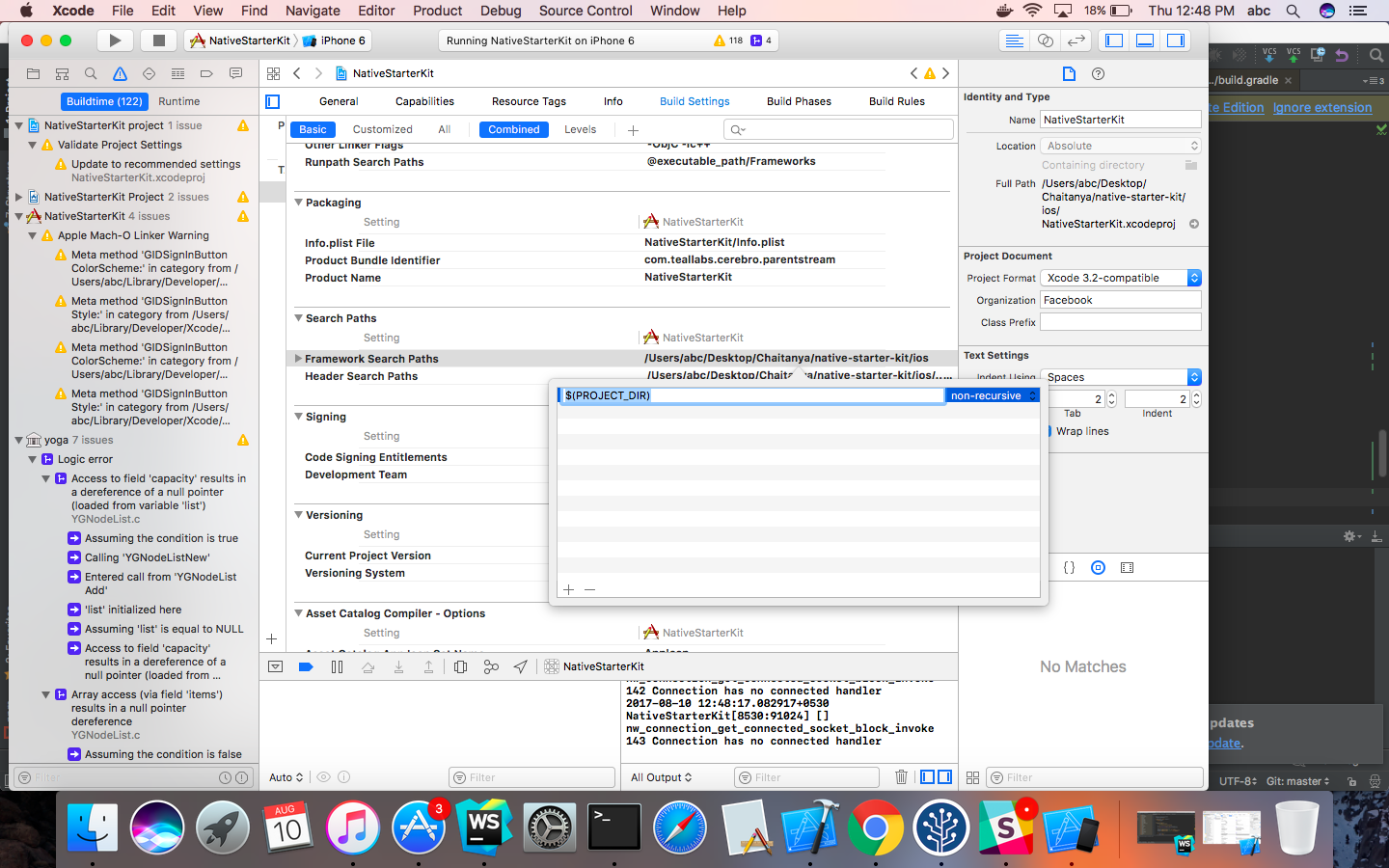
https://stackoverflow.com/questions/31980840/framework-search-paths - Helps to add Framework Path
shahchaitanya
on 10 Aug 2017
facing the same issue, is there any solution ?
 GrishmaM
on 1 Jan 2018
GrishmaM
on 1 Jan 2018
Amazing @shahchaitanya it works your solution works amazing thanks so much finally
 ckOfor
on 14 Mar 2018
ckOfor
on 14 Mar 2018
still get the issue, where's the author ????
 luongs3
on 6 Apr 2018
luongs3
on 6 Apr 2018
What issue you have? @luongs3
 khadkaPratik
on 6 Apr 2018
khadkaPratik
on 6 Apr 2018
For anybody still having this issue, these are the exact steps I followed to make it work: (Please note that these are just my internal notes and I am using this together with react-native-firebase)
Especially the last step should be the one which resolves the error
Open the /node_modules/react-native-google-signin/ios folder in Finder.
Move the GoogleSDK Folder into the XCode Project. (Select Copy items if needed)
Make sure that all contents of the GoogleSDK Folder are added to the Link Binaries with Libraries Build Step. At the time of writing:
GoogleAppUtilities.frameworkGoogleAuthUtilities.frameworkGoogleNetworkingUtilities.frameworkGoogleSignIn.bundleGoogleSignIn.frameworkGoogleSymbolUtilities.frameworkGoogleUtilities.framework
Select your App Target from the Project Navigator to the left within XCode and open the Info Tab.
Under URL Types add the REVERSE_CLIENT_ID from the GoogleService-Info.plist File you have downloaded and saved to the iOS Folder in a previous step (while setting up firebase). Both the Identifier and URL Schema should contain the exact copied and pasted REVERSE_CLIENT_ID.
Add another URL Type with the Identifier and URL Schema set to the BUNDLE_ID. e.G: com.example.appname.ios
Within the AppDelegate.m File add the following near the top:
#import <RNGoogleSignin/RNGoogleSignin.h>
Now it becomes a bit tricky. We can only define one openURL handler. As we have already integrated the Facebook SDK Login, we will have to combine both of them into a single method:
// React Native FBSDK & Google Sign in
- (BOOL)application:(UIApplication *)application
            openURL:(NSURL *)url
            options:(NSDictionary<UIApplicationOpenURLOptionsKey,id> *)options {

  BOOL handled = [[FBSDKApplicationDelegate sharedInstance] application:application
                                                                openURL:url
                                                      sourceApplication:options[UIApplicationOpenURLOptionsSourceApplicationKey]
                                                             annotation:options[UIApplicationOpenURLOptionsAnnotationKey]
  ] || [RNGoogleSignin      application:application
                                openURL:url
                      sourceApplication:options[UIApplicationOpenURLOptionsSourceApplicationKey]
                             annotation:options[UIApplicationOpenURLOptionsAnnotationKey]
            ];
  // Add any custom logic here.
  return handled;
}
When you try to build now you will get an error:
fatal error: 'GoogleSignIn/GoogleSignIn.h' file not found
#import <GoogleSignIn/GoogleSignIn.h>
I was able to solve it by adding the GoogleSDK Folder into the ios subfolder, and adding the Following to the Framework Search Path and Header Search Path in the Build Settings:
$(SRCROOT)/GoogleSdk
 jaschaio
on 15 May 2018
jaschaio
on 15 May 2018
Thanks a lot @jaschaio, I was having a lot of problems with this one and I see that I was close but could not get it working. After so many idiotic answers, copying the GoogleSDK folder into project ios folder and adding the path to framework and header search paths solved the issue for me....
 bajaga
on 22 May 2018
bajaga
on 22 May 2018
You can follow @jaschaio suggestion and also check out our example app to see how to build this with cocoapods.
thank you.
 AndreiCalazans
on 27 May 2018
AndreiCalazans
on 27 May 2018
Hey @AndreiCalazans, with cocoapods route should we have the pod 'RNGoogleSignin', :path => '../node_modules/react-native-google-signin' pod? This is getting added when I run react-native link react-native-google-signin.
 pcooney10
on 8 Jun 2018
pcooney10
on 8 Jun 2018
@pcooney10 No you don't have to but you can if you want to.
When you have Podfile already in your project's ios folder and run
react-native link react-native-google-signin
it will add
pod 'RNGoogleSignin', :path => '../node_modules/react-native-google-signin
to your Podfile.
If you don't want that you can rename your Podfile to something before the linking process and rename it back to Podfile after linking.
 jozan
on 9 Jun 2018
jozan
on 9 Jun 2018
Here is what works!!
npm install react-native-google-signin
react-native link react-native-google-signin
Make sure there is no entry of pod 'GoogleSignIn' in Podfile
copy contents of node_modules/react-native-google-signin/ios/GoogleSdk into project's ios directory.
Drag these libraries from the ios directory into Xcode > Frameworks (Select Copy items if needed)
Build project.
 ajaymore
on 19 Jun 2018
ajaymore
on 19 Jun 2018
I tried to setup android for google signin. but gradle build is failed.
 fullstackdeveloper90
on 19 Jul 2018
fullstackdeveloper90
on 19 Jul 2018
@ajaymore Could you please clarify what is your version of react-native-google-signin in the package.json?
 valerybodak
on 26 Jul 2018
valerybodak
on 26 Jul 2018
@valerybodak
"react-native-google-signin": "^0.12.0",
ajaymore
on 26 Jul 2018
@behrendtio you saved a ton of my brain cells!
How the hell readme still has the incorrect code???
 kirill-konshin
on 26 Sep 2018
kirill-konshin
on 26 Sep 2018
Related issues
 yogeshpaisode
·
4Comments
yogeshpaisode
·
4Comments
 ghost
·
4Comments
ghost
·
4Comments
 smartcris
·
3Comments
smartcris
·
3Comments
 Decoder3-14
·
3Comments
Decoder3-14
·
3Comments
 tundak
·
4Comments
tundak
·
4Comments
Most helpful comment
Do everything as mentioned in the iOS Guides but use a different import: