Google-play-music-desktop-player-unofficial-: Can't switch to YouTube Music Player
Checklist:
[X] I have checked that there are no issues with similar or the same content
YOU SHOULD CHECK CLOSED ISSUES AS WELL
- [X] I have checked the FAQ (https://github.com/MarshallOfSound/Google-Play-Music-Desktop-Player-UNOFFICIAL-/wiki/FAQ) and the answer I am looking for is not there
- [X] I have double checked and can reproduce the issue
OS: macOS Catalina 10.15.7 (19H2)
GPMDP Version: Version 4.7.1 (4.7.1)
Issue Descriptions:
Today was closed my access to Goole Play Music, but on this new webpage, I can't switch to YouTube Music, because there is no button.
Steps to Reproduce:
Open GPMDP and show this screen.

 equiman
All 9 comments
👋 Thanks for opening your first issue here! If you're reporting a 🐞 bug, please make sure you include steps to reproduce it. We get a lot of duplicate issues on this repo, so please double check now that your issue has not already been solved or doesn't have an open issue already.
To help make it easier for us to investigate your issue, please follow the contributing guidelines and ensure the issue template was filled out.
![welcome[bot] picture](https://avatars.githubusercontent.com/in/4141?v=4&s=40) welcome[bot]
on 22 Oct 2020
welcome[bot]
on 22 Oct 2020
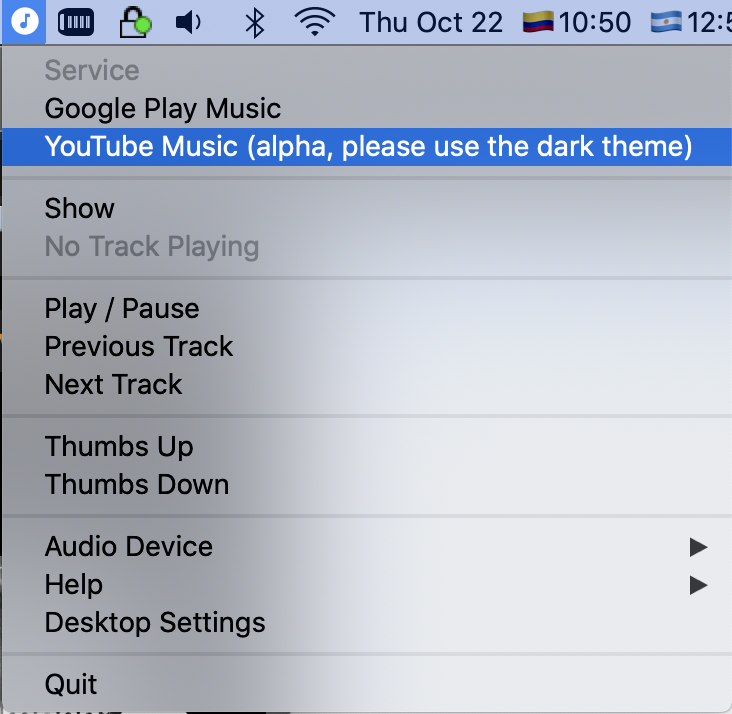
Use the tray icon on the top bar in Mac.
 jostrander
on 22 Oct 2020
jostrander
on 22 Oct 2020
Done! Thanks!
equiman
on 22 Oct 2020
You can also click Transfer to youtube music then you get to a side, where you can pick if you actually want to transfer or skip.
The downside is, that the application will ask you again on next start, as it thinks you want gmusic to start.
 Razzeee
on 22 Nov 2020
Razzeee
on 22 Nov 2020
Use the tray icon on the top bar in Mac.
Worked for me. Thanks!
 tekfranz
on 3 Dec 2020
tekfranz
on 3 Dec 2020
Any options for those of us using Linux?
 jason-mehmel
on 5 Dec 2020
jason-mehmel
on 5 Dec 2020
The same "transfer" button or tray icon selector as mentioned for macOS work fine for me on Linux to get into YT music mode.
It would be nice if somebody sent in a PR to make this the default/only mode now that we don't have other options.
 alerque
on 5 Dec 2020
alerque
on 5 Dec 2020
I had to install a gnome extension, that enables tray icons, switch the app over and Uninstaller the extension
Razzeee
on 5 Dec 2020
That worked for me!
jason-mehmel
on 5 Dec 2020
Related issues
 ARTVRO
·
3Comments
ARTVRO
·
3Comments
 logictom
·
4Comments
logictom
·
4Comments
 greghesp
·
3Comments
greghesp
·
3Comments
 ivko1950
·
4Comments
ivko1950
·
4Comments
 timp3289
·
3Comments
timp3289
·
3Comments
Most helpful comment
Done! Thanks!