Google-play-music-desktop-player-unofficial-: Version 4.7.0 - Minor Release
This issue is for tracking progress on the release process.
- [x] Update MR_CHANGELOG
- [x] Version minor
- [x] Push to master
- [x] Build all platforms on CI
- [x] Check release process on staging update server
staging.googleplaymusicdesktopplayer.com - [x] Check operational on Windows
- [x] Check operational on OS X
- [x] Check operational on Linux
- [x] Make release on GitHub
- [x] Upload to bintray
- [ ] ~Upload to WinStore~
- [ ] Watch the world burn :fire: :fire_engine:
 MarshallOfSound
All 39 comments
See --> https://github.com/MarshallOfSound/Google-Play-Music-Desktop-Player-UNOFFICIAL-/issues/3761#issuecomment-569455691
MarshallOfSound
on 28 Dec 2019
I can verify that the Windows build works if that helps. :)
 mlidbom
on 28 Dec 2019
mlidbom
on 28 Dec 2019
Hi,
Ubuntu 19.10 (5.3.0-24-generic amd64) works fine :)
Thanks!
 galetahub
on 28 Dec 2019
galetahub
on 28 Dec 2019
Verified the Windows build on my home PC. Nice work everyone.
 trevorscottprice
on 28 Dec 2019
trevorscottprice
on 28 Dec 2019
Chromecast button on Windows 10 is missing. Casting from other apps is OK on this machine.
Poked around with Bonjour and that seems to be OK. Anything I can try or see to identify the issue?
 SoftWyer
on 28 Dec 2019
SoftWyer
on 28 Dec 2019
Just to add onto what @SoftWyer said, my immediate thought was that it was because of using a Firefox UA but using the below UAs didn't show the cast option either, nor does it show in Opera, the closest I have to Chrome on hand (I didn't use a clean install to test though)
Chromium
Mozilla/5.0 (X11; Linux x86_64) AppleWebKit/534.30 (KHTML, like Gecko) Ubuntu/11.04 Chromium/12.0.742.112 Chrome/12.0.742.112 Safari/534.30
Chrome
Mozilla/5.0 (Windows NT 10.0; Win64; x64) AppleWebKit/537.36 (KHTML, like Gecko) Chrome/74.0.3729.169 Safari/537.36
 Max9403
on 28 Dec 2019
Max9403
on 28 Dec 2019
I won't be able to debug Chromecast stuff till the second week of January. Currently on holiday, barely got internet let alone a Chromecast.
If someone else could figure it out that'd be great, it's probably a client side UA check. Using our preload script to hack the UA just for client side code should be enough (just guessing though)
MarshallOfSound
on 28 Dec 2019
Never mind about my last comment it is indeed to do with the user agent since it hides the cast button if it can't find any devices (I forgot that I don't have one around at the moment).
It seems to just not be sending this script tag down when using the Firefox UA
which should be fixable with below snippet in PlayerPage in the _domReady function:
document.querySelector("webview").executeJavaScript("let s = document.createElement('script'); s.src = 'https://www.gstatic.com/cv/js/sender/v1/cast_sender.js?loadCastFramework=1'; (document.head||document.documentElement).appendChild(s)");
Hope you're enjoying the holiday
Max9403
on 28 Dec 2019
4.7.0rc works on Kubuntu 19.10 64-bit!
EDIT 2020-1-1: MPRIS media playback works correctly on another Kubuntu 19.10 desktop.. the first time I launched it. The second time and thereafter Plasma didn't recognize it. I'm not sure what might be happening.
Unfortunately, the media player information still appears to be broken, with media hotkeys not controlling playback and KDE Plasma's Media Player notification tray widget not showing up. This is a minor issue and can be fixed next release.
I do get messages about the Avahi compatibility layer, though I think those have always been present:
*** WARNING *** The program 'Google Play Music Desktop Player' called 'DNSServiceRegister()' which is not supported (or only supported partially) in the Apple Bonjour compatibility layer of Avahi.
*** WARNING *** Please fix your application to use the native API of Avahi!
*** WARNING *** For more information see <http://0pointer.de/blog/projects/avahi-compat.html>
If there's any further debugging I can do, I'd be happy to help. I don't see any other messages, just Starting Sentry then the above repeated.
 digitalcircuit
on 28 Dec 2019
digitalcircuit
on 28 Dec 2019
There is bug related to miniplayer. On linux if I try clicking on miniplayer with dark theme the window goes maximized and it start flickering cant get it back to normal except if I quit the player and then start again.
Also yeah integration with player-control do not work so no playback control via multimediakeys.
 MarkoShiva
on 28 Dec 2019
MarkoShiva
on 28 Dec 2019
Thanks for testing folks, I've got new RC builds that _might_ fix the Chromecast thing but I took a shot in the dark. It also might break the sign-in fix so if y'all could test the whole thing, signing in, using GPM, using YTM and trying to cast a thing that'd be really helpful.
RC Builds:
Please note that these builds are versioned as 4.7.0 and therefore won't auto update if the version we end up releasing is different to this RC. Also the Windows installer is not code signed.
Darwin
Linux
Windows
cc @MarkoShiva @digitalcircuit @Max9403 @trevorscottprice @galetahub @mlidbom @SoftWyer
MarshallOfSound
on 28 Dec 2019
This latest Windows build fixed the sign in issues in Win7 x64
 Jakobud
on 29 Dec 2019
Jakobud
on 29 Dec 2019
Linux version (.deb converted to Arch package) works fine. Thanks!
EDIT: Windows version also seems to work w/o immediate issues.
 openmindead
on 29 Dec 2019
openmindead
on 29 Dec 2019
Great! This works on my Mac where it has not worked for months. Only thing is that it says that I signed in on Windows in a Firefox browser, but the IP is correct, so I guess that is just some sort of user agent hack to make this work. Great work!
 sorendam
on 29 Dec 2019
sorendam
on 29 Dec 2019
Yup that's just the user agent hack coming in to play. I wonder if we should somehow let people know that that's a thing. Or just assume folks will figure it out :/
MarshallOfSound
on 29 Dec 2019
Probably worth adding something to the readme about it (and probably the changelog too). If nothing else, it will give you a single place to refer people to if you start getting questions about it.
 reduckted
on 29 Dec 2019
reduckted
on 29 Dec 2019
Thank you so much for the fix. Never realize how much you love something until its gone. I should really start clicking the donate button once a year.
 shaneh445
on 29 Dec 2019
shaneh445
on 29 Dec 2019
I can confirm that the new Windows build has fixed the Chromecast issue, thanks for the quick turnaround!
There is some weirdness around sign-out/sign-in. It didn't want to sign-out whilst playing, and then the pause button became un-clickable. I think it it had signed out as eventually music stopped playing. However, I needed to switch to the Home page and then sign-out again to see the sign-in page.
SoftWyer
on 30 Dec 2019
I'm happy to report functional on Kubuntu 19.10. Appears to be missing media access again, though... which is weird. I can access it just fine via KDEConnect on my smartphone, but from my widgets it just doesn't show up.
I'm uncertain which subsystem isn't seeing what's going on, here, as I'm not much of a hacker when it comes to the KDE backend stuff. Obviously something is working, or KDEConnect wouldn't work.
 silentdis
on 30 Dec 2019
silentdis
on 30 Dec 2019
Windows 10 1909 Build 18363.535 works great again!
 subhead
on 30 Dec 2019
subhead
on 30 Dec 2019
4.7.0 GPM stuck loading music library, YTM loads fine.
Windows 10 1909 18363.535
 Ralph77777
on 31 Dec 2019
Ralph77777
on 31 Dec 2019
MacOS download doesn't seem to be working for me. Getting a 500 Internal Server error at:
https://3865-40008106-gh.circle-artifacts.com/0/home/circleci/project/dist/installers/darwin/Google%20Play%20Music%20Desktop%20Player.zip
 solepixel
on 31 Dec 2019
solepixel
on 31 Dec 2019
recently switched from spotify to GPM and this app is a lifesaver. was having trouble signing in like others but this version helped me sign in no problem.
thanks for your work on this!
PS - 2019 MBP running Mojave 10.14.6
 williamhscholl
on 31 Dec 2019
williamhscholl
on 31 Dec 2019
Ubuntu 19.04 checking in.
Removed all previous versions and 4.7.0 is logging in and working with no issues.
Thanks for the fix!
 jarednthomas
on 1 Jan 2020
jarednthomas
on 1 Jan 2020
I'm happy to report functional on Kubuntu 19.10. Appears to be missing media access again, though... which is weird. I can access it just fine via KDEConnect on my smartphone, but from my widgets it just doesn't show up.
After further experimentation, this matches my experience. The KDE Plasma media player notification tray widget showed up the first time I tried on my desktop (separate from laptop), then it stopped ("No media playing") thereafter, but KDE Connect kept working. Media keys still work, too, which they hadn't before on my laptop.
It's an improvement, at least :slightly_smiling_face: I'll try to figure out what's consistently happening.
digitalcircuit
on 2 Jan 2020
Windows 1809 (Build 17763.914) working
- GPM Login working again
- Casting to Google Home Mini working
- Switch to YTM & hitting play > crashed the first time but consecutive switches worked fine, so _unable to reproduce_
👍
 b0rg0nd
on 2 Jan 2020
b0rg0nd
on 2 Jan 2020
MacOS download doesn't seem to be working for me. Getting a 500 Internal Server error at:
https://3865-40008106-gh.circle-artifacts.com/0/home/circleci/project/dist/installers/darwin/Google%20Play%20Music%20Desktop%20Player.zip
That link is working for me now if you want to try again, @solepixel
I tried a couple of days ago and got the same 500 error, too.
App has worked fine for me so far in my limited testing at work on macOS 10.15.2.
 DavidAllewell
on 2 Jan 2020
DavidAllewell
on 2 Jan 2020
@DavidA122 Thanks! It's working now for me too!
solepixel
on 2 Jan 2020
Works for me on Linux Mint 19.3 too, thank you!
 moraleida
on 2 Jan 2020
moraleida
on 2 Jan 2020
The Mac link, https://github.com/MarshallOfSound/Google-Play-Music-Desktop-Player-UNOFFICIAL-/issues/3761#issuecomment-569954006, does work. You'll also need to update settings in Security & Privacy to allow it to be installed locally.
 mikeyamato
on 2 Jan 2020
mikeyamato
on 2 Jan 2020
Thanks for testing folks, I've got new RC builds that _might_ fix the Chromecast thing but I took a shot in the dark. It also might break the sign-in fix so if y'all could test the whole thing, signing in, using GPM, using YTM and trying to cast a thing that'd be really helpful.
Windows
Win10 x64 - Install failed initially, but succeeded when running the installer as Admin. Login issues resolved.
 byeuji
on 2 Jan 2020
byeuji
on 2 Jan 2020
@byeuji This is probably due to it being unsigned.
 jostrander
on 2 Jan 2020
jostrander
on 2 Jan 2020
The latest build from here works for me on Windows 10 build 1909, thank you so much!
 Zumochi
on 3 Jan 2020
Zumochi
on 3 Jan 2020
Works for me on Mac OS 10.15.2.
 dwhansen-cbg
on 3 Jan 2020
dwhansen-cbg
on 3 Jan 2020
And thank you! Love this app.
dwhansen-cbg
on 3 Jan 2020
Fixed my sign in issues on Linux Ubuntu 19.10 (64 deb). Thanks so much!
 alitoyn
on 4 Jan 2020
alitoyn
on 4 Jan 2020
I installed to double check as I was having other issues with a different build (rameezv's build, issue #3640) not displaying the music title, artist and cover art (link below) on my new computer. Enable the Windows 10 System Media Service and Show track information in Windows 10 volume overlay are both checked.
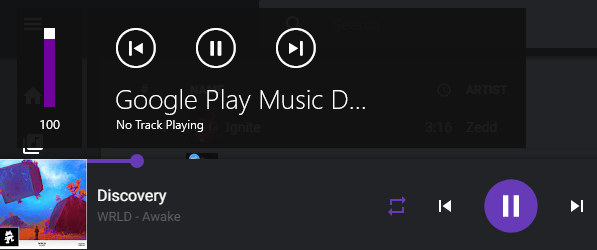
New minor release still is stuck loading library, so I'm unable to test if there's issues with volume overlay on 4.7.0.
EDIT: Installed a much older 4.7.0, which was linked in another thread, didn't see the recent installer. Confirmed working, confirmed volume overlay is fixed.
 Dragon911XX
on 5 Jan 2020
Dragon911XX
on 5 Jan 2020
Mission Complete
Released as 4.7.1 --> https://github.com/MarshallOfSound/Google-Play-Music-Desktop-Player-UNOFFICIAL-/releases/tag/v4.7.1
MarshallOfSound
on 7 Jan 2020
🎉
@MarshallOfSound are there still problems with the store release?
 Silvenga
on 7 Jan 2020
Silvenga
on 7 Jan 2020
Related issues
 darkvertex
·
4Comments
darkvertex
·
4Comments
 amgrider
·
3Comments
amgrider
·
3Comments
 Nxt3
·
4Comments
Nxt3
·
4Comments
 oscarfroberg
·
3Comments
oscarfroberg
·
3Comments
 ARTVRO
·
3Comments
ARTVRO
·
3Comments
Most helpful comment
Thanks for testing folks, I've got new RC builds that _might_ fix the Chromecast thing but I took a shot in the dark. It also might break the sign-in fix so if y'all could test the whole thing, signing in, using GPM, using YTM and trying to cast a thing that'd be really helpful.
RC Builds:
Please note that these builds are versioned as
4.7.0and therefore won't auto update if the version we end up releasing is different to this RC. Also the Windows installer is not code signed.Darwin
Linux
Windows
cc @MarkoShiva @digitalcircuit @Max9403 @trevorscottprice @galetahub @mlidbom @SoftWyer