Google-play-music-desktop-player-unofficial-: Stuck on Loading Music Library
OS: macOS Mojave 10.14.5
GPMDP Version: 4.6.1
Issue Descriptions:
Stuck on Loading Music Library after opening

 hoghug
All 169 comments
👋 Thanks for opening your first issue here! If you're reporting a 🐞 bug, please make sure you include steps to reproduce it. We get a lot of duplicate issues on this repo, so please double check now that your issue has not already been solved or doesn't have an open issue already.
To help make it easier for us to investigate your issue, please follow the contributing guidelines and ensure the issue template was filled out.
![welcome[bot] picture](https://avatars.githubusercontent.com/in/4141?v=4&s=40) welcome[bot]
on 31 Oct 2019
welcome[bot]
on 31 Oct 2019
I'm having the same issue, Win 10. Had it happen on multiple systems. Youtube Music works just fine though.
 Aer0nic
on 31 Oct 2019
Aer0nic
on 31 Oct 2019
Fixed in master, will hopefully release soon. You can download builds from CI in the meantime
 MarshallOfSound
on 31 Oct 2019
MarshallOfSound
on 31 Oct 2019
I don't understand, what is the fix? I've uninstalled and installed the latest version but still can't get it to load my library
 nintyuk
on 3 Nov 2019
nintyuk
on 3 Nov 2019
Fixed in master, will hopefully release soon. You can download builds from CI in the meantime
@MarshallOfSound
TravisCL for OS X appears to be inactive and 2 years out of date. Can we get an OS X build?
 jfries289
on 4 Nov 2019
jfries289
on 4 Nov 2019
@jfries289 The OSX and Linux builds are on CircleCI.
MarshallOfSound
on 4 Nov 2019
I have the same issue on Windows 10.
 Gibbel91
on 4 Nov 2019
Gibbel91
on 4 Nov 2019
@Gibbel91 You can find the latest windows build to download at https://ci.appveyor.com/project/MarshallOfSound/google-play-music-desktop-player-unofficial/build/artifacts
I believe it has the fix for this in it.
jfries289
on 4 Nov 2019
Thanks @jfries289, this fixes this issue for me (Windows 10).
 edorgeville
on 4 Nov 2019
edorgeville
on 4 Nov 2019
For lazy OS X users: https://3667-40008106-gh.circle-artifacts.com/0/home/circleci/project/dist/installers/darwin/Google%20Play%20Music%20Desktop%20Player.zip
May become dead in the future, I don't know how long Circle retains artifacts.
Thanks a lot for the quick fix, btw
 singjsong
on 6 Nov 2019
singjsong
on 6 Nov 2019
Stumbled upon this today. For Debian amd64: https://3667-40008106-gh-circle-artifacts.com/0/home/circleci/project/dist/installers/debian/google-play-music-desktop-player_4.6.1_amd64.deb
 Nephiel
on 6 Nov 2019
Nephiel
on 6 Nov 2019
The link @Nephiel gave didn't work for me, but this one did:
 jdobbin-hsahealthplan
on 6 Nov 2019
jdobbin-hsahealthplan
on 6 Nov 2019
The link @Nephiel gave didn't work for me, but this one did:
Thank you, It worked for me.
 Bobyn
on 7 Nov 2019
Bobyn
on 7 Nov 2019
@Gibbel91 You can find the latest windows build to download at https://ci.appveyor.com/project/MarshallOfSound/google-play-music-desktop-player-unofficial/build/artifacts
I believe it has the fix for this in it.
Thank you! Getting latest CI build fixed for me too :).
 Tsumiki
on 8 Nov 2019
Tsumiki
on 8 Nov 2019
@Gibbel91 You can find the latest windows build to download at https://ci.appveyor.com/project/MarshallOfSound/google-play-music-desktop-player-unofficial/build/artifacts
I believe it has the fix for this in it.
Don't exactly know what this means, but it fixed the issue for me too - thanks!
 jayDB5
on 20 Nov 2019
jayDB5
on 20 Nov 2019
Is there any chance to get a 4.6.2 version with this fix?
 ctron
on 25 Nov 2019
ctron
on 25 Nov 2019
I can connect perfectly with the version for youtube but not for google play, it gets to say that songs load and stay there.
I'm in Spain.
version 4.6.1
Google the web of play I have no problem with my email and password
If anyone has any idea how can I fix it agradeceria.
 cdyax
on 26 Nov 2019
cdyax
on 26 Nov 2019
Same on ubuntu 19.10
 bigclap
on 26 Nov 2019
bigclap
on 26 Nov 2019
@Gibbel91 You can find the latest windows build to download at https://ci.appveyor.com/project/MarshallOfSound/google-play-music-desktop-player-unofficial/build/artifacts
I believe it has the fix for this in it.Don't exactly know what this means, but it fixed the issue for me too - thanks!
cdyax
on 26 Nov 2019
Finding where to download the latest MacOS build was confusing to me, but here's a working link for all but Windows: https://circleci.com/api/v1.1/project/github/MarshallOfSound/Google-Play-Music-Desktop-Player-UNOFFICIAL-/latest/artifacts
 austinbutler
on 26 Nov 2019
austinbutler
on 26 Nov 2019
I seem to have now run into the same issue on my PC as well. I've tried reinstalling the latest version, but as soon as I open up GPMDP, it just stays on "Loading Music Library..."
 dcikpeama
on 27 Nov 2019
dcikpeama
on 27 Nov 2019
@MarshallOfSound
will hopefully release soon
Is there anything blocking the release of current master as is?
 doubleloop
on 30 Nov 2019
doubleloop
on 30 Nov 2019
I just came across this thread and I'm having the same issue on a Mac. Does anyone know what I need to do in order to resolve this?
 iamhenry
on 5 Dec 2019
iamhenry
on 5 Dec 2019
Just wanted to throw out a note to say that I'm running Windows 10 1809 x64, and I very suddenly started having the player hang on the "loading music library" this afternoon following a reboot. Tried uninstall/reinstall, clearing %appdata% and %localappdata% files and reinstalling, and was spinning my wheels till I found this pinned. Thanks to @jostrander for pinning it.
If you were too rushed to read the whole issue... Download a build from CI and keep an eye out for the next master release.
https://ci.appveyor.com/project/MarshallOfSound/google-play-music-desktop-player-unofficial/build/artifacts
 rileym94
on 5 Dec 2019
rileym94
on 5 Dec 2019
I just came across this thread and I'm having the same issue on a Mac. Does anyone know what I need to do in order to resolve this?
@iamhenry I haven't seen any CI links for macOS builds, only Windows and Linux. Maybe @jostrander or @MarshallOfSound can point you in the right direction?
rileym94
on 5 Dec 2019
The Mac builds are on CircleCI under the name "Darwin".
- go to the Circle page: https://circleci.com/gh/MarshallOfSound/Google-Play-Music-Desktop-Player-UNOFFICIAL-
- click one of the successful builds (with the green badges)
- go to the Artifacts tab, and click
home/circleci/project/dist/installers/darwin/Google Play Music Desktop Player.zipto download.
After attempting to open the app, I had to go to Security & Privacy settings and make an exception to allow the mysterious internet-downloaded app to launch.
 daiyi
on 5 Dec 2019
daiyi
on 5 Dec 2019
The Mac builds are on CircleCI under the name "Darwin". You can go to a successful build, such as this page, go to the Artifacts tab, and click
home/circleci/project/dist/installers/darwin/Google Play Music Desktop Player.zipto download.After attempting to open the app, I had to go to Security & Privacy settings and make an exception to allow the mysterious internet-downloaded app to launch.
@daiyi I'm getting "Page Not Found" with that link you provided to the artifacts page. Can you provide an alternative working link plz?

NVM: I used this link:
https://circleci.com/api/v1.1/project/github/MarshallOfSound/Google-Play-Music-Desktop-Player-UNOFFICIAL-/latest/artifacts
iamhenry
on 6 Dec 2019
For me this issue just popped up today also on stable 4.6.1 version. Is there a workaround for this issue?
 DASPRiD
on 6 Dec 2019
DASPRiD
on 6 Dec 2019
@DASPRID
For me this issue just popped up today also on stable 4.6.1 version. Is there a workaround for this issue?
Same. Happened to me on macos mojave 10.14.6 just today
Fixed by:
- going to https://circleci.com/api/v1.1/project/github/MarshallOfSound/Google-Play-Music-Desktop-Player-UNOFFICIAL-/latest/artifacts and downloading file with link having
darwinportion in it - for macos. There're also debian (ubuntu) and redhat versions. Working windows version is located here - removing existing installed app
- installing downloaded file
- ...
- PROFIT!
 yioteh
on 6 Dec 2019
yioteh
on 6 Dec 2019
@yioteh - thank you! Quality of life restored! And of course thanks to all the creators of this great software!
 Slapbox
on 6 Dec 2019
Slapbox
on 6 Dec 2019
@yioteh Sadly, in that version my media hot keys do not work.
DASPRiD
on 6 Dec 2019
Experiencing this issue on both Win7 and macOS 10.14.6
 titomb345
on 7 Dec 2019
titomb345
on 7 Dec 2019
Experiencing this issue with Windows 10 even though I'm using latest version.
I tried deleting the whole thing including any caches and it's still stuck there.
 Zoodinger
on 7 Dec 2019
Zoodinger
on 7 Dec 2019
I'm chiming in to say this issue came up on version 4.6.1 for both Windows and Mac but the link provided above from singjsong solved the issue.
 KicknGuitar
on 7 Dec 2019
KicknGuitar
on 7 Dec 2019
(mac version)
This worked for me:
https://github.com/MarshallOfSound/Google-Play-Music-Desktop-Player-UNOFFICIAL-/issues/3660#issuecomment-562656210
But I'd like to point out that switching to the youtube player was a dead end, as it resulted in a "not available for your browser" page, with the usual burger menu option to switch back missing.
The fix:
editing the settings.json file with the following value:
"service": "google-play-music"
 renclav
on 7 Dec 2019
renclav
on 7 Dec 2019
Fixed version solved the main problem but now media hot keys stopped working (Win 10).
 Sirroga
on 7 Dec 2019
Sirroga
on 7 Dec 2019
Fixed version solved the main problem but now media hot keys stopped working (Win 10).
Had the same problem. Don't know why, but after a reboot the media hotkeys also worked on the new version.
DASPRiD
on 7 Dec 2019
Fixed version solved the main problem but now media hot keys stopped working (Win 10).
I have this same issue on Win 10. If I disable the "Show track information in Windows 10 volume overlay" option in the desktop setting, my multimedia key works as expected. Note that this setting only appears if you have the Windows 10 System Media Service option enabled. You can disable the entire service for the multimedia keys to work, but I only had issues when I enabled the "Show track information in Windows 10 volume overlay" option
When it's enabled, the overlay will display "No track playing" even when there is music playing. If I use my multimedia key for play/pause, the overlay freaks out a little and toggles into some kind of play/pause loop where the overlay thinks it's playing but there's no audio coming out. I have to go back into the app to get the music to resume properly (and if I hit multimedia play/pause before actually playing any music the app totally freaks out and won't start any music).
If I can provide any more diagnostic data let me know!
 thecoloryes
on 8 Dec 2019
thecoloryes
on 8 Dec 2019
I'm new here...When I visit https://ci.appveyor.com/project/MarshallOfSound/google-play-music-desktop-player-unofficial/build/artifacts to download the latest Windows build, I see a message "The build job does not contain any artifacts." and can't see anything I can download. Am I missing something? Or am I not looking in the right spot?
 electrikweb
on 9 Dec 2019
electrikweb
on 9 Dec 2019
You need to click on history and then find the most recent successful build I guess.
 IndefiniteBen
on 9 Dec 2019
IndefiniteBen
on 9 Dec 2019
I've been using this on Ubuntu for > 1 year, and it has been working great until today. Then out of the blue, it's stuck on 'Loading Library Music Library'.
I restarted machine, downloaded and installed the latest .deb, and still same problem. This is the output I get:
rods@rods-XPS:~$ google-play-music-desktop-player
Starting Sentry
error: Failed to load bonjour with error: {}
Bonjour is required to use Chromecast Support or to enable ZeroConf for the PlaybackAPI
On linux you need to install "avahi"
Failed to encode dictionary
Failed to encode reply value
Failed to encode dictionary
Failed to encode reply value
 ruborg
on 9 Dec 2019
ruborg
on 9 Dec 2019
Reinstalling as per this page:
https://github.com/MarshallOfSound/Google-Play-Music-Desktop-Player-UNOFFICIAL-/blob/master/docs/Installation_On_Debian.md
Ends up outputting these errors:
error: Emitter fn() threw exception. TypeError: Cannot read property '0' of undefined
    at LibraryNamespace.getTracks (/usr/share/google-play-music-desktop-player/resources/app.asar/node_modules/gmusic-ui.js/dist/gmusic-ui.js:107:84)
    at LibraryNamespace.getLibrary (/usr/share/google-play-music-desktop-player/resources/app.asar/node_modules/gmusic-ui.js/dist/gmusic-ui.js:99:22)
    at /usr/share/google-play-music-desktop-player/resources/app.asar/build/renderer/windows/GPMWebView/playback/handler.js:100:53
    at /usr/share/google-play-music-desktop-player/resources/app.asar/build/renderer/windows/GPMWebView/index.js:81:9
    at arrayEach (/usr/share/google-play-music-desktop-player/resources/app.asar/node_modules/lodash/lodash.js:537:11)
    at Function.forEach (/usr/share/google-play-music-desktop-player/resources/app.asar/node_modules/lodash/lodash.js:9359:14)
    at /usr/share/google-play-music-desktop-player/resources/app.asar/build/renderer/windows/GPMWebView/index.js:79:22
error: Emitter fn() threw exception. TypeError: Cannot read property 'insertBefore' of undefined
    at installSidebarButton (/usr/share/google-play-music-desktop-player/resources/app.asar/build/renderer/windows/GPMWebView/interface/customUI.js:121:58)
    at installDesktopSettingsButton (/usr/share/google-play-music-desktop-player/resources/app.asar/build/renderer/windows/GPMWebView/interface/customUI.js:127:3)
    at installMainMenu (/usr/share/google-play-music-desktop-player/resources/app.asar/build/renderer/windows/GPMWebView/interface/customUI.js:161:3)
    at /usr/share/google-play-music-desktop-player/resources/app.asar/build/renderer/windows/GPMWebView/interface/customUI.js:274:3
    at /usr/share/google-play-music-desktop-player/resources/app.asar/build/renderer/windows/GPMWebView/index.js:81:9
    at arrayEach (/usr/share/google-play-music-desktop-player/resources/app.asar/node_modules/lodash/lodash.js:537:11)
    at Function.forEach (/usr/share/google-play-music-desktop-player/resources/app.asar/node_modules/lodash/lodash.js:9359:14)
    at /usr/share/google-play-music-desktop-player/resources/app.asar/build/renderer/windows/GPMWebView/index.js:79:22
error: Emitter fn() threw exception. TypeError: Cannot read property '0' of undefined
    at LibraryNamespace.getTracks (/usr/share/google-play-music-desktop-player/resources/app.asar/node_modules/gmusic-ui.js/dist/gmusic-ui.js:107:84)
    at LibraryNamespace.getLibrary (/usr/share/google-play-music-desktop-player/resources/app.asar/node_modules/gmusic-ui.js/dist/gmusic-ui.js:99:22)
    at /usr/share/google-play-music-desktop-player/resources/app.asar/build/renderer/windows/GPMWebView/playback/handler.js:100:53
    at /usr/share/google-play-music-desktop-player/resources/app.asar/build/renderer/windows/GPMWebView/index.js:81:9
    at arrayEach (/usr/share/google-play-music-desktop-player/resources/app.asar/node_modules/lodash/lodash.js:537:11)
    at Function.forEach (/usr/share/google-play-music-desktop-player/resources/app.asar/node_modules/lodash/lodash.js:9359:14)
    at /usr/share/google-play-music-desktop-player/resources/app.asar/build/renderer/windows/GPMWebView/index.js:79:22
error: Emitter fn() threw exception. TypeError: Cannot read property 'insertBefore' of undefined
    at installSidebarButton (/usr/share/google-play-music-desktop-player/resources/app.asar/build/renderer/windows/GPMWebView/interface/customUI.js:121:58)
    at installDesktopSettingsButton (/usr/share/google-play-music-desktop-player/resources/app.asar/build/renderer/windows/GPMWebView/interface/customUI.js:127:3)
    at installMainMenu (/usr/share/google-play-music-desktop-player/resources/app.asar/build/renderer/windows/GPMWebView/interface/customUI.js:161:3)
    at /usr/share/google-play-music-desktop-player/resources/app.asar/build/renderer/windows/GPMWebView/interface/customUI.js:274:3
    at /usr/share/google-play-music-desktop-player/resources/app.asar/build/renderer/windows/GPMWebView/index.js:81:9
    at arrayEach (/usr/share/google-play-music-desktop-player/resources/app.asar/node_modules/lodash/lodash.js:537:11)
    at Function.forEach (/usr/share/google-play-music-desktop-player/resources/app.asar/node_modules/lodash/lodash.js:9359:14)
    at /usr/share/google-play-music-desktop-player/resources/app.asar/build/renderer/windows/GPMWebView/index.js:79:22
ruborg
on 9 Dec 2019
@ruborg, I might suggest using the snap --edge channel. The deb packages from that repo are extremely out of date.
 jostrander
on 9 Dec 2019
jostrander
on 9 Dec 2019
This worked, thanks for the tip!
ruborg
on 9 Dec 2019
question: when I click on the artifacts page for successful builds, I only see windows .exe installers - where do I find the Linux builds?
 anna328p
on 9 Dec 2019
anna328p
on 9 Dec 2019
You are looking in AppVeyer. The linux builds are under the collect artifacts job of CircleCI.
jostrander
on 9 Dec 2019
Windows workaround: https://github.com/MarshallOfSound/Google-Play-Music-Desktop-Player-UNOFFICIAL-/issues/3640#issuecomment-543863416
Fixed the issue on my Win10 machine if the CI builds fail for anyone.
 abion136
on 10 Dec 2019
abion136
on 10 Dec 2019
You need to click on history and then find the most recent successful build I guess.
Perfect! Thank you. Now working again on my Windows 10 pro.
electrikweb
on 10 Dec 2019
I'm trying to find the Linux builds from the Circle CI link https://circleci.com/gh/MarshallOfSound/Google-Play-Music-Desktop-Player-UNOFFICIAL- and it's not clear to me where to find the build outputs.
 jschewebbn
on 10 Dec 2019
jschewebbn
on 10 Dec 2019
Just had this issue happen to me this morning too. On Ubuntu 18.04 I was able to resolve this by uninstalling and then reinstalling from snap with the edge channel as mentioned above.
sudo snap install google-play-music-desktop-player --edge
 alexbaucom
on 10 Dec 2019
alexbaucom
on 10 Dec 2019
For linux/mac users that want the latest build, easiest way is through here (rather than looking through circleci apis): https://circleci.com/gh/MarshallOfSound/workflows/Google-Play-Music-Desktop-Player-UNOFFICIAL-
- Find the latest Green workflow
- Click the artifact-gathering box
- Click artifacts tab
- Expand tree until you get to your installer. Darwin = Mac for those that don't know.
 b-n
on 10 Dec 2019
b-n
on 10 Dec 2019
This issue is still on going and not fixed.
 AO0213
on 10 Dec 2019
AO0213
on 10 Dec 2019
@AO0213 can you clarify which version you're using? If you are not using a version from
AppVeyor/CircleCI/self-built, then you're still running the old version without the fix, as mentioned above by MarshallOfSound:
Fixed in master, will hopefully release soon. You can download builds from CI in the meantime
IndefiniteBen
on 10 Dec 2019
On Mac, after using the latest version from circleci above, click "Try Youtube Music Player Desktop" beta button says: "Sorry Youtube Music is not optimised for our browser. Check for updates or try Google Chrome". I'm happy to build a version and play around with user agents if that helps?
b-n
on 10 Dec 2019
Has anyone found a fix for this on Mac OS? I am running Catalina 10.15.1. I have tried to grab the new release but Mac Security won't let me install it.
Edit: I can't get the CircleCI page to load with the experimental builds. Plus Apple won't allow the installation I downloaded from Git. Suggestions? How far away are we from a stable release @MarshallOfSound ?
 kp37
on 10 Dec 2019
kp37
on 10 Dec 2019
Edit: Also, no idea how to shift back to GPMDP from YMPD either.
Mentioned by @jostrander in another issue thread, for both the issue with "not optimised" message and just how to switch back to GPM: right click on the icon in the tray and the top menu option is for choosing the service. You don't switch between services from inside the app window itself.
IndefiniteBen
on 10 Dec 2019
@AO0213 can you clarify which version you're using? If you are not using a version from
AppVeyor/CircleCI/self-built, then you're still running the old version without the fix, as mentioned above by MarshallOfSound:Fixed in master, will hopefully release soon. You can download builds from CI in the meantime
Version 4.6.1 on WIndows 10
AO0213
on 10 Dec 2019
Version 4.6.1, Ubuntu. Also stuck and can't seem to get it working.
EDIT: Doesn't seem to be version dependant. The behaviour is exactly the same when running 4.5.0
 no452
on 10 Dec 2019
no452
on 10 Dec 2019
Just started having the library load issue on Windows 10 Pro. Using version 4.6.1. Was working fine as recently as yesterday.
This issue only happens using the Google Play service. Using YouTube Music works fine.
 erosen03
on 11 Dec 2019
erosen03
on 11 Dec 2019
Can confirm using GPMDP on Windows10 x64 version 4.6.1 stuck on loading screen across multiple devices.
 andrewsnydes
on 11 Dec 2019
andrewsnydes
on 11 Dec 2019
Confirm same issue started today, running version 4.6.1 on Windows 10 64-bit.
 DeclanEM
on 11 Dec 2019
DeclanEM
on 11 Dec 2019
I have the app on multiple work computers and my own personal computer and all have the same issue. Started today, was fine before.
 DummyHorse
on 11 Dec 2019
DummyHorse
on 11 Dec 2019
Seeing this with the snap package on Ubuntu 18.04:
Error: dns service error: unknown
at new Browser (/snap/google-play-music-desktop-player/72/usr/share/google-play-music-desktop-player/resources/app.asar/node_modules/mdns/lib/browser.js:86:10)
at Object.create [as createBrowser] (/snap/google-play-music-desktop-player/72/usr/share/google-play-music-desktop-player/resources/app.asar/node_modules/mdns/lib/browser.js:114:10)
at new _class (/snap/google-play-music-desktop-player/72/usr/share/google-play-music-desktop-player/resources/app.asar/node_modules/node-mdns-easy/dist/browser.js:44:30)
at _class.createBrowser (/snap/google-play-music-desktop-player/72/usr/share/google-play-music-desktop-player/resources/app.asar/node_modules/node-mdns-easy/dist/mdns.js:42:14)
at Object.
at Object.
at Module._compile (module.js:642:30)
at Object.Module._extensions..js (module.js:653:10)
at Module.load (module.js:561:32)
at tryModuleLoad (module.js:504:12)
And this in the console:
* WARNING The program 'Google Play Music Desktop Player' uses the Apple Bonjour compatibility layer of Avahi.
WARNING Please fix your application to use the native API of Avahi!
WARNING For more information see http://0pointer.de/blog/projects/avahi-compat.html
WARNING The program 'Google Play Music Desktop Player' called 'DNSServiceRegister()' which is not supported (or only supported partially) in the Apple Bonjour compatibility layer of Avahi.
WARNING Please fix your application to use the native API of Avahi!
WARNING For more information see http://0pointer.de/blog/projects/avahi-compat.html
debug: Renderer process logger initialized.
WARNING The program 'Google Play Music Desktop Player' uses the Apple Bonjour compatibility layer of Avahi.
WARNING Please fix your application to use the native API of Avahi!
WARNING For more information see http://0pointer.de/blog/projects/avahi-compat.html
WARNING The program 'Google Play Music Desktop Player' called 'DNSServiceRegister()' which is not supported (or only supported partially) in the Apple Bonjour compatibility layer of Avahi.
WARNING Please fix your application to use the native API of Avahi!
WARNING For more information see http://0pointer.de/blog/projects/avahi-compat.html
debug: Renderer process logger initialized.
WARNING The program 'Google Play Music Desktop Player' uses the Apple Bonjour compatibility layer of Avahi.
WARNING Please fix your application to use the native API of Avahi!
WARNING For more information see http://0pointer.de/blog/projects/avahi-compat.html
WARNING The program 'Google Play Music Desktop Player' called 'DNSServiceRegister()' which is not supported (or only supported partially) in the Apple Bonjour compatibility layer of Avahi.
WARNING Please fix your application to use the native API of Avahi!
WARNING * For more information see http://0pointer.de/blog/projects/avahi-compat.html
According to Snap:
snap info google-play-music-desktop-player
name: google-play-music-desktop-player
summary: Standalone player for Google Play Music
publisher: Chris Halse Rogers (cooperteam)
contact: https://github.com/MarshallOfSound/Google-Play-Music-Desktop-Player-UNOFFICIAL-/issues
license: unset
description: |
This Google Play Music player provides desktop integration - with music
hotkeys and the sound indicator via an MPRIS interface, the abiliy to use
custom colours and load custom themes, a remote-control interface, and
lower resource consumption than a full-blown browser tab.
.
This is not an official Google project.
commands:
- google-play-music-desktop-player
snap-id: 4Y41wz5UioPArGBhEyQaO1DkY5pfUEpa
tracking: stable
refresh-date: today at 19:34 PST
channels:
stable: 4.6.1 2019-09-13 (72) 116MB -
candidate: 4.6.1 2019-09-13 (72) 116MB -
beta: 4.6.1 2019-09-13 (72) 116MB -
edge: v4.6.1-63-g4445ffa 2019-12-09 (77) 98MB -
installed: 4.6.1 (72) 116MB -
 graywizardx
on 11 Dec 2019
graywizardx
on 11 Dec 2019
@nzchicken check out this https://github.com/MarshallOfSound/Google-Play-Music-Desktop-Player-UNOFFICIAL-/issues/3545#issuecomment-563215650 which fixed YTM for me. Just follow the instructions per the linked comment.
abion136
on 11 Dec 2019
Can confirm too, on Win10. Since yesterday.
 WebFactoryLtd
on 11 Dec 2019
WebFactoryLtd
on 11 Dec 2019
Same here
 buzzik
on 11 Dec 2019
buzzik
on 11 Dec 2019
Ran into this issue today, Win10
 slipperydippery
on 11 Dec 2019
slipperydippery
on 11 Dec 2019
facing the same issue on MacOS.
 shoaib30
on 11 Dec 2019
shoaib30
on 11 Dec 2019
I ran into this problem on MacOS, but installing this version fixed it: https://3667-40008106-gh.circle-artifacts.com/0/home/circleci/project/dist/installers/darwin/Google%20Play%20Music%20Desktop%20Player.zip
 carolfs
on 11 Dec 2019
carolfs
on 11 Dec 2019
Confirmed, same issue on Windows 10 64 bit v1909 Build 18363.535 running GPMDP v 4.6.1.
 troylit
on 11 Dec 2019
troylit
on 11 Dec 2019
Add me to the list. Google Play Music Desktop was working as of 12.10.19 @ 5 PM ET. This morning it was stuck on the "Loading Music Player" screen. I'm running Windows 10 Pro 64-bit.
 Hank3
on 11 Dec 2019
Hank3
on 11 Dec 2019
I'm having the same issue, Win10. The app was working up until last Friday. YT works.
 bruno-brant
on 11 Dec 2019
bruno-brant
on 11 Dec 2019
Stopped working mid afternoon yesterday for me as well. Win 10.
 eKalb33
on 11 Dec 2019
eKalb33
on 11 Dec 2019
I just downloaded a build from appveyor and worked for me.
Not sure how stable those builds are.
bruno-brant
on 11 Dec 2019
I'm having this issue on Kubuntu 18. I'm on the latest release:
I also tried downgrading to the previous release and blowing up the local config under ~/.config/Google Play Music Desktop Player but nothing seemed to work so far :disappointed:
 juanmagalhaes
on 11 Dec 2019
juanmagalhaes
on 11 Dec 2019
@Gibbel91 You can find the latest windows build to download at https://ci.appveyor.com/project/MarshallOfSound/google-play-music-desktop-player-unofficial/build/artifacts
I believe it has the fix for this in it.
How do I download anything from this website, exactly?
 Teascade
on 11 Dec 2019
Teascade
on 11 Dec 2019
This is the latest master build. The link you posted was the latest build in general, which was from a PR and it failed, which is why there are no artifacts.
jostrander
on 11 Dec 2019
This is the latest master build. The link you posted was the latest build in general, which was from a PR and it failed, which is why there are no artifacts.
I downloaded the version you posted and when I run/open GPMD, I get a YouTube Music error:
Sorry, YouTube Music is not optimized for your browser. Check for updates or try Google Chrome.
I already have Chrome, but if I download it within the GPMD window it stays in the Chrome window and doesn't go back to YouTube Music or Google Play Music.
Hank3
on 11 Dec 2019
Unfortunately this and another issue (#3545) have both popped up at the same time, so until #3545 is closed the master builds won't be 100% working for everyone.
jostrander
on 11 Dec 2019
Finally got things working again by downloading the latest master build posted; closing GPMDP and deleting the cache logs.
Hank3
on 11 Dec 2019
@Hank3 how did you delete the cache logs?
slipperydippery
on 11 Dec 2019
@Hank3 how did you delete the cache logs?
I used the info from this post: https://github.com/MarshallOfSound/Google-Play-Music-Desktop-Player-UNOFFICIAL-/issues/3707#issuecomment-562957745
Hank3
on 11 Dec 2019
Thanks for the reply, however now it won't let me log in again
slipperydippery
on 11 Dec 2019
Doing this allowed YTMusic to start and get into library but still can't get into GPM. (was using taskbar right click menu to switch)
I can get into desktop settings also but thats it. I've had this issue for about a full week now.
andrewsnydes
on 11 Dec 2019
Using this build though does in fact fix this problem:
https://ci.appveyor.com/api/buildjobs/amjhy1vx6gjpf31k/artifacts/dist%2Finstallers%2Fwin32%2FGoogle%20Play%20Music%20Desktop%20PlayerSetup.exe
andrewsnydes
on 11 Dec 2019
I'm having the same issue (stuck Loading like on the screen at the beginning of the issue). I already deleted the whole Google Play Music App folder in the Application Support folder (Mac) and it didn't work. I tried on two different computers.
 tauil
on 11 Dec 2019
tauil
on 11 Dec 2019
This is the latest master build. The link you posted was the latest build in general, which was from a PR and it failed, which is why there are no artifacts.
Is there a way to get this build for Linux (RPM distros, specifically)? The linked build only has a Windows installer.
 ollien
on 12 Dec 2019
jostrander
on 12 Dec 2019
ollien
on 12 Dec 2019
jostrander
on 12 Dec 2019
Ah, I didn't realize there were two different build systems at work, here. Thanks!
ollien
on 12 Dec 2019
Im having the same issue here, it just started today. I have the Windows build
 NovaViper
on 12 Dec 2019
NovaViper
on 12 Dec 2019
@NovaViper did you try the build that's linked 5 comments above yours?
abion136
on 12 Dec 2019
@tauil have you tried this build: https://3667-40008106-gh.circle-artifacts.com/0/home/circleci/project/dist/installers/darwin/Google%20Play%20Music%20Desktop%20Player.zip?
abion136
on 12 Dec 2019
@NovaViper did you try the build that's linked 5 comments above yours?
That worked! Thanks
NovaViper
on 12 Dec 2019
I've also installed the build from here. I can confirm that the issue is indeed fixed on Windows 10 in my case.
Thanks for fixing this! I really love the desktop player and depend on it on a day to day basis 😄
 bsurd
on 12 Dec 2019
bsurd
on 12 Dec 2019
I ran into this problem on MacOS, but installing this version fixed it: https://3667-40008106-gh.circle-artifacts.com/0/home/circleci/project/dist/installers/darwin/Google%20Play%20Music%20Desktop%20Player.zip
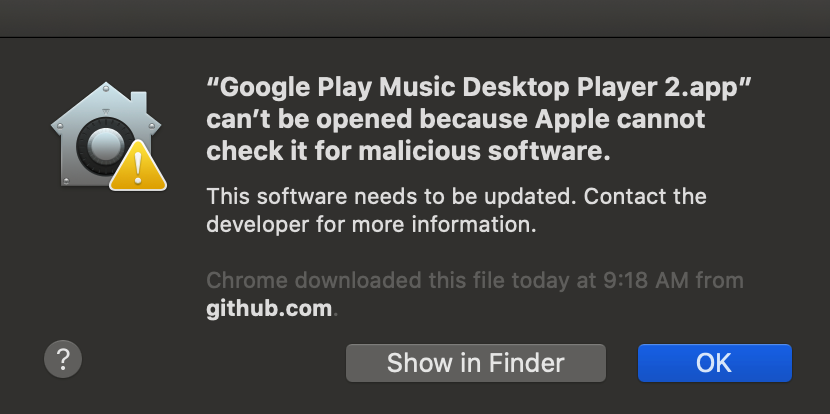
How do you get around this?
kp37
on 12 Dec 2019
Any idea when we'll get a release with this fix? Currently the Linux Flatpak is suffering from this issue but they track releases, not master.
 Pobega
on 12 Dec 2019
Pobega
on 12 Dec 2019
I'm in the same boat as @Pobega. What can we do to help get a release with this fix out there?
 samiconductor
on 12 Dec 2019
samiconductor
on 12 Dec 2019
I ran into this problem on MacOS, but installing this version fixed it: 3667-40008106-gh.circle-artifacts.com/0/home/circleci/project/dist/installers/darwin/Google%20Play%20Music%20Desktop%20Player.zip
How do you get around this?
@kp37
This is unrelated to this issue. Googling should have helped you figure this out yourself easily. You can start here.
 jottr
on 12 Dec 2019
jottr
on 12 Dec 2019
To save others from having to hunt down the most recent MacOS build artifacts:
- Identify the last successful build for
Darwinon CircleCI. - Just plug the most recent build number into the following oneliner:
BUILD=3729 wget "$(curl -s https://circleci.com/api/v1.1/project/github/MarshallOfSound/Google-Play-Music-Desktop-Player-UNOFFICIAL-/3729/artifacts | grep -o 'https://[^"]*')"
Build 3729 works for me.
The same approach should also work with the linux builds.
jottr
on 12 Dec 2019
Can someone tell me why can't we have a brew formula for this app? So we can do brew install gpmdp --HEAD, instead every time having to go through hurdles whenever Google breaks API on a whim?
 agzam
on 12 Dec 2019
agzam
on 12 Dec 2019
@agzam It's open source, feel free to submit a PR or write one. :+1:
jostrander
on 12 Dec 2019
Oh, there is a formula, but the name of it makes it difficult to find ;)
brew cask info marshallofsound-google-play-music-player
sadly, it does not seem to support --head flag
agzam
on 12 Dec 2019
@NovaViper did you try the build that's linked 5 comments above yours?
this also worked for me. thank you
 c4naan
on 12 Dec 2019
c4naan
on 12 Dec 2019
(MacOS Catalina)
This morning I ran into this issue, and before searching I just instinctively wiped out ~/Library/Application\ Support/Google Play Music Desktop Player and then couldn't log back in. I was getting "Browser not secure, could not log you in" errors.
As of this comment this is the latest Darwin build: BUILD=3744 wget "$(curl -s https://circleci.com/api/v1.1/project/github/MarshallOfSound/Google-Play-Music-Desktop-Player-UNOFFICIAL-/3729/artifacts | grep -o 'https://[^"]*')"
Thanks to @jottr for the comment https://github.com/MarshallOfSound/Google-Play-Music-Desktop-Player-UNOFFICIAL-/issues/3660#issuecomment-565094820
 svpernova09
on 13 Dec 2019
svpernova09
on 13 Dec 2019
Would definitely like to see a release so we can get a flatpak update. I haven't been able to use any other Linux version of GPMDP for years because it just gives a white screen (which other opened issues have not resolved) so I have to use the flatpak.
 tjkirch
on 13 Dec 2019
tjkirch
on 13 Dec 2019
@NovaViper did you try the build that's linked 5 comments above yours?
Whoa, this did it! The regular build kept giving trouble this morning (after rebooting for Windows updates), but this one solved it.
 dmitriy461
on 13 Dec 2019
dmitriy461
on 13 Dec 2019
Is the plan to use this appveyor now instead of the GH releases section? It just barely noticed that's from over 1 year ago. O.o
 jwhipp
on 13 Dec 2019
jwhipp
on 13 Dec 2019
For those using the flatpak app, I found a workaround until a release is cut and flathub is updated. Basically, rebuild the flatpak and point it at the new .deb listed above.
- Get the flatpak source:
git clone 'https://github.com/flathub/com.googleplaymusicdesktopplayer.GPMDP.git'and cd in - Install dependencies:
flatpak install flathub org.freedesktop.Sdk/x86_64/18.08flatpak install flathub io.atom.electron.BaseApp//18.08
- Edit
com.googleplaymusicdesktopplayer.GPMDP.json:
- Change the
urlkey from github to the CI artifact link above,https://3667-40008106-gh.circle-artifacts.com/0/home/circleci/project/dist/installers/debian/google-play-music-desktop-player_4.6.1_amd64.deb - Change the
sha256just below it to the sha256 of the file
- Change the
- Build:
flatpak-builder build-dir com.googleplaymusicdesktopplayer.GPMDP.json - Now you can run using:
flatpak-builder --run build-dir com.googleplaymusicdesktopplayer.GPMDP.json google-play-music-desktop-player
tjkirch
on 13 Dec 2019
@NovaViper did you try the build that's linked 5 comments above yours?
https://ci.appveyor.com/api/buildjobs/amjhy1vx6gjpf31k/artifacts/dist%2Finstallers%2Fwin32%2FGoogle%20Play%20Music%20Desktop%20PlayerSetup.exeWhoa, this did it! The regular build kept giving trouble this morning (after rebooting for Windows updates), but this one solved it.
The one issue I'm stuck with is that for some reason the native Windows media controls work only half way -- I'm able to pause, but unable to resume. So I'm having to use the hotkeys, which is not as convenient.
Not sure if that's an issue with my setup, or other people have the same issue?
dmitriy461
on 13 Dec 2019
Still stuck on loading on ubuntu on https://3667-40008106-gh.circle-artifacts.com/0/home/circleci/project/dist/installers/debian/google-play-music-desktop-player_4.6.1_amd64.deb
 austin-xgen
on 13 Dec 2019
austin-xgen
on 13 Dec 2019
@dmitriy461 The one issue I'm stuck with is that for some reason the native Windows media controls work only half way -- I'm able to pause, but unable to resume. So I'm having to use the hotkeys, which is not as convenient.
Not sure if that's an issue with my setup, or other people have the same issue?
I have exactly the same issue! And it also says "no track playing" in the Windows Media Service / Volume overlay. Wasn't like that before :( Maybe a Windows update messed with it :(
WebFactoryLtd
on 13 Dec 2019
When will an official patch for this be released??
NovaViper
on 15 Dec 2019
Currently having this issue, stuck on the google play music loading screen
 Stevester118
on 15 Dec 2019
Stevester118
on 15 Dec 2019
I also have this issue, stuck on the google play music loading screen.
I have the latest version.
 robert9422
on 15 Dec 2019
robert9422
on 15 Dec 2019
Sorry, this link fixed it, for me. thanks.
https://ci.appveyor.com/api/buildjobs/amjhy1vx6gjpf31k/artifacts/dist%2Finstallers%2Fwin32%2FGoogle%20Play%20Music%20Desktop%20PlayerSetup.exe
robert9422
on 15 Dec 2019
I had the same issue, the build mentioned above fixed it but my Chromecast Audio is not detected anymore (it works as expected via https://play.google.com/ in a Chrome tab), I did not find related Chromecast issues reported, it's just me?
 ciarpame
on 15 Dec 2019
ciarpame
on 15 Dec 2019
Happens again on Catalina
 Darel13712
on 15 Dec 2019
Darel13712
on 15 Dec 2019
Same issue here. MacOS Catalina 10.15.2, GPMDP Version 4.6.1
 yarko686
on 16 Dec 2019
yarko686
on 16 Dec 2019
Are we going to see a 4.6.2 release?
It's been a year and a half since 4.6.1 and there's a ton of major/breaking problems for different platforms/distributions that have cropped up in that time.
Plus, some of the packages (Flatpak, Chocolatey) are now running a long way behind.
 agc93
on 16 Dec 2019
agc93
on 16 Dec 2019
Latest Darwin build (3744) working on MacOS Catalina 10.15.2
https://3744-40008106-gh.circle-artifacts.com/0/Users/distiller/project/dist/installers/darwin/Google%20Play%20Music%20Desktop%20Player.zip
 droM4X
on 16 Dec 2019
droM4X
on 16 Dec 2019
Running into this issue on Windows right now.
 yllekz
on 16 Dec 2019
yllekz
on 16 Dec 2019
@jostrander Hesitant to tag MarshallOfSound... Is 4.7.0 on a short timetable before release? I haven't seen a short list that needs to be completed, so I guess it's not making release anytime soon.
As mentioned by @agc93 a 4.6.2 release with some of the basic fixes like for this loading issue could reduce a lot of the recent issue reports? I don't know why it's happening lately (instead of June), but it seems to be affecting most users these days.
Alternatively, maybe MarshallOfSound can edit his comment at the top of the thread with links to where to find the working builds?
Are we going to see a 4.6.2 release?
It's been a year and a half since 4.6.1 and there's a ton of major/breaking problems for different platforms/distributions that have cropped up in that time.
IndefiniteBen
on 16 Dec 2019
Hello, Has this been fixed for Windows 10? I downloaded the latest version (4.6.1) on Windows 10 (Build 1909) and it's stuck on Loading Music Library at launch.
 pete360
on 16 Dec 2019
pete360
on 16 Dec 2019
@IndefiniteBen I don't make any decisions regarding releases, and I don't have the keys to sign anything for releases. I know that the outstanding login issue and user agent compatibility with YTM is a major blocker for doing a release currently. We can probably start gearing towards a release once that is finalized. Then we have to update the changelog, tag git, prepare releases through staging server for testing (All MarshallOfSound), and publish the release. I don't see there being a 4.6.2 unfortunately. If anything 4.7.0 will be the release version still, because there are 60+ commits in the backlog since 4.6.1, so it wouldn't be a small patch.
jostrander
on 16 Dec 2019
@jostrander I didn't expect you made the decisions, but judging by your comment you definitely know enough to make it clear that any kind of release (like @agc93 suggested) before 4.7.0 is impractical and would be a waste of time at this point.
In the meantime, for everyone who's still running into the issue, see the workaround (only personally tested on Windows).
Workaround
- Go to the build service website (history section):
- Windows: AppVeyor
- Mac/Linux systems: CircleCI or its workflows page
- Find the most recent (latest @20191216 linked) build that succeeded (which are the green ones).
- Find the artifacts page and download the file:
- Windows
- Mac/Linux: apparently there should be an artifacts tab on the CircleCI/workflows links, but I can't find them so can't mention how right now... There's direct links to the most recent versions earlier in the thread, and also instructions on how to download and build it. Alternatively, see this comment for using
wgetto update it on Mac.
- Install the new version and it should work!
If anyone wants to tell me where I'm wrong so I can edit my comment I welcome that.
IndefiniteBen
on 16 Dec 2019
In terms of getting/running new versions, are the build instructions in the README.md up2date? I haven't personally tried the npm builds and really haven't looked into the CI/CD configs, but if that works, it's another method. Not that it's everyone's cup of tea, but another method nonetheless.
jwhipp
on 16 Dec 2019
Linux builds for build 3751 #master:
https://3751-40008106-gh.circle-artifacts.com/0/home/circleci/project/dist/installers/debian/google-play-music-desktop-player_4.6.1_amd64.deb
https://3751-40008106-gh.circle-artifacts.com/0/home/circleci/project/dist/installers/debian/google-play-music-desktop-player_4.6.1_i386.deb
https://3751-40008106-gh.circle-artifacts.com/0/home/circleci/project/dist/installers/redhat/google-play-music-desktop-player-4.6.1.i386.rpm
https://3751-40008106-gh.circle-artifacts.com/0/home/circleci/project/dist/installers/redhat/google-play-music-desktop-player-4.6.1.x86_64.rpm
This build is working great. There are no stucks on logining and loading music library.
 MadRay
on 16 Dec 2019
MadRay
on 16 Dec 2019
@IndefiniteBen That command does not work for me. It says "the name of the server is unacceptable".
Darel13712
on 16 Dec 2019
Ok. For anyone who can't make that command line work -- just download https://3751-40008106-gh.circle-artifacts.com/0/home/circleci/project/dist/installers/darwin/Google%20Play%20Music%20Desktop%20Player.zip
for mac.
Just make sure to NOT click on button Youtube Music (Beta) It will brick app to a browser mode on YTM page and there's no way to go back. (Or is it? I donno, help me pls)
Darel13712
on 16 Dec 2019
there's no way to go back. (Or is it? I donno, help me pls)
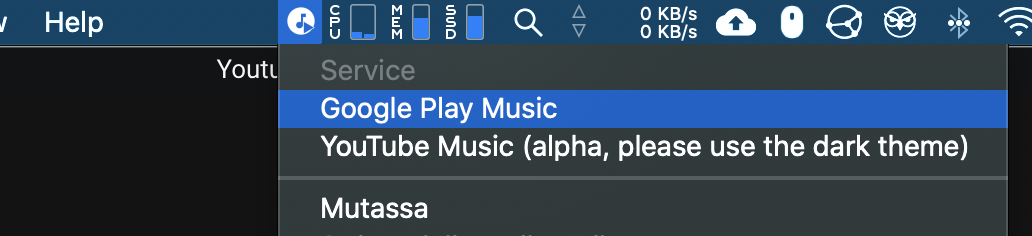
Just click on it's icon on menu bar and choose Google Play Music as service to switch back.
droM4X
on 16 Dec 2019
No such option
Darel13712
on 16 Dec 2019
droM4X
on 16 Dec 2019
Is there a way to find the link of downloads instead of clicking other's download link directly? No offense to people who's trying to help, but years of computer common sense won't let me just download from a direct link and install it that I never know where it's from.
 GreatBigWhiteWorld
on 17 Dec 2019
GreatBigWhiteWorld
on 17 Dec 2019
@GreatBigWhiteWorld here's the CI links from the README:
https://ci.appveyor.com/project/MarshallOfSound/google-play-music-desktop-player-unofficial
https://circleci.com/gh/MarshallOfSound/Google-Play-Music-Desktop-Player-UNOFFICIAL-
abion136
on 17 Dec 2019
@jostrander I understand you can't control it, but given that 4.7.0 is likely to be the next release to contain all these fixes (some of which are pretty fatal to the packaged versions*), is there any expectation, from what you can tell, that this release will come in any reasonable time frame? The release issue has been open for 7 months already...
While downloading CI artifacts can work around some of these bugs (as shitty a user experience as it is), forcing package maintainers to either a) field 18 months worth of bug reports waiting on an unresponsive upstream or b) maintain and triage packages based on CI-quality builds, seems like a pretty poor compromise.
agc93
on 17 Dec 2019
@droM4X Many thanks! Sorry for stupidity.
Other question is there a way to remove this annoying YTM button? Or what release does not have it?
Darel13712
on 17 Dec 2019
@abion136 Thank you for the link. How come I can't find any link to a download from those pages?
GreatBigWhiteWorld
on 17 Dec 2019
@GreatBigWhiteWorld If you're not suspicious about oneliner posted earlier you can check link from that command -- https://circleci.com/api/v1.1/project/github/MarshallOfSound/Google-Play-Music-Desktop-Player-UNOFFICIAL-/3729/artifacts
You can change the number of build to 3751. And find the link I gave you in the darwin section of the response.
Don't know how can anyone retrieve this links from the circleci in a normal way
Darel13712
on 17 Dec 2019
@Darel13712 Thank you. Don't know why this has to be this unusually hard.
GreatBigWhiteWorld
on 17 Dec 2019
How feasible would it be to get someone who has access upload the latest version to the GitHub releases? It would save a lot of people a lot of googling and messing with CircleCI links :)
 derwent-m-js
on 18 Dec 2019
derwent-m-js
on 18 Dec 2019
@GreatBigWhiteWorld the typical workflow would be to visit the CI page, find the most recent passing build for your platform, click its link, and then find the artifact section for that build. You want to download the artifact produced by the build - that is your .exe, .deb, etc.
Although, I can't seem to find a passing build on CircleCI that actually has an artifact section so... I'm building from source, so thankfully I don't actually have to deal with that issue though. I honestly don't know how people are finding artifacts to link to for Linux/OSX.
Don't know why this has to be this unusually hard.
Normally, it isn't :stuck_out_tongue:
abion136
on 18 Dec 2019
I've opened a PR to update brew cask using a CI build until a new release is cut
https://github.com/Homebrew/homebrew-cask/pull/74407
 FernandoMiguel
on 18 Dec 2019
FernandoMiguel
on 18 Dec 2019
Okay for anyone getting confused by the different links and CI providers, I've slapped together something to help you find the latest release...
GPMDP Release Finder will just poll through the CI build history on AppVeyor or CircleCI and pull the last successful build on master for your chosen platform. It's hardly bulletproof but easier than keeping track of all the URLs being thrown around IMO.
agc93
on 19 Dec 2019
Okay for anyone getting confused by the different links and CI providers, I've slapped together something to help you find the latest release...
GPMDP Release Finder will just poll through the CI build history on AppVeyor or CircleCI and pull the last successful build on
masterfor your chosen platform. It's hardly bulletproof but easier than keeping track of all the URLs being thrown around IMO.
Life saver! (Well, you stopped me having to waste my life figuring this out for myself 😆)
Thanks! 👍
 markgaze
on 19 Dec 2019
markgaze
on 19 Dec 2019
@agc93 Nice job! It would be great if it would list a couple of last releases, not just the last one.
Darel13712
on 19 Dec 2019
@Darel13712 If you create an issue at agc93/gpmdp-release I'll see what I can do. Ideally this app won't be needed for that long 😆
agc93
on 19 Dec 2019
OS: macOS Mojave 10.14.5
GPMDP Version: 4.6.1
Issue Descriptions:
Stuck on Loading Music Library after opening
I'm having this same problem. Newbie here, can someone stats steps to fix?
 turdfergusonpdx
on 21 Dec 2019
turdfergusonpdx
on 21 Dec 2019
Ok. For anyone who can't make that command line work -- just download https://3751-40008106-gh.circle-artifacts.com/0/home/circleci/project/dist/installers/darwin/Google%20Play%20Music%20Desktop%20Player.zip
for mac.Just make sure to NOT click on button Youtube Music (Beta) It will brick app to a browser mode on YTM page and there's no way to go back. (Or is it? I donno, help me pls)
Never mind, I downloaded this build and it's working fine now.
turdfergusonpdx
on 21 Dec 2019
Hi all,
I reqested @agc93 's neat search tool be added to the README. I guess we'll wait and see if it is accepted.
https://github.com/MarshallOfSound/Google-Play-Music-Desktop-Player-UNOFFICIAL-/pull/3745
 jnr2820
on 21 Dec 2019
jnr2820
on 21 Dec 2019
@turdfergusonpdx read this thread.
https://github.com/MarshallOfSound/Google-Play-Music-Desktop-Player-UNOFFICIAL-/issues/3660#issuecomment-567304602
IndefiniteBen
on 21 Dec 2019
Windows 10.
Well, I got a little further but now have a new issue. I installed Revo Uninstaller and did a complete uninstall and wipe of GPMD. Did a fresh install and it bring me to sign in the page, after signing I get a message from Google:
Couldn't sign you in
This browser or app may not be secure. Learn more
Try using a different browser. If you’re already using a supported browser, you can refresh your screen and try again to sign in.

pete360
on 24 Dec 2019
Why is this issue closed given that the bug still exists?
 cconeill
on 24 Dec 2019
cconeill
on 24 Dec 2019
Standard procedure is the close the issue when a bug fix has been merged into the code. The bug still exists in the version that was released, but does not exist in master, or future releases.
jostrander
on 24 Dec 2019
@jostrander Good practice, realy, but over the month I can't listen to music, and there is no any roadmap to release next working stable version.
The current released version doesn't work at all, this is a critical issue, and a standart procedure to make a patch release 14.6.2, and only then close the issue. Customers can't use master branch, folk don't know what "master" and "brach" mean, they just want to download app and listen to music.
I tried to use CI artifacts, but is crashed too.
@MarshallOfSound Any news to this?
 for7raid
on 25 Dec 2019
for7raid
on 25 Dec 2019
@for7raid just gonna stop you right there, this project is open source, their are no "customers". Everyone using this project does so for free, under the license in this repo.
We're working on finding a fix for all folks and at that point we will release a new version. No one gets paid to work on this though so patience is key here if you can't figure out how CI works.
MarshallOfSound
on 25 Dec 2019
@MarshallOfSound Excuse me, I know that is open source and UNOFFICIAL, and I have to say "thank you for all thees years", but right now you are losing your unpaid, but anyway customers, who can't use app. I afraid it can be very expensive pay for this community.
While you created the great public app, you got the responsibility to all users and does not have ability to hide behind "no pay no service". 155 comments here, more over 10 clones and grows every day.
If you have workaround - please clearly provide it (links to download, instructions), if you have roadmap - publish it.
All this is very untransparenty for us, but you have closed the issue and don't support users.
I'm not angry about this issue, I (and I'm not alone) confused how you answer to us.
I can't find any commits linked to this issue. Can you provide it?
for7raid
on 25 Dec 2019
@for7raid This is an open source project; everyone working on this probably does it as a hobby next to an actual job/study.
I can understand how it's annoying if you just download it to use, but you should've been aware that it's an open source project and what that means. If you want something reliable, use what is officially supported (by Google) and just use GPM in a browser. Chrome/Edge beta will even let you install a site as an app using PWA support.
IndefiniteBen
on 25 Dec 2019
@for7raid don't like it? Don't use it! As simple as that! Build a better app, fork this one find a better one ...
And no, Marshall has absolutely no responsibility towards anyone. Everything here is provided "as is".
WebFactoryLtd
on 25 Dec 2019
@for7raid See #3548 for the next release super ticket.
IndefiniteBen
on 25 Dec 2019
@WebFactoryLtd don't be so nasty asking people to leave the community. Nativefier or web version is a more stable way to use GPM now than GPMDP today and it's not an achievement for this community to be proud of. Don't act like there is no problem which @for7raid is referring to even if you don't like his wording.
@MarshallOfSound great you're joined the conversation. I myself don't intend to blame anyone here. Master branch stopped working for me several monthes ago. I use ci build or web version or other services. But let me rephrase what @for7raid was trying to convey here in my own words.
Repository says that current build is passing. Yet a lot of people have been experiencing this issue 3660 for a long period of time now. Current build does not work and is not usable. If it's passing then some tests are missing. Please consider adding info that this package is broken atm and there is work concerning this to readme and site. This is wrong that people have to find this thread asking the same questions of how to download ci build over and over again. It's simple respect to let people know what's going on.
Darel13712
on 25 Dec 2019
@Darel13712 you are more than welcome to write the tests yourself and submit a pr if you so desire. The build is passing because the thing builds. Build passing doesn't have to mean it works.
But more importantly, he doesn't technically owe us anything, that's what the license says. There is no warranty, etc. If I were to raise an issue on one or your repos, but you were on holiday, then what should I expect? One unpaid man owes us 0, and I'm just grateful he contributed to start off with.
b-n
on 25 Dec 2019
Guys, please, I never told you about warranty, I never told you drop all your business and quickly run to fix this issue.
Just ask yourself for what do you do public open source? Why you welcome only to respect, but not to criticism. If this project only hobby to feeling yourself - make it private, if you do it for helping to people, to get respect and acknowledgment - be welcome to any feedback. Please pay a simplest respect to users and talk to us, to everyone, who is confused like me, why bug is steel exists but the issue is closed without any commits, description, bug fix release.
Yes, nobody pay money for this job, but we pay respect, starts and likes to you, which can be change to real money, help you, when you go to find new good job. And it is "plus" to your karma, of course.
I'm the same developer as you all, and have a little open source project too, and fully understand what does it mean. Open source does not equal to free, open source does not equal to unresponsible. When Samuel reject my improvement request - it is fully ok to me, but close unresolved bug - very strange.
I'd like to make a PR to fix this, but master branch do not build on my windows machine, and again there is no any instruction how to run it. How can I help you, if you do not want to get my help?
I can test any CI build, but you do not provide any link, any ask for this.
How many downloads and active users did you have 3 months ago? And how many now? I think zero, because the app is unusable at all. Seems, the next good open source project is dying, I do afraid that never can use it again, and this is a reason why I cry here.
Now I go with WebFactoryLtd's suggest and uninstalled the app, with my sad.
R.I.P. GPMDP.
for7raid
on 26 Dec 2019
Does anyone know how to get back Chromecast button?
Mac OS Catalina 10.15.2 (19C57)
 DenisStetsenko
on 26 Dec 2019
DenisStetsenko
on 26 Dec 2019
Why was this marked off topic when I provided information as to what I did to resolve the loading library issue. It was a clean uninstall and re-install. Not my fault it brought up a new issue.
Also, why is this thread closed considering the bug still exists?
Windows 10.
Well, I got a little further but now have a new issue. I installed Revo Uninstaller and did a complete uninstall and wipe of GPMD. Did a fresh install and it bring me to sign in the page, after signing I get a message from Google:
Couldn't sign you in
This browser or app may not be secure. Learn more
Try using a different browser. If you’re already using a supported browser, you can refresh your screen and try again to sign in.
pete360
on 26 Dec 2019
@pete360 My best guess is its closed as the specific bug this was opened for (i.e. being stuck on the opening Loading Music Library) seems to have been fixed in current CI builds (tool for anyone without a CI build ).
I think that specific error is tracked in #3545 instead.
agc93
on 26 Dec 2019
Been involved in Open Source before it was called that. The only thing I ever feel that I owe my users is a working build from an official source. If I've broken the official build, then I either fix it or back out the change and re-release. Open Source is sometimes a pain in the butt but it's not hard.
 hpeyerl
on 27 Dec 2019
hpeyerl
on 27 Dec 2019
The following helped me on Fedora 31:
- Remove GPMDP
$ sudo dnf remove google-play-music-desktop-player-4.6.1.x86_64.rpm - Remove GPMDP config files
$ cd $HOME
$ rm -rf .config/Google\ Play\ Music\ Desktop\ Player/
- Download the latest rpm x64 build from Circle CI
- Go to https://circleci.com/vcs-authorize/
- Sign in
- Find here https://circleci.com/gh/MarshallOfSound/Google-Play-Music-Desktop-Player-UNOFFICIAL- the latest successfully build with jobname "artifact_gather" and click it
- Go to artifacts tab, find there the link to google-play-music-desktop-player-4.6.1.x86_64.rpm and copy it.
- Download the build from the copied link
$ wget https://3838-40008106-gh.circle-artifacts.com/0/home/circleci/project/dist/installers/redhat/google-play-music-desktop-player-4.6.1.x86_64.rpm
- Install it using
$ sudo dnf install google-play-music-desktop-player-4.6.1.x86_64.rpm
 sonnymilton
on 28 Dec 2019
sonnymilton
on 28 Dec 2019
As I said up in the original comment that closed this issue, this issue is fixed in master and will be released once we've got a the following things:
- The user agent issue in #3545 figured out
- A green build
- Me having spare time to actually organize and run a release
I'm going to lock this out for now to avoid notification spam, if you want CI builds but don't know how to get them it looks like an awesome community member (sorry not sure who originally built it) has made a handy tool for fetching CI builds.
MarshallOfSound
on 28 Dec 2019
There are also 4.7.0 RC builds available over here --> https://github.com/MarshallOfSound/Google-Play-Music-Desktop-Player-UNOFFICIAL-/issues/3545#issuecomment-569379704
Check out that comment and follow the instructions there
MarshallOfSound
on 28 Dec 2019
Related issues
 EzraLopez
·
4Comments
EzraLopez
·
4Comments
 PazerOP
·
4Comments
PazerOP
·
4Comments
 Nxt3
·
4Comments
Nxt3
·
4Comments
 darkvertex
·
4Comments
darkvertex
·
4Comments
 damiong28
·
3Comments
damiong28
·
3Comments
Most helpful comment
For lazy OS X users: https://3667-40008106-gh.circle-artifacts.com/0/home/circleci/project/dist/installers/darwin/Google%20Play%20Music%20Desktop%20Player.zip
May become dead in the future, I don't know how long Circle retains artifacts.
Thanks a lot for the quick fix, btw