Google-play-music-desktop-player-unofficial-: Dock Icon disappeared from install Multiple Linux Flavors (still shows on listing in ubuntu software)
Checklist:
[ x] I have checked that there are no issues with similar or the same content
YOU SHOULD CHECK CLOSED ISSUES ASWELL
- [x ] I have checked the FAQ (https://github.com/MarshallOfSound/Google-Play-Music-Desktop-Player-UNOFFICIAL-/wiki/FAQ) and the answer I am looking for is not there
- [x ] I have double checked and can reproduce the issue
OS: Ubuntu 18.04 LTS
GPMDP Version: 4.6.1
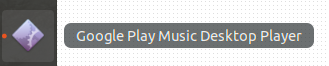
Issue Descriptions: The icon is appearing as the default for no icon. It worked in previous versions
Steps to Reproduce: Just install it. I had it installed then one day it disappeared. Have un/reinstalled several times. There used to be one with the electron symbol in the icon and one with an orange slice circle type thing. The electron one is gone and this is the latter. It is a snap.
 rgordon95
All 6 comments
I was able to temporarily fix this by doing the following:
first download the icon file from the repo
1) navigating to the application folder ~/snap/google-play-music-desktop-player/current/usr/bin/
2) right clicking google-play-music-desktop-player
3) clicking properties
4) dragging the svg file downloaded from the repo into the blank icon spot.
caveats are this does not update the app in the applications drawar and must be launched from the path described above.
rgordon95
on 6 Mar 2019
Can confirm this is happening on KDE Plasma too
 blazingkin
on 9 Mar 2019
blazingkin
on 9 Mar 2019
updated title to reflect more widespread issue
rgordon95
on 9 Mar 2019
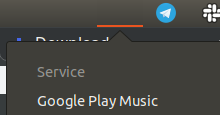
There is no icon in tray too.
 madaolex
on 21 Mar 2019
madaolex
on 21 Mar 2019
can confirm latest (3/22) update does not fix
rgordon95
on 22 Mar 2019
This will be fixed in an upcoming Electron update
 MarshallOfSound
on 23 Apr 2019
MarshallOfSound
on 23 Apr 2019
Related issues
 EzraLopez
·
4Comments
EzraLopez
·
4Comments
 ARTVRO
·
3Comments
ARTVRO
·
3Comments
 xnaas
·
4Comments
xnaas
·
4Comments
 PazerOP
·
4Comments
PazerOP
·
4Comments
 timp3289
·
3Comments
timp3289
·
3Comments
Most helpful comment
There is no icon in tray too.

