Google-play-music-desktop-player-unofficial-: Missing Icon on Mac OS
OS:
Mac OS Sierra 10.12.6
GPMDP Version:
4.6.1
Issue Descriptions:
The App Icon is missing in Finder and Dock
Steps to Reproduce:
Download GPMDP, unpack it ans open it. You will see the generic Mac OS app icon in the Finder and the Dock.
Possible Solution
It seems like the app icon file electron.icns is corrupted or missformated. I have re-saved the app icon using the app ”iConvert Icons“ replaced it in the app’s content folder (cleared the app cache on my mac; restart Finder and Dock) and then all works fine.
Please find the fixed icns-file attached.
 supermueller
All 7 comments
👋 Thanks for opening your first issue here! If you're reporting a 🐞 bug, please make sure you include steps to reproduce it. We get a lot of duplicate issues on this repo, so please double check now that your issue has not already been solved or doesn't have an open issue already.
To help make it easier for us to investigate your issue, please follow the contributing guidelines and ensure the issue template was filled out.
![welcome[bot] picture](https://avatars.githubusercontent.com/in/4141?v=4&s=40) welcome[bot]
on 3 Aug 2018
welcome[bot]
on 3 Aug 2018
For me the icon is missing but only on non retina external screens. When I move the dock to MacBook retina screen the icons appears just fine. Same issue in Finder. Icon is fine when Finder is on retina screen but breaks as soon as I move Finder to external non-retina display. Hope this helps. Thanks for amazing app!
 kamilpaluch
on 3 Aug 2018
kamilpaluch
on 3 Aug 2018
I have just tested the app on my MacBook pro and the icon looks fine. I still think it’s a wrong formatted or corrupted icns file.
supermueller
on 5 Aug 2018
This has been fixed in master
 MarshallOfSound
on 6 Aug 2018
MarshallOfSound
on 6 Aug 2018
I do not have an icon in dock or finder for GPMDP version 4.6.1 on Mac El Capitan 10.11.6 on mid 2012 Mac Mini using a non-retina external monitor. I have downloaded and installed a fresh version from the website and it downloads and unzips and does not have an icon for the dock. The icon in the top tray shows when the app is running. I have tried reinstalling, rebooting computer and closing and opening the app.
 Chewieez
on 29 Sep 2018
Chewieez
on 29 Sep 2018
@MarshallOfSound this is still happening for me on latest version
 dstarh
on 2 Nov 2018
dstarh
on 2 Nov 2018
@MarshallOfSound This issue is still happening in the latest build (4.6.1) on non-retina external displays. Please see screenshots for comparison.
Retina:
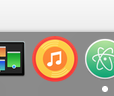
Non-Retina:

 bassmastry101
on 27 Mar 2019
bassmastry101
on 27 Mar 2019
Related issues
 greghesp
·
3Comments
greghesp
·
3Comments
 St0rmwindX
·
3Comments
St0rmwindX
·
3Comments
 timp3289
·
3Comments
timp3289
·
3Comments
 amgrider
·
3Comments
amgrider
·
3Comments
 tehdef
·
4Comments
tehdef
·
4Comments
Most helpful comment
For me the icon is missing but only on non retina external screens. When I move the dock to MacBook retina screen the icons appears just fine. Same issue in Finder. Icon is fine when Finder is on retina screen but breaks as soon as I move Finder to external non-retina display. Hope this helps. Thanks for amazing app!