Google-play-music-desktop-player-unofficial-: Two clicks necessary to enter search field
OS: Windows 10
GPMDP Version: 4.6.1
Issue Descriptions: When clicking on the search field when the window is inactive, a second click is necessary to actually start typing. This issue is present since 4.6 and did not appear before. This seems like a minor issue but it does get annoying after a while.
Steps to Reproduce: Open both GPMD and Notepad side-by-side. Use Notepad and then click on the GPMD search.
Also, thanks for all the great work you do! :)
 sigma67
All 12 comments
👋 Thanks for opening your first issue here! If you're reporting a 🐞 bug, please make sure you include steps to reproduce it. We get a lot of duplicate issues on this repo, so please double check now that your issue has not already been solved or doesn't have an open issue already.
To help make it easier for us to investigate your issue, please follow the contributing guidelines and ensure the issue template was filled out.
![welcome[bot] picture](https://avatars.githubusercontent.com/in/4141?v=4&s=40) welcome[bot]
on 14 Jul 2018
welcome[bot]
on 14 Jul 2018
I can't reproduce this :confused:
 jostrander
on 14 Jul 2018
jostrander
on 14 Jul 2018
@jostrander
Try to switch from another app to gpmdp by clicking in the search field - dropdown opens, but no focus on input. (os: ubuntu16.04, gpmdp: 4.6.0)
 Art4es
on 16 Jul 2018
Art4es
on 16 Jul 2018
I did exactly that, however I'm using latest master (which is basically 4.6.1 currently). Was able to type immediately.
jostrander
on 16 Jul 2018
Can confirm that this is an issue on my end. Version 4.6.1, Windows 10.
 AndrewMuise
on 16 Jul 2018
AndrewMuise
on 16 Jul 2018
I can confirm this bug as well (Windows 10, GPMDP 4.6.1), however it doesn't happen every time. You can see it in the GIF below (the mouse cursor glows yellow when I click).

 reduckted
on 17 Jul 2018
reduckted
on 17 Jul 2018
From the screencast that @reduckted provided it look like this is a GPM issue, the DOM clearly received the click event as the suggestions appeared. My guess is that GPM are handling click events in a weird way and somehow this is an edge case.
 MarshallOfSound
on 17 Jul 2018
MarshallOfSound
on 17 Jul 2018
Hmm, I'm not so sure about that. I can reproduce this about 60-70% of the time in GPMDP, but I haven't been able to reproduce it at all in Chrome. Here's a diagram of how I can reproduce it.
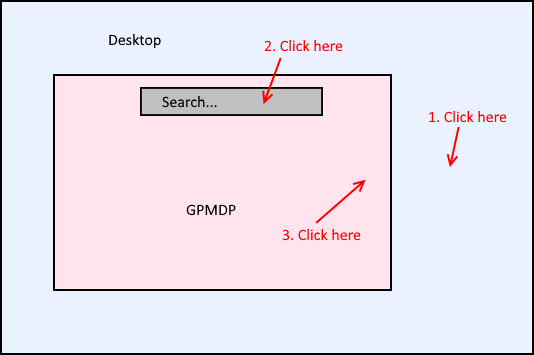
- Click on the desktop to take the focus away from GPMDP.
- Click on the search box in GPMDP (the search box may or may not get the focus at this point).
- Click somewhere else in GPMDP to close the dropdown.
- Repeat.
For step 1, you don't have to click on the desktop. Clicking in another application would also be sufficient.
reduckted
on 17 Jul 2018
Related to the back button listener maybe?
jostrander
on 17 Jul 2018
Not happening for me in Chrome either, only 100% of the time in GDMDP. I also tried disabling most of the Desktop settings I had checked which unfortunately made no difference.
sigma67
on 17 Jul 2018
This is still happening for me. Windows 10, 4.6.1
 vegeta897
on 12 Feb 2019
vegeta897
on 12 Feb 2019
This was still happening to me on v4.6.1 (same version as my last comment a while ago), _but_ I've been using the latest Electron v4 build from #3588 (this is the artifact, I think), and I can no longer reproduce it. Perhaps it's electron-related, or maybe it's just a coincidence and something changed on GPM's side of things. 🤷♂
reduckted
on 2 Dec 2019
Related issues
 amgrider
·
3Comments
amgrider
·
3Comments
 PazerOP
·
4Comments
PazerOP
·
4Comments
 Gimbergsson
·
3Comments
Gimbergsson
·
3Comments
 tehdef
·
4Comments
tehdef
·
4Comments
 ivko1950
·
4Comments
ivko1950
·
4Comments
Most helpful comment
Hmm, I'm not so sure about that. I can reproduce this about 60-70% of the time in GPMDP, but I haven't been able to reproduce it at all in Chrome. Here's a diagram of how I can reproduce it.
For step 1, you don't have to click on the desktop. Clicking in another application would also be sufficient.