Google-play-music-desktop-player-unofficial-: Relatively High CPU Usage When Paused and not Minimised
First off, I have seen that there already are a lot of issues concerning CPU usage. But I think that mine is different.
OS: Ubuntu 17.04
GPMDP Version: 4.3.0
Issue Descriptions:
Google Play Music Player has an (in my opinion) fairly low CPU usage when playing music:

Great work on that! :+1:
However, the CPU usage is just as high (or higher!) when the music is paused:

When taking this screenshot, the Google Play Music Desktop Player window was open on another workspace, but playback was paused. Minimising the window solves the issue. It does not affect the issue whether the window is open on current or another workspace.
If Google Play Music is opened in Chrome, the CPU usage is similar while playing music. But it goes down to 0 when music is paused, regardless of whether the window is visible or not.
To summarise, I’d expect the CPU usage of Google Play Music Desktop Player to drop to zero shortly after pausing playback.
(Please excuse my backup tool taking the first place in both screenshots).
Steps to Reproduce:
- Open Google Play Music Desktop Player
- Start some music.
- Pause the music.
- Wait a little for things to settle.
- Look at the CPU usage
- Minimise the window -> CPU usage goes to 0
- Open the window again -> CPU usage is at 2-5% again.
 jGleitz
All 14 comments
👋 Thanks for opening your first issue here! If you're reporting a 🐞 bug, please make sure you include steps to reproduce it. We get a lot of duplicate issues on this repo, so please double check now that your issue has not already been solved or doesn't have an open issue already.
To help make it easier for us to investigate your issue, please follow the contributing guidelines and ensure the issue template was filled out.
![welcome[bot] picture](https://avatars.githubusercontent.com/in/4141?v=4&s=40) welcome[bot]
on 16 Sep 2017
welcome[bot]
on 16 Sep 2017
I can confirm that is true. In my new MacBook Pro 2017 I can se a high CPU usage e extremely high energy impact on Activity Monitor which turn the fans on. It is a very nice app however, It would have a good performance improvement.
Hope that you guys can fix it soon.
Going back to web chrome version :-(
 betorobson
on 19 Sep 2017
betorobson
on 19 Sep 2017
@betorobson I'm with you on this one, on the new MacBook Pro 2017 too, had to uninstall GPMDP because of high CPU usage. Would be great to see this resolved.
 sliday
on 24 Oct 2017
sliday
on 24 Oct 2017
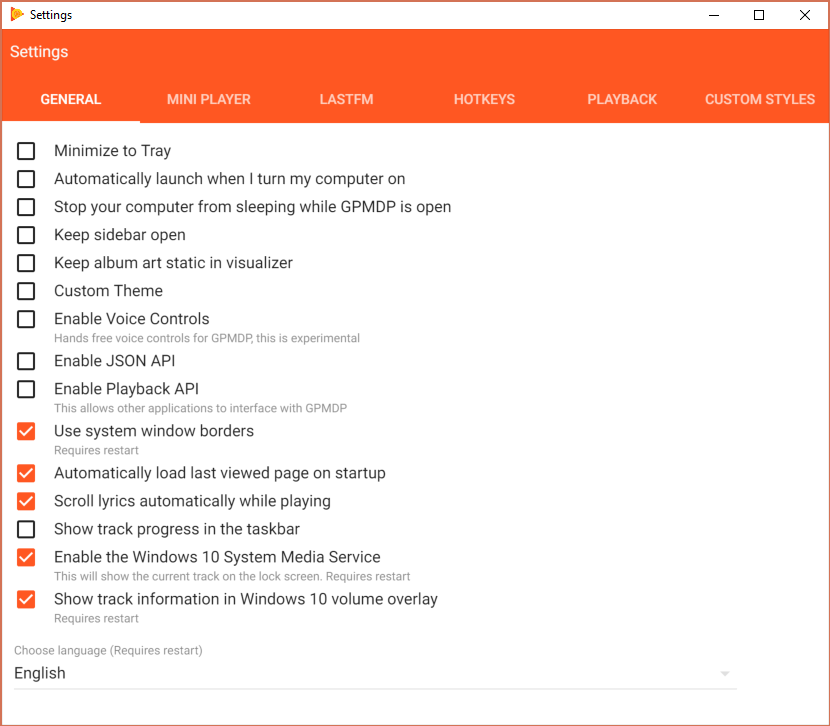
Same on Windows 10. Have always remember to minimize GPMDP so my laptop can make it till evening.
Maximized

Minimized

Settings
 pamidur
on 3 Nov 2017
pamidur
on 3 Nov 2017
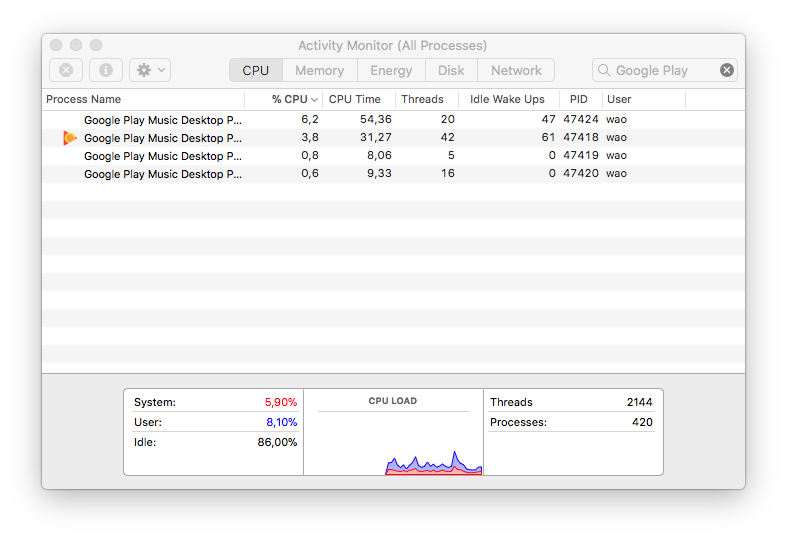
On MacOS High Sierra I can confirm the same thing: Minimised window use a lot less CPU than maximised window.
 jhkersul
on 8 Nov 2017
jhkersul
on 8 Nov 2017
Can you clone my fork where I upgraded to electron 1.7.9 and try that? For me, upgrade to Electron 1.7.9/Chrome 58 helped.
 yangwao
on 17 Nov 2017
yangwao
on 17 Nov 2017
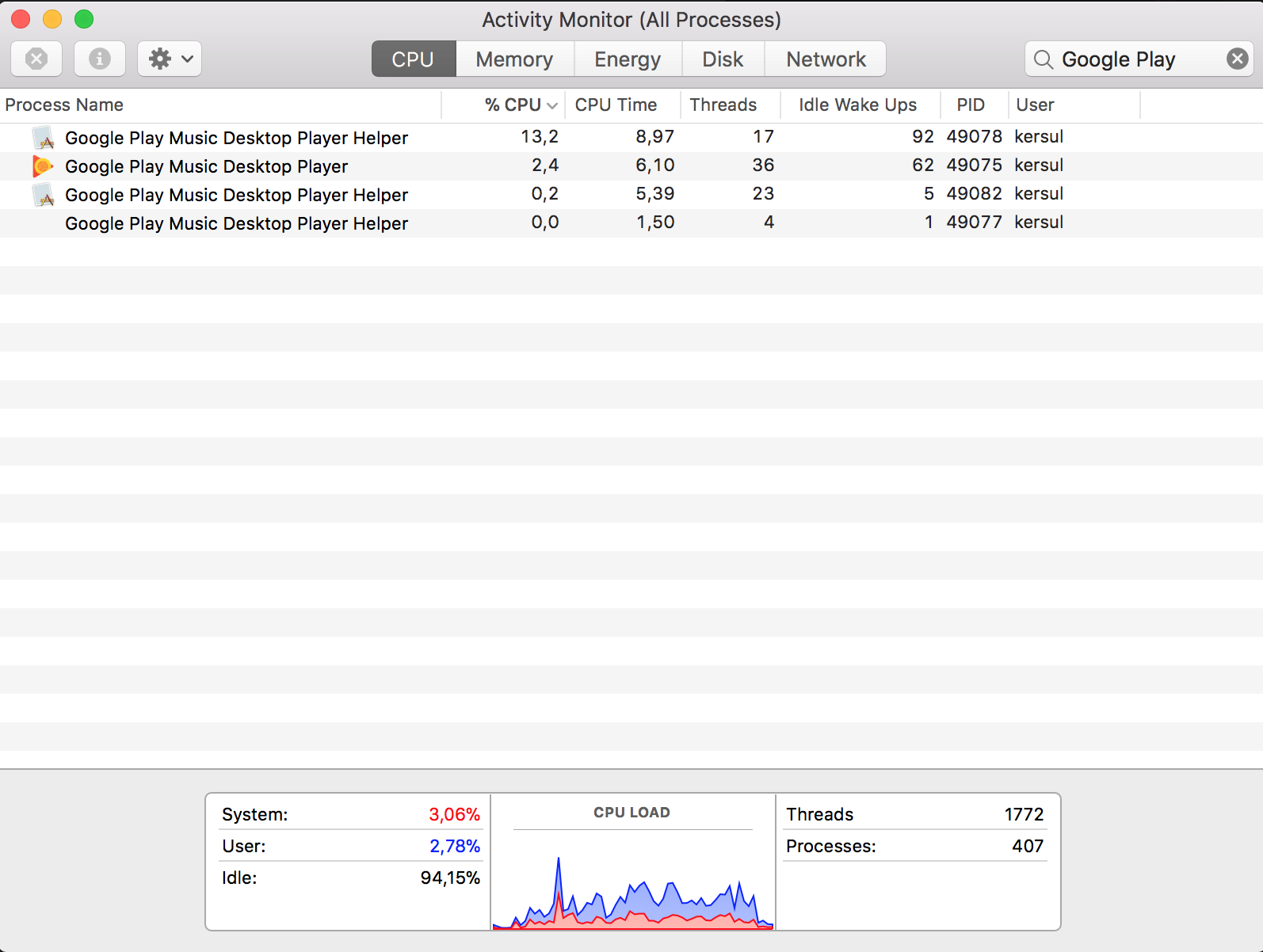
@yangwao I don't think that made any difference. Look:
Before:
After:
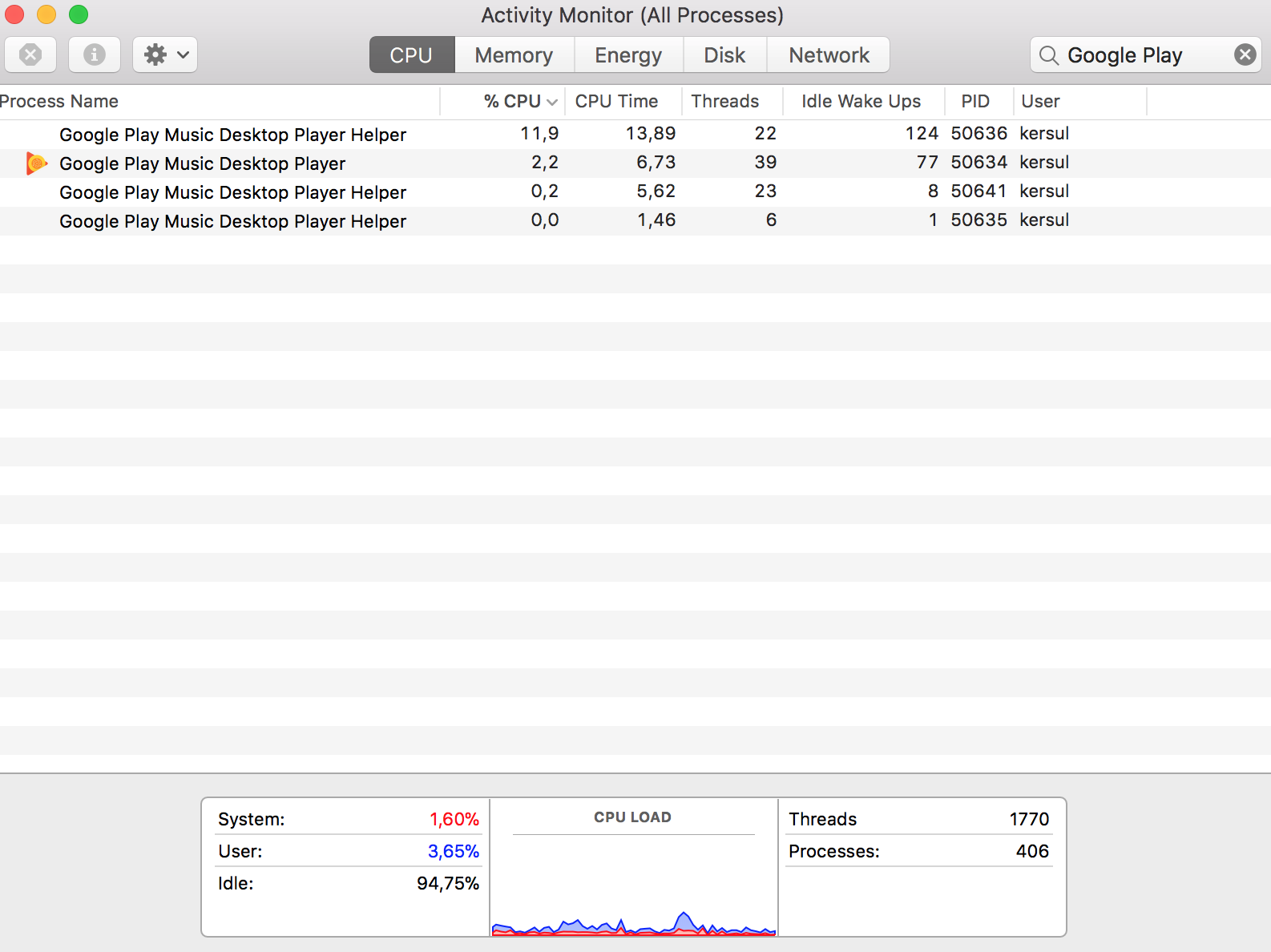
It's only making a huge difference when I minimise the window.
jhkersul
on 18 Nov 2017
Oh boy I haven't even noticed this before.
It's the same for me on Linux (elementaryOS). Checking htop if I don't minimize GPMDP the CPU will stay at 50% ish. Even if I just change my current app it won't go down.
 andbuitra
on 15 Jan 2018
andbuitra
on 15 Jan 2018
Same here, Win 10, ~15% CPU Usage
 andrewNestorenko
on 31 Jan 2018
andrewNestorenko
on 31 Jan 2018
Same here, Kubuntu 17.10, KDE 5.12
~20% CPU unless minimized.
 henkesn
on 8 Feb 2018
henkesn
on 8 Feb 2018
OSX Sierra, MacBook Pro (Retina, 15-inch, Mid 2015). I see 10-20% CPU when window open, but idle, and < 1% when minimized. This is particularly for the "helper" process. The parent does not seem so aggressive.
 markhamb
on 29 Mar 2018
markhamb
on 29 Mar 2018
On Ubuntu 18.04 uses over 25% of CPU in 4th gen Intel i5 even when not playing anything and is very slow and unresponsive.
 multiflexi
on 15 Apr 2018
multiflexi
on 15 Apr 2018
Guys, using this app is really too expensive. I compared playing music with Foobar with all sound processing and whistles takes about 0,3% on my system, but your app takes 1% even when the music is paused and up to 3% during playing. What's the advantage of using it actually if I can open an Edge window which uses just 0,5% of my CPU and the same amount of memory as your app does.
 keerah
on 7 May 2018
keerah
on 7 May 2018

This is how much resources it uses, recently it completely froze GNOME, had to kill it. I really wish to use it by I simply cannot now.
i5-4570, Ubuntu 18.04 with vanilla GNOME
multiflexi
on 8 May 2018
Related issues
 ARTVRO
·
3Comments
ARTVRO
·
3Comments
 tehdef
·
4Comments
tehdef
·
4Comments
 amgrider
·
3Comments
amgrider
·
3Comments
 PazerOP
·
4Comments
PazerOP
·
4Comments
 ivko1950
·
4Comments
ivko1950
·
4Comments
Most helpful comment
On MacOS High Sierra I can confirm the same thing: Minimised window use a lot less CPU than maximised window.