Google-play-music-desktop-player-unofficial-: No scrollbar for long list of chromecast devices on windows
Created on 21 Jul 2017
·
2Comments
·
Source: MarshallOfSound/Google-Play-Music-Desktop-Player-UNOFFICIAL-
OS: Windows 10 Pro N
Build: 14393.1480
Issue Descriptions:
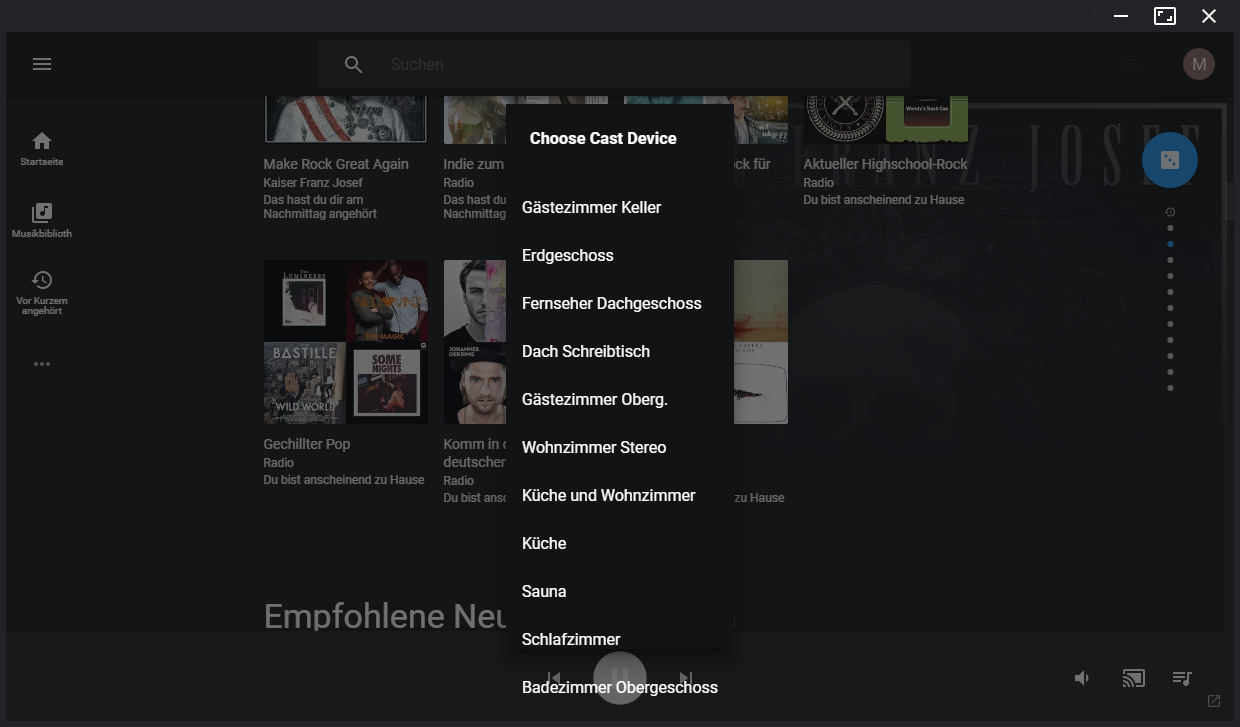
There is no scrollbar if the list of available chromecast devices entries fill up the available vertical space. The last visible entries are rendered outside of the list's borders (see screenshot).
Steps to reproduce:
Resize the application to have less vertical space available than the number of list entries and click on the cast button. The issue exists as well in fullscreen mode when there are too many entries (17 enries in my case at display resolution 1920x1080).
Screenshot of resized window:
typbug
 meggiman
All 2 comments
Thanks for the concise bug report. This should be fairly simple to fix, I just never had 17 devices to test the UI with.
 jostrander
on 21 Jul 2017
jostrander
on 21 Jul 2017
😄2
Dayum, that's a lost of chromecasts 😆
 MarshallOfSound
on 22 Jul 2017
MarshallOfSound
on 22 Jul 2017
Was this page helpful?
0 / 5 - 0 ratings
Related issues
 EzraLopez
·
4Comments
EzraLopez
·
4Comments
 Turbotailz
·
4Comments
Turbotailz
·
4Comments
 ARTVRO
·
3Comments
ARTVRO
·
3Comments
 oscarfroberg
·
3Comments
oscarfroberg
·
3Comments
 PazerOP
·
4Comments
PazerOP
·
4Comments
Most helpful comment
Thanks for the concise bug report. This should be fairly simple to fix, I just never had 17 devices to test the UI with.