Google-play-music-desktop-player-unofficial-: KDE + HiDPI: Wrong tray icon scale
OS: Kubuntu 16.10
Issue Descriptions: Scale of tray icon is off, it's way too big and cropped
Steps to Reproduce: Install GPMDP on Kubuntu, set Scale factor to 2 in Kubuntu Display settings.

 z0rc
z0rc
All 27 comments
This happens to me with Scale factor at 1 as well.
 OOPMan
on 19 Dec 2016
OOPMan
on 19 Dec 2016
@OOPMan thanks for update, as I haven't tested it with unscaled desktop.
z0rc
on 19 Dec 2016
IMO this is partly Chromium's fault and partly Kubuntu's fault.
Chromium due to the strange way they set tray icons and Kubuntu's for not doing what literally every other OS in the world does and scale the icon themselves.
I'll accept a PR to fix this but bearing in mind people have tried many times setting up a system of tray icons that works on every platform is quite tricky.
 MarshallOfSound
on 19 Dec 2016
MarshallOfSound
on 19 Dec 2016
Oh well. I don't really mind clicking on a funny icon, since I know the only funny icon is Play :-)
OOPMan
on 19 Dec 2016
Same problem on KDE neon. However Neon is practically identical to Kubuntu at this point.
 tjaart
on 20 Mar 2017
tjaart
on 20 Mar 2017
I'm having the same issue, KDE Plasman 5.9.4 Arch Linux 64bit. The tray looks exactly like z0rc posted.
 yochaigal
on 30 Mar 2017
yochaigal
on 30 Mar 2017
I too would love to see this icon fixed:), it looks horrible, I'm not on HiDPI either...
 zyrorl
on 9 Apr 2017
zyrorl
on 9 Apr 2017
Agrees, problem is exists on KDE Neon Developers Edition as well.
 Niklan
on 17 Apr 2017
Niklan
on 17 Apr 2017
Chiming in to say that on one KDE desktop (Arch) I have this issue, but not on another.
yochaigal
on 12 May 2017
Similar thing happening to me as well.
Fedora 26/Gnome 3.24.3. Screen resolution: 3200x1800, scale factor: 2

UPD: I'm using Top Icons plus with slightly increased icons size. Anyways, in default gnome tray it looks like this:

 sashasimkin
on 6 Aug 2017
sashasimkin
on 6 Aug 2017
Hmm I notice slack is handling it fine. I wonder what they are doing differently.
 jostrander
on 6 Aug 2017
jostrander
on 6 Aug 2017
Also seeing this on KDE Plasma 5.8 on Debian unstable. Screen resolution is 1920x1080, no scaling. Slack's icon looks a little weird (looks like it might be getting a little cut off) but I can clearly see it is Slack, unlike GMDP.
 rsnyman
on 16 Aug 2017
rsnyman
on 16 Aug 2017
KDE deb/Ubuntu/mint is doing the scaling issue on my 1366x768 laptop panel, so not just hidpi
 Deckee
on 24 Aug 2017
Deckee
on 24 Aug 2017
I fixed this on my system. Here's what I did:
Install the Papirus theme.
Install Hardcode-Tray.
Do:
sudo hardcode-tray --theme Papirus-Light -o gpmdp
Start/Restart GPMDP. You can mess around with Papirus-Dark or other variants until you find the perfect icon for your desktop.
yochaigal
on 13 Oct 2017
@yochaigal Thanks, working perfectly :-)
OOPMan
on 16 Oct 2017
Seems to have been fixed in Plasma 5.11.3 (on Arch), at least on a non-HiDPI display.
 argymeg
on 14 Nov 2017
argymeg
on 14 Nov 2017
As others have pointed out, this actually seems to be a Chromium/Electron issue. I see it with Keybase too, which is also an Electron app.
Thanks to the Papirus theme page on Github, I found a workaround. Preface the command with XDG_CURRENT_DESKTOP=Unity when running GPMDP. I edited my .desktop file (via the KDE _Edit Applications_ menu option) so that the command looks like this:
XDG_CURRENT_DESKTOP=Unity google-play-music-desktop-player
With that, my icon is fixed.
rsnyman
on 4 Jan 2018
Closing as stale/possibly fixed. If anyone has any further issues feel free to leave a comment and we'll look into it again.
jostrander
on 14 Jul 2018
Workaround with XDG_CURRENT_DESKTOP=Unity helps, but without it the issue is still present on KDE.
z0rc
on 14 Jul 2018
Yep, I still have the issue, it's just hidden with the workaround.
rsnyman
on 23 Jul 2018
As a last resort I suggest to start second instance of GPMDP with that variable already set if confirmed that it's KDE.
 ruslang02
on 5 Sep 2018
ruslang02
on 5 Sep 2018
On Manjaro I solve this problem by resize image files
- slack-taskbar-rest.png
- slack-taskbar-highlight.png
- slack-taskbar-unread.png
in folder /usr/lib/slack/resources/app.asar.unpacked/src/static/
Goog size is 24x24 px
Origin size was 64x64 px
 malyk2
on 22 Jan 2019
malyk2
on 22 Jan 2019
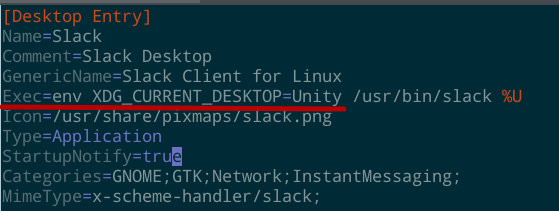
On LinuxMint I solve this problem by adding
env XDG_CURRENT_DESKTOP=Unity
variable to Exec section in /usr/share/applications/salck.desktop file
 rami-res
on 14 Mar 2019
rami-res
on 14 Mar 2019
The error is still present. KDE Neon unstable. Workaround with XDG_CURRENT_DESKTOP = Unity helps.
 Kazun3500
on 5 Apr 2019
Kazun3500
on 5 Apr 2019
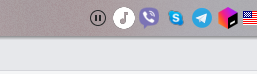
with workaround:
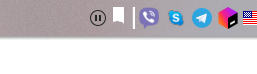
Without
Kazun3500
on 5 Apr 2019
A bit later can check on kubuntu 18.04
Kazun3500
on 5 Apr 2019
I fixed this on my system. Here's what I did:
Install the Papirus theme.
Install Hardcode-Tray.
Do:
sudo hardcode-tray --theme Papirus-Light -o gpmdpStart/Restart GPMDP. You can mess around with Papirus-Dark or other variants until you find the perfect icon for your desktop.
Just wanted to point out a couple minor details regarding the suggested invocation for hardcode-tray. Personally, I would use the following arguments instead:
sudo -E hardcode-tray -ct RSVGConvert -dt Papirus-Dark -lt Papirus-Light -o gpmdp
The reasoning behind those specific command arguments being:
sudo -Eprovides elevated privileges while retaining the original user's environment variables, which the hardcode-tray script uses to refine its course of action depending on which desktop environment is in use and its current scaling factor- RSVGConvert (librsvg) is the most reliable of the possible conversion backends that hardcode-tray makes use of and the one that the Papirus Team explicitly suggests manually selecting for this use case. I believe it has to do with its handling of their use of CSS to determine the light/dark/elementary variants of all their icons
- Setting the dark and light theme variants simultaneously leaves you with installed versions for each from a single command and safeguards against a theme or palette change down the road that sets you back at square one, potentially needing to go search for the solution again
- An optional command argument which could prove useful is
-s 22(alternatively-s 16or-s 24) if you've changed the default panel icon size for your DE and the script isn't giving you precisely the right size. Also some icons with a lot of negative space that look slightly undersized at 22px will look marvelous at 24px - The
-o gpmdpcan also be thought of as optional as without it the script will work its magic on any other troublesome apps that it finds are not playing nicely with the panel of your DE, not solely Google Play Music Desktop Player
 RogueScholar
on 7 Apr 2019
RogueScholar
on 7 Apr 2019
Related issues
 amgrider
·
3Comments
amgrider
·
3Comments
 damiong28
·
3Comments
damiong28
·
3Comments
 timp3289
·
3Comments
timp3289
·
3Comments
 PazerOP
·
4Comments
PazerOP
·
4Comments
 St0rmwindX
·
3Comments
St0rmwindX
·
3Comments
Most helpful comment
As others have pointed out, this actually seems to be a Chromium/Electron issue. I see it with Keybase too, which is also an Electron app.
Thanks to the Papirus theme page on Github, I found a workaround. Preface the command with
XDG_CURRENT_DESKTOP=Unitywhen running GPMDP. I edited my .desktop file (via the KDE _Edit Applications_ menu option) so that the command looks like this:With that, my icon is fixed.