Google-meet-grid-view: v1.37 Issues
If v1.37 is broken for you in any way please post here. Thank you.
 Fugiman
All 182 comments
V. 1.37 funziona solo se in Modifica Layout si seleziona Barra Laterale
 Robinlocksleyy63
on 17 Jun 2020
Robinlocksleyy63
on 17 Jun 2020
1.37 Still does not work (In all modes). It displays a simple list. Number of participants 24.
Сhrome version 83.0.4103.106.
I also tried 1.34 https://greasyfork.org/en/scripts/397862-google-meet-grid-view?version=809789, this script does not work either. The withdrawal of participants is still a list.
Thanks and good luck!
 freeitgroupe
on 17 Jun 2020
freeitgroupe
on 17 Jun 2020
Did you make sure to refresh the page? Can you show an image of it not working with the grid view menu open?
Fugiman
on 17 Jun 2020
V. 1.37 only works if Sidebar is selected in Edit Layout
Robinlocksleyy63
on 17 Jun 2020
Please make sure you're not still on v1.36, it _just_ released and you may need to refresh the page, restart the browser and/or restart the computer for it to fully take effect. You can verify you're using v1.37 in the menu inside meet itself.
Fugiman
on 17 Jun 2020
Ok I try it.
Robinlocksleyy63
on 17 Jun 2020
I reset all but the problem is present. Works if Sidebar is selected in Edit Layout.
I'm sorry
Robinlocksleyy63
on 17 Jun 2020
The version is 1.37
Robinlocksleyy63
on 17 Jun 2020
I did as you said. The result is on the screen.

freeitgroupe
on 17 Jun 2020
Installed v1.37.0 (Chrome Webstore Extension) on Microsoft Edge Canary.
Everything worked great until the Presentation Mode was enabled. The whole browser became unresponsive, had to shut down the browser.
When rejoined the meeting, the participant UI became the same parallel like this https://github.com/Fugiman/google-meet-grid-view/issues/225#issuecomment-645249816 https://github.com/Fugiman/google-meet-grid-view/issues/203#issue-638594751

When Sidebar https://github.com/Fugiman/google-meet-grid-view/issues/225#issuecomment-645240078 is chosen, the UI returns to it's expected behavior. Rest of the layouts make the browser to be frozen.
Software used:
- Windows 10
- Microsoft Edge Canary
- Version 85.0.549.0 (Official build) canary (64-bit)
- Official Chrome Extension
- Grid View v1.37.0

 sayedarifuddin
on 17 Jun 2020
sayedarifuddin
on 17 Jun 2020
Try selecting Sidebar in Edit Layout. It works
Robinlocksleyy63
on 17 Jun 2020
In Meet try selecting Sidebar in Edit Layout. It works
Robinlocksleyy63
on 17 Jun 2020
It works with more than 16 participants also choosing grid or auto layout.
It doesnt' work in presentation mode.
Software used:
Windows 10
Google Chrome
Versione 83.0.4103.106 (Build ufficiale) (a 64 bit)
Official Chrome Extension
Grid View v1.37.0
 marchris42
on 17 Jun 2020
marchris42
on 17 Jun 2020
Reopen issue #218 Google meet crashes...It didnt work..I thought it worked it worked on the first class when i rejoin it makes the screen freeze...Pls help me out again Fugiman....
 Pravin1001
on 17 Jun 2020
Pravin1001
on 17 Jun 2020
Did you make sure to refresh the page? Can you show an image of it not working with the grid view menu open?
We have updated to 1.37 grid..but still can see only 16 students whereas we could see 30 before in a class and more than 100 in a meeting
 sarayu1971
on 17 Jun 2020
sarayu1971
on 17 Jun 2020
Thanks Fugi for v1.37. I am also experiencing the same problem.
No problem with grid view for participants more than 16.
But once it is in presentation mode, google meet become unresponsive.
 Yukeechan
on 17 Jun 2020
Yukeechan
on 17 Jun 2020
I join this thread because I am in the same boat, waiting for a stable solution from the developers, to whom I am very grateful..... waiting for v1.38 <3
 vgisbert
on 17 Jun 2020
vgisbert
on 17 Jun 2020
FOUND OUT THE SOLUTION...
FIRST:-DONT ENABLE GRID VIEW BY DEFAULT..
SECOND:-JOIN THE MEETING AND CHANGE THE LAYOUT TO SIDEBAR..
THIRD:-NOW TURN ON GRID VIEW EXTENSION
IT WORKED PLS COMMENT BELOW IF IT WORKED..TRY IT @Fugiman
Pravin1001
on 17 Jun 2020
Some teachers were complaining and the sidebar thing did help.
 mrtavares
on 17 Jun 2020
mrtavares
on 17 Jun 2020
@Pravin1001 Did you have 17 or more participants in your Meet?
Grid View itself is now working. However, if you try to Present / Share Screen with 17+ participants, the tab will freeze. This seems to happen all the time. 16 or less seems to be fine.
Interestingly, we found that for some people, if they Change Layout --> Tiled, then Present / Share Screen, then Stop Sharing, the Meet (17+ participants) may hang. For the people who have this issue, it seems to happen every time. This happens whether the Extension is installed or not. Switching Layout back to Auto prevents the hang.
 rogerl19
on 17 Jun 2020
rogerl19
on 17 Jun 2020
@Pravin1001 Did you have 17 or more participants in your Meet?
Grid View itself is now working. However, if you try to Present / Share Screen with 17+ participants, the tab will freeze. This seems to happen all the time. 16 or less seems to be fine.
Interestingly, we found that for some people, if they Change Layout --> Tiled, then Present / Share Screen, then Stop Sharing, the Meet (17+ participants) may hang. For the people who have this issue, it seems to happen every time. This happens whether the Extension is installed or not. Switching Layout back to Auto prevents the hang.
I am in class with 37 people and my teacher is presenting and it is working @rogerl19
i will Attach a screenshot in a while
Pravin1001
on 17 Jun 2020
Dont work with slidebar. Still crashes...
but it works for a time
 EnzoLiv
on 17 Jun 2020
EnzoLiv
on 17 Jun 2020
@Pravin1001 Did you have 17 or more participants in your Meet?
Grid View itself is now working. However, if you try to Present / Share Screen with 17+ participants, the tab will freeze. This seems to happen all the time. 16 or less seems to be fine.
Interestingly, we found that for some people, if they Change Layout --> Tiled, then Present / Share Screen, then Stop Sharing, the Meet (17+ participants) may hang. For the people who have this issue, it seems to happen every time. This happens whether the Extension is installed or not. Switching Layout back to Auto prevents the hang.

This is my result which helps in Sidebar techique ....
Pravin1001
on 17 Jun 2020
Dont work with slidebar. Still crashes...
but it works for a time
Pls refer the screenshot
Pravin1001
on 17 Jun 2020
@Pravin1001 I have been testing on a Windows PC. What computer are you using? PC, Mac, Chromebook?
rogerl19
on 17 Jun 2020
@Pravin1001 I have been testing on a Windows PC. What computer are you using? PC, Mac, Chromebook?
I use a Windows 10 PC Version 1909 and a Google Chrome Version 83.0.4103.106 (Official Build) (64-bit)
Pravin1001
on 17 Jun 2020
I am working with a MacBook Pro with Google Chrome Version 83.0.4103.106 (Official Build) (64-bit)I I'm having same issues as freeitgroupe.
 mangosmommy
on 17 Jun 2020
mangosmommy
on 17 Jun 2020
i use a windows 10 pro 64bit
EnzoLiv
on 17 Jun 2020
FOUND OUT THE SOLUTION...
FIRST:-DONT ENABLE GRID VIEW BY DEFAULT..
SECOND:-JOIN THE MEETING AND CHANGE THE LAYOUT TO SIDEBAR..
THIRD:-NOW TURN ON GRID VIEW EXTENSION
IT WORKED PLS COMMENT BELOW IF IT WORKED..TRY IT @Fugiman
This solution works very well.
To make it work well it has a trick:
First you have to install the latest version of the extension from the link:
https://chrome.google.com/webstore/detail/google-meet-grid-view/kklailfgofogmmdlhgmjgenehkjoioip
Then, without activating the extension, enter the meeting link and change the presentation design to the sidebar:
In the three dots at the bottom right -> Change design -> Sidebar.
Later re-enter the meeting with the extension already active.
These settings will remain unchanged and working as long as we do not change anything (computer, browser or clear the browser cache)
If at any time we change the presentation layout of Meet and the GRID extension is active, the Meet program will hang, and only the meeting will be heard. The only way to restore normality is to disable the extension in:
chrome: // extensions /
and momentarily disable the GRID extension:
vgisbert
on 17 Jun 2020
Hi! don´t work whit 27 conections!
In this moment the program is down whit 27 #connections
 Sebenite
on 17 Jun 2020
Sebenite
on 17 Jun 2020
We have a 28 person one and its crashing all over the place.
Not even able to get to settings to change the view.
 it-administrator
on 17 Jun 2020
it-administrator
on 17 Jun 2020
@Sebenite @it-administrator Try changing the Layout to Sidebar, you'll find it in the 3-dots menu that is in the bottom-right-corner -> Change layout, then enable the extension. Worked for me this way.

sayedarifuddin
on 17 Jun 2020
Dont work with slidebar. Still crashes after some seconds.
 jamilatta
on 17 Jun 2020
jamilatta
on 17 Jun 2020
funciona bien durante un tiempo, luego tilda el navegador
 laturca311
on 17 Jun 2020
laturca311
on 17 Jun 2020
I'm glad that my contribution was!!!
 ivanmalgra
on 17 Jun 2020
ivanmalgra
on 17 Jun 2020
Can confirm that 1.37 causes the tab to become unresponsive when someone is presenting. Used it today with my staff meeting of 30 people. I can also confirm that changing the Meet layout to Sidebar helped significantly. Still a few glitches - duplicate videos temporarily when people were joining and people shifted (lag in video when rearranging) - but generally worked.
Chrome: 83.0.4103.106
Grid View: 1.37
Windows 7
 Eagle-Man
on 17 Jun 2020
Eagle-Man
on 17 Jun 2020
FOUND OUT THE SOLUTION...
FIRST:-DONT ENABLE GRID VIEW BY DEFAULT..
SECOND:-JOIN THE MEETING AND CHANGE THE LAYOUT TO SIDEBAR..
THIRD:-NOW TURN ON GRID VIEW EXTENSION
IT WORKED PLS COMMENT BELOW IF IT WORKED..TRY IT @FugimanThis solution works very well.
To make it work well it has a trick:
First you have to install the latest version of the extension from the link:
https://chrome.google.com/webstore/detail/google-meet-grid-view/kklailfgofogmmdlhgmjgenehkjoioip
Then, without activating the extension, enter the meeting link and change the presentation design to the sidebar:
In the three dots at the bottom right -> Change design -> Sidebar.
Later re-enter the meeting with the extension already active.These settings will remain unchanged and working as long as we do not change anything (computer, browser or clear the browser cache)
If at any time we change the presentation layout of Meet and the GRID extension is active, the Meet program will hang, and only the meeting will be heard. The only way to restore normality is to disable the extension in:
chrome: // extensions /
and momentarily disable the GRID extension:
Trying this with all my people tomorrow, they are busy setting their settings in anticipation.
hopefully this tides us all over until the fix of the fix is fixed.
it-administrator
on 17 Jun 2020
Seconding IT-Administrator's fix. We tested it this AM with success as well.
 rmusalMC
on 17 Jun 2020
rmusalMC
on 17 Jun 2020
Just a heads up that I ran my class today without GridView extension installed and I was still having the crashes with Presentation Mode. Every time I stopped presenting the page became unresponsive. It might be a Google side thing rather then a GridView thing. Not giving up! I'll be trying out GridView again tomorrow.
 mason195
on 17 Jun 2020
mason195
on 17 Jun 2020
With Google released something, previous GridView didn't work for a few days. Installed new version V1.37 from official store today. Had a few meetings.
Team meeting works fine - only 10+ participants.
Demo meeting, GridView failed me - 53 participants here based on my screenshot.
WIT meeting, GridView failed again - 37 participants here. It frozen my window/tab as soon as I turned GridView on ( I turned off GridView by default from last meeting). Chrome Task Manager told me that this tab using 36% of CPU. In the last 10 minutes or so, I selected "only show participants with video", that's 9 participants, and it worked. And it used 57% of CPU.
Chrome: Version 83.0.4103.97 (Official Build) (64-bit)
Grid View: 1.37
macOS Version 10.14.6
Seems for me that:
1.) 16 or less participants work fine; 17 or more will crash and freeze the meet tab/window in a short period of time.
2.) Sidebar layout works; Spotlight and Tiled will crash.
3.) With 17+ participants, only Sidebar layout works.
 yuhaian
on 17 Jun 2020
yuhaian
on 17 Jun 2020
FOUND OUT THE SOLUTION...
FIRST:-DONT ENABLE GRID VIEW BY DEFAULT..
SECOND:-JOIN THE MEETING AND CHANGE THE LAYOUT TO SIDEBAR..
THIRD:-NOW TURN ON GRID VIEW EXTENSION
IT WORKED PLS COMMENT BELOW IF IT WORKED..TRY IT @Fugiman
Will try tomorrow morning first thing.
sarayu1971
on 17 Jun 2020
Dear Fugiman, maybe this information will be useful:

freeitgroupe
on 18 Jun 2020
FOUND OUT THE SOLUTION...
FIRST:-DONT ENABLE GRID VIEW BY DEFAULT..
SECOND:-JOIN THE MEETING AND CHANGE THE LAYOUT TO SIDEBAR..
THIRD:-NOW TURN ON GRID VIEW EXTENSION
IT WORKED PLS COMMENT BELOW IF IT WORKED..TRY IT @FugimanThis solution works very well.
To make it work well it has a trick:
First you have to install the latest version of the extension from the link:
https://chrome.google.com/webstore/detail/google-meet-grid-view/kklailfgofogmmdlhgmjgenehkjoioip
Then, without activating the extension, enter the meeting link and change the presentation design to the sidebar:
In the three dots at the bottom right -> Change design -> Sidebar.
Later re-enter the meeting with the extension already active.
These settings will remain unchanged and working as long as we do not change anything (computer, browser or clear the browser cache)
If at any time we change the presentation layout of Meet and the GRID extension is active, the Meet program will hang, and only the meeting will be heard. The only way to restore normality is to disable the extension in:
chrome: // extensions /
and momentarily disable the GRID extension:Trying this with all my people tomorrow, they are busy setting their settings in anticipation.
hopefully this tides us all over until the fix of the fix is fixed.
Hello Thanks a bunch. Fixed my issue
sarayu1971
on 18 Jun 2020

Workaround is working for us on 1.37.0 pending the ultimate update fix.
it-administrator
on 18 Jun 2020
Workaround is doing well so far!
Looking forward for the next update fix.
Cheers!
- Is there any Google Meet extension to "freeze" while you are showing something such as a powerpoint slideshow?
Saludos desde Mexico!
 sgomezmx
on 18 Jun 2020
sgomezmx
on 18 Jun 2020
Froze my screen when I tried to use it with Edge, and not working at all with Chrome. Completely ruined my graduation.
 them1ghtydill
on 18 Jun 2020
them1ghtydill
on 18 Jun 2020
Meet was freezing up with or without Grid View enabled. Now it seems trouble free today and I didn't have to use the Layouts workaround. As far as I know, there were no changes to the extension. That leads me to believe the problems can't be related to this code. Thanks for all the hard work. You made the last couple of months more fun with Meet!
rogerl19
on 19 Jun 2020
Same with me ^
them1ghtydill
on 19 Jun 2020
Froze my screen when I tried to use it with Edge, and not working at all with Chrome. Completely ruined my graduation.
Update chrome or use firefox ..
Try the solution
https://github.com/Fugiman/google-meet-grid-view/issues/225#issuecomment-645291688
Pravin1001
on 19 Jun 2020
Meet was freezing up with or without Grid View enabled. Now it seems trouble free today and I didn't have to use the Layouts workaround. As far as I know, there were no changes to the extension. That leads me to believe the problems can't be related to this code. Thanks for all the hard work. You made the last couple of months more fun with Meet!
I agree with you, I spoke about this two days ago. https://github.com/Fugiman/google-meet-grid-view/issues/225#issuecomment-645236418. I rolled back to grid version 1.34 which used to work, but now it (1.34) has stopped working too.
freeitgroupe
on 19 Jun 2020
Meet was freezing up with or without Grid View enabled. Now it seems trouble free today and I didn't have to use the Layouts workaround. As far as I know, there were no changes to the extension. That leads me to believe the problems can't be related to this code. Thanks for all the hard work. You made the last couple of months more fun with Meet!
I agree with you, I spoke about this two days ago. #225 (comment). I rolled back to grid version 1.34 which used to work, but now it (1.34) has stopped working too.
The version 1.37 worked well and u have to use the technique which i provided..Check on that if it still doesnt work reply back...
https://github.com/Fugiman/google-meet-grid-view/issues/225#issuecomment-645291688
Pravin1001
on 19 Jun 2020
And i just wanted to know why does the time disappear while entering full screen..I want the time to be appearing always during the meet..
Can someone help me with it!!?
Pravin1001
on 19 Jun 2020
Meet was freezing up with or without Grid View enabled. Now it seems trouble free today and I didn't have to use the Layouts workaround. As far as I know, there were no changes to the extension. That leads me to believe the problems can't be related to this code. Thanks for all the hard work. You made the last couple of months more fun with Meet!
I agree with you, I spoke about this two days ago. #225 (comment). I rolled back to grid version 1.34 which used to work, but now it (1.34) has stopped working too.
The version 1.37 worked well and u have to use the technique which i provided..Check on that if it still doesnt work reply back...
#225 (comment)
It is possible to get the output of the grid according to your method and it works. However, if it is necessary to conduct operations with other layouts while previously disabling the Google meet grid view, we get a hang and the session breaks. And this greatly limits the possibilities for events.
Thanks for your method.
freeitgroupe
on 19 Jun 2020
This extension unfortunately just crashes now when joining a meet. Had to disable for now.
 jamesmcroft
on 19 Jun 2020
jamesmcroft
on 19 Jun 2020
Updating Google Chrome to 83.0.4103.106 and Grid View to 1.37 fixed the problem for me.
macOS: 10.15.15
 lpicanco
on 19 Jun 2020
lpicanco
on 19 Jun 2020
Many issues:
freeze
mic off
crashing
 Salvot69
on 19 Jun 2020
Salvot69
on 19 Jun 2020
Updating Google Chrome to
83.0.4103.106and Grid View to1.37fixed the problem for me.
macOS: 10.15.15
This hasn't worked for me in either Windows 10 or Ubuntu 20.04. Meet completely unresponsive with extension installed.
Chrome version: 83.0.4103.106
Grid view version: 1.37
 Scott3142
on 19 Jun 2020
Scott3142
on 19 Jun 2020
I'm getting tab crashes when I use the Grid View extension (they don't happen if I have it installed but don't use it), Chrome 83.0.4103.106, Grid View 1.37.0.
 sersorrel
on 19 Jun 2020
sersorrel
on 19 Jun 2020
Aguardando correção da versão 1.37 ou nova atualização por favor
 ghost
on 19 Jun 2020
ghost
on 19 Jun 2020
Made some quick instructions on the workaround:
https://docs.google.com/document/d/15h5JtPj0JyYD5BP03F0TmDABUFC8E33jfaByG0wJS7g
 ntoupin
on 19 Jun 2020
ntoupin
on 19 Jun 2020
Generally works well, but:
Had someone join a call via phone call, and all hell broke loose.
Tab hanging/crashing, videos not playing, unable to unmute myself.
Disabled the extension and everything was fine again.
 nbcraft
on 19 Jun 2020
nbcraft
on 19 Jun 2020
Worked well with the work around, until the recording of the Meet was stopped. Then the tab crashed.
Chrome 83.0.4103.106
Grid View 1.37
Windows 7
Eagle-Man
on 20 Jun 2020
Same problem here. Many teachers in ours school were kicked out of meetings, crashed...all sorts of trouble.
I hope it can be updated soon. Disabled it for my whole organization so far. We're working with Meet's integrated 16 people grid until this is resolved.
 CaptainStraw
on 20 Jun 2020
CaptainStraw
on 20 Jun 2020
Since the past few days, I have had similar issues as mentioned above.
First: the configuration I'm working with:
- Google Chrome Version 83.0.4103.106 (Official build) (64-bit)
- Windows 10 Pro N
- Google Gsuite with extension Google Meet Grid View 1.37.0
- In the settings: 'Enable grid automatically' checked, and Layout on 'automatic'.
Since the past few days my browser 'hangs' and eventually crashes. This happens when I go in Meet into presentation mode (i.e. share an Chrome tab), then go from Meet tab, to the tab to share with others, and switch back to the tab where the Meet video call is open.
Normally I see next to the video of the other participants and myself, also the tab (the document or window) that I share. Now I don't see that anymore, but I do see my profile photo several times.
I can then no longer select and/or close the shared tab or end sharing.
The workaround as described in the document https://docs.google.com/document/d/15h5JtPj0JyYD5BP03F0TmDABUFC8E33jfaByG0wJS7g/edit seems to work, but I have not been able to test it exhaustively with groups of participants.
The solution that Google recommends (updating the video adapters and video drivers) on their website puts the problem outside of Google (en their responsibility), but does not solve anything. (see Google's recommendation at https://support.google.com/meet/answer/7290456?hl=en)
I hope the bug in Meet Grid V1.37 is resolved quickly.
 bertklaver
on 20 Jun 2020
bertklaver
on 20 Jun 2020
No me funciona el workarround en "Sidebar" sino en "Spotlight".
PROBADO EN VARIAS PCs.
 pablogirado
on 21 Jun 2020
pablogirado
on 21 Jun 2020
Hello i tried grid view extension with more than 100 students first time its shown proper but second time its hang all the pc please provide quick solution for this i want to watch all students.
 vaishu09
on 21 Jun 2020
vaishu09
on 21 Jun 2020
Hi Fugi, today it seems worse. More trainers reported their google meet hanged or crashed. We have asked them to remove grid view extension. Hope it can be fixed soon. Thanks.
Yukeechan
on 22 Jun 2020
please help with the meet crashing on presentation mode
 minakshipodar
on 22 Jun 2020
minakshipodar
on 22 Jun 2020
If v1.37 is broken for you in any way please post here. Thank you.
My Google meet hangs when I use Grid View Extension. We were relying on Grid View to maintain class discipline but its not working
 ReubsSchool
on 22 Jun 2020
ReubsSchool
on 22 Jun 2020
We have removed this extension for our organisation for the time being due to this issue. We first noticed last Friday.
 thebigyarhoo
on 22 Jun 2020
thebigyarhoo
on 22 Jun 2020
Good morning,
Please let us know if this is going to be fixed or we need to find an alternative.
Thank you so much,
 ruruboxer
on 22 Jun 2020
ruruboxer
on 22 Jun 2020
All of the above issues to - on latest Chrome & 1.37 of meet.
crashes
unresponsive
duplicates host if you crash then you are muted, can't select anything.
 JayBeckitt
on 22 Jun 2020
JayBeckitt
on 22 Jun 2020
I see a lot of people in the comments here talking about how their school etc. depends on this extension in order to conduct classes properly. Understand that this is free software provided as-is without any support contract or obligation by the owner to maintain the functionality of the extension.
This is free software developed independently at personal cost to the contributors, if you want support this software in the hopes that Fugi has more time to fix issues when they arise, please use the SPONSOR button and send Fugi some money thanking them for their extension and hoping that they decide to continue to support it.
If you are a large organization using this extension for your whole domain because Google Meet on its own doesn't provide the right views that your org needs, then you should probably be seeking a different video conference client, not complaining that a hack (extension programming against google's UI which isn't a contract) that is provided by someone who built this to use for themself isn't working.
 ericvolp12
on 22 Jun 2020
ericvolp12
on 22 Jun 2020
I see a lot of people in the comments here talking about how their school etc. depends on this extension in order to conduct classes properly. Understand that this is free software provided as-is without any support contract or obligation by the owner to maintain the functionality of the extension.
This is free software developed independently at personal cost to the contributors, if you want support this software in the hopes that Fugi has more time to fix issues when they arise, please use the SPONSOR button and send Fugi some money thanking them for their extension and hoping that they decide to continue to support it.
If you are a large organization using this extension for your whole domain because Google Meet on its own doesn't provide the right views that your org needs, then you should probably be seeking a different video conference client, not complaining that a hack (extension programming against google's UI which isn't a contract) that is provided by someone who built this to use for themself isn't working.
Thank you! I didn't know about the sponsor button. Yay! I have been wanting to donate.
ruruboxer
on 22 Jun 2020
Suddenly snapped out of memory.. is one of them, others described above also happened to other teachers. Various different crashes.
 andreaspringfield
on 23 Jun 2020
andreaspringfield
on 23 Jun 2020
Try with workaround: https://docs.google.com/document/d/15h5JtPj0JyYD5BP03F0TmDABUFC8E33jfaByG0wJS7g/edit
but it worked for me with the Spotlight view, not with the Sidebar view....
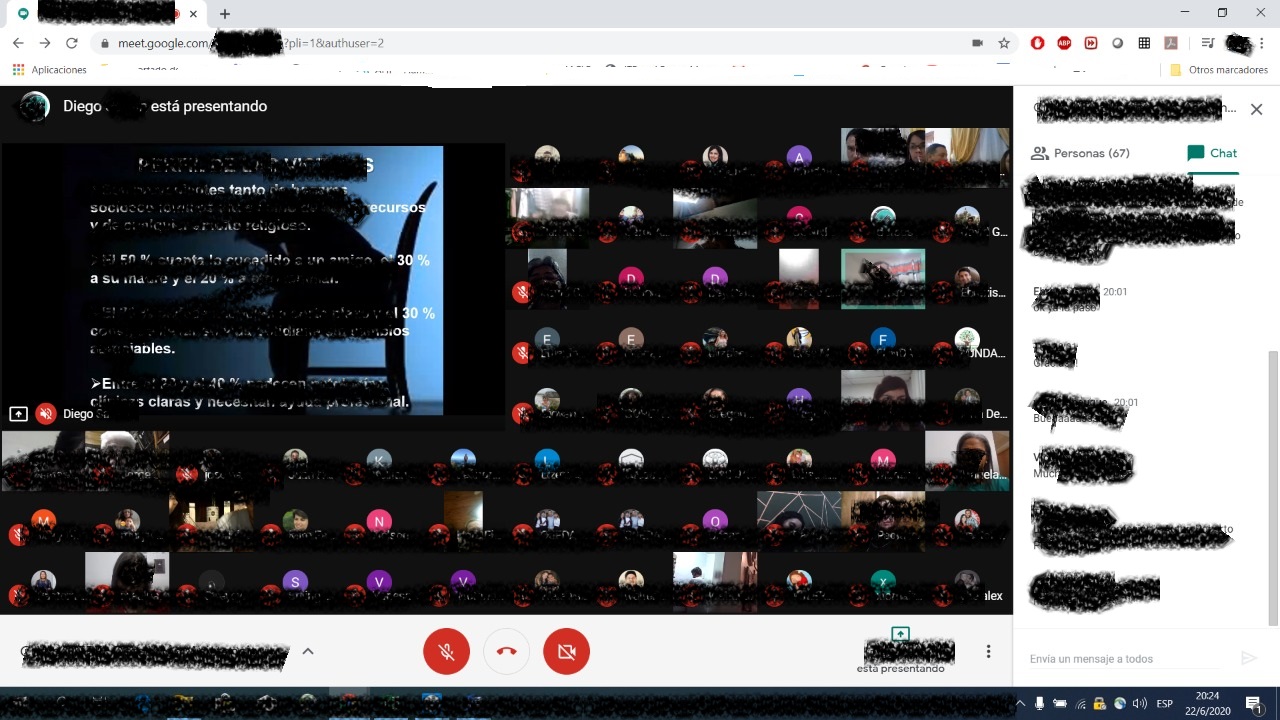
You can also try the following contribution:
https://github.com/Fugiman/google-meet-grid-view/issues/233#issuecomment-647504850
pablogirado
on 23 Jun 2020
I was facing this issue as well before, but it actually got fixed for me today. ~10 people conference.
I didn't do anything in particular to fix it.
 toml01
on 23 Jun 2020
toml01
on 23 Jun 2020
In the new version of Chrome - Chrome Versión 83.0.4103.116 (Build oficial) (64 bits)- it no longer fails in any way. On Friday or Monday I test it with many more users.
Regards.
pablogirado
on 25 Jun 2020
Depois da atualização do google chrome 83.0.4103.116 na segunda dia 22 ,fui testando e não ouve mais falhas .espero que continue assim.
ghost
on 25 Jun 2020
Today it seems to work with both Chrome 83.0.4103.116 and Firefox 77.01 on Ubuntu 18.04.
 benetti-smeup
on 25 Jun 2020
benetti-smeup
on 25 Jun 2020
Hello, All and @Fugiman
We've tested right now Google Chrome 83.0.4103.116 and Grid 1.37.0, both on Linux Mint and Windows and it seems to work as expected with 17+ people on the Meet.
We didn't experienced any crashes or tab freezing, hope this is a final state.
Best regards.
 mhzuchini
on 25 Jun 2020
mhzuchini
on 25 Jun 2020
It worked fine today with Chrome Version 83.0.4103.116 (Official Build) (64 bit) on windows 10. 35 attendees
 luisforj
on 26 Jun 2020
luisforj
on 26 Jun 2020
1.37 suddenly stop working today.. anyone else having the same issue?
I'm using Chrome Version 83.0.4103.116 (Official Build) (64-bit)
 melodiazz
on 30 Jun 2020
melodiazz
on 30 Jun 2020
Any idea about when is this going to be fixed?
 daniequy
on 30 Jun 2020
daniequy
on 30 Jun 2020
Hello, yesterday Google Grid View seems to be fine. But today it is not working again.
Some trainers reported Google Grid View shows participants in vertical form (see below). There are also trainers reported Google Chrome browser freeze with Google Grid View added.
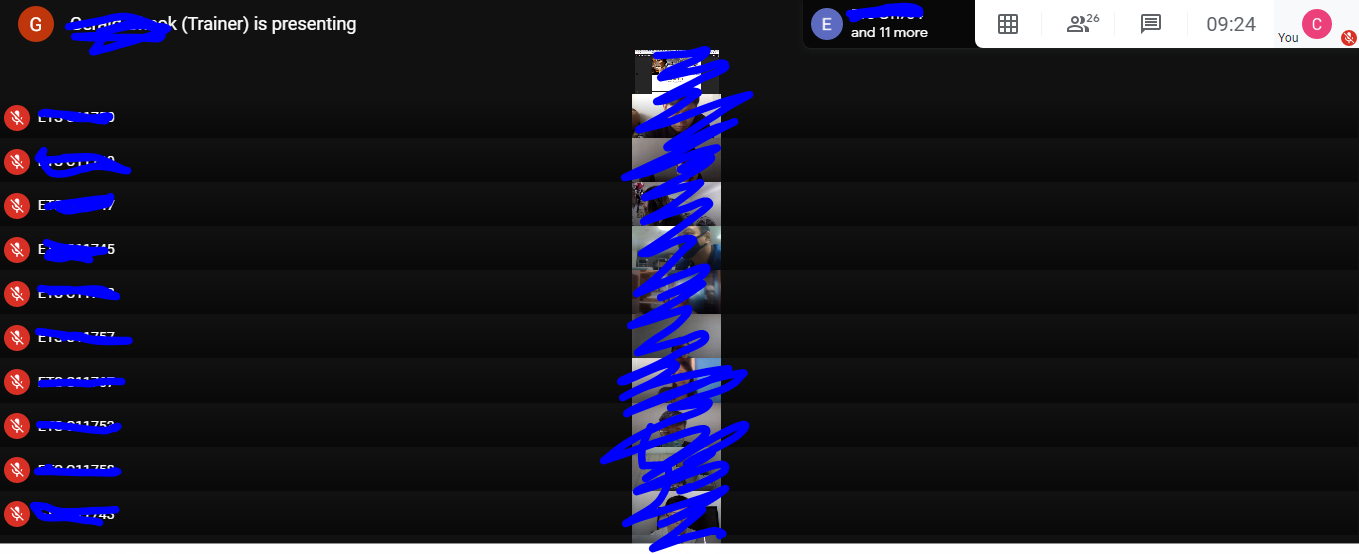
We are using:
Chrome Version 83.0.4103.116 (Official Build) (64-bit)
Grid View Version 1.37
Windows 8
Yukeechan
on 1 Jul 2020
241
 hxghf
on 1 Jul 2020
hxghf
on 1 Jul 2020
Today the grid view extension crashed...Why?
Till date it was working...Today morning it not works...
Is it a due to a new update?
Please help me
Pravin1001
on 1 Jul 2020
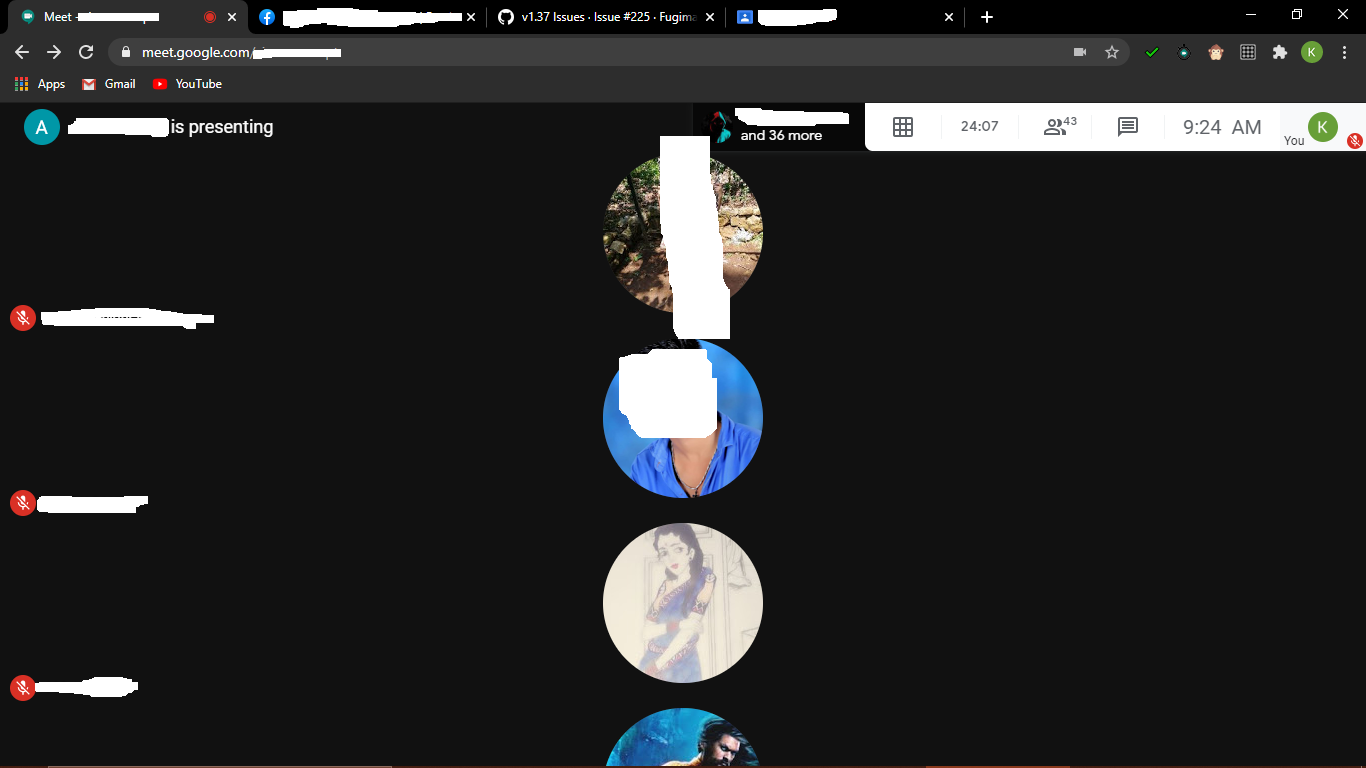
This is what it happened
Please help me out
Pravin1001
on 1 Jul 2020
If v1.37 is broken for you in any way please post here. Thank you.
Hello. I could see all 30 students in class after disabling grid view by default and selecting sidebar until yesterday. Today again i am able to see only 16.
sarayu1971
on 1 Jul 2020
Today the grid view extension crashed...Why?
Till date it was working...Today morning it not works...
Is it a due to a new update?
Please help me
Yes , it has crashed.
sarayu1971
on 1 Jul 2020
2 days ago, I was using the grid view and everything was fine. Recently I had a meet conference and the grid view does not work. It either displays participants in stacks or it just shows myself. Happened in both Google extension and Firefox extension. My system is running Linux Mint 19.3 Cinnamon.
 XavierMint-git
on 1 Jul 2020
XavierMint-git
on 1 Jul 2020
Broken again!
 tomviv2020
on 1 Jul 2020
tomviv2020
on 1 Jul 2020
Broken again, only show video of yourself
UPDATE:
Yesterday it was working fine, however as I notice in master the last commit was done 14 days ago, so it is defiantly not code break. Possibly js lib hosting issue?
Here is console error:
DevTools failed to load SourceMap: Could not load content for chrome-extension://kklailfgofogmmdlhgmjgenehkjoioip/browser-polyfill.js.map: HTTP error: status code 404, net::ERR_UNKNOWN_URL_SCHEME
 Bryksin
on 1 Jul 2020
Bryksin
on 1 Jul 2020
Extensão grid ainda apresentando problemas de visualização.
ghost
on 1 Jul 2020
I use the sidebar layout but is the same
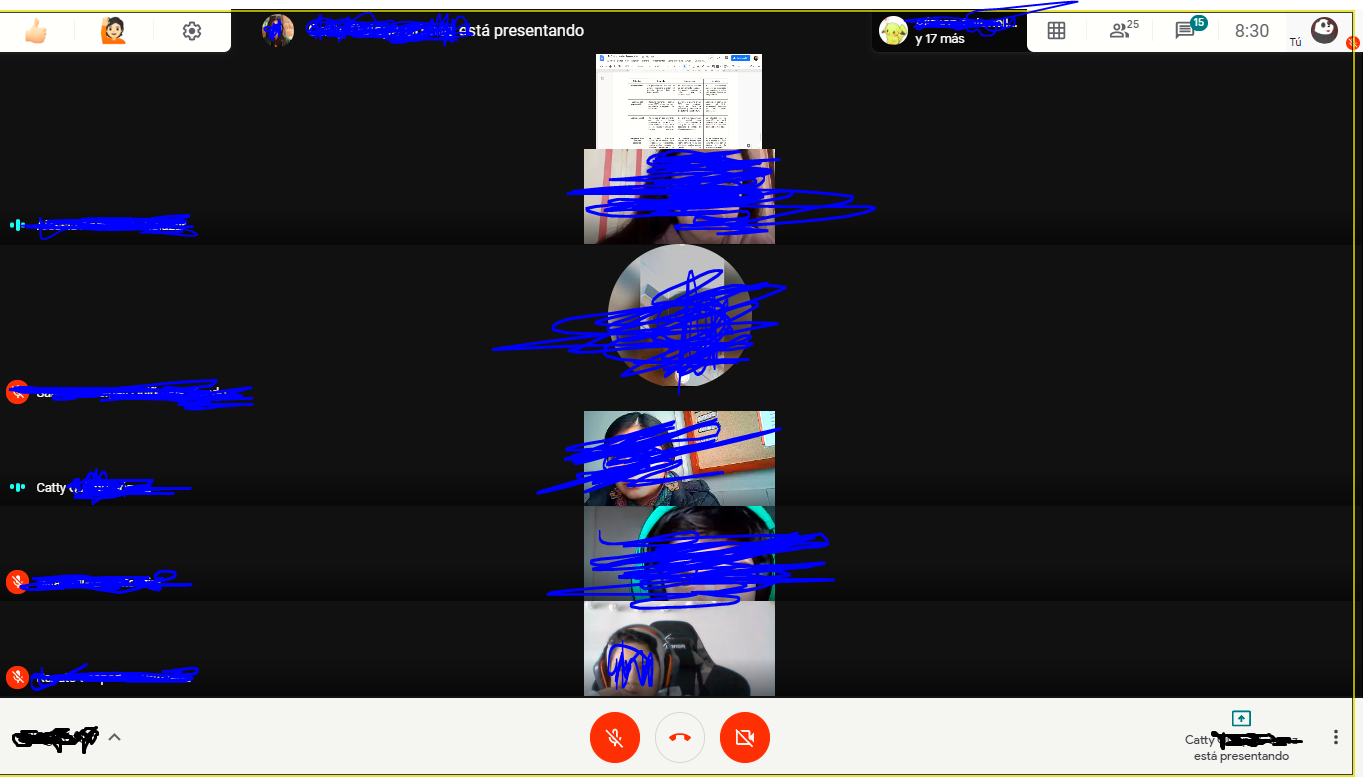
I have all this problems: i can´t see my photo in the grid, i can´t all the people in the grid (i try with sidebar but nothing) and finaly with the presentation mode is the same think, is not fixet
I use : Google Chrome v.83.0.4103.116, Google Meet Grid v.1.37.0, Windows 10 Home Single Language. v.1909
 hero2020yt
on 1 Jul 2020
hero2020yt
on 1 Jul 2020
Worked fine 'till yesterday.
Today had issues again.
The late workaround doesn't solves the problem. In the screen doesn't appear the display when you select "show a window"
Any ideas?
Chrome Version: 83.0.4103.116 (64-bit)
Meet grid view: 1.37
20 Attendees
sgomezmx
on 1 Jul 2020
Worked fine 'till yesterday.
Today had issues again.The late workaround doesn't solves the problem. In the screen doesn't appear the display when you select "show a window"
Any ideas?
Chrome Version: 83.0.4103.116 (64-bit)
Meet grid view: 1.37
20 Attendees
but i try with the presentation mode in display 1, is the same
hero2020yt
on 1 Jul 2020
Probably google has updated meet to add the option of deciding (on the last minute) whether to join a meeting that is been recorded; I have just noticed this feature on this morning (then grid view stopped working.)
 fervidal79
on 1 Jul 2020
fervidal79
on 1 Jul 2020
Not working :( again...
pablogirado
on 2 Jul 2020
Yeah Again Google Meet is not working with Grid View. Grid View is desirable feature that we need with Google Meet. Hope to use Grid View again soon
ReubsSchool
on 2 Jul 2020
2 days ago, I was using the grid view and everything was fine. Recently I had a meet conference and the grid view does not work. It either displays participants in stacks or it just shows myself. Happened in both Google extension and Firefox extension. My system is running Linux Mint 19.3 Cinnamon.
Checked again on another device using Firefox, and shows the same problem.
XavierMint-git
on 2 Jul 2020
Hola, ayer Google Grid View parece estar bien. Pero hoy no está funcionando de nuevo.
Algunos formadores informaron que Google Grid View muestra a los participantes en forma vertical (ver más abajo). También hay entrenadores que informaron la congelación del navegador Google Chrome con Google Grid View agregado.
Estamos utilizando:
Chrome Versión 83.0.4103.116 (Versión oficial) (64 bits)
Vista de cuadrícula Versión 1.37
Windows 8
Me sucede exactamente lo mismo. Meet Grid View no está funcionando correctamente. Lo he probado en Firefox y Chrome
 maxburboav
on 2 Jul 2020
maxburboav
on 2 Jul 2020
Pruebe con una solución alternativa: https://docs.google.com/document/d/15h5JtPj0JyYD5BP03F0TmDABUFC8E33jfaByG0wJS7g/edit
pero funcionó para mí con la vista Spotlight, no con la vista Sidebar ...
También puedes probar la siguiente contribución:
# 233 (comentario)
Gracias por la orientación en Docs, lo probé y no me funciona.
Tengo windows 10, chrome Google Chrome está actualizado
Versión 83.0.4103.116 (Build oficial) (64 bits)
Saludos
maxburboav
on 2 Jul 2020
¡¡Me uno a los pedidos!! Soy docente y necesito la posibilidad de ver a todos mis alumnos. Especialmente uso MEET porque me parece más seguro y no quiero usar ZOOM. Sé que esto lleva muchooo trabajo, pero los usuarios estaríamos muy agradecidos!!!
 martaele66
on 2 Jul 2020
martaele66
on 2 Jul 2020
Hello. Google meet Grid view Ice v 2.0 and Google meet grid view v. 1.37.0 aren't working well. They don't show all the participant and dn't show me on the grid also. I tested them on Brave Browser (My default browser), Firefox and Chromium (I'm using Linux mint 20)
 sbstnlb
on 3 Jul 2020
sbstnlb
on 3 Jul 2020
Tested NEW workaround posted here: https://github.com/Fugiman/google-meet-grid-view/issues/241#issuecomment-652863025
Works well over an empty meet session.
Looking forward for trying tomorrow with live + real-time audiences.
(3 attempts: +30 attendants each)
sgomezmx
on 3 Jul 2020
Today tried a solution of @thor84no .....It worked
The solution was:
Disable or delete the grid view extension in chrome
Download tampermonkey extension on the chrome web store...
Then go to https://greasyfork.org/en/scripts/397862-google-meet-grid-view
Download the script..
Open it via note pad and copy it..
Then in chrome go to tampermonkey extension and create a new script..
Paste the script and go to line 1361 and replace the line
let pinnedIndex = ret.findIndex(v => v[magicKey].isPinned())
with
let pinnedIndex = ret.findIndex(v => v[magicKey].isPinned && v[magicKey].isPinned())
Save it and reload the google meet page and you will see tampermonkey showing a number 1(Which shows one script is running)
Then Boooooo......Grid view is working
Please try and comment guyz..
Thanks again to @thor84no
Pravin1001
on 3 Jul 2020
Today tried a solution of @thor84no .....It worked
The solution was:
Disable or delete the grid view extension in chrome
Download tampermonkey extension on the chrome web store...
Then go to https://greasyfork.org/en/scripts/397862-google-meet-grid-view
Download the script..
Open it via note pad and copy it..
Then in chrome go to tampermonkey extension and create a new script..
Paste the script and go to line 1361 and replace the line
let pinnedIndex = ret.findIndex(v => v[magicKey].isPinned())
with
let pinnedIndex = ret.findIndex(v => v[magicKey].isPinned && v[magicKey].isPinned())
Save it and reload the google meet page and you will see tampermonkey showing a number 1(Which shows one script is running)
Then Boooooo......Grid view is working
Please try and comment guyz..
Thanks again to @thor84no
I tried this, tampermonkey displayed 1 but no grid view buttong was showed.
melodiazz
on 3 Jul 2020
Today tried a solution of @thor84no .....It worked
The solution was:
Disable or delete the grid view extension in chrome
Download tampermonkey extension on the chrome web store...
Then go to https://greasyfork.org/en/scripts/397862-google-meet-grid-view
Download the script..
Open it via note pad and copy it..
Then in chrome go to tampermonkey extension and create a new script..
Paste the script and go to line 1361 and replace the line
let pinnedIndex = ret.findIndex(v => v[magicKey].isPinned())
with
let pinnedIndex = ret.findIndex(v => v[magicKey].isPinned && v[magicKey].isPinned())
Save it and reload the google meet page and you will see tampermonkey showing a number 1(Which shows one script is running)
Then Boooooo......Grid view is working
Please try and comment guyz..
Thanks again to @thor84noI tried this, tampermonkey displayed 1 but no grid view buttong was showed.
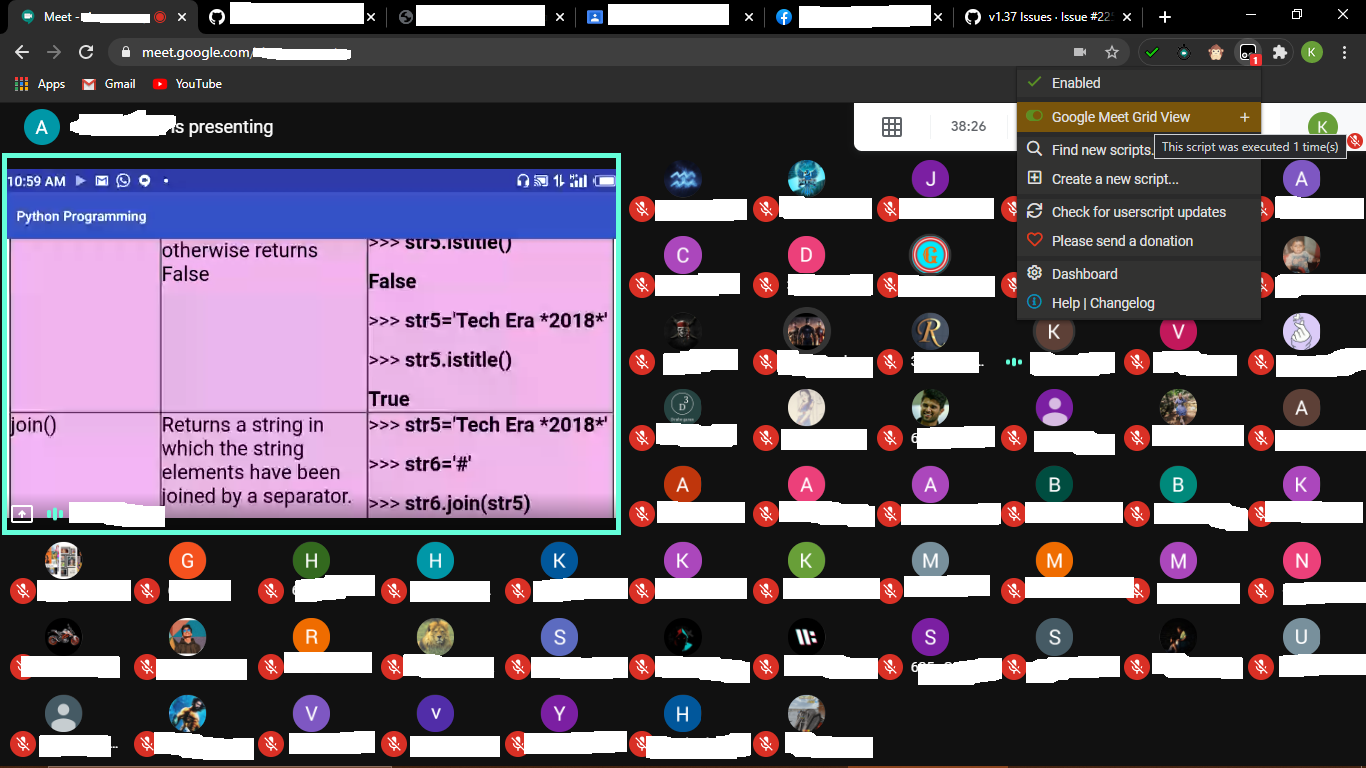
I tried it worked...Did u change the line 1361??
Pravin1001
on 3 Jul 2020
Today tried a solution of @thor84no .....It worked
The solution was:
Disable or delete the grid view extension in chrome
Download tampermonkey extension on the chrome web store...
Then go to https://greasyfork.org/en/scripts/397862-google-meet-grid-view
Download the script..
Open it via note pad and copy it..
Then in chrome go to tampermonkey extension and create a new script..
Paste the script and go to line 1361 and replace the line
let pinnedIndex = ret.findIndex(v => v[magicKey].isPinned())
with
let pinnedIndex = ret.findIndex(v => v[magicKey].isPinned && v[magicKey].isPinned())
Save it and reload the google meet page and you will see tampermonkey showing a number 1(Which shows one script is running)
Then Boooooo......Grid view is working
Please try and comment guyz..
Thanks again to @thor84noI tried this, tampermonkey displayed 1 but no grid view buttong was showed.
I tried it worked...Did u change the line 1361??
If this solution works, why don't implement this in this extension?
 Dragao75
on 3 Jul 2020
Dragao75
on 3 Jul 2020
@Dragao75 because it's only a temporary patch for the crash (it still leaves pinning of videos broken) and the person who is the only one who can accept it in to the extension and release a new version hasn't been active on GitHub for a while.
 thor84no
on 3 Jul 2020
thor84no
on 3 Jul 2020
Today tried a solution of @thor84no .....It worked
The solution was:
Disable or delete the grid view extension in chrome
Download tampermonkey extension on the chrome web store...
Then go to https://greasyfork.org/en/scripts/397862-google-meet-grid-view
Download the script..
Open it via note pad and copy it..
Then in chrome go to tampermonkey extension and create a new script..
Paste the script and go to line 1361 and replace the line
let pinnedIndex = ret.findIndex(v => v[magicKey].isPinned())
with
let pinnedIndex = ret.findIndex(v => v[magicKey].isPinned && v[magicKey].isPinned())
Save it and reload the google meet page and you will see tampermonkey showing a number 1(Which shows one script is running)
Then Boooooo......Grid view is working
Please try and comment guyz..
Thanks again to @thor84no
Thanks @pravin1001 and @thor84no, it works with 4 participants in the conference. Looking forward to trying it with over 70 participants in three more days.
XavierMint-git
on 3 Jul 2020
Today tried a solution of @thor84no .....It worked
The solution was:
Disable or delete the grid view extension in chrome
Download tampermonkey extension on the chrome web store...
Then go to https://greasyfork.org/en/scripts/397862-google-meet-grid-view
Download the script..
Open it via note pad and copy it..
Then in chrome go to tampermonkey extension and create a new script..
Paste the script and go to line 1361 and replace the line
let pinnedIndex = ret.findIndex(v => v[magicKey].isPinned())
with
let pinnedIndex = ret.findIndex(v => v[magicKey].isPinned && v[magicKey].isPinned())
Save it and reload the google meet page and you will see tampermonkey showing a number 1(Which shows one script is running)
Then Boooooo......Grid view is working
Please try and comment guyz..
Thanks again to @thor84noI tried this, tampermonkey displayed 1 but no grid view buttong was showed.
I tried it worked...Did u change the line 1361??
Hi, I tried it again and now the grid view works as before. Thanks mate
melodiazz
on 3 Jul 2020
@Dragao75 because it's only a temporary patch for the crash (it still leaves pinning of videos broken) and the person who is the only one who can accept it in to the extension and release a new version hasn't been active on GitHub for a while.
Is there any way to contact him because this is an important thing to discuss with him..Because many people depend on the extension to take attendance[Me],To see all students at the same time...
We have to make sure this gets well soon @thor84no
Pravin1001
on 3 Jul 2020
@Pravin1001
Even if there is a way to contact him, it would be incredibly rude to do so. This extension is something he does in his free time for no pay. We don't have any right to ask anything of him because it's not his job to fix this. Just think, if he didn't choose to create this extension, you would still have no way to view all of your students. Be thankful that you have had that opportunity and that you may again in the future, and perhaps request of Google to add that feature. But this is the risk of relying on free, 3rd-party software. Further, we don't know what's going on in his life right now, personally or professionally, so to request him to spend time on this now might be highly inappropriate. Long story short, he doesn't owe us anything, as it's not his fault that we rely on this, so we just need to be patient and/or find alternate ways to achieve our goals.
-- edit --
And, I may be so bold as to suggest that it is we who owe him, and should consider using the Support button at the top to give him some money as a thank you for his creation and his prompt support up until now.
Eagle-Man
on 3 Jul 2020
I am pretty new to GitHub, but how will it work? Will other coders help make it work? If so, we need you ;)
ruruboxer
on 3 Jul 2020
@Pravin1001
Even if there is a way to contact him, it would be incredibly rude to do so. This extension is something he does in his free time for no pay. We don't have any right to ask anything of him because it's not his job to fix this. Just think, if he didn't choose to create this extension, you would still have no way to view all of your students. Be thankful that you have had that opportunity and that you may again in the future, and perhaps request of Google to add that feature. But this is the risk of relying on free, 3rd-party software. Further, we don't know what's going on in his life right now, personally or professionally, so to request him to spend time on this now might be highly inappropriate. Long story short, he doesn't owe us anything, as it's not his fault that we rely on this, so we just need to be patient and/or find alternate ways to achieve our goals.-- edit --
And, I may be so bold as to suggest that it is we who owe him, and should consider using the Support button at the top to give him some money as a thank you for his creation and his prompt support up until now.
You are absolutely correct...I don't mean to work on this...He may do it in his spare time that's not a problem..I didn't mean something rude or bossy..If you think it is then I am sorry...
And it may be great to contribute him but as of my case i am from a middle class family from India...I may help you contributing my gratitude and my support because my parents wont allow spending on these extensions and if I say to them the use also they don't understand it...
But I am your side.
Pravin1001
on 3 Jul 2020
many people depend on the extension
They should not depend on a free unofficial extension if it's so critical.
Ask Google to add this feature and/or switch to other app that has it.
 AlexP11223
on 3 Jul 2020
AlexP11223
on 3 Jul 2020
You are absolutely correct...I don't mean to work on this...He may do it in his spare time that's not a problem..I didn't mean something rude or bossy..If you think it is then I am sorry...
And it may be great to contribute him but as of my case i am from a middle class family from India...I may help you contributing my gratitude and my support because my parents wont allow spending on these extensions and if I say to them the use also they don't understand it...
But I am your side.
No worries! I don't mean to sound antagonistic either. But there are definitely people who have expressed an expectation that it would always work or that it must be fixed immediately, that do need to hear it stated plainly.
Eagle-Man
on 3 Jul 2020
For those of you who don't already know, Google is working on the ability to see more people (up to 59):
https://www.blog.google/outreach-initiatives/education/new-meet-features-for-edu/
There's no release date but at least we know they're coming up with it sometime in the next few months. In the meantime, let's leave the developer of this extension alone. He will fix it when he can.
CaptainStraw
on 4 Jul 2020
The solution from @thor84no is working for me on linux chrome 83.0.4103.106 with 35 people.
The real problem is the license of the code, which are not allowing us to fork and distribute fixed software, #266 Maybe a PR is needed...
 sebas891
on 4 Jul 2020
sebas891
on 4 Jul 2020
@Pravin1001 and everyone who is in need of a quick temporary fix:
https://chrome.google.com/webstore/detail/google-meet-grid-view-fix/dakebdbeofhmlnmjlmhjdmmjmfohiicn
This is just a temporary workaround (which looses the pinning feature) [credits: @ma2shita], in order to allow people who heavily rely on the extension (e.g., online exams) to continue their work. The extension will be removed as soon as Chris is able to properly fix the issue. Just temporary disable the problematic extension and activate this one.
 icysapphire
on 6 Jul 2020
icysapphire
on 6 Jul 2020
@icysapphire I contemplated doing that, but it's technically against the license so I didn't. I don't know if you got permission or anything, but it's worth keeping in mind. What would be nice to avoid the issue in the future would be to allow for more people to merge and automatically updating the extension on merge to master, but that may be wishing for too much.
thor84no
on 6 Jul 2020
@icysapphire I contemplated doing that, but it's technically against the license so I didn't. I don't know if you got permission or anything, but it's worth keeping in mind. What would be nice to avoid the issue in the future would be to allow for more people to merge and automatically updating the extension on merge to master, but that may be wishing for too much.
Absolutely,But could be used as and alternative as of now....used it in the previous class and it is working....I think the code might be copied from you and pasted as the source code....
Pravin1001
on 6 Jul 2020
@Pravin1001 and everyone who is in need of a quick temporary fix:
https://chrome.google.com/webstore/detail/google-meet-grid-view-fix/dakebdbeofhmlnmjlmhjdmmjmfohiicn
This is just a temporary workaround (which looses the pinning feature) [credits: @ma2shita], in order to allow people who heavily rely on the extension (e.g., online exams) to continue their work. The extension will be removed as soon as Chris is able to properly fix the issue. Just temporary disable the problematic extension and activate this one.

@icysapphire Be careful....It could be against it...
Pravin1001
on 6 Jul 2020
I uninstalled and reinstalled google meet grid v1.37. It still doesn’t show everyone in grid format. I only see myself.
 dsgpson
on 7 Jul 2020
dsgpson
on 7 Jul 2020
@dsgpson it hasn't been released and it would presumably not be v1.37 once it has been. The fixed version is available as a different extension with a different name at the link posted above.
thor84no
on 7 Jul 2020
anyone having issues even though already followed the fix from @thor84no ?
melodiazz
on 10 Jul 2020
anyone having issues even though already followed the fix from @thor84no ? <
Yes, the grid view seems to not work again...
I opened the Google Meet just now, and noticed that now Google will ask how satisfied are you with Gmeet after you leave call. I'm guessing that it is caused by that.
XavierMint-git
on 10 Jul 2020
anyone having issues even though already followed the fix from @thor84no ?
😭😭The solution crashed today morning....
I dont know whats happening....
Something fishy...
Help me out....
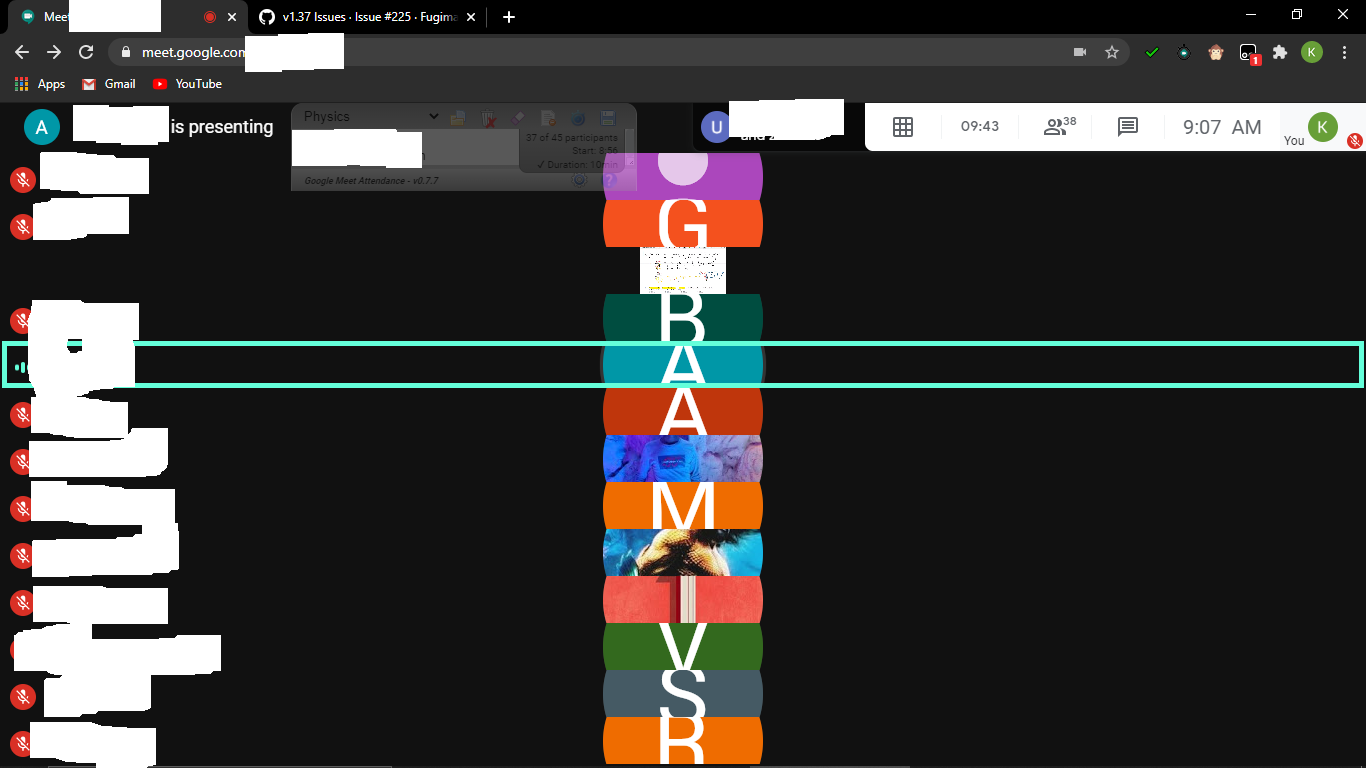
Pravin1001
on 10 Jul 2020
Crash!!! Noooo!!! :(
El vie., 10 de julio de 2020 00:30, Pravin10 notifications@github.com
escribió:
anyone having issues even though already followed the fix from @thor84no
https://github.com/thor84no ?😭😭The solution crashed today morning....
I dont know whats happening....
Something fishy...
Help me out....—
You are receiving this because you commented.
Reply to this email directly, view it on GitHub
https://github.com/Fugiman/google-meet-grid-view/issues/225#issuecomment-656461403,
or unsubscribe
https://github.com/notifications/unsubscribe-auth/APWAILTSTV7FX6LJP7QE2N3R22DODANCNFSM4OALESAQ
.
pablogirado
on 10 Jul 2020
Ouch, this time the bug seems more complicated. No error in the console.. If you notice anything useful, please share!
icysapphire
on 10 Jul 2020
Yes, this one is far more subtle. I had a look just now and stepping through the code it's not obvious where the issue is, let alone what it is. I might look in to it more later, but my work day starts now, so I can't really do anything now.
thor84no
on 10 Jul 2020
@thor84no actually the problem seems to be in the missing hook into the rendering pipeline (all the other hooks succeed).
Maybe there is something with the regexes that scrape Meet code, which appear to be unstable. In fact there are three different versions of RefreshVideoProxyHandler.. in particular, look at row 981:
// When this inevitably fails again run the following: Object.values(default_MeetingsUi).filter(v => v && typeof v === 'function' && /this\.([A-Za-z]+)=[A-Za-z]+\(this\)/.test(v.toString()))
    function MeetingsUIProxyHandler
I've tried to look up the new function to hook but with no luck. Please, let me know if you can figure it out!
icysapphire
on 10 Jul 2020
the tampermonkwy fix isn't working, its showing people in a single colune...
EnzoLiv
on 10 Jul 2020
That's what the discussion above was about.
thor84no
on 10 Jul 2020
That's what the discussion above was about.
yes i see
EnzoLiv
on 10 Jul 2020
@icysapphire I've been trying to figure out which function it's trying to find there too. The snippet in the comment returns a couple candidates for me (2 functions in a clean Meet window, 4 in my current work one), but none of them match the full regex obviously, just the partial regex from the snippet.
I modified that snippet to Object.values(default_MeetingsUi).filter(v => v && typeof v === 'function' && /this\.([A-Za-z]+)=[A-Za-z]+\(this\)/.test(v.toString()) && console.log(v.toString())); so it actually outputs the candidate functions as a string to the console rather than objects so it's easier to look at them.
Only one of them matches on even a partial regex of \([a-zA-Z,.]+\{ from the const m line, which seems to be looking for a literal paren, followed by a letter/word param, probably a comma, and then an object param into the same method? And the part of the function that matches even that little bit is AFTER the part that matches on the this\.([A-Za-z]+)=[A-Za-z]+\(this\) portion, so didn't get any further there.
Might be easier to figure out if we knew what the previous function it was matching on looked like, so could compare and see if any of these are similar, but without knowing that I'm just kind of digging/trying to glean some understanding.
 medlir
on 10 Jul 2020
medlir
on 10 Jul 2020
@medlir @thor84no
I've changed line 986
const m = /\.([A-Za-z]+)\([a-zA-Z,.]+\{[^\x05]*?this\.([A-Za-z]+)=[A-Za-z]+/.exec(value.toString())
Now, some Meet function is hooked, I am not sure that it is correct. However I think there is some progress because LayoutVideoProxyHandler is now triggered every time the canvas with videos is updated (f.i. when the control bar [mic, camera, ..] is shown/hidden). But everything else is just broken, maybe the capture of the regex should be changed? Maybe I am totally wrong, don't know!
icysapphire
on 10 Jul 2020
@icysapphire With the regex chopped down like that, it seems to match at least 7 functions. I started looking at those though, and one specifically mentions a "renderer" in it, which matched your trimmed regex, but ALSO matched with the (this) still on there if you allow numbers in the method names, so just for kicks, I modified the regex on that line to:
const m = /\.([A-Za-z]+)\([a-zA-Z,.]+\{[^\x05]*?this\.([A-Za-z]+)=[A-Za-z0-9]+\(this\)/.exec(value.toString())
And I seem to have a working grid currently.
medlir
on 10 Jul 2020
With the above change, Hiding and Showing Participants seems to work, resizing/obscuring/always show toolbar seems fine, resizing/obscuring on chat seems to be working, can see other people's presentations fine, highlight works, only show with video works, mirroring own video works, name formatting seems fine as well.
medlir
on 10 Jul 2020
@medlir whoah, you're awesome!
however, I see people in a single column.. :(
icysapphire
on 10 Jul 2020
@medlir there were other changes in previous attempts.. it works correctly for me! :)
Please guys, confirm that this change works well, and I will update the extension ASAP :+1:
icysapphire
on 10 Jul 2020
That regex change works also for me. Ship it! :)
 pragmaware
on 10 Jul 2020
pragmaware
on 10 Jul 2020
@icysapphire hi! Does the extension (v1.39) update automatically? thanks to everyone!
pablogirado
on 11 Jul 2020
Hello, is there a solution with the grid to be able to see all the participants and not only 16, how does the defect of meet?
 Joslfri
on 11 Jul 2020
Joslfri
on 11 Jul 2020
@medlir there were other changes in previous attempts.. it works correctly for me! :)
Please guys, confirm that this change works well, and I will update the extension ASAP 👍
@medlir @icysapphire Boooom guyz...Just freaking...
The grid view is back
Thanks to you both..... tried it with 40 participants...All working fine....

Pravin1001
on 11 Jul 2020
@Pravin1001 how did you fix the problem in grid view? what did you change on the script? may I know? Thank you so much
 frncsmndp
on 11 Jul 2020
frncsmndp
on 11 Jul 2020
@Pravin1001 how did you fix the problem in grid view? what did you change on the script? may I know? Thank you so much
@frncsmndp Change line 986 to...
const m = /.([A-Za-z]+)([a-zA-Z,.]+{[^\x05]*?this.([A-Za-z]+)=[A-Za-z0-9]+(this)/.exec(value.toString())
Just save and reload meet....
Pls try and send a comment..
Pravin1001
on 11 Jul 2020
@Pravin1001 how did you fix the problem in grid view? what did you change on the script? may I know? Thank you so much
@frncsmndp Change line 986 to...
const m = /.([A-Za-z]+)([a-zA-Z,.]+{[^\x05]*?this.([A-Za-z]+)=[A-Za-z0-9]+(this)/.exec(value.toString())
Just save and reload meet....
Pls try and send a comment..
Tried this, the google meet shows blank page instead.
Did I do something wrong? there was a warning anyway when I editing line 986
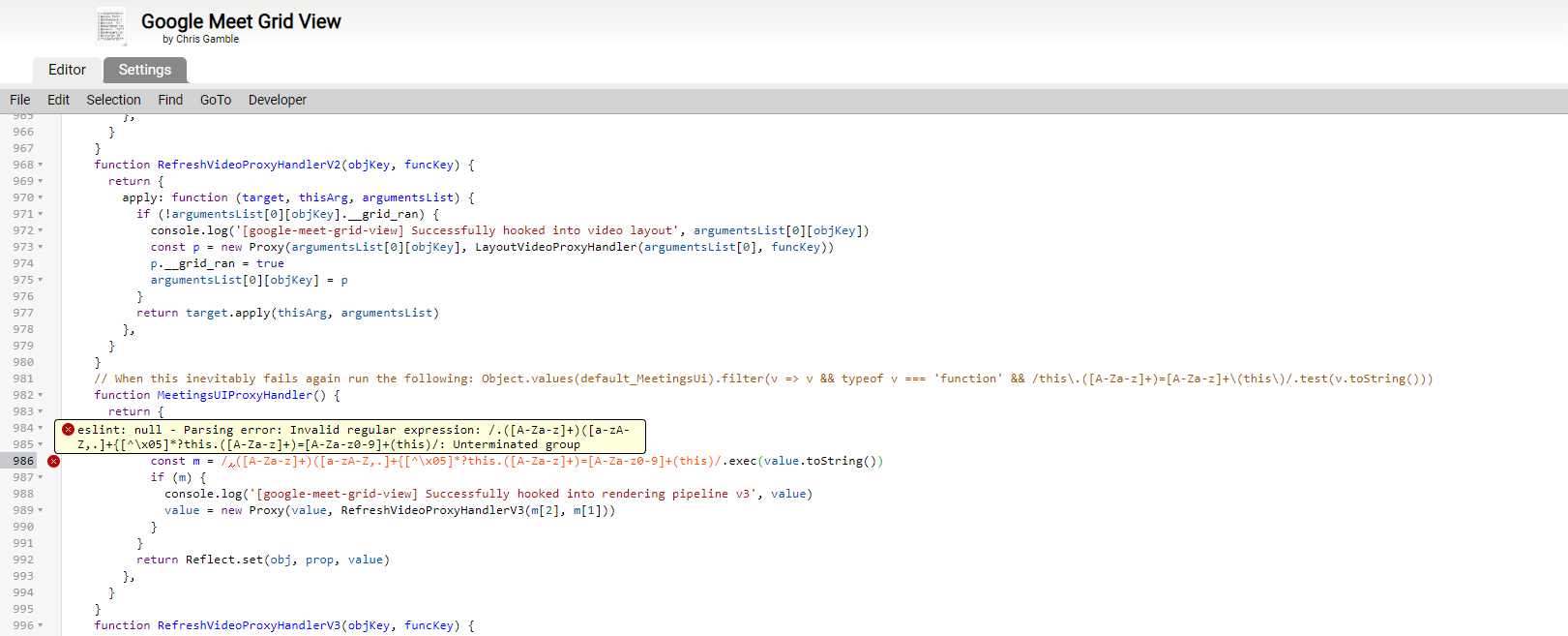
Update :Nevermind, the code should be changed to :
const m = /\.([A-Za-z]+)\([a-zA-Z,.]+\{[^\x05]*?this\.([A-Za-z]+)=[A-Za-z0-9]+\(this\)/.exec(value.toString())
now it's working well. Thanks guys!
melodiazz
on 11 Jul 2020
@Pravin1001 how did you fix the problem in grid view? what did you change on the script? may I know? Thank you so much
@frncsmndp Change line 986 to...
const m = /.([A-Za-z]+)([a-zA-Z,.]+{[^\x05]*?this.([A-Za-z]+)=[A-Za-z0-9]+(this)/.exec(value.toString())
Just save and reload meet....
Pls try and send a comment..Tried this, the google meet shows blank page instead.
Did I do something wrong? there was a warning anyway when I editing line 986
Update :Nevermind, the code should be changed to :
const m = /\.([A-Za-z]+)\([a-zA-Z,.]+\{[^\x05]*?this\.([A-Za-z]+)=[A-Za-z0-9]+\(this\)/.exec(value.toString())now it's working well. Thanks guys!
It works for me. Thank you so much @Pravin1001 and @melodiazz
frncsmndp
on 11 Jul 2020
@icysapphire hi! Does the extension (v1.39) update automatically? thanks to everyone!
@pablogirado Yes, it is under approval currently. Then, it should be automatically delivered to users.
icysapphire
on 11 Jul 2020
Make sure you copy and paste from my post above, some people have quoted it or re-pasted without code quoting it, which loses the backslashes that are escaping several characters.
medlir
on 11 Jul 2020
Can someone share the fixed versión?
El lun., 13 jul. 2020 a las 7:55, EnzoLiv (notifications@github.com)
escribió:
Just tried: it is working for me. Make sure that you have the latest
version of (fix) extension, as reported. Il giorno lun 13 lug 2020 alle ore
12:28 EnzoLiv [email protected] ha scritto:I deleted the comment because the @frncsmndp
https://github.com/frncsmndp reported the error first.—
You are receiving this because you commented.
Reply to this email directly, view it on GitHub
https://github.com/Fugiman/google-meet-grid-view/issues/225#issuecomment-657489089,
or unsubscribe
https://github.com/notifications/unsubscribe-auth/AQEBMNRCSIOM3AJCGIPKRKDR3LRZBANCNFSM4OALESAQ
.
daniequy
on 13 Jul 2020
Can someone share the fixed versión? El lun., 13 jul. 2020 a las 7:55, EnzoLiv (notifications@github.com) escribió:
 GCNAMentor
on 13 Jul 2020
GCNAMentor
on 13 Jul 2020
Thanks @icysapphire @Pravin1001 and @melodiazz
Applied the changes to line 1361 and 986, grid view now shows all participants. Problem is, it only works for a few seconds then videos freeze only audio present.
 Kur01nu
on 14 Jul 2020
Kur01nu
on 14 Jul 2020
A mi la Version 1.39 de la extensión Google Meet Grid View (fix) funciona a
la perfección. Hoy lo probé con 68 integrantes.
Saludos!
El lun., 13 de julio de 2020 23:58, Kur01nu notifications@github.com
escribió:
Applied the changes to line 1361 and 986, grid view now shows all
participants. Problem is, it only works for a few seconds then videos
freeze only audio present.—
You are receiving this because you were mentioned.
Reply to this email directly, view it on GitHub
https://github.com/Fugiman/google-meet-grid-view/issues/225#issuecomment-657936923,
or unsubscribe
https://github.com/notifications/unsubscribe-auth/APWAILWNLRBQR4HYFUPIEP3R3PCTPANCNFSM4OALESAQ
.
pablogirado
on 14 Jul 2020
Nooooooo, grid fix stopped working again! its showing participants in a straight line... lets see if theres an issue..
EnzoLiv
on 14 Jul 2020
Working fine for me. Just check that you have v1.39.
Nooooooo, grid fix stopped working again! its showing participants in a straight line... lets see if theres an issue..
icysapphire
on 14 Jul 2020
Where can we get v1.39? Only 1.37 in google
Kur01nu
on 14 Jul 2020
Working fine for me. Just check that you have v1.39.
Where i can get??
EnzoLiv
on 14 Jul 2020
Working fine for me. Just check that you have v1.39.
Where i can get??
The link has been reported multiple times earlier in the thread. Please, let's keep clean the conversation..
icysapphire
on 14 Jul 2020
Working fine for me. Just check that you have v1.39.
Where i can get??
The link has been reported multiple times earlier in the thread. Please, let's keep clean the conversation..
Thank you for the reminder. Just to clarify, is the fix alright for distribution? Need it for work but I'm afraid of the tampering indicated in Grid View's license.
Kur01nu
on 15 Jul 2020
Working fine for me. Just check that you have v1.39.
Where i can get??
The link has been reported multiple times earlier in the thread. Please, let's keep clean the conversation..
Thank you for the reminder. Just to clarify, is the fix alright for distribution? Need it for work but I'm afraid of the tampering indicated in Grid View's license.
GCNAMentor
on 15 Jul 2020
Working fine for me. Just check that you have v1.39.
Where i can get??
The link has been reported multiple times earlier in the thread. Please, let's keep clean the conversation..
Thank you for the reminder. Just to clarify, is the fix alright for distribution? Need it for work but I'm afraid of the tampering indicated in Grid View's license.
You may download the script and change the lines and use it for personal..It is not against it
Pravin1001
on 15 Jul 2020
hey is there a version of the fix for firefox?
 DudeMine
on 30 Jul 2020
DudeMine
on 30 Jul 2020
If you do the fix using a user script plugin like Tampermonkey it's exactly the same in Firefox.
thor84no
on 30 Jul 2020
If you do the fix using a user script plugin like Tampermonkey it's exactly the same in Firefox.
ah thanks, i will do that
DudeMine
on 31 Jul 2020
I uninstalled this extension and used ViolentMonkey (available in every browser) with this patched version instead: https://github.com/colinbendell/google-meet-grid-view/raw/master/grid.user.js
Meet works like a charm again! Thanks @colinbendell!
 henrik242
on 31 Jul 2020
henrik242
on 31 Jul 2020
i try 1.39 and work perfect.
 rsaurc
on 4 Aug 2020
rsaurc
on 4 Aug 2020
@rsaurc where can you find 1.39?
 wookayin
on 4 Aug 2020
wookayin
on 4 Aug 2020
In a post, issues tab.
Arte.
Rodrigo Saur
rodrigo.[email protected]
El mar., 4 ago. 2020 17:23, Jongwook Choi notifications@github.com
escribió:
@rsaurc https://github.com/rsaurc where can you find 1.39?
—
You are receiving this because you were mentioned.
Reply to this email directly, view it on GitHub
https://github.com/Fugiman/google-meet-grid-view/issues/225#issuecomment-668832139,
or unsubscribe
https://github.com/notifications/unsubscribe-auth/AQQAQSZ7ZFW2XZCOJKVSBNTR7B33PANCNFSM4OALESAQ
.
rsaurc
on 5 Aug 2020
fwiw, my fork also allows you to just load the unpacked extension in chrome. https://github.com/colinbendell/google-meet-grid-view
 colinbendell
on 5 Aug 2020
colinbendell
on 5 Aug 2020
Colin, look that extension:
https://chrome.google.com/webstore/detail/google-meet-grid-view-fix/dakebdbeofhmlnmjlmhjdmmjmfohiicn
Atte.
Rodrigo Saur Caces
E-Mail: rodrigo.[email protected]
El mié., 5 de ago. de 2020 a la(s) 08:20, Colin Bendell (
[email protected]) escribió:
fwiw, my fork also allows you to just load the unpacked extension in
chrome. https://github.com/colinbendell/google-meet-grid-view—
You are receiving this because you were mentioned.
Reply to this email directly, view it on GitHub
https://github.com/Fugiman/google-meet-grid-view/issues/225#issuecomment-669160716,
or unsubscribe
https://github.com/notifications/unsubscribe-auth/AQQAQS5EDB7O7UR2PAH3JALR7FFBXANCNFSM4OALESAQ
.
rsaurc
on 5 Aug 2020
This morning, following the pressure of the icon for the activation of the grid, the browser was totally freezed. After updating Chrome to version 86.0.4240.193. the result is the one shown in the image below

 Marco-Gtto
on 10 Nov 2020
Marco-Gtto
on 10 Nov 2020
Why are you still using the extension? Google natively supports grid view of up to 49 people now. This extension has not been updated since June and I see no reason why it should be updated since it is now natively supported. Uninstall and just use the regular layout option in Google. https://manhattan.teamdynamix.com/TDClient/1932/Portal/KB/ArticleDet?ID=108478
rmusalMC
on 10 Nov 2020
Grid view is still a far superior product. There are options not available in tiled layout.
Why are you still using the extension? Google natively supports grid view of up to 49 people now. This extension has not been updated since June and I see no reason why it should be updated since it is now natively supported. Uninstall and just use the regular layout option in Google. https://manhattan.teamdynamix.com/TDClient/1932/Portal/KB/ArticleDet?ID=108478
ruruboxer
on 10 Nov 2020
Why are you still using the extension? Google natively supports grid view of up to 49 people now. This extension has not been updated since June and I see no reason why it should be updated since it is now natively supported. Uninstall and just use the regular layout option in Google. https://manhattan.teamdynamix.com/TDClient/1932/Portal/KB/ArticleDet?ID=108478
Yes even though Google now supports up to 49 people in the Tiled layout Although it only shows up to 17 people at once For some reason. It is Google's code We can't do anything about that.
 ArcheryAce
on 22 Feb 2021
ArcheryAce
on 22 Feb 2021
@ArcheryAce sir, are you presenting while doing so? you can't see all students while so.
 Jkarhani
on 22 Feb 2021
Jkarhani
on 22 Feb 2021
@ArcheryAce sir, are you presenting while doing so? you can't see all students while so.
No, there is no presentation going on and it still won't show 49 students Even when there are more than 60 students in the meet
ArcheryAce
on 22 Feb 2021
Hi, this is just to let you know that the Grid View (fix) extension (source at icysapphire/google-meet-grid-view) is available on the chrome web store. The extension still does not work exactly as before, but I am working on it. Some advanced features (such as alphabetizing, presentation-resizing, etc.) are already coming back. Any contribution is very appreciated!
icysapphire
on 24 Feb 2021
@icysapphire
Can I just say that I, for one, am super appreciative of your work to keep this extension going. You said in your comment on your GitHub page that this might require too much time and change for you, so I appreciate you continuing your work. Please, though, do not feel like you have to get it all done, especially if it starts being detrimental to your personal life. We're teachers and our job is often all about flexibility, so we would find a way without it. Your work (after Chris left) got us through the roughest and most sudden part of adjusting to remote teaching, but there are now some functional alternatives (even if they aren't quite as good) and we may have to start getting used to using them. Also, if this extension were to not continue, then perhaps the masses of comments to Google might get them to implement some changes more quickly.
Eagle-Man
on 10 Mar 2021
Related issues
sayedarifuddin
·
5Comments
 loretoparisi
·
3Comments
loretoparisi
·
3Comments
 Rossolson
·
3Comments
Rossolson
·
3Comments
 kchopy
·
8Comments
kchopy
·
8Comments
 sajalhome
·
5Comments
sajalhome
·
5Comments
Most helpful comment
I did as you said. The result is on the screen.
