Google-map-react: Marker shows differently on zoom out
Describe the bug 🐛
On zoom out, my marker is showing differently, it re renders to the incorrect area
To Reproduce 🔍
Steps to reproduce the behavior:
Please check here, i created sandbox for my exact same production behaviour
The problem is when it is zoomed out, the marker went away to the ocean, however when zoomed in it shows perfectly fine on the land, i'm not sure if this is the scaling problem or its my own mistake
Screenshots 🖥
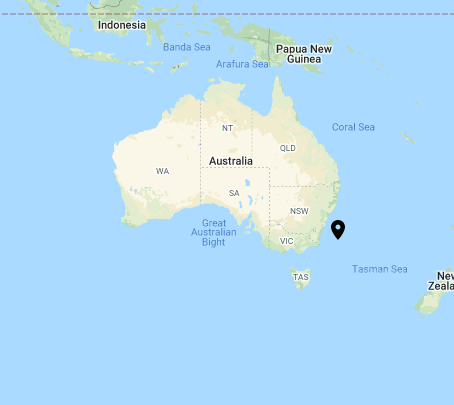
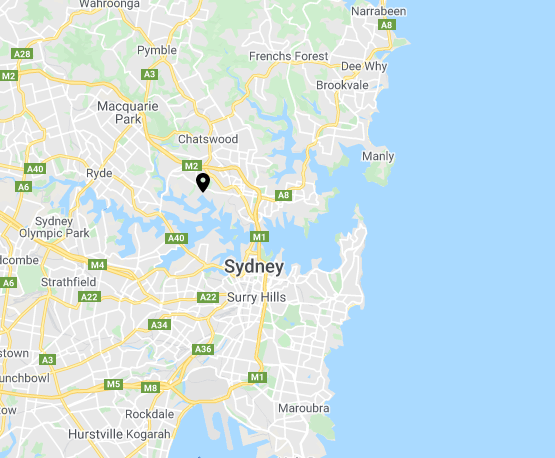
Please help, thankyou!
 robertwt7
All 4 comments
@robertwt7 Hey! I think your issue is that you want the axis of the marker to be positioned center-bottom, instead of the default which is top-left. We sadly don't have a special prop we can pass (will work on it soon), but you can align it using css:
<LocationOnIcon style={{transform: 'translate(-50%, -100%)'}} />
Here is a codesandbox
Here is a link to the api doc that talks about it.
Let me know if that works.
 itsmichaeldiego
on 5 Oct 2020
itsmichaeldiego
on 5 Oct 2020
@robertwt7 Hey! I think your issue is that you want the axis of the marker to be positioned
center-bottom, instead of the default which istop-left. We sadly don't have a special prop we can pass (will work on it soon), but you can align it using css:<LocationOnIcon style={{transform: 'translate(-50%, -100%)'}} />Here is a codesandbox
Here is a link to the api doc that talks about it.
Let me know if that works.
Wow, this was the only reason I switched to https://github.com/fullstackreact/google-maps-react , I was annoyed by the marker doing that, I'm going back to this library now! Thanks
 GabrielBB
on 5 Oct 2020
GabrielBB
on 5 Oct 2020
@robertwt7 Hey! I think your issue is that you want the axis of the marker to be positioned
center-bottom, instead of the default which istop-left. We sadly don't have a special prop we can pass (will work on it soon), but you can align it using css:<LocationOnIcon style={{transform: 'translate(-50%, -100%)'}} />Here is a codesandbox
Here is a link to the api doc that talks about it.
Let me know if that works.
Hey this is awesome! Thanks for getting back to me with example, just a quick question, when you said top-left, shouldn't it mean bottom-right? Isn't that why you're translating with -50%, -100% ? to put it back to the center-top
I think i'm just confused with the interpretation...
robertwt7
on 5 Oct 2020
@GabrielBB @robertwt7 I will work on an easier way to do this soon! Stay tuned!
itsmichaeldiego
on 6 Oct 2020
Related issues
 SantosOMartinez
·
4Comments
SantosOMartinez
·
4Comments
 StephenMayeux
·
4Comments
StephenMayeux
·
4Comments
 figalex
·
4Comments
figalex
·
4Comments
 lord-xeon
·
3Comments
lord-xeon
·
3Comments
 VLNTNA
·
4Comments
VLNTNA
·
4Comments
Most helpful comment
@robertwt7 Hey! I think your issue is that you want the axis of the marker to be positioned
center-bottom, instead of the default which istop-left. We sadly don't have a special prop we can pass (will work on it soon), but you can align it using css:Here is a codesandbox
Here is a link to the api doc that talks about it.
Let me know if that works.