Google-drive-ocamlfuse: Mount a specific folder
So I set up google-drive-ocamlfuse on a headless server. I do google-drive-ocamlfuse /mnt/google_drive/ and I can see all my files at /mnt/google_drive. This is brilliant!
But is it possible to mount just the "data" folder of my Google Drive to /mnt/google_drive?
I'm using Google Drive as a storage area for owncloud.org. The person whose Google Drive account I'm using won't want all his Google Drive files accessible on the server. He only wants one folder to be used for the owncloud storage area.
Would it be possible to add a "root_directory" option for google-drive-ocamlfuse? Can I just edit src / drive.ml#30 and change let root_directory = "/" to let root_directory = "/data/"? Or are there other places in the codebase I'd need to change?
Great project btw. Very useful. Thank you!
 hynese
All 19 comments
Files are downloaded to the cache only if needed. So if you don't copy files under other directories other than "data", you will not download them. If you want to be sure that the local cache doesn't exceed a specific quota, you can use the max_cache_size_mb option to limit cache size and if you still want to access bigger files, you can set stream_large_files to true and use large_file_threshold_mb to choose which files you want to cache and which files you want to stream.
 astrada
on 6 Nov 2014
astrada
on 6 Nov 2014
Any plans to specify the mount point subdirectory? I really don't want my whole drive mounted on the server (security). Based on @hynese suggestion where can i find the drive.ml on my install?
 kilabyte
on 25 Apr 2017
kilabyte
on 25 Apr 2017
Based on @hynese suggestion where can i find the drive.ml on my install?
If you are using opam, you can clone the repository locally, edit the src/drive.ml file (https://github.com/astrada/google-drive-ocamlfuse/blob/master/src/drive.ml#L44) at line 44, instead of "root" you should enter the folder id of the folder you want to mount. To get the folder id, you can open the Drive web interface, go to the said folder and note the id that is the string that is after the last slash in the URL. Then with opam pin add google-drive-ocamlfuse . -n (from the directory where you cloned the repository) you can select you local version. opam update && opam upgrade should compile and install it. If it doesn't work, opam remove google-drive-ocamlfuse && opam install google-drive-ocamlfuse should do.
astrada
on 25 Apr 2017
hmmm thats the kicker is i don't have root/sudo access to add opam
kilabyte
on 25 Apr 2017
If you want you can install opam in a custom directory (without sudo). Check this link and replace /usr/local/bin with a directory you have permission to write to.
astrada
on 25 Apr 2017
I really don't want to install opam and compile it to be able to mount a subdirectory. Seems like a big hassle over having an option like root_directory as an argument. Any plans on adding something like this?
 rourke
on 7 May 2017
rourke
on 7 May 2017
Any plans on adding something like this?
Yes, I just have to find some spare time to add this feature. :-)
astrada
on 7 May 2017
i am needing this too
 bayoumedic
on 19 May 2017
bayoumedic
on 19 May 2017
I just published version 0.6.20 (on the beta channel) where I added a root_folder config option where you can specify a folder id or a remote path to the a custom root folder.
astrada
on 12 Jun 2017
Has anyone gotten this to work, what is the syntax?
 jmiller0
on 18 Jun 2017
jmiller0
on 18 Jun 2017
You can insert a folder id or a path. For example root_folder=0B-TenPiSMBplOGg4eXR1c3U0RTg or root_folder=/folder/f1.

astrada
on 18 Jun 2017
This does not seem to work with folder ids from backuped computers like the following:
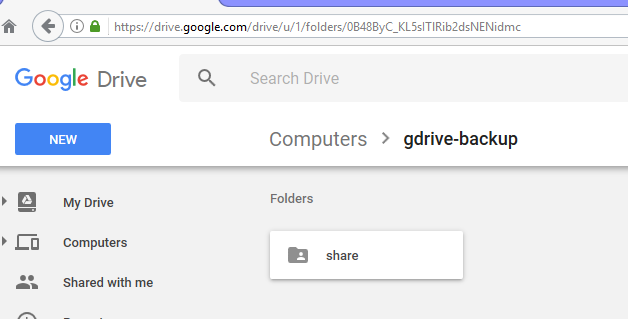
i assume the regular gdrive api can't reach those?
 felixbrucker
on 2 Aug 2017
felixbrucker
on 2 Aug 2017
i assume the regular gdrive api can't reach those?
Yes, right.
astrada
on 9 Aug 2017
I tried running this in command line but it doesnt work:
"google-drive-ocamlfuse root_folder=1s-Y... gdrive"
It still tries to pull everything. What do I do?
 soulslicer
on 22 May 2019
soulslicer
on 22 May 2019
@soulslicer: you should set it in the config file.
astrada
on 22 May 2019
Hi astrada, it's a very useful tool. Thanks!
BTW, It seems I cannot get it to work with folder ID or path (it still shows the full drive folder even I denote a specific folder id). Any comments?
 vinkwok
on 13 Feb 2020
vinkwok
on 13 Feb 2020
@soulslicer: you should set it in the
configfile.
If I want to have two mounted folders foo and bar mounted within some directory baz, can this be done. It seems setting the root_folder would be global.
 oliversheridanmethven
on 27 Mar 2020
oliversheridanmethven
on 27 Mar 2020
I gave up and switched to in sync almost a year ago
soulslicer
on 27 Mar 2020
Hi astrada, it's a very useful tool. Thanks!
BTW, It seems I cannot get it to work with folder ID or path (it still shows the full drive folder even I denote a specific folder id). Any comments?
I fixed it on headless by running the headless usage and authorization command again @vinkwok
 google-meet-meat
on 2 Nov 2020
google-meet-meat
on 2 Nov 2020
Related issues
 smartm0use
·
4Comments
smartm0use
·
4Comments
 xxx31fr
·
3Comments
xxx31fr
·
3Comments
 drgroot
·
4Comments
drgroot
·
4Comments
 acardona
·
3Comments
acardona
·
3Comments
 leighsjo
·
3Comments
leighsjo
·
3Comments
Most helpful comment
I just published version 0.6.20 (on the beta channel) where I added a
root_folderconfig option where you can specify a folder id or a remote path to the a custom root folder.