Google-cloud-python: [Speech] does not work from AWS Lambda
Google.cloud.speech

fails within AWS Lambda environment, works fine on windows
python 3.6
Error message:
Unable to import module 'My_Module': cannot import name 'cygrpc'
To reproduce:
create dummy Lambda function, copy code to windows, import google.cloud.speech, install libs into folder, create lambda bundle by zipping together and upload to lambda.
module can't be loaded
- Code example
import os
os.environ['GOOGLE_APPLICATION_CREDENTIALS'] = './gcp-info-insights.json'
import base64 as b64
import boto3
import sys
sys.path.append('./lib')
from google.cloud import speech_v1p1beta1 as speech
from google.cloud.speech_v1p1beta1 import enums
from google.cloud.speech_v1p1beta1 import types

print('Loading function, this will never be reached as some dependencies of google.cloud.api can't be loaded, particularly cygrpc')

s3 = boto3.client('s3')
def lambda_handler(event, context):
 #leave blunk
 galinagpolyakova
All 19 comments
@galinagpolyakova Thanks for the report! Can you please provide the full traceback at the time of the import error? Also, can you please show the steps you are using to install google-cloud-speech and its dependencies?
 tseaver
on 20 Aug 2018
tseaver
on 20 Aug 2018
@tseaver
Hi there, at the moment I can only provide this:
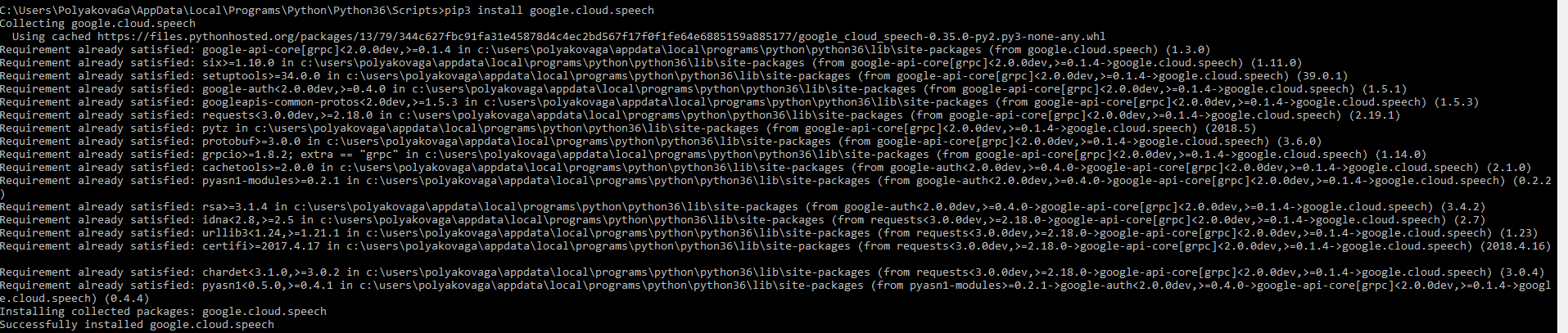
I don't have access to Lambda Execution environment locally, I use the console version so can't see the full trace back unfortunately.
I assume the problem is in the lack of libraries for Virtual Environment, but I can't figure out what dependencies are missing as all it works locally.
galinagpolyakova
on 20 Aug 2018
@galinagpolyakova Can you get a completely new environment on AWS? If not, can you trigger the install such that it replaces everything, e.g.:
pip3 install --upgrade --upgrade-strategy eager --force-reinstall google-cloud-speech
Sorry, i don't think it's possible, it's a serverless environment I don't have access to. But I can force upgrade locally and try to bundle the libraries again.
galinagpolyakova
on 30 Aug 2018
Same problem happened to me. Trying to use google.cloud.language.
Is it possible that because of the runtime. Lambda is on Python 3.6. Which one are you using @galinagpolyakova ?
 conghungypbn
on 10 Sep 2018
conghungypbn
on 10 Sep 2018
@conghungypbn I use 3.6 locally and on AWS. I don't think it's because of Python version, most likely it's smth to do with Virtual Environment Python. Physical PC seems to be different. If you have time try it out on VM and Container and see if that affects imports. Most likely it will.
I gave up and re-implemented lambda on google functions :(
galinagpolyakova
on 10 Sep 2018
Hi @galinagpolyakova
I successfully made it work using Python 3.6, just last night. No need for VM or Container, just try Anaconda and/or virtualenv. Make sure that you run all the command using Python 3.6
And yes, the environments are different, but after solving it by yourself, you will find out how they're different.
Google Function has its own problem. You will see eventually :)
I'm new with Python, btw. Only one month for both learning and working. Don't give up so fast on anything
conghungypbn
on 11 Sep 2018
Same issue here when using virtualenv or not using it.. Here are my import statements:
import google.oauth2
import googleapiclient.discovery
import google.cloud.vision
Here's the trace:
14:53:26
START RequestId: 265c6bd5-749a-4622-b5e9-f504e961068c Version: $LATEST
14:53:26
Unable to import module 'lambda_function': cannot import name 'cygrpc'
14:53:26
END RequestId: 265c6bd5-749a-4622-b5e9-f504e961068c
14:53:26
REPORT RequestId: 265c6bd5-749a-4622-b5e9-f504e961068c Duration: 0.86 ms Billed Duration: 100 ms Memory Size: 128 MB Max Memory Used: 44 MB
 joshwolff1
on 18 Sep 2018
joshwolff1
on 18 Sep 2018
I'm not familiar with AWS Lambda. Can one of you experiencing this issue please show in detail the steps you used to get google-cloud-speech and its dependencies installed into the environment?
tseaver
on 18 Sep 2018
Yes, absolutely. Please note that I found this thread with a google search, and that I am trying to import the google-api-python-client and google-cloud-vision with python3.6 runtime. (not the google-cloud-speech API)
For AWS Lambda, you have to export a deployment package if you want to use external modules. There are two ways to do this. You can cd into the directory and install your modules using pip install module-name -t . and then finally zipping the contents into a zip file. The other method is to use virtualenv, install the dependencies using pip, copy the contents from the lib/python3.6/site-packages folder into another folder. In the other folder, put your python program, title it "lambda_function.py" and then zip those contents. I have tried both ways, and both give me the error "cannot import name 'cygrpc'". I see this error in CloudWatch, which is an AWS service where you can view the programming logs of AWS Lambda.
joshwolff1
on 18 Sep 2018
I will post more once I have more information. I am in the process of trying to figure this out as well. Odd bug!
joshwolff1
on 18 Sep 2018
I can go into more detail if you'd like.
joshwolff1
on 18 Sep 2018
@joshwolff1 It sounds like an architecture / system library mismatch between the machine on which you build the deployment package and the system where it runs. Can you verify the contents of the /lib/python3.6/site-packages/grpc/_cython/ directory in your zipfile?
tseaver
on 18 Sep 2018
The AWS deployment docs you linked say about the non-virtualenv strategy:
This should work for most standard installations of Python and pip when using pure Python modules in your Lambda function. If you are including modules that have native dependencies or have Python installed with Homebrew on OS X, you should see the next section which provides instructions to create a deployment package when using Virtualenv.
If you are using Linux, the Lambda Execution Environment and Available Libraries document states:
The underlying AWS Lambda execution environment is based on the following:
The public Amazon Linux AMI version (AMI name: amzn-ami-hvm-2017.03.1.20170812-x86_64-gp2), which you can access in the Amazon EC2 Management Console.
For information about using an AMI, see Amazon Machine Images (AMI) in the Amazon EC2 User Guide for Linux Instances.
Linux kernel version – 4.14.62-84.118.amzn2.x86_64.
If you're using any native binaries in your code, make sure that they're compiled against the package and library versions from this AMI and kernel. Note that only 64-bit binaries are supported on AWS Lambda, and that the specific CPU make and model is subject to continual updates.
So, it looks like you need to build the deployment package in a VM which uses that image.
tseaver
on 18 Sep 2018
I'm going to close this issue, as I don't think there is anything actionable for google-cloud-speech.
Please feel free to continue discussing here, and we can re-open if anything develops that we can address here.
tseaver
on 18 Sep 2018
I had the same issue " cannot import name 'cygrpc' " while running the lambda.
Solved it with pip install google-cloud-vision in the AMI amzn-ami-hvm-2017.03.1.20170812-x86_64-gp2 instance
and exported the lib/python3.6/site-packages to aws lambda
Thank you @tseaver
 bmanohar16
on 20 Sep 2018
bmanohar16
on 20 Sep 2018
I had same issue "ImportError: cannot import name 'cygrpc' from 'grpc._cython'".
When import google-cloud-vision.
I build it by docker amazon-linux use 'pythonRequirements'.
serverless.yml
custom:
   pythonRequirements:
     dockerizePip: true
 h-takenori
on 24 Oct 2019
h-takenori
on 24 Oct 2019
I had same issue "ImportError: cannot import name 'cygrpc' from 'grpc._cython'".
When import google-cloud-vision.I build it by docker amazon-linux use 'pythonRequirements'.
custom:
   pythonRequirements:
     dockerizePip: true
Hi @h-takenori
Please see my answer here: https://stackoverflow.com/questions/52913257/google-cloud-platform-api-for-python-and-aws-lambda-incompatibility-cannot-impo/52913258#52913258
joshwolff1
on 24 Oct 2019
I had same issue "ImportError: cannot import name 'cygrpc' from 'grpc._cython'".
When import google-cloud-vision.I build it by docker amazon-linux use 'pythonRequirements'.
custom:
   pythonRequirements:
     dockerizePip: true
I was able to deploy it from my mac machine using
custom:
  pythonRequirements:
    dockerizePip: true
    useDownloadCache: false
    useStaticCache: false
 jacinthd
on 25 Oct 2020
jacinthd
on 25 Oct 2020
Related issues
 VikramTiwari
·
3Comments
VikramTiwari
·
3Comments
 tweeter0830
·
4Comments
tweeter0830
·
4Comments
 stevenschlansker
·
3Comments
stevenschlansker
·
3Comments
 vrcs
·
3Comments
VikramTiwari
·
4Comments
vrcs
·
3Comments
VikramTiwari
·
4Comments
Most helpful comment
I had the same issue " cannot import name 'cygrpc' " while running the lambda.
Solved it with
pip install google-cloud-visionin the AMI amzn-ami-hvm-2017.03.1.20170812-x86_64-gp2 instanceand exported the
lib/python3.6/site-packagesto aws lambdaThank you @tseaver