Google-cloud-python: BigQuery: insert_rows does not seem to work
Hello,
I have this code snippet:
client = bigquery.Client(...)
table = client.get_table(
  self.client.dataset("Integration_tests").table("test")
)
print(table.schema)
rows = [
  {"doi": "test-{}".format(i), "subjects": ["something"]}
  for i in range(1000)
]
client.insert_rows(table, rows)
This produces the following output:
DEBUG:urllib3.util.retry:Converted retries value: 3 -> Retry(total=3, connect=None, read=None, redirect=None, status=None)
DEBUG:google.auth.transport.requests:Making request: POST https://accounts.google.com/o/oauth2/token
DEBUG:urllib3.connectionpool:Starting new HTTPS connection (1): accounts.google.com:443
DEBUG:urllib3.connectionpool:https://accounts.google.com:443 "POST /o/oauth2/token HTTP/1.1" 200 None
DEBUG:urllib3.connectionpool:Starting new HTTPS connection (1): www.googleapis.com:443
DEBUG:urllib3.connectionpool:https://www.googleapis.com:443 "GET /bigquery/v2/projects/{projectname}/datasets/Integration_tests/tables/test HTTP/1.1" 200 None
[SchemaField('doi', 'STRING', 'REQUIRED', None, ()), SchemaField('subjects', 'STRING', 'REPEATED', None, ())]
DEBUG:urllib3.connectionpool:https://www.googleapis.com:443 "POST /bigquery/v2/projects/{projectname}/datasets/Integration_tests/tables/test/insertAll HTTP/1.1" 200 None
It seems like it worked, but when I go to my table it's empty. Any idea?
Python version: 3.6.0
Libraries version:
google-cloud-bigquery==1.1.0
google-cloud-core==0.28.1
 epifab
All 32 comments
client.insert_rows returns a list of errors (typically, rows which don't match the schema requirements). What is returned in your case?
 tseaver
on 26 Jun 2018
tseaver
on 26 Jun 2018
tseaver
on 26 Jun 2018
tseaver
on 26 Jun 2018
If "go to my table" means checking the web UI, be aware that the UI doesn't refresh table state automatically. You should be able to issue a query against the table and expect the streamed records to be available.
 shollyman
on 26 Jun 2018
shollyman
on 26 Jun 2018
hi, there are no errors thrown, that's literally the only output produced. I came back to check today (via the UI), the table still has no rows. I run a manual query and it returned nothing.
epifab
on 27 Jun 2018
@epifab Note that the errors are the return value from client.insert_rows(), and are not raised as an exception.
Trying to reproduce (Gist of reproduce_gcp_5539.py).
$ python3.6 -m venv /tmp/gcp-5539
$ /tmp/gcp-5539/bin/pip install --upgrade setuptools pip wheel
...
Successfully installed pip-10.0.1 setuptools-39.2.0 wheel-0.31.1
$ /tmp/gcp-5539/bin/pip install google-cloud-bigquery
...
Successfully installed cachetools-2.1.0 certifi-2018.4.16 chardet-3.0.4 google-api-core-1.2.1 google-auth-1.5.0 google-cloud-bigquery-1.3.0 google-cloud-core-0.28.1 google-resumable-media-0.3.1 googleapis-common-protos-1.5.3 idna-2.7 protobuf-3.6.0 pyasn1-0.4.3 pyasn1-modules-0.2.1 pytz-2018.4 requests-2.19.1 rsa-3.4.2 six-1.11.0 urllib3-1.23
$ /tmp/gcp-5539/bin/python /tmp/gcp-5539/reproduce_gcp_5539.py
Schema:
------------------------------------------------------------------------------
[SchemaField('doi', 'STRING', 'REQUIRED', None, ()),
 SchemaField('subjects', 'STRING', 'REPEATED', None, ())]
------------------------------------------------------------------------------
Errors:
------------------------------------------------------------------------------
[]
------------------------------------------------------------------------------
Fetched:
------------------------------------------------------------------------------
[Row(('test-157', ['something']), {'doi': 0, 'subjects': 1}),
 Row(('test-325', ['something']), {'doi': 0, 'subjects': 1}),
 Row(('test-73', ['something']), {'doi': 0, 'subjects': 1}),
 Row(('test-524', ['something']), {'doi': 0, 'subjects': 1}),
...
 Row(('test-805', ['something']), {'doi': 0, 'subjects': 1})]
Please reopen if you can provide more information to help us reproduce the issue.
tseaver
on 27 Jun 2018
I run the code again and printed the results from insert_rows: empty list.
I run a select query after about 1 hour: 0 records.
I then run the following snippet:
for i in range(10):
    query_params = [
        bigquery.ScalarQueryParameter('doi', 'STRING', "test-{}".format(i)),
        bigquery.ArrayQueryParameter('subjects', 'STRING', ["test-1", "test-2"])
    ]
    query = "INSERT Integration_tests.test (doi, subjects) VALUES (@doi, @subjects)"
    job_config = bigquery.QueryJobConfig()
    job_config.query_parameters = query_params
    client.query(
        query,
        job_config=job_config
    )
This time, all the records were correctly inserted in the table and basically instantly available.
I can't seem to figure out what the issue is here, and I am unsure how to provide better steps to replicate it.
Also I wonder how bad is to run insert queries as opposed to use insert_rows, although this is probably out of scope here.
epifab
on 28 Jun 2018
+1, currently also facing this issue exactly as epifab described
 asontha-zz
on 26 Jul 2018
asontha-zz
on 26 Jul 2018
+1, it works if i run it as a script, but not when I run it as part of a unittest class
 rlkelly
on 31 Aug 2018
rlkelly
on 31 Aug 2018
I had the same issue and managed to identify the problem.
My service create a tmp table each time I call it and use a QueryJobConfiguration to copy data from this tmp table to the final destination table (BigQuery does not like when you Delete/Update while the streaming buffer is not empty that's why I am using this trick).
this process flow did not work until I tried to use a US dataset instead of my initial EU dataset. to confirm the issue I deleted the US dataset and tried again on EU, same as before does not work.
It is not the first time that I notice some discrepancies between data centers' region.
 duperran
on 16 Nov 2018
duperran
on 16 Nov 2018
insert_rows does not work. . .
 heisen273
on 11 Jul 2019
heisen273
on 11 Jul 2019
Have got same issue here with insert_rows api.
Tried with simple cases to insert two rows, most of time it won't work.
I saw this issue is closed now but no solution was actually provided.
Can someone help take a look?
 zhudaxi
on 5 Aug 2019
zhudaxi
on 5 Aug 2019
@zhudaxi, @heisen273 Please check the response returned from Client.insert_rows: it contains information about any failed inserts (see my gist for an example).
tseaver
on 5 Aug 2019
Hi @tseaver , the errors in my scripts is empty.
zhudaxi
on 5 Aug 2019
Here is my very simple code to insert two rows. FYI.
client = bigquery.Client()
schema = [
    bigquery.SchemaField("a", "INTEGER", mode="REQUIRED"),
    bigquery.SchemaField("b", "STRING", mode="REQUIRED"),
    bigquery.SchemaField("c", "BOOL", mode="REQUIRED"),
    bigquery.SchemaField("insertId", "INTEGER")
]
table = bigquery.Table('mytable', schema=schema)
table = client.create_table(table)

print(table.modified)
for i in range(2):
    rows_to_insert = [(i, chr(i % 26 + 65), i % 2 == 0, i)]
    print(rows_to_insert)
    errors = client.insert_rows(table, rows_to_insert)
    print(errors)
    assert errors == []
print(table.modified)
print(table.streaming_buffer)
Here is the output of my script:
2019-08-05 19:39:35.078000+00:00
[(0, 'A', True, 0)]
[]
[(1, 'B', False, 1)]
[]
2019-08-05 19:39:35.078000+00:00
None
In my script, the google-cloud-bigquery is in version 1.17.0.
zhudaxi
on 5 Aug 2019
@zhudaxi You appear to be printing stale table stats. Try invoking client.get_table after performing some streaming inserts.
shollyman
on 5 Aug 2019
@shollyman Thanks!
So you mean I need to get a new table object from client.get_table after streaming inserts for printing table.modified/table.streaming_buffer? I tried but still got same result.
And in my scripts, the inserts sometimes can work 100% (insert two rows), sometimes it will only insert 1 row. And most of the time nothing inserted.
zhudaxi
on 5 Aug 2019
Yes, if you want to consult the current metadata of the table you'll need to invoke get_table to fetch the most recent representation from the BigQuery backend service. As an aside, the streaming buffer statistics are computed lazily (as it's an estimation), so comparing it to verify row count is not an appropriate verification method. It may be the case that the buffer doesn't immediately refresh after the first insert, so that may be causing the issue you're observing.
If you run a SELECT query that would include your inserted data and you find the data not present, that would indicate there's something more fundamental at issue.
shollyman
on 5 Aug 2019
Thanks~
I do use a select query (in script and from Google Big Query Web) to check the table, as I mentioned, most of the time the table is empty.
zhudaxi
on 6 Aug 2019
Any chance you're destroying and recreating a table with the same id?https://cloud.google.com/bigquery/troubleshooting-errors#metadata-errors-for-streaming-inserts
shollyman
on 6 Aug 2019
@shollyman Thanks.
Yes, in my script I delete and create table, then insert data into the table.
And, I just tried to use a new table id and insert 100 rows, right after the insert finishes and use SELECT to query, only 1 row appears.
After a while I did the query again, the 100 rows are returned.
So it is expected that the new insert will Unavailable for some time? How long will that time be?
zhudaxi
on 6 Aug 2019
I had the same problem. I got around it by using jobs to push data instead of client.insert_rows
Like this:
```dataset_ref = client.dataset(dataset_id)
table_ref = dataset_ref.table(table_id)
job_config = bigquery.LoadJobConfig()
job_config.source_format = bigquery.SourceFormat.NEWLINE_DELIMITED_JSON
job_config.autodetect = False
job = client.load_table_from_file(io.StringIO(data), table_ref, job_config=job_config)
job.result() # Waits for table load to complete.
print("Loaded {} rows into {}:{}.".format(job.output_rows, dataset_id, table_id))
```
Reference: https://cloud.google.com/bigquery/docs/loading-data-local
 srinidhi-shankar
on 6 Aug 2019
srinidhi-shankar
on 6 Aug 2019
The issue is eventual consistency with the backend. Replacing the table, while it has the same table_id, represents a new table in terms of it's internal UUID and thus backends may deliver to the "old" table for a short period (typically a few minutes).
shollyman
on 8 Aug 2019
Hey folks,
Has anyone found a reliable solution for this issue? I'm also facing the same issue, I insert like this:
    dataset_ref = client.dataset('my_dataset', 'my-project')
    table_ref = dataset_ref.table('my_table')
    table = client.get_table(table_ref)

    rows_to_insert = [
        ('foo', 'bar')
    ]

    errors = client.insert_rows(table, rows_to_insert)

    if errors == []:
        print('Payload saved succesfully.')
    else:
        print('Error during inserting the BigQuery')
And I'm not receiving any error.
However, if I go to my table in the GCP console, I don't see my inserted record, even half an hour later.
 markvincze
on 12 Sep 2019
markvincze
on 12 Sep 2019
Hi all!
Instead of checking the result rows in Preview, try to SELECT * FROM table, inserted data should be in output of your query.
For some reason preview does not seem to work properly, however when you query your table everything looks ok.
heisen273
on 12 Sep 2019
@heisen273 thanks for the reply!
I was trying with a proper query, and not the Preview tab. (I also tried to query with the SDK from Python.)
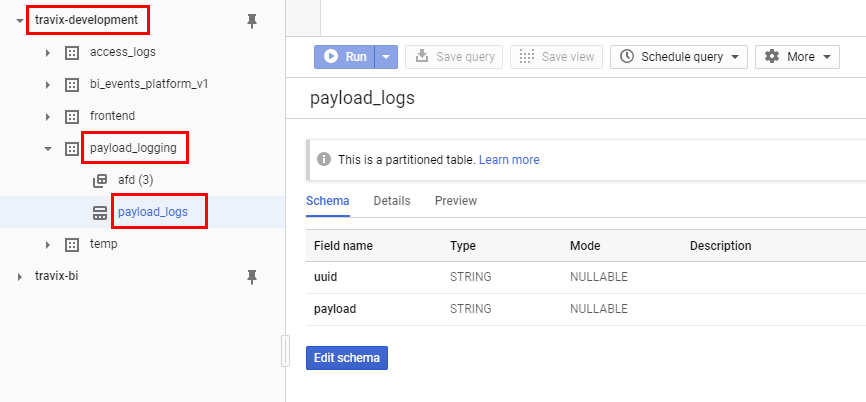
Just to show more concretely what I'm doing. I have this table in BQ:
Then this is the actual code I'm running:
from google.cloud import bigquery

client = bigquery.Client()

dataset_ref = client.dataset('payload_logging', 'travix-development')
table_ref = dataset_ref.table('payload_logs')
table = client.get_table(table_ref)

rows_to_insert = [
    ('abc123', 'testvalue')
]

errors = client.insert_rows(table, rows_to_insert)

if errors == []:
    print('Record saved successfully.')
else:
    print('Error during inserting to BigQuery')
Which prints success at the end.
And then this query doesn't return any results, even half an hour later:
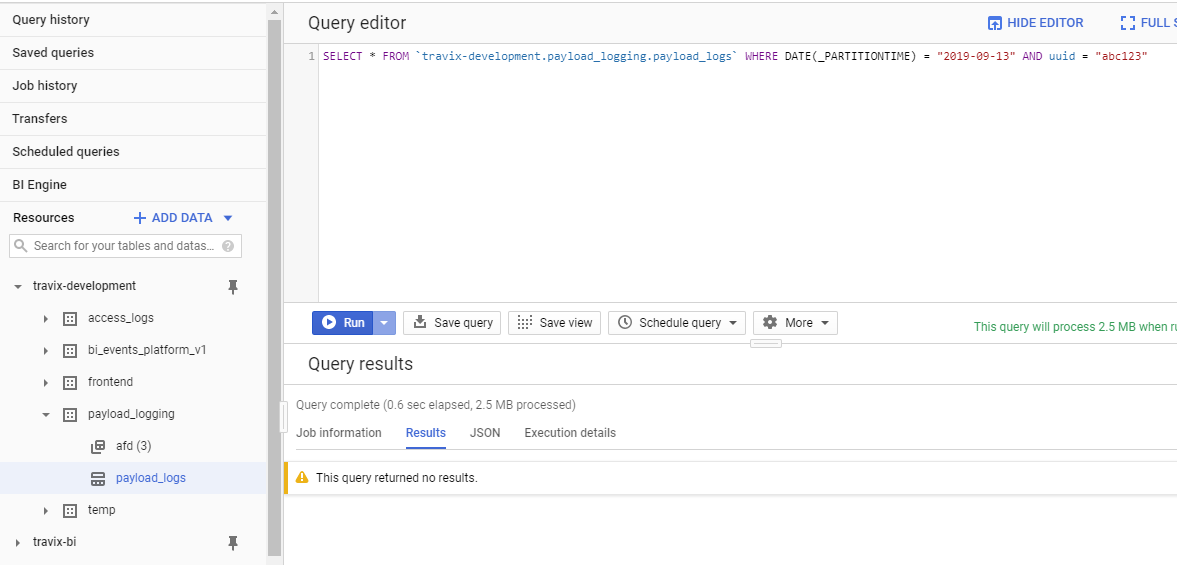
Since this is such a basic scenario, I'm sure that I'm making some trivial mistake. Might this be related to partitioning? Do I maybe have to use insert_rows in a different way for a partitioned table?
markvincze
on 13 Sep 2019
Update: I tried some of the queries that weren't working yesterday, and now they are returning the results properly.
So it seems that it takes even more time than half an hour for the results be available. This answer suggests that this is related to partitioning, and that it can take several hours for the result to be partitioned.
Is it maybe possible to speed this up?
markvincze
on 13 Sep 2019
Okay, I think I might have found a solution.
In the "Streaming into ingestion-time partitioned tables" section on this page there is the suggestion that the partition can be explicitly specified with the syntax mydataset.table$20170301.
If I do this (so replace table_ref = dataset_ref.table('payload_logs') with dataset_ref.table('payload_logs$20190913') in the code above), then it works, and the result is immediately returned by the queries.
This is a bit surprising to me, because if I don't specify the partitiontime explicitly, then I'd expect BigQuery to simply take the current UTC date, which seems to be identical to what I'm doing when I'm specifying it in code.
Anyhow, this seems to solve the issue.
markvincze
on 13 Sep 2019
I just had a similar experience and can confirm that the solution that @markvincze suggest seems to work.
First I was trying to run:
yesterday = datetime.now() - timedelta(days=1)
table_id = 'ffpipeline.revenue.new_ads_performance_{}'.format(yesterday.strftime('%Y%m%d'))

schema = [
    bigquery.SchemaField("start_date", "DATE"),
    bigquery.SchemaField("advertiser", "STRING"),
    bigquery.SchemaField("line_item", "STRING"),
    bigquery.SchemaField("creative", "STRING"),
    bigquery.SchemaField("impressions", "INTEGER"),
    bigquery.SchemaField("clicks", "INTEGER"),
    bigquery.SchemaField("ctr", "FLOAT"),
]

# Test data
ad_performance_data = [('2019-12-12', 'Testing', 'testing', 'testing', 123, 2, 0.98),('2019-12-12', 'Testing 2', 'testing', 'testing', 123, 2, 0.98)]

table = bigquery.Table(table_id, schema=schema)
table = bq_client.create_table(table)

errors = bq_client.insert_rows(table, ad_performance_data)  # Make an API request.
if errors == []:
    print("New rows have been added.")
else:
  print(errors)
In this case I got no errors. However, when looking in the UI I saw no data:

I then used the solution mentioned above and added:
dataset_ref = bq_client.dataset('revenue', 'ffpipeline')
table_ref = dataset_ref.table('new_ads_performance_20200107')
table = bq_client.get_table(table_ref)
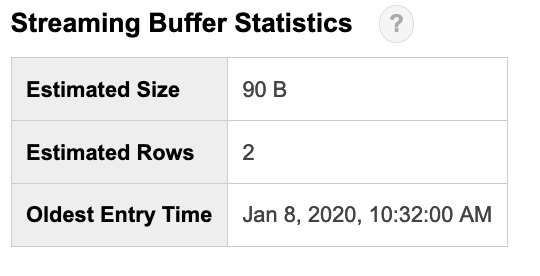
after creating the table (and overwriting the table variable by doing so). Then this box showed up in the UI, suggesting that it worked:
 adderollen
on 8 Jan 2020
adderollen
on 8 Jan 2020
I now tried the exact same code again, and the "Streaming Buffer Statistics" did not show up.. This seems highly irregular...
adderollen
on 8 Jan 2020
Very late to the party but @adderollen I think you need to change the table_id. You have
table_id = 'ffpipeline.revenue.new_ads_performance_{}'.format(yesterday.strftime('%Y%m%d')) which creates new_ads_performance_20200107
but I think you need
table_id = 'ffpipeline.revenue.new_ads_performance${}'.format(yesterday.strftime('%Y%m%d')) to create new_ads_performance$20200107
without the $, you're just creating a table with the date in its name, as opposed to a partition
 maxmetzger
on 29 Jun 2020
maxmetzger
on 29 Jun 2020
Related issues
 bmenasha
·
3Comments
bmenasha
·
3Comments
 blainehansen
·
3Comments
blainehansen
·
3Comments
 blaflamme
·
3Comments
blaflamme
·
3Comments
 vrcs
·
3Comments
vrcs
·
3Comments
 LMeinhardt
·
4Comments
LMeinhardt
·
4Comments
Most helpful comment
Okay, I think I might have found a solution.
In the "Streaming into ingestion-time partitioned tables" section on this page there is the suggestion that the partition can be explicitly specified with the syntax
mydataset.table$20170301.If I do this (so replace
table_ref = dataset_ref.table('payload_logs')withdataset_ref.table('payload_logs$20190913')in the code above), then it works, and the result is immediately returned by the queries.This is a bit surprising to me, because if I don't specify the partitiontime explicitly, then I'd expect BigQuery to simply take the current UTC date, which seems to be identical to what I'm doing when I'm specifying it in code.
Anyhow, this seems to solve the issue.