Google-cloud-php: Slow first connection (huge latency)
I'm already been testing a while with different services (PubSub, BigTable, BigQuery, ...) but always run into the same problem.
The initial connection is consuming lot more time as expected, something between 150-400ms. Within the same request all actions are quite fast (3-30ms).
As we need these services (especially PubSub and BigTable) for real-time calls via HTTP i can't accept response times (from a user perspective) between 200-500ms. Currently (using AWS) we have average processing times between 5-10ms and response/requrest times between 40-120ms which must not get longer, as we are running real-time tracking and API services.
I tried both (VM & App Engine) which didn't make any difference. Authentication is done via Service Accounts, so without providing credentials or json within init of classes. Also authCache didn't help.
Is there any trick i haven't seen or anything i could do to speed up the inital call to get to my <=25ms processing time in total per request?
 fschirl
All 53 comments
Thank you for the report @fschirl.
As a quick test to help isolate things, do you see a similar latency when running the following?
use Google\Auth\CredentialsLoader;

$key = json_decode(file_get_contents('/data/mykey.json'), true);
$creds = CredentialsLoader::makeCredentials($scopes, $key);
$creds->fetchAuthToken();
Edit: Added fetchAuthToken to the snippet
 dwsupplee
on 28 Dec 2017
dwsupplee
on 28 Dec 2017
Hi @dwsupplee,
many thanks for the fast reply.
Probably stupid question, but $scopes should be defined as?
Basically i used:
use Google\Auth\CredentialsLoader;
$scopes = array('https://www.googleapis.com/auth/pubsub');
$key = json_decode(file_get_contents('./key.json'), true);
$creds = CredentialsLoader::makeCredentials($scopes, $key);
$creds->fetchAuthToken();
Using this i have a processing time between 8-9ms
fschirl
on 28 Dec 2017
What you came up with for scopes looks great. Thanks for running the snippet.
What was the method you used to measure latency for the first connection?
dwsupplee
on 28 Dec 2017
Here you go with the sample code:w
$_start_time = microtime(true);
$_num_inserts = 0;

require('/usr/local/usr/share/php/vendor/autoload.php');
use Google\Cloud\PubSub\PubSubClient;

$projectId = 'xxx-etl';
$pubSub = new PubSubClient([
    'projectId' => $projectId,
    'transport' => 'grpc'
]);

$_topic = $pubSub->topic('test');
$_topic->publish([
    'data' => 'My new message. ('.time().')',
    'attributes' => [
        'location' => 'Test 123 - '.rand(1000,9999)
    ]
]);
$_end_time = microtime(true);
print "end: $_end_time (".($_end_time-$_start_time).")\n";

$_topic->publish([
    'data' => 'My new message. ('.time().')',
    'attributes' => [
        'location' => 'Test 456 - '.rand(1000,9999)
    ]
]);

$_end_time = microtime(true);
print "end: $_end_time (".($_end_time-$_start_time).")\n";
Output Examples:
felix@xxx:~/pubsub$ php -q write-sub.php
end: 1514534155.8115 (0.40926885604858)
end: 1514534155.8418 (0.43961787223816)
felix@xxx:~/pubsub$ php -q write-sub.php
end: 1514534158.2425 (0.17152810096741)
end: 1514534158.2739 (0.20284509658813)
As you can see the 2nd Request is something at 30ms, the first is in average about 250ms
fschirl
on 29 Dec 2017
@fschirl
It seems like the library is fetching the auth token. It contributes to the latency.
I think the underlining auth library has a feature for caching the token. I'll take a look and let you know when I have sth to share
 tmatsuo
on 13 Feb 2018
tmatsuo
on 13 Feb 2018
@tmatsuo many thanks for your reply.
Basically caching seems to work for same requests within the script, but as also each request will be it's own process - single HTTP calls from tracking the caching needs to be done across processes
fschirl
on 13 Feb 2018
If the slowdown you are seeing is expressly related to fetching the token, we have some documentation regarding caching here:
https://github.com/GoogleCloudPlatform/google-cloud-php#caching-access-tokens
dwsupplee
on 13 Feb 2018
While using the cache helps, the first request still has a higher latency over continued requests in new processes. With gRPC the initial handshake appears to take roughly 2x the time as it does with REST (using the sample script provided by @fschirl).
In order to test this I stripped the calls down to circumvent the client library and use the underlying code provided to us by the gRPC package. While I believe repeated calls once a channel is established may end up being faster than REST, we may need to look into why the initial connection in a process takes longer, perhaps at the C extension level?
dwsupplee
on 13 Feb 2018
@dwsupplee Does the ArrayAdaptor share the cache among processes?
I wrote a simple ItemPool impl with sysv shared memory which shares the cache between multiple processes. This pool allows me to skip fetching the token after the initial request on a machine. You can use the ItemPool as follows:
$pubSub = new PubSubClient([
    'projectId' => $projectId,
    'authCache' => new SysVItemPool(),
    'transport' => 'grpc',
]);
SysVItemPool.php
<?php
/**
 * Copyright 2018 Google Inc. All Rights Reserved.
 *
 * Licensed under the Apache License, Version 2.0 (the "License");
 * you may not use this file except in compliance with the License.
 * You may obtain a copy of the License at
 *
 *      http://www.apache.org/licenses/LICENSE-2.0
 *
 * Unless required by applicable law or agreed to in writing, software
 * distributed under the License is distributed on an "AS IS" BASIS,
 * WITHOUT WARRANTIES OR CONDITIONS OF ANY KIND, either express or implied.
 * See the License for the specific language governing permissions and
 * limitations under the License.
 */

use Google\Auth\Cache\Item;
use Psr\Cache\CacheItemInterface;
use Psr\Cache\CacheItemPoolInterface;

class SysVItemPool implements CacheItemPoolInterface {

    const VAR_KEY = 1;

    /** @var int */
    private $sysvKey;

    /**
     * @var CacheItemInterface[]
     */
    private $items;

    /**
     * @var CacheItemInterface[]
     */
    private $deferredItems;

    public function __construct()
    {
        if (! extension_loaded('sysvshm')) {
            throw \RuntimeException(
                'sysvshm extension is required to use this ItemPool');
        }
        $this->items = [];
        $this->deferredItems = [];
        $this->sysvKey = ftok(__FILE__, 'B');
        $shmid = shm_attach($this->sysvKey);
        if ($shmid !== false) {
            try {
                $data = @shm_get_var($shmid, self::VAR_KEY);
                if (!empty($data)) {
                    $this->items = $data;
                    var_dump($this->items);
                }
            } finally {
                shm_detach($shmid);
            }
        }
    }

    /**
     * {@inheritdoc}
     */
    public function getItem($key)
    {
        return current($this->getItems([$key]));
    }
    /**
     * {@inheritdoc}
     */
    public function getItems(array $keys = [])
    {
        $items = [];
        foreach ($keys as $key) {
            $items[$key] = $this->hasItem($key) ? clone $this->items[$key] : new Item($key);
        }
        return $items;
    }
    /**
     * {@inheritdoc}
     */
    public function hasItem($key)
    {
        return isset($this->items[$key]) && $this->items[$key]->isHit();
    }
    /**
     * {@inheritdoc}
     */
    public function clear()
    {
        $this->items = [];
        $this->deferredItems = [];
        return true;
    }
    /**
     * {@inheritdoc}
     */
    public function deleteItem($key)
    {
        return $this->deleteItems([$key]);
    }
    /**
     * {@inheritdoc}
     */
    public function deleteItems(array $keys)
    {
        array_walk($keys, [$this, 'isValidKey']);
        foreach ($keys as $key) {
            unset($this->items[$key]);
        }
        return true;
    }
    /**
     * {@inheritdoc}
     */
    public function save(CacheItemInterface $item)
    {
        $this->items[$item->getKey()] = $item;
        $shmid = shm_attach($this->sysvKey);
        if ($shmid !== false) {
            try {
                shm_put_var($shmid, self::VAR_KEY, $this->items);
                return true;
            } finally {
                shm_detach($shmid);
            }
        }
        return false;
    }
    /**
     * {@inheritdoc}
     */
    public function saveDeferred(CacheItemInterface $item)
    {
        $this->deferredItems[$item->getKey()] = $item;
        return true;
    }
    /**
     * {@inheritdoc}
     */
    public function commit()
    {
        foreach ($this->deferredItems as $item) {
            $this->save($item);
        }
        $this->deferredItems = [];
        return true;
    }
}
However, as @dwsupplee mentioned, I still see the first request has higher latency.
tmatsuo
on 14 Feb 2018
@fschirl Have you looked at https://github.com/GoogleCloudPlatform/google-cloud-php/blob/master/src/PubSub/BatchPublisher.php ?
It will batch multiple messages into one single RPC call. Also it allows you to offload the RPC latency to an external process. Let me know if you're interested.
tmatsuo
on 14 Feb 2018
First of all many thanks for your answers.
The thing is why i want to use Pub/Sub is to get rid of latency and have stateless tracking.
So from a setup point of view i have an autoscaling pool of loadbalanced micro instances for tracking. Each user (e.g. from a website) will have one single tracking request at a time which is called via HTTP and a pixel request. This Request needs to be stored and processed.
So far i was using file storage on each machine and transporting the data each hour to an aggreagtion job.
As i want to get rid of this Pub/Sub seemed to be the ideal solution of having stateless tracking and real time processing when fetching the data through Pub/Sub on the worker machine.
However a tracking request within a browser must not take longer as about 10-20ms processing time on the maching (currently i have 7-8ms using file storage).
As every call is handled on it's own as this is a simple web tracking - batch processing is not the solution i was looking for.
I could find tons of work arounds (e.g storing to file for x seconds and sending it after this to Pub/sub) bu i hope Pub/Sub would exactly be used to have low latency and processing can be done by workers.
@dwsupplee you mentioned C Extension, yes sure i can add a C extension to Apache for holding the connection, but this also will take some time.
Also if you have any good idea how to have a fast and stateless tracking where tracking requests will be handeled asynchron, feel free to drop me ideas .
fschirl
on 14 Feb 2018
@fschirl
BatchPublisher also provides asynchronous RPC calls.
1) You need to have these 3 extensions; sysvsem, sysvshm, and sysvmsg (normaly binary PHP distributions have them compiled in, so probably you don't need to do anything)
2) You need to run a daemon process provided as vendor/bin/google-cloud-batch as follows:
vendor/bin/google-cloud-batch daemon
You need to run this daemon as the same user as the web app (e.x. php-fpm). You may want to use process manager like supervisord. There is an example supervisord config file.
3) Set an environment variable IS_BATCH_DAEMON_RUNNING to true. Then the BatchPublisher will offload all the RPC calls to the daemon process via the kernel message queue.
The kernel message queue is super fast because it's just in kernel memory, so hopefully it will be faster than the file based solution.
tmatsuo
on 14 Feb 2018
Does the ArrayAdaptor share the cache among processes?
That adapter does not, but many of the other implementations in the symfony component do. The sysv implementation you provided looks nice too!
dwsupplee
on 14 Feb 2018
Thanks for all your support. I will test the stuff by tomorrow and let you know. Thanks again so far!
fschirl
on 14 Feb 2018
@fschirl No problem. Sorry for the late reply and feel free to ping me at [email protected] for questions regarding the setup!
tmatsuo
on 15 Feb 2018
@fschirl Sorry I had a typo for the environment name in the previous comment. IS_BATCH_DAEMON_RUNNING is the correct one.
tmatsuo
on 15 Feb 2018
Hi @tmatsuo ,
thanks for the fix / workaround which will solve things with PubSub.
Anyway the "warm-up" or initial request being slow also applies for BigTable.
I got following code as example:
Code:
$_start_time = microtime(true);

require('/path/to/vendor/autoload.php');

use Google\Cloud\Bigtable\V2\BigtableClient;
use Google\Cloud\Bigtable\V2\RowSet;
use Google\Protobuf\Internal\RepeatedField;
use Google\Cloud\Bigtable\V2\ReadModifyWriteRule;

$project_id = 'PROJECT';
$_options = array('projectId' => $project_id);

print date('r')." start time ".$_start_time."\n";
$BigtableClient = new BigtableClient();

_read_all_entries($BigtableClient);

$_end_time_1 = microtime(true);
print date('r')." time: $_end_time_1 (".($_end_time_1-$_start_time).")\n";

_read_all_entries($BigtableClient);

$_end_time_2 = microtime(true);
print date('r')." time: $_end_time_2 (".($_end_time_2-$_end_time_1).")\n";

_read_all_entries($BigtableClient);

$_end_time_3 = microtime(true);
print date('r')." time: $_end_time_3 (".($_end_time_3-$_end_time_2).")\n";
print date('r')." time: $_end_time_3 (".($_end_time_3-$_start_time).") <-- total time taken\n";

$BigtableClient->close();


function _read_all_entries(&$BigtableClient) {
    $_table = $BigtableClient->tableName('PROJECT', 'INSTANCE', 'TABLE');

    $RowSet = new RowSet();
    $_options = array();
    $_options['rows'] = $RowSet->setRowKeys(array('key1', 'key2'));
    $_result = $BigtableClient->readRows($_table, $_options);

    $_row_result = array();
    foreach ($_result->readAll() as $_element) {
        foreach ($_element->getChunks() as $_chunk) {
            /* DO SOMETHING */
        }
    }
    return $_row_result;
}
Output:
$ php -q bigtable-read-test.php
Mon, 26 Feb 2018 20:30:48 +0000 start time 1519677048.9694
Mon, 26 Feb 2018 20:30:49 +0000 time: 1519677049.3106 (0.34117007255554)
Mon, 26 Feb 2018 20:30:49 +0000 time: 1519677049.3227 (0.01210880279541)
Mon, 26 Feb 2018 20:30:49 +0000 time: 1519677049.3266 (0.0039091110229492)
Mon, 26 Feb 2018 20:30:49 +0000 time: 1519677049.3266 (0.3571879863739) <-- total time taken
As you can see, request 2 and 3 are way faster as the initial request.
The table itself has just 6 keys, as this is also only a testing table.
fschirl
on 26 Feb 2018
@fschirl,
Do you know which version of gRPC you are using?
From what I understand there should have been some improvements made in the C extension to keep a channel open behind the scenes (https://github.com/grpc/grpc/pull/11878). I wonder if it is possible the version you are using may not have this included. It should offer a substantial improvement.
@stanley-cheung do any optimizations come to mind which may increase the speed of the initial handshake for gRPC?
edit: I have edited the title, as it looks like we have narrowed this down to not be an issue with auth
dwsupplee
on 26 Feb 2018
@dwsupplee ,
gRPC version i used for tests above was 1.8.0.
Just updated it to 1.9.0, here's the output oft the same test script above:
$ php -q bigtable-read-test.php
Mon, 26 Feb 2018 22:33:48 +0000 start time 1519684428.173
Mon, 26 Feb 2018 22:33:48 +0000 time: 1519684428.1869 (0.013916969299316)
Mon, 26 Feb 2018 22:33:48 +0000 time: 1519684428.5268 (0.35385513305664)
Mon, 26 Feb 2018 22:33:48 +0000 time: 1519684428.5389 (0.012111902236938)
Mon, 26 Feb 2018 22:33:48 +0000 time: 1519684428.5428 (0.0038189888000488)
Mon, 26 Feb 2018 22:33:48 +0000 time: 1519684428.5428 (0.36978602409363) <-- total time taken
So basically same results
fschirl
on 26 Feb 2018
Hi,
gRPC has added persistent connections since 1.4.7 so the user should have had that already. Is there an xhprof breakdown on which functions took the longest time?
 stanley-cheung
on 26 Feb 2018
stanley-cheung
on 26 Feb 2018
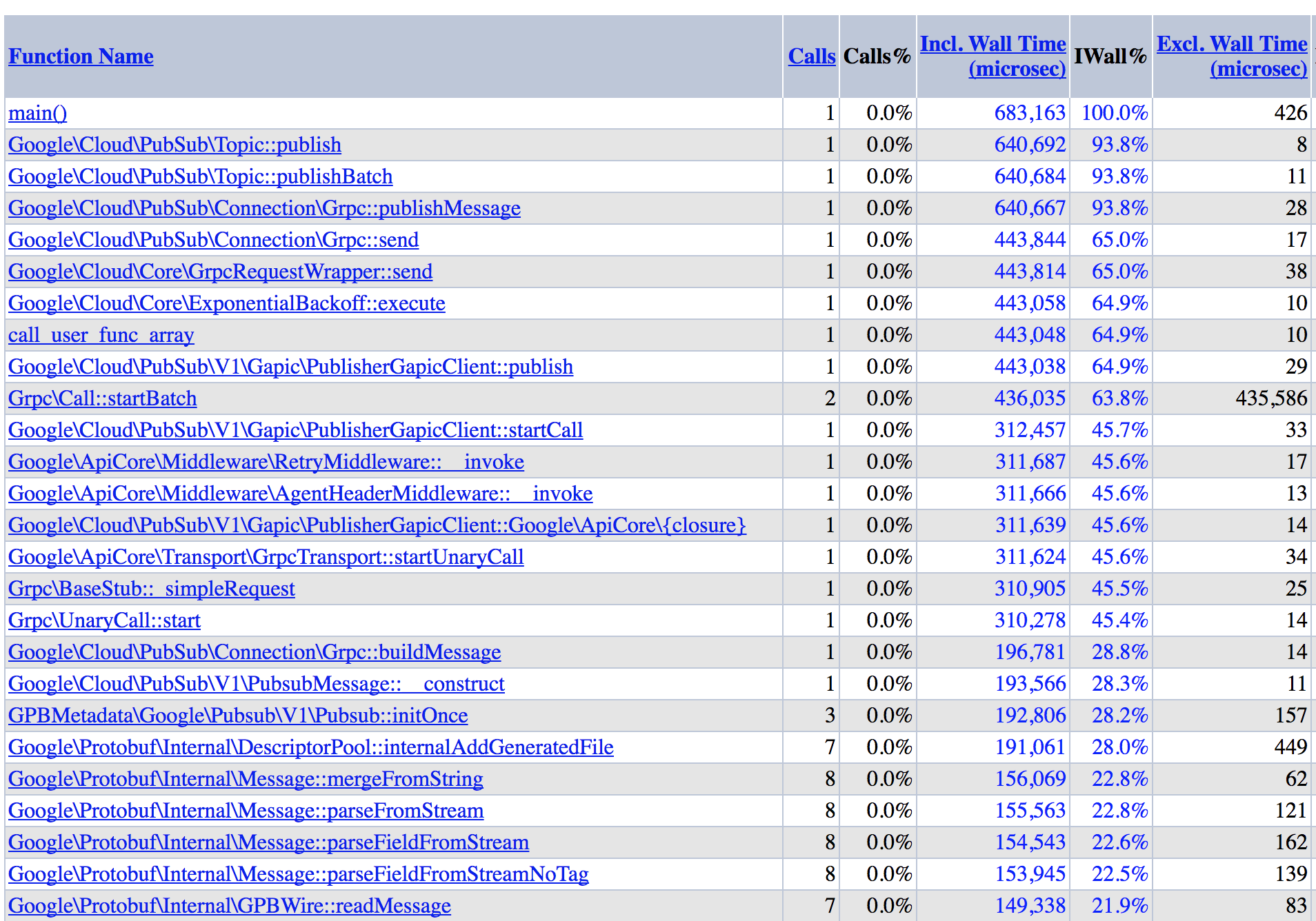
Here is the full report of running a single publish call with an already established auth token: 5a94aa10abfc0.xhprof_foo.xhprof.zip
A screen cap of the top calls from the report (sorted by incl. wall time):
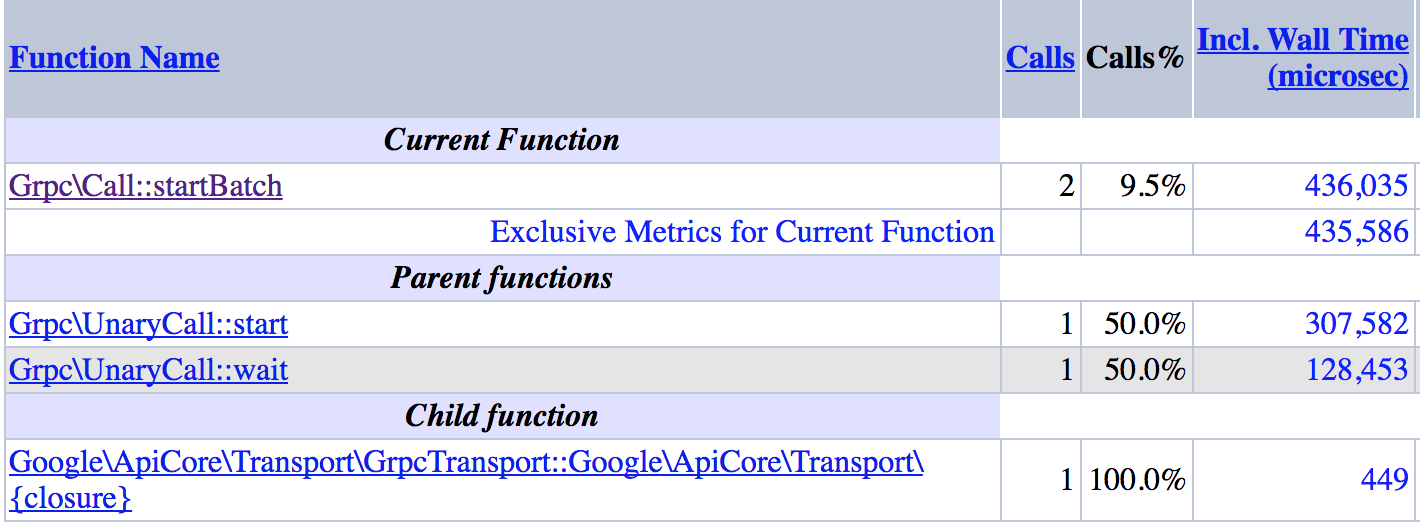
And digging down into Grpc\Call::startBatch:
dwsupplee
on 27 Feb 2018
Tracking it here: https://github.com/grpc/grpc/issues/14534
stanley-cheung
on 27 Feb 2018
Re: persistent connection
I don't think the very first API request within a process benefit from the persistent connection. However, the persistent connection might benefit subsequent HTTP request within the same PHP process.
For example, if you're running the PHP script with php-fpm, the following will happen:
- php-fpm spawn a PHP process
- the first http request comes to that process, then gRPC extension will create a channel, so it is still slow as you observe
- the second http request comes to the same process, then gRPC extension can re-use the same channel. This API call might be faster than the first one, although I'm not sure how faster it is.
- All the following requests will benefit from the persistent channel
So, in short, only the first request will pay the cost of creating the channel. Then, amortized latency might be acceptable for you.
To check how fast it is, maybe you can use the PHP builtin web server to run the script.
$ php -S localhost:8080
Then access the script with the browser. The first API request of the first HTTP request should be slow, but what about the first API request of the second HTTP request?
tmatsuo
on 28 Feb 2018
Hi @tmatsuo ,
we currently didn't use php-fpm. Just default Apache with mod_php configuration with also keep-alive off.
As I understood from my developers team, this was due to performance or anything like this not using fastCGI/php-fpm.
In our case every request stands for it's own without any connection to the other requests (high performance tracking of websites).
Same applies for our API which handles currently about 750 requests / sec (will grow to about 2500/sec within the next 4-5 months).
From your point of view using apache with php-fpm would increase performance instead of using plain apache/mod_php?
fschirl
on 28 Feb 2018
@fschirl
Re: mod_php v.s. php-fpm
I just said php-fpm as an example, I don't necessarily recommend one over the other.
I don't have data, but apache + mod_php should be fast enough.
With apache + mod_php, the apache process should also benefit from the grpc persistent connection.
tmatsuo
on 28 Feb 2018
@tmatsuo
just tried both, mod_php and php-fpm.
Also 2nd request shows latency on first call.
fschirl
on 28 Feb 2018
@fschirl Thanks for confirming.
What's the use case for BigTable? Does your app write user data to BigTable? or does your app reads BigTable in the request as the sample?
tmatsuo
on 28 Feb 2018
@tmatsuo in this case just reads would be used to access data.
Also the reads would be accessed by direct key lookup
fschirl
on 28 Feb 2018
@fschirl
Do you really need to read the data in every request? Is it cache-able?
tmatsuo
on 28 Feb 2018
@tmatsuo ,
actually not directly. So i've used a redis cluster so far to hold information needed in real time. If BigTable will not work out from performance / connection time point of view I will use Redis Cluster again to hold the data.
BigTable would just give me way more flexibility as well as I could get rid of Redis Cluster.
fschirl
on 28 Feb 2018
With redis, you still need network RPC, right? How about to cache the data in kernel shared memory or somewhere so that it's going to be super fast, and potentially have a cron or daemon program to read the value from BigTable and update the value?
tmatsuo
on 28 Feb 2018
@tmatsuo
at the current setup in AWS I have a redis cluster access through TCP connection.
Redis itself has about 12-20GB stored and accessing the data is < 4ms (including connection).
As I'll have about 20-50 micro instances for handling the traffic i need to have one central place which I can update without having to update a dynamic range of instances.
We are not talking about caching some data (therefor I'll use kernel memory) but for bigger data which i need to access in a very fast way redis was No. 1 so far.
As being said I can also work again with a Redis cluster and accessing it through TCP connection just though BigTable could replace this at some stage and also having more features as Redis has.
fschirl
on 28 Feb 2018
@fschirl Alright. I understand your use case better, thanks!
I think we should try to lower the initial latency with our client library, but are you currently unblocked with the pubsub batch client and the workaround of using redis?
tmatsuo
on 28 Feb 2018
@tmatsuo
PubSub Batch Client will work out the way as described above, that already solved me a huge problem. Thanks again for this.
Having BigTable without the latency would just be the nice-to-have, but I can also use Redis meanwhile. Solving the PubSub Issue with using Batch will work totally fine for the part i needed.
fschirl
on 28 Feb 2018
Hi @fschirl
Can you provide the information about the location you run the Computer Engine VM or App Engine, such as us-central1, us-west1, etc? It may have influence on the latency for the initiate connection.
Thanks!
 ZhouyihaiDing
on 6 Mar 2018
ZhouyihaiDing
on 6 Mar 2018
I tried europe-west1 and europe-west3, but as the sencond requwest being fast and also the service is available in europe I thought this wouldn’t be an issue
fschirl
on 6 Mar 2018
Hi @fschirl ,
Backend does exist in the location you are running.
Can you please help us to get the IP address of the services for the PubSub and BigTable, like ping "pubsub.googleapis.com" and "bigtable.googleapis.com" inside VM or App Engine? They may locate somewhere else other than europe-west.
Thank you!
ZhouyihaiDing
on 6 Mar 2018
Hi @ZhouyihaiDing ,
here you go:
root@xxx:~# ping pubsub.googleapis.com
PING googleapis.l.google.com (108.177.15.95) 56(84) bytes of data.
64 bytes from wr-in-f95.1e100.net (108.177.15.95): icmp_seq=1 ttl=53 time=0.628 ms

root@xxx:~# ping bigtable.googleapis.com
PING googleapis.l.google.com (74.125.140.95) 56(84) bytes of data.
64 bytes from wq-in-f95.1e100.net (74.125.140.95): icmp_seq=1 ttl=53 time=0.613 ms
Latency of a few hundred ms for the first connection is expected. You can create the VM in US region to get lower latency, like us-central1 with around 100ms.
cc: @mdietz94 @fengli79 .
ZhouyihaiDing
on 7 Mar 2018
@ZhouyihaiDing thanks so far, but most of our clients are based in EU, so having a VM in US would slower the latency of the connection request within GCP, but the latency would then be on client side accessing the service, so this can't be a solution
fschirl
on 7 Mar 2018
@fschirl, the latency is actually introduced on the server side when pubsub fanout to its backend servers.
There's no too much we can do on the client side.
 fengli79
on 7 Mar 2018
fengli79
on 7 Mar 2018
@fengli79 For pubsub, we're fine with the solution with the batch(and async) client. What about bigtable?
tmatsuo
on 7 Mar 2018
Just letting everyone know that I am seeing this problem with Spanner as well.
 taka-oyama
on 9 Mar 2018
taka-oyama
on 9 Mar 2018
I was told that the NodeJS version of the client keeps the connection in memory so that initial connection happens only once while the application is running.
Is it possible to do something similar and cache connections between requests?
taka-oyama
on 12 Mar 2018
It seems grpc v1.8.5 is really faster than v1.10.0 for first connection.
(10ms vs 500ms)
 axot
on 13 Mar 2018
axot
on 13 Mar 2018
Nice find @axot. I can confirm seeing a thorough boost in speed with v1.8.5 as well.
dwsupplee
on 13 Mar 2018
@tmatsuo, when digging into the bigtable case, we found something wrong on the client side. Will update once we get the root cause.
fengli79
on 13 Mar 2018
@axot, as I mentioned in my previous comment, we do aware of something wrong on the grpc client side, however, I don't think it lead to such a huge difference, like 10ms vs 500ms. It's more like saving 50ms in a 200ms total latency.
Could you help to clarify your test case?
- Which Google API your client is trying to connect?
- Where you run the client, on a GCE VM? Or somewhere else? Which cloud region/zone?
- How you measure the latency? A code snippet is highly appreciated.
fengli79
on 13 Mar 2018
@fengli79, I'm testing Spanner in Tokyo/asia-northeast1. Here is the test code.
The test client is running on GCE asia-northeast1-a.
<?php

require_once __DIR__.'/../../vendor/autoload.php';

use Symfony\Component\Cache\Adapter\ApcuAdapter;
use Google\Auth\Credentials\GCECredentials;
use Google\Cloud\Spanner\Session\CacheSessionPool;
use Google\Cloud\Spanner\SpannerClient;
use Symfony\Component\Cache\Adapter\FilesystemAdapter;

$gceCredentials = new GCECredentials();
$cacheItemPool = new ApcuAdapter();
$sessionPool = new CacheSessionPool($cacheItemPool, ['minSessions' => 1,  'maxSessions' => 1]);

$spanner = new SpannerClient(['credentialsFetcher' => $gceCredentials]);
$database = $spanner->connect('where', 'name', ['sessionPool' => $sessionPool]);

$then = microtime(true);
$sessionPool->warmup();
$elapsed = (microtime(true) - $then) * 1000;
echo "Warmup: ".number_format($elapsed, 3)." milliseconds".PHP_EOL;

for($i=1; $i<11; $i++) {
  $then = microtime(true);
  $results = $database->execute('SELECT ' . $i);
  foreach ($results as $data) {
      // do nothing
  }
  $elapsed = (microtime(true) - $then) * 1000;
  echo $i . " Query: ".number_format($elapsed, 3)." milliseconds".PHP_EOL;
}

$database->close();
Results after run few times:
v1.8.5
Warmup: 0.054 milliseconds
1 Query: 9.833 milliseconds
2 Query: 2.655 milliseconds
3 Query: 3.549 milliseconds
4 Query: 2.562 milliseconds
5 Query: 3.291 milliseconds
6 Query: 3.658 milliseconds
7 Query: 2.629 milliseconds
8 Query: 2.742 milliseconds
9 Query: 2.621 milliseconds
10 Query: 3.129 milliseconds
v1.10.0
Warmup: 0.049 milliseconds
1 Query: 514.264 milliseconds
2 Query: 40.312 milliseconds
3 Query: 6.996 milliseconds
4 Query: 4.102 milliseconds
5 Query: 3.241 milliseconds
6 Query: 4.094 milliseconds
7 Query: 4.421 milliseconds
8 Query: 3.320 milliseconds
9 Query: 3.261 milliseconds
10 Query: 3.090 milliseconds
For the Bigtable, the latency for the first RPC is mostly caused by fetching the auth token and wating for the response from the backend server.
My experiment gets the result like this:
For the first RPC, it will take about 50ms to fetch the auth token, wait 50-70ms to get the response, and it takes gRPC ~70ms to initialize and do some processing.
For the second and third RPC, only waiting for the response takes most of the time, while other parts take almost 0ms.
Here is the code and the result I get. I created both GCE and bigtable instance in europe-west-1d. I Installed gRPC and protobuf C-extension.
use Google\Cloud\Bigtable\V2\BigtableClient;
use Google\Cloud\Bigtable\V2\RowSet;
use Google\Protobuf\Internal\RepeatedField;
use Google\Cloud\Bigtable\V2\ReadModifyWriteRule;
$project_id = 'xxxx';
$_options = array('projectId' => $project_id);
$BigtableClient = new BigtableClient();
$_start_time = microtime(true);
_read_all_entries($BigtableClient, 'my-table');
$_end_time_1 = microtime(true);
print date('r')." time: $_end_time_1 (".($_end_time_1-$_start_time).")\n";
_read_all_entries($BigtableClient, 'my-table2');
$_end_time_2 = microtime(true);
print date('r')." time: $_end_time_2 (".($_end_time_2-$_end_time_1).")\n";
_read_all_entries($BigtableClient, 'my-table3');
$_end_time_3 = microtime(true);
print date('r')." time: $_end_time_3 (".($_end_time_3-$_end_time_2).")\n";
print date('r')." time: $_end_time_3 (".($_end_time_3-$_start_time).") <-- total time taken\n";
$BigtableClient->close();

function _read_all_entries(&$BigtableClient, $table) {
    $_table = $BigtableClient->tableName('xxxx', 'xxxx', $table);
    $RowSet = new RowSet();
    $_options = array();
    $_options['rows'] = $RowSet->setRowKeys(array('r1', 'r2'));
    $_result = $BigtableClient->readRows($_table, $_options);
    $_row_result = array();
    foreach ($_result->readAll() as $_element) {
        foreach ($_element->getChunks() as $_chunk) {
                print_r($_chunk);
        }
    }
    return $_row_result;
}
The time for fetching auth token and waiting for the response are read from the gRPC's trace log. The gRPC init and processing time is calculated by minus the total time with the other time:
| ------------- | fetch auth token | readRows(wait for response after sending the request) | gRPC(init+processing)+php code | total |
| --- | --- | --- | --- | --- |
| First RPC | 58 | 58 | 73 | 199 |
| Second RPC | 0.05 | 31 | 1 | 32 |
| Third RPC | 0.1 | 22 | 1 | 23 |
For the Bigtable in the client part, we can try to save more time by optimize gRPC init and persistent channel.
ZhouyihaiDing
on 15 Mar 2018
Adding to the comment by @ZhouyihaiDing , you can use cache implementation in https://github.com/GoogleCloudPlatform/google-cloud-php/issues/819#issuecomment-365461933 to reduce the latency spent for the auth token.
tmatsuo
on 15 Mar 2018
Per https://github.com/GoogleCloudPlatform/google-cloud-php/issues/989 I believe we can close this out now. If there are still issues please feel free to re-open.
dwsupplee
on 3 Sep 2018
Related issues
 lorenzosfarra
·
7Comments
lorenzosfarra
·
7Comments
 castaneai
·
4Comments
castaneai
·
7Comments
castaneai
·
4Comments
castaneai
·
7Comments
 codeflorist
·
5Comments
codeflorist
·
5Comments
 ammopt
·
6Comments
ammopt
·
6Comments