Google-cloud-node: Logging Winston Monitored Resource
Environment details
- OS: Ubuntu 16.04
- Node.js version: v4.8.4
- npm version: 2.15.11
- google-cloud/logging-winston: 0.5.0
Hi there. 2 things that I noticed when trying out the Stackdriver transport for winston.
- The auto detection of monitored resource is not accurate. My node app is running on Google Compute Engine (GCE), but my logs appear in Google Container Engine (GKE). I am using PM2 to manage my node applications, could this be the cause?
- Since the auto detection above wasn't working accurately, I tried specifying the monitored resource manually. The keys for
labelsseems to only take snake_case i.e.project_idand NOT camelCaseprojectId.
// Works
resource: {
  type: 'gce_instance',
  labels: {
    project_id: projectId,
    instance_id: instanceId,
    zone: zone,
  },
},

// Does not work. Nothing gets logged
resource: {
  type: 'gce_instance',
  labels: {
    projectId: projectId,
    instanceId: instanceId,
    zone: zone,
  },
},
I referred to the documentations here and here when specifying the key-value.
 jwgoh
jwgoh
All 11 comments
Hi @jwgoh. Thanks for the detailed bug report. I have split the snake_case issue into a separate one (https://github.com/GoogleCloudPlatform/google-cloud-node/issues/2494) and we can keep this issue for diagnosing the incorrect resource identification of GCE as GKE.
Is there any chance you might be setting the cluster_name as a metadata attribute on your GCE instance?
We detect the environment using the logic here. We check for container engine before checking for GCE. If I am reading the logic correctly, It seems that the only way we identify the environment to be container engine is if the cluster-name attribute is set.
 ofrobots
on 27 Jul 2017
ofrobots
on 27 Jul 2017
@ofrobots Hey there, sorry for the late reply. Thanks for splitting up the snake_case issue into a separate one.
No, I am not setting any metadata attribute, just adding the winston transport directly.
logger.add(Stackdriver, {
  level: options.level,
  logName: options.logName,
});
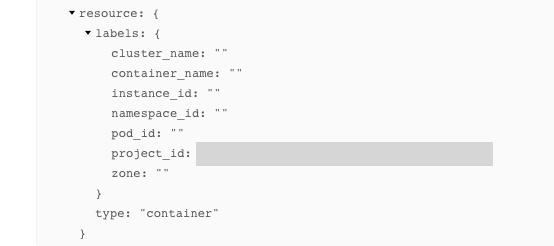
This can be confirmed from an example log entry that has the following resource JSON content. Only project_id is present.
jwgoh
on 7 Aug 2017
Thanks. I suspect this will be fixed by https://github.com/GoogleCloudPlatform/google-cloud-node/pull/2483. @stephenplusplus could we get a release for the base logging module followed by a dep-bump + release of logging-{winston,bunyan}?
ofrobots
on 8 Aug 2017
@ofrobots Thanks, will check if this change fixes the bug once there is a new release 👍
jwgoh
on 8 Aug 2017
@google-cloud/[email protected] released. New installs as well as un- and re-installing logging-winston and logging-bunyan will pick up the change.
 stephenplusplus
on 8 Aug 2017
stephenplusplus
on 8 Aug 2017
@jwgoh Please let us know when you've tried out the fix. If there are still issues, I would like to understand them further.
ofrobots
on 10 Aug 2017
@ofrobots Hey I tried the new release and this is what I get in my log output
resource: {
  labels: {
   cluster_name:  "<!DOCTYPE html>
<html lang=en>
  <meta charset=utf-8>
  <meta name=viewport content="initial-scale=1, minimum-scale=1, width=device-width">
  <title>Error 404 (Not Found)!!1</title>
  <style>
    *{margin:0;padding:0}html,code{font:15px/22px arial,sans-serif}html{background:#fff;color:#222;padding:15px}body{margin:7% auto 0;max-width:390px;min-height:180px;padding:30px 0 15px}* > body{background:url(//www.google.com/images/errors/robot.png) 100% 5px no-repeat;padding-right:205px}p{margin:11px 0 22px;overflow:hidden}ins{color:#777;text-decoration:none}a img{border:0}@media screen and (max-width:772px){body{background:none;margin-top:0;max-width:none;padding-right:0}}#logo{background:url(//www.google.com/images/branding/googlelogo/1x/googlelogo_color_150x54dp.png) no-repeat;margin-left:-5px}@media only screen and (min-resolution:192dpi){#logo{background:url(//www.google.com/images/branding/googlelogo/2x/googlelogo_color_150x54dp.png) no-repeat 0% 0%/100% 100%;-moz-border-image:url(//www.google.com/images/branding/googlelogo/2x/googlelogo_color_150x54dp.png) 0}}@media only screen and (-webkit-min-device-pixel-ratio:2){#logo{background:url(//www.google.com/images/branding/googlelogo/2x/googlelogo_color_150x54dp.png) no-repeat;-webkit-background-size:100% 100%}}#logo{display:inline-block;height:54px;width:150px}
  </style>
  <a href=//www.google.com/><span id=logo aria-label=Google></span></a>
  <p><b>404.</b> <ins>That’s an error.</ins>
  <p>The requested URL <code>/computeMetadata/v1/instance/attributes/clusterName</code> was not found on this server.  <ins>That’s all we know.</ins>
"
   container_name:  ""
   instance_id:  ""
   namespace_id:  ""
   pod_id:  ""
   project_id: <REDACTED>
   zone:  ""
  }
  type:  "container"
 }
It seems like it is still detecting my node app as coming from GKE and attempting to query the metadata server for clusterName which clearly is not defined for GCE.
jwgoh
on 10 Aug 2017
Ooops. This is embarrassing. I did a typo in the fix. It seems that kubernetes uses kebab-case in the attribute names.
On a GKE machine:
ofrobots@gke-cloudcats-default-pool-9562f1XX-XXXXX ~ $ curl "http://metadata.google.internal/computeMetadata/v1/inst
ance/attributes/" -H "Metadata-Flavor: Google"
cluster-name
configure-sh
created-by
gci-ensure-gke-docker
gci-update-strategy
instance-template
kube-env
user-data
Let me fix this.
ofrobots
on 10 Aug 2017
Hi @jwgoh. I believe this should be fixed now. Please give this a shot, and let us know if there are still issues.
ofrobots
on 1 Sep 2017
@ofrobots Thanks it's working now! 👍
Minor nit, the zone is an empty string (instance_id and project_id are correct)
jwgoh
on 5 Sep 2017
Thanks for verifying. I have opened #2601 to deal with the zone label.
ofrobots
on 11 Sep 2017
Related issues
 chadbr
·
3Comments
chadbr
·
3Comments
 positlabs
·
3Comments
positlabs
·
3Comments
 jackzampolin
·
3Comments
jackzampolin
·
3Comments
 vvzen
·
4Comments
vvzen
·
4Comments
 mik115
·
5Comments
mik115
·
5Comments