Google-cloud-node: getSignedUrl throwing error on app engine flex env
Problem
According to the docs
If you are running you app on Google Compute Engine, you won't need to worry about supplying connection configuration options to @google-cloud/storage— we figure that out for you.
However in App Engine Flex env I receive the following error when trying getSignedUrl
Environment details
- OS: Linux version 3.16.0-4-amd64 ([email protected]) (gcc version 4.8.4 (Debian 4.8.4-1) ) #1 SMP Debian 3.16.36-1+deb8u2 (2016-10-19)
- Node.js version: v6.9.2
- npm version: v3.10.9
- google-cloud-node version: v0.45.0
Steps to reproduce
- SSH into flex node env running node
- Run `$ sudo Docker exec -it
/bin/bash - Install most recent version of google-cloud
$npm install [email protected] - Open a node cli instance by running
$ node - Execute the following code
const gcs = require('google-cloud')().storage();
const groupBucket = gcs.bucket(`groups-test-bucket`);
const newFile = groupBucket.file('group-test-new-file');
newFile.getSignedUrl({ action: 'read', expires: '03-17-2025' }).then(function(data) { console.log(data[0]); }).catch(err => console.log(err));
- Notice Error
{ SigningError: Could not get credentials without a JSON, pem, or p12 keyfile.
    at /usr/src/app/node_modules/google-cloud/node_modules/@google-cloud/storage/src/file.js:1460:16
    at /usr/src/app/node_modules/google-cloud/node_modules/google-auto-auth/index.js:107:7
    at addScope (/usr/src/app/node_modules/google-cloud/node_modules/google-auto-auth/index.js:85:5)
    at callback (/usr/src/app/node_modules/google-cloud/node_modules/google-auth-library/lib/auth/googleauth.js:42:14)
    at /usr/src/app/node_modules/google-cloud/node_modules/google-auth-library/lib/auth/googleauth.js:289:13
    at _combinedTickCallback (internal/process/next_tick.js:67:7)
    at process._tickDomainCallback (internal/process/next_tick.js:122:9)
  message: 'Could not get credentials without a JSON, pem, or p12 keyfile.' }
 redwood-egarcea
All 14 comments
Thanks for reporting. Indeed, this is a crypto operation, which we cannot perform without a key file. This was also reported here, which explained a way that won't require the key file anymore. I'll leave this issue open to track our implementing that.
 stephenplusplus
on 12 Dec 2016
stephenplusplus
on 12 Dec 2016
@stephenplusplus Is this issue a duplicate of https://github.com/GoogleCloudPlatform/gcloud-common/issues/180? If so, we can copy this description to a comment in that issue, and close this one.
 bjwatson
on 2 Mar 2017
bjwatson
on 2 Mar 2017
Oh, I see what's going on. That's a gcloud-common issue. I understand why you're keeping this open.
bjwatson
on 2 Mar 2017
Any workarounds here? I'm trying to use file.getSignedUrl within firebase functions, and running into the same error:
{ SigningError: Could not get credentials without a JSON, pem, or p12 keyfile.
    at /user_code/node_modules/@google-cloud/storage/src/file.js:1441:16
    at /user_code/node_modules/@google-cloud/storage/node_modules/google-auto-auth/index.js:98:7
    at Immediate.<anonymous> (/user_code/node_modules/@google-cloud/storage/node_modules/google-auto-auth/index.js:36:7)
    at runCallback (timers.js:637:20)
    at tryOnImmediate (timers.js:610:5)
    at processImmediate [as _immediateCallback] (timers.js:582:5)
  message: 'Could not get credentials without a JSON, pem, or p12 keyfile.' }
 ecastano
on 21 Mar 2017
ecastano
on 21 Mar 2017
I'm currently not sure how to implement this for the auto-auth'd environments (ones where you don't provide a keyFilename or credentials argument). I elaborate on this here: https://github.com/GoogleCloudPlatform/gcloud-common/issues/180#issuecomment-288512562 -- if anyone has ideas, please comment!
stephenplusplus
on 24 Mar 2017
@ecastano A workaround is to specify the keyfile.
const gcs = require('@google-cloud/storage')({
projectId: 'project-id-2934',
keyFilename: './path/to/keyfile.json'
});
The keyfile can be downloaded by clicking Generate new keyfile in project settings of the firebase console.
 simonbengtsson
on 1 Apr 2017
simonbengtsson
on 1 Apr 2017
I'm going to close here for now, as I can't see a way to implement this-- more conversation can take place in the upstream issue (https://github.com/GoogleCloudPlatform/gcloud-common/issues/180) and if it turns out we can make this happen, we'll definitely do it.
stephenplusplus
on 1 Apr 2017
I'm also getting this error in Cloud Functions for Firebase. Is there any way to provide a keyfile to that environment?
 markgoho
on 26 May 2017
markgoho
on 26 May 2017
Yes! The workaround posted above works for firebase functions as well.
simonbengtsson
on 26 May 2017
Okay, after the key is generated where do I put it in order to reference it in keyFilename: './path/to/keyfile.json?
markgoho
on 26 May 2017
Include it in the same folder you have your cloud functions.
simonbengtsson
on 26 May 2017
Awesome! It worked!
Perhaps someday we'll get Storage methods on the Admin SDK for FIrebase and we can just call .getDownloadURL
markgoho
on 26 May 2017
I am trying myself to implement the workaround, but I do not know what keyfile.json I need to upload? Is that from Firebase settings or GCP settings? if latter, from where exactly?
 adic26
on 29 Sep 2017
adic26
on 29 Sep 2017
Firebase console
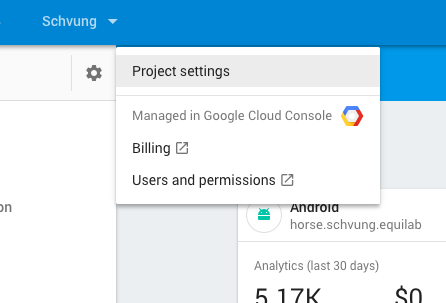
And then -> Service Accounts -> Generate new Keyfile
simonbengtsson
on 30 Sep 2017
Related issues
 nicolasgarnier
·
4Comments
nicolasgarnier
·
4Comments
 positlabs
·
3Comments
stephenplusplus
·
4Comments
positlabs
·
3Comments
stephenplusplus
·
4Comments
 pputhran
·
4Comments
pputhran
·
4Comments
 sporkd
·
5Comments
sporkd
·
5Comments
Most helpful comment
Any workarounds here? I'm trying to use file.getSignedUrl within firebase functions, and running into the same error:
{ SigningError: Could not get credentials without a JSON, pem, or p12 keyfile.
    at /user_code/node_modules/@google-cloud/storage/src/file.js:1441:16
    at /user_code/node_modules/@google-cloud/storage/node_modules/google-auto-auth/index.js:98:7
    at Immediate.<anonymous> (/user_code/node_modules/@google-cloud/storage/node_modules/google-auto-auth/index.js:36:7)
    at runCallback (timers.js:637:20)
    at tryOnImmediate (timers.js:610:5)
    at processImmediate [as _immediateCallback] (timers.js:582:5)
  message: 'Could not get credentials without a JSON, pem, or p12 keyfile.' }