Google-cloud-go: Bigquery latency issue
Client
BigQuery Go Client
Describe Your Environment
Ubuntu 14
Expected Behavior
BigQuery client Put method should send messages fast, with only network delay( and encoding/decoding of ValueStructs) variance taken into account.
Actual Behavior
method newInsertRequest slows down with time.
I have been using this client for streaming data into bigquery from kafka. Usually I have to restart the clients few times in a day, when I benchmarked this library, this particular method newInsertRequest does not perform well. I understand it depends on my schema, but this function's performance degrades with time to a point where it takes 2-10 times the network time. Surprising thing is if i restart this client, this function works pretty fast. Could you please write test case to test this function? It's causing the bigquery client to not function properly. I've testes this against a collection of random messages of nearly 15-18kb in size. Performance degrades linearly
 arriqaaq
All 15 comments
Hi @arriqaaq, I wrote a small program to test your question and was unable to replicate the results you're describing:
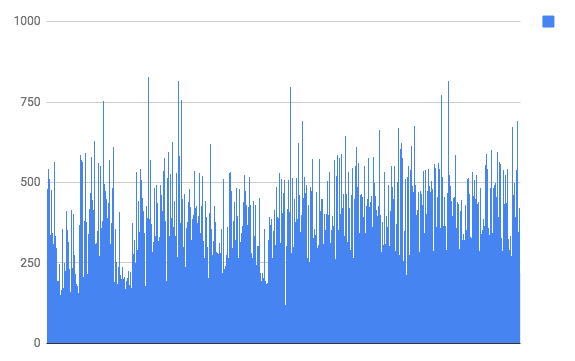
(times in ns)
Could you tell me more about your program - is there processing happening around the put? Also, I recommend putting some opencensus or even time.Now() / time.Since() benchmarking in your app - it may give us clues as to what's going on.
 jadekler
on 3 Apr 2018
jadekler
on 3 Apr 2018
Hi @jadekler
Thanks for the quick response
My program is a consumer from kafka which processes messages and puts them into bigquery. I've timed the Put method by using time.Now()/time.Since()
The problem arises because my messages are 15-20 KB in size, which translates to a bigger struct of multiple data types. I send these messages in a batch of 1000 items per second.
Could you let me know what sort of data I can provide which could be helpful to you?
Would really appreciate your help on this
arriqaaq
on 5 Apr 2018
@arriqaaq Ahh ok. Could you provide me a snippet of your code? I'm interested in seeing the start := time.Now() and time.Now().Sub(start) and all code between (including the Put call).
jadekler
on 5 Apr 2018
@jadekler
Here is a simple wrapper over the bq library which I use to push data, basically you do multiple BatchInsert, and the Commit
// NewBqWriter constructs a new Client which can perform BigQuery write operations.
func NewBqWriter(
    projectId string,
    dataSetName string,
    tableName string,
    schema bigquery.Schema) *BigQueryWriter {

    ctx := context.Background()

    bqManager := new(BigQueryWriter)
    bqManager.batchSize = DEFAULTBATCHSIZE
    bqManager.projectID = projectId
    bqManager.Ctx = ctx
    bqManager.dataSet = dataSetName
    bqManager.table = tableName
    bqManager.schema = schema
    bqManager.counter = 0
    // bqManager.linksavers = make(map[string][]*bigquery.StructSaver, 0, DEFAULTBATCHSIZE)
    bqManager.linksavers = make(map[string][]*bigquery.StructSaver)
    bqManager.errChannel = make(chan ErrorMsg, DEFAULTCHANNELSIZE)
    return bqManager

}

// BigQueryWriter is a writer which contains all the functionalities required to do write operations on BigQuery
type BigQueryWriter struct {
    batchSize int
    counter   int
    projectID string
    dataSet   string
    table     string

    Ctx        context.Context
    client     *bigquery.Client
    uploader   *bigquery.Uploader
    schema     bigquery.Schema
    linksavers map[string][]*bigquery.StructSaver
    errChannel chan ErrorMsg

    mux sync.Mutex
}

// Connect established a new client connection to BigQuery
func (b *BigQueryWriter) Connect() error {
    //Create new client
    newClient, err := bigquery.NewClient(b.Ctx, b.projectID)
    if err != nil {
        log.Println("Error while connecting to BiqQuery", err)
        return err
    }

    b.client = newClient

    return nil

}


// InsertRow inserts a row in BigQuery, takes in a RowSchema(empty) interface
func (b *BigQueryWriter) InsertRow(dbItem RowSchema) error {
    ctx := b.Ctx
    u := b.uploader
    err := u.Put(ctx, dbItem)
    return err
}

// BatchInsert inserts multiple rows in BigQuery, takes in a RowSchema(empty) interface
func (b *BigQueryWriter) BatchInsert(partionKey string, dbItem RowSchema) {
    //incrementing the flush counter
    b.counter++

    //if partionKey is null, put default table name/key with table name
    //keys

    // fun with pointers
    linkPartionMap := &b.linksavers

    if _, partKeyPresent := (*linkPartionMap)[partionKey]; !partKeyPresent {
        (*linkPartionMap)[partionKey] = make([]*bigquery.StructSaver, 0, DEFAULTBATCHSIZE)
    }

    randomId := GetRandomInsertId()

    (*linkPartionMap)[partionKey] = append((*linkPartionMap)[partionKey],
        &bigquery.StructSaver{Struct: dbItem, Schema: b.schema, InsertID: randomId})

}

// SetBatchSize is a setter method to set the batchsize of the stack,
//  after which the rows will be pushed to BQ
func (b *BigQueryWriter) SetBatchSize(bSize int) {
    b.batchSize = bSize
}

// flush clears all the linksavers in the array
func (b *BigQueryWriter) flush() {
    b.counter = 0
    b.linksavers = map[string][]*bigquery.StructSaver{}
}

func (b *BigQueryWriter) Errors() (errChannel chan ErrorMsg) {
    return b.errChannel
}

// Close closes any resources held by the client.
// Close should be called when the client is no longer needed.
func (b *BigQueryWriter) Close() error {
    // Clears the memory allocated for storing linksavers
    b.flush()
    // Close the error channel
    close(b.errChannel)

    log.Println("closed the writer, luke")

    err := b.client.Close()
    if err != nil {
        log.Println("Error closing Big Query handler")
    }
    return err
}

func GetRandomInsertId() string {
    return GetUUID()
}

func GetUUID() string {
    u1 := uuid.NewV4()
    return u1.String()
}

func (b *BigQueryWriter) Commit() error {

    b.mux.Lock()
    defer b.mux.Unlock()

    var bqErr error


    for partKey, bqrows := range b.linksavers {
        log.Println("flush:ready:messages: ", len(bqrows))

        bqTableName := b.table + "$" + partKey

        client := b.client
        u := client.Dataset(b.dataSet).Table(bqTableName).Uploader()

        //Push data to BQ
        networkStart := time.Now()
        log.Println("tablename:", bqTableName," rows:" len(bqrows))
        bqErr = u.Put(b.Ctx, bqrows)
        timetoPush := time.Now().Sub(networkStart)
        log.Println("network-delay: ", timetoPush)

        //Error handling BQ
        if bqErr != nil {
            log.Println("bigquery:error:generic: ", bqErr)
            errLog := ErrorMsg{
                Msg: "bq_generic",
                Err: bqErr,
            }

            //Send to bq error channel
            b.errChannel <- errLog

            //How should you return multiple errors?
            multiError, mErr := bqErr.(bigquery.PutMultiError)
            if mErr {
                for _, rowErr := range multiError {
                    for _, merr := range rowErr.Errors {
                        log.Println("bigquery:error:specific:error: ", merr)
                    }
                }
            }
        } else {
            log.Println("sentTobq:", partKey, ":", len(bqrows), "messages")
        }
    }

    //Clear the map, luke
    b.flush()
    return bqErr

}
I've actually use the timer functions inside the Put method to check where exactly bigquery is taking time. The network time is not a problem at all, for a 1000 messages, it ranges between 300-800 ms, but the newInsertRequest method performance degrades linearly. I'm trying to debug it more. let me know if you need any other info
arriqaaq
on 6 Apr 2018
Thanks @arriqaaq, we'll investigate and let you know what we find.
jadekler
on 6 Apr 2018
Hi @arriqaaq. So I ran some more tests. I first tried that same simple bigquery uploader, but this time with 32kb data per insert. Unfortunately although this slowed things down, the performance was still uniform.
I then tried making the app highly concurrent (spin up a goroutine per Put call), and I observed a linear increase in time as you mentioned.
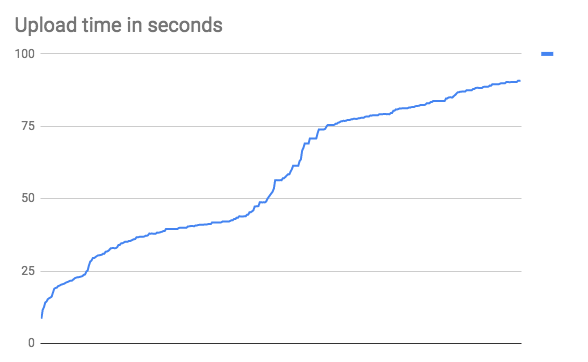
Is that what you're doing - spinning up goroutines for each Put call? If not, could I ask you to provide a reproduction of your problem that we could run? Perhaps in a gist, or a small github repo?
jadekler
on 11 Apr 2018
Hey @jadekler
Thank you for your time on this, really appreciate this.
It is interesting that concurrency is affecting the upload time, but in my program,, it is a single go routine which listens to messages and pushes them to bigquery is a sequential blocking manner. There is no goroutine per Put call.
I will try to provide a gist with some dataset to reproduce this problem
But as per my tests, the liner increase in time was with newInsertRequest method. When I benchmarked with a single object, by replicating it in a batch of 1000, i never saw this problem. It arises when there are random messages which are being converted by this method, just wanted to mention in case it helps. Is there some caching going on inside newInsertRequest? Or any sort of append which is happening in a list which is causing the linear growth in time?
arriqaaq
on 13 Apr 2018
Though could you explain why mutliple put calls in goroutines increase linearly with time? I run multiple consumers on one instance, so that is the closest I get to running multiple goroutines, one for each consumer group instance
arriqaaq
on 13 Apr 2018
Here is a flame graph, in case it helps
https://gist.github.com/arriqaaq/98cb787b488aca5808ea535a41f9006f
arriqaaq
on 13 Apr 2018
@arriqaaq Thanks, I appreciate it. As to why goroutines cause a linear growth in time; resource exhaustion. Just running into the limit of can do per second, which causes a backup of work.
jadekler
on 16 Apr 2018
Hey @jadekler
Any update?
arriqaaq
on 19 Apr 2018
Hi @arriqaaq
I will try to provide a gist with some dataset to reproduce this problem
Per the above, I was hoping you'd be able to provide us with a runnable reproduction. Apart from the concurrent example above, I was unable to reproduce your results. Would that be possible for you?
jadekler
on 19 Apr 2018
Hey @jadekler
I thought the flame graph would help. As you can see, the test results will remain consistent for you if you are going to use the same struct with values, replicated n number of times because of the fieldCache variable, as pointed out in the flame graph too. If you keep producing random data, you will observer the lag.
arriqaaq
on 20 Apr 2018
@arriqaaq It is useful, but I think a repro would be the best way for us to debug this since we're unable to reproduce it ourselves.
jadekler
on 23 Apr 2018
Thank you for filing this issue. We asked some clarifying questions or suggested a course of action a week or more ago and never heard back from you. We are unable to proceed with this issue until then, so we are closing it. Please feel free to comment with more information and we will re-open this issue.
 jba
on 8 Jun 2018
jba
on 8 Jun 2018
Related issues
 rntk
·
3Comments
rntk
·
3Comments
 MoreThanCarbon
·
3Comments
MoreThanCarbon
·
3Comments
 deelienardy
·
3Comments
deelienardy
·
3Comments
 ianrose14
·
3Comments
ianrose14
·
3Comments
 lukaszraczylo
·
3Comments
lukaszraczylo
·
3Comments