Google-cloud-dotnet: Grpc.Core.RpcException: 'Status(StatusCode=Unavailable, Detail="failed to connect to all addresses")'
Environment details
- OS: Window 10
- .NET version: 4.7.2
Steps to reproduce
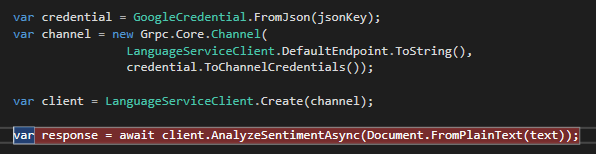
- Call 'AnalyseSentimentAsync' never returns response.

My code:
 jadewilson123
All 33 comments
Thanks for the report. Could you give any details about your networking, e.g. any proxies that might cause problems? We test this regularly in our integration tests, so it definitely can work - we need to work out what's different in your environment.
 jskeet
on 7 Jun 2019
jskeet
on 7 Jun 2019
(I probably won't be able to look at this more before Monday UK time, btw.)
jskeet
on 7 Jun 2019
Additional questions:
- Does this happen all the time, or just intermittently?
- If you use other Google Cloud APIs, have you seen the same problem with those?
- Are you able to test the same code on a different network?
jskeet
on 10 Jun 2019
Hi Jskeet,
It happens all the time when I'm at work, however it works all the time when I'm on my home network.
I can use speech to text, face detection and translation API's okay both at work/home.
jadewilson123
on 10 Jun 2019
Okay, so it definitely sounds like a network issue on your work network. The Translation API only uses HTTP/1.1 so I'm not surprised that that works - but I'm surprised that the TextToSpeech and Vision APIs work but Language doesn't. Could you confirm exactly which NuGet packages you're using for text-to-speech and face detection?
jskeet
on 10 Jun 2019
Google Speech to Text - Google.Cloud.Speech.V1 1.1.0
Google Vision - Google.Cloud.Vision.V1 1.4.0
jadewilson123
on 10 Jun 2019
Okay, so still the gRPC APIs. I've very surprised that they work but this does.
If I provide a small console app that uses all three of them in a single application (trivially) would you be happy to run that and report the results?
jskeet
on 10 Jun 2019
Yes that would be fine.
jadewilson123
on 10 Jun 2019
Okay, here's a sample console application. Just unzip it and run "dotnet run" and it should print out versions and test the three APIs. (Obviously look at the source code first to prove to yourself that this isn't hostile code!)
jskeet
on 10 Jun 2019
Hi there,
Thanks for sharing with me.
So initially with your example when I ran it didn't connect with any as it just hung once calling the Language API and produced the same error as above.
I moved the ordering around and it worked for speech but not for the vision.
jadewilson123
on 10 Jun 2019
However when I change the vision API call from 'DetectImageProperties' to be the one I'm using in my solution 'DetectFaces' that works fine.
jadewilson123
on 10 Jun 2019
So what happens with DetectImageProperties? Does that fail with the same error as before? I don't understand why one call would fail and the other succeed, to be honest (or why Language would fail).
jskeet
on 10 Jun 2019
Just as one thing to test, could you run it again with the GRPC_DNS_RESOLVER environment variable set to native? If that changes things (either for Vision or Language) that would give a bit hint.
jskeet
on 10 Jun 2019
Yes exact same issue with the DetectImageProperties.
Added the environment variable and same issue occurs.
jadewilson123
on 10 Jun 2019
That's really interesting. One extra test to run, just to really, really show that it's the feature type that makes a difference in Vision... here's a replacement Main method:
static void Main()
{
    var client = ImageAnnotatorClient.Create();
    var image = Image.FromUri("https://cloud.google.com/images/devtools-icon-64x64.png");
    var request = new BatchAnnotateImagesRequest
    {
        Requests =
        {
            new AnnotateImageRequest
            {
                Image = image,
                Features = { new Feature { Type = Feature.Types.Type.FaceDetection } }
            }
        }
    };

    try
    {
        client.BatchAnnotateImages(request);
        Console.WriteLine("Detect faces success");
    }
    catch (RpcException e)
    {
        Console.WriteLine($"Detect faces failed: {e.Status}");
    }

    // *Just* change the feature type...
    request.Requests[0].Features[0].Type = Feature.Types.Type.ImageProperties;
    try
    {
        client.BatchAnnotateImages(request);
        Console.WriteLine("Detect image properties success");
    }
    catch (RpcException e)
    {
        Console.WriteLine($"Detect image properties failed: {e.Status}");
    }
}
Judging by what you've said, I'd expect the first call to pass, and the second to fail. Could you test that that is in fact the case? If it is, I'll need to file a bug internally for this.
jskeet
on 10 Jun 2019
No it doesn't work for either case above, same error again.
jadewilson123
on 10 Jun 2019
I'm intrigued that neither of those works - I'd expect the face detection to work, given that that works for you elsewhere. Could you try to make changes to the code (e.g. using the Image that you'd use in your own code, loading from a file or whatever) to try to get the facial detection working? If we can pinpoint exactly what's needed to go from "reliably working" to "reliably failing" that could make all the difference. Apologies for all the back and forth on this - if I could reproduce it myself, I would, of course...
jskeet
on 10 Jun 2019
It works when I use the DetectFaces call on the original code you had given me, just not when using the BatchAnnotateImages with the facial detection inner request. Is there differences with how these two methods connect to the API?
jadewilson123
on 10 Jun 2019
No, DetectFaces calls BatchAnnotateImages pretty simply, as far as I remember. I'll check it tomorrow to see what differences there are.
jskeet
on 11 Jun 2019
Okay, here's a version where either both should fail or both should succeed. Please let me know what happens:
static void Main()
{
    var client = ImageAnnotatorClient.Create();
    var image = Image.FromUri("https://cloud.google.com/images/devtools-icon-64x64.png");

    // Detect faces via the helper method...
    try
    {
        client.DetectFaces(image);
        Console.WriteLine("DetectFaces success");
    }
    catch (RpcException e)
    {
        Console.WriteLine($"DetectFaces failed: {e.Status}");
    }

    // Now do the same thing manually...
    var request = new BatchAnnotateImagesRequest
    {
        Requests =
        {
            new AnnotateImageRequest
            {
                Image = image,
                Features = { new Feature { Type = Feature.Types.Type.FaceDetection } }
            }
        }
    };
    try
    {
        client.BatchAnnotateImages(request);
        Console.WriteLine("BatchAnnotateImage success");
    }
    catch (RpcException e)
    {
        Console.WriteLine($"BatchAnnotateImage failed: {e.Status}");
    }
}
Okay so I have just got back into the office and neither are working and are producing the same error.
jadewilson123
on 11 Jun 2019
Okay, that's at least self-consistent... but isn't the DetectFaces line the exact same one that was working yesterday? Or were you using a different image for that?
Do you know if there's anything unusual at all about either your GCP project or your networking? (I suspect at this point that it might be a failure within GCP, in terms of your project accessing the image, but it's still hard to tell...)
jskeet
on 11 Jun 2019
Yes, but my guess is that my machine had switched to the guest WIFI, as I have just switched to this to test both methods and they work, so I think we can disregard that.
Is there anything you want to know specifically about the network?
jadewilson123
on 11 Jun 2019
Ah - so when on the guest wifi everything works, but on your normal corp network things fail? (If you try the earlier Sample.zip, do all three APIs work?)
Does everything fail at that point for the Vision API? Does Speech still work on your Corp network, just not Vision and Language?
It might be worth trying to ping the three endpoints both on your guest wifi and corp network:
- vision.googleapis.com
- speech.googleapis.com
- language.googleapis.com
jskeet
on 11 Jun 2019
Yes all work when I'm on the guest network, I've ran a list of tests and here is the output:
Work network:
Speech - Success
Vision - Fail
Language - Fail
ping vision.googleapis.com - Fail
ping speech.googleapis.com - Fail
ping language.googleapis.com - Fail
Guest network:
Speech - Success
Vision - Success
Language - Success
ping vision.googleapis.com - Fail
ping speech.googleapis.com - Fail
ping language.googleapis.com - Fail
jadewilson123
on 11 Jun 2019
I'm interested that the pings all fail. Do they fail to resolve to IP addresses, or just fail to make the eventual calls?
I think it's probably worth talking to your network administrator to ask what differences there are between the guest and work networks... for example, is one of them using IPv6 and one using IPv4?
jskeet
on 11 Jun 2019

They resolve the IP addresses and try to send a request 4 times before stopping. Each time the request times out.
jadewilson123
on 11 Jun 2019
Okay - that may well just be your firewall. When you talk to your network administrator, it's worth asking about any proxy differences in particular between the two networks. It's very odd that Speech works but not Language or Vision though.
jskeet
on 11 Jun 2019
This happens on both the guest/regular network even though the API calls work okay on the guest network so I suspect it's a bit of a red herring.
I'm in talk with our network administrators and will update you further when I know more information.
jadewilson123
on 11 Jun 2019
So our network was blocking googleapis.com and they have now allowed access and it works okay. It is very bizarre that speech to text was working though. Thank you for your help I'm going to close this issue now.
jadewilson123
on 11 Jun 2019
Hooray - glad it's solved; thanks for giving the explanation. (That might be useful to future readers.)
jskeet
on 11 Jun 2019
I am having the same problem, ping is working fine.
 rmfogel
on 18 Nov 2020
rmfogel
on 18 Nov 2020
@rmfogel: Presumably the way you're pinging it doesn't use HTTP/2 though, which is what gRPC uses. I would ask your network administrators whether they have any specific HTTP/2 rules in place, and whether they have tracing/detection to help you diagnose this. I'm afraid there's not a lot we can do from a libraries perspective.
jskeet
on 18 Nov 2020
Related issues
 AliSheikhTaheri
·
6Comments
AliSheikhTaheri
·
6Comments
 mehtanilay10
·
5Comments
mehtanilay10
·
5Comments
 Talento90
·
6Comments
Talento90
·
6Comments
 Watanyou
·
7Comments
Watanyou
·
7Comments
 rkalasky
·
8Comments
rkalasky
·
8Comments