Google-cloud-dotnet: Logged with log4net but log lines never appear in stackdriver.
Like this user report on stack overflow,
https://stackoverflow.com/questions/48962850/cant-write-log-entry-with-google-clouds-log4net-integration
I followed the instructions here:
https://googlecloudplatform.github.io/google-cloud-dotnet/docs/Google.Cloud.Logging.Log4Net/index.html
Wrote this code:
https://github.com/SurferJeffAtGoogle/csharp-docs-samples/tree/log4net/logging/api/Log4NetSample
And ran it:
~/gitrepos/dotnet-docs-samples/logging/api/Log4NetSample$ dotnet run
log4net: log4net assembly [log4net, Version=2.0.8.0, Culture=neutral, PublicKeyToken=669e0ddf0bb1aa2a]. (.NET Framework [.NET Core 4.6.0.0] on Linux 4.9.0-5-amd64 #1 SMP Debian 4.9.65-3+deb9u2 (2018-01-04))
log4net: defaultRepositoryType [log4net.Repository.Hierarchy.Hierarchy]
log4net: Creating repository for assembly [Log4NetSample, Version=1.0.0.0, Culture=neutral, PublicKeyToken=null]
log4net: Assembly [Log4NetSample, Version=1.0.0.0, Culture=neutral, PublicKeyToken=null] Loaded From [Not supported on .NETCore]
log4net: Assembly [Log4NetSample, Version=1.0.0.0, Culture=neutral, PublicKeyToken=null] does not have a RepositoryAttribute specified.
log4net: Assembly [Log4NetSample, Version=1.0.0.0, Culture=neutral, PublicKeyToken=null] using repository [log4net-default-repository] and repository type [log4net.Repository.Hierarchy.Hierarchy]
log4net: Creating repository [log4net-default-repository] using type [log4net.Repository.Hierarchy.Hierarchy]
log4net: configuring repository [log4net-default-repository] using file [log4net.xml]
log4net: configuring repository [log4net-default-repository] using stream
log4net: loading XML configuration
log4net: Configuring Repository [log4net-default-repository]
log4net: Configuration update mode [Merge].
log4net: Logger [root] Level string is [ALL].
log4net: Logger [root] level set to [name="ALL",value=-2147483648].
log4net: Loading Appender [CloudLogger] type: [Google.Cloud.Logging.Log4Net.GoogleStackdriverAppender,Google.Cloud.Logging.Log4Net]
log4net: Converter [message] Option [] Format [min=-1,max=2147483647,leftAlign=False]
log4net: Converter [newline] Option [] Format [min=-1,max=2147483647,leftAlign=False]
log4net: Setting Property [ConversionPattern] to String value [%-4timestamp [%thread] %-5level %logger %ndc - %message]
log4net: Converter [timestamp] Option [] Format [min=4,max=2147483647,leftAlign=True]
log4net: Converter [literal] Option [ [] Format [min=-1,max=2147483647,leftAlign=False]
log4net: Converter [thread] Option [] Format [min=-1,max=2147483647,leftAlign=False]
log4net: Converter [literal] Option [] ] Format [min=-1,max=2147483647,leftAlign=False]
log4net: Converter [level] Option [] Format [min=5,max=2147483647,leftAlign=True]
log4net: Converter [literal] Option [ ] Format [min=-1,max=2147483647,leftAlign=False]
log4net: Converter [logger] Option [] Format [min=-1,max=2147483647,leftAlign=False]
log4net: Converter [literal] Option [ ] Format [min=-1,max=2147483647,leftAlign=False]
log4net: Converter [ndc] Option [] Format [min=-1,max=2147483647,leftAlign=False]
log4net: Converter [literal] Option [ - ] Format [min=-1,max=2147483647,leftAlign=False]
log4net: Converter [message] Option [] Format [min=-1,max=2147483647,leftAlign=False]
log4net: Setting Property [Layout] to object [log4net.Layout.PatternLayout]
log4net: Setting Property [ProjectId] to String value [surferjeff-test2]
log4net: Setting Property [LogId] to String value [console]
log4net: Created Appender [CloudLogger]
log4net: Adding appender named [CloudLogger] to logger [root].
log4net: Hierarchy Threshold []
Hello World!
But nothing appears in my stackdriver logs:

 SurferJeffAtGoogle
All 15 comments
(Assigned to Chris as our Log4Net expert.)
 jskeet
on 27 Feb 2018
jskeet
on 27 Feb 2018
I'll look at reproducing this now.
 chrisdunelm
on 27 Feb 2018
chrisdunelm
on 27 Feb 2018
My implementation of pretty much exactly @SurferJeffAtGoogle's code works as expected, and the expected log entry appears in Google Stackdriver logging.
Because this is running on my local machine, it appears as a "global" log entry.
If running on GCE the log entry will appear as a "GCE VM Instance", "GAE Application", or "GKE Container" entry, depending on the exact platform.
This is defined in MonitoredResourceBuilder.cs.
chrisdunelm
on 27 Feb 2018
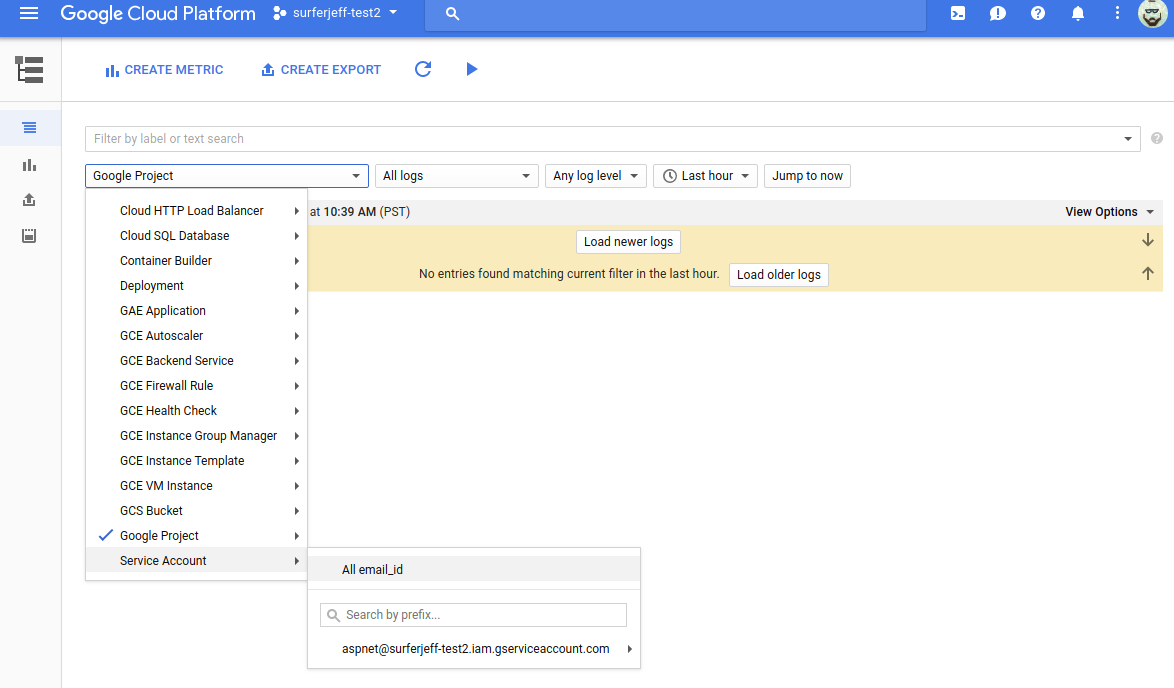
Can you provide a screenshot where you see the log entry?
I see no way to select a "global" log.
SurferJeffAtGoogle
on 27 Feb 2018
I hacked the uri to see the global log, but I still see nothing:

SurferJeffAtGoogle
on 27 Feb 2018
Looks like this is being caused by LogManager.Flush() not working properly. Delaying program exit after the flush fixes the problem.
chrisdunelm
on 1 Mar 2018
I will investigate and see if this can be fixed.
chrisdunelm
on 1 Mar 2018
OK, so this is broken in two ways:
- The LogManager.Flush call does absolutely nothing in .NETStandard projects; and this sample is .NETStandard, so it cannot work.
- On full .NET framework code,
LogManager.Flush()requires the appender to implement IFlushable, whichGoogleStackdriverAppenderdoes not.
I will add IFlushable support in a PR soon.
chrisdunelm
on 1 Mar 2018
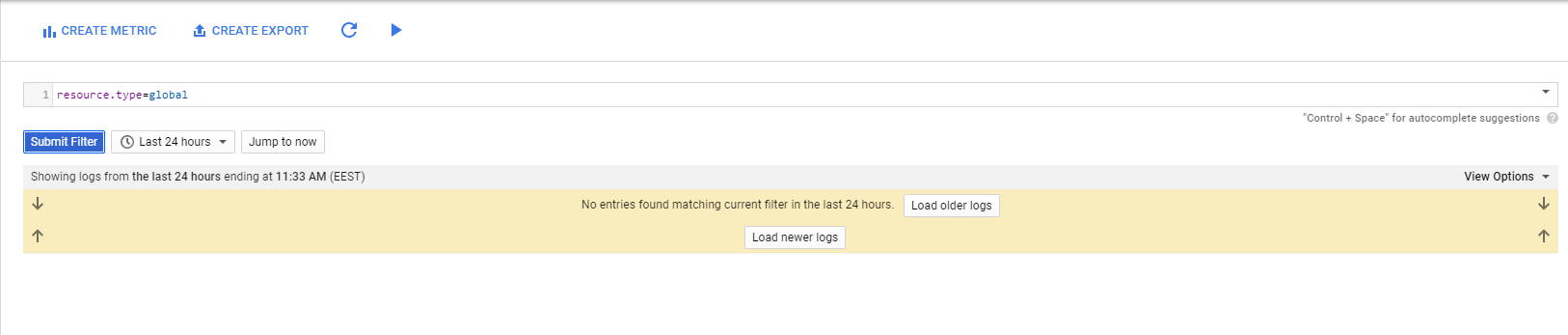
I run .NET Core app with the latest Google.Cloud.Logging.Log4Net 2.2.1 release, and still have similar issue. StackDriver does not show any logprints. I fully follow the example. Here is my XML configuration for GoogleStackdriverAppender:
<log4net debug="true">
  <appender name="CloudLogger" type="Google.Cloud.Logging.Log4Net.GoogleStackdriverAppender,Google.Cloud.Logging.Log4Net">
    <layout type="log4net.Layout.PatternLayout">
      <conversionPattern value="%-4timestamp [%thread] %-5level %logger %ndc - %message" />
    </layout>
    <projectId value="here-goes-my-project-id" />
    <logId value="mySampleLog" />
  </appender>
  <root>
    <level value="ALL" />
    <appender-ref ref="CloudLogger" />
  </root>
</log4net>
And the code looks like this:
        var logRepository = LogManager.GetRepository(GetType().GetTypeInfo().Assembly);
        log4net.Config.XmlConfigurator.Configure(logRepository, new FileInfo(log4netConfigFile));

        ILog log = LogManager.GetLogger(typeof(BusinessLogicAPITester));

        log.Info("Hello World2.");
        bool repositoryFlushCompleted = ((IFlushable)logRepository).Flush(10_000);
        Assert.True(repositoryFlushCompleted);
The same code works perfectly when configured with RollingLogFileAppender instead of GoogleStackdriverAppender.
Attaching Stackdriver screenshot
 sigorbor
on 24 Apr 2018
sigorbor
on 24 Apr 2018
Reopened - Chris, are you okay to have a look at this?
jskeet
on 24 Apr 2018
Hello, I can agree with what sigorbor said above. Still the same issue.
 Vosec
on 24 Apr 2018
Vosec
on 24 Apr 2018
Guys, this was a GCP permissions misconfiguration on our side. Sorry about that, please close the issue.
sigorbor
on 30 Apr 2018
Thanks @sigorbor, closing.
chrisdunelm
on 30 Apr 2018
I run .NET Web app with the latest Google.Cloud.Logging.Log4Net 2.2.1 release, and I'm still facing the same issue. Stackdriver does not show any logs. Can you look into it?
 ghost
on 22 Nov 2018
ghost
on 22 Nov 2018
Guys, this was a GCP permissions misconfiguration on our side. Sorry about that, please close the issue.
Sigorbor, I'm facing the same issue. Could you please explain what was the GCP permissions misconfiguration from your side?
ghost
on 26 Nov 2018
Related issues
 mahesh-bennie
·
7Comments
mahesh-bennie
·
7Comments
 giammin
·
6Comments
giammin
·
6Comments
 Thaina
·
9Comments
Thaina
·
9Comments
 bbuzzi
·
3Comments
bbuzzi
·
3Comments
 mehtanilay10
·
5Comments
mehtanilay10
·
5Comments
Most helpful comment
Reopened - Chris, are you okay to have a look at this?