Google-api-python-client: export_media as PDF gets Letter version of A4 document
Environment details
- OS type and version:
- Python version: Python 3.8.1
- pip version: pip 19.3.1 from /usr/lib/python3.8/site-packages/pip (python 3.8)
google-api-python-clientversion: Version: 1.12.5
Steps to reproduce
- Have a "Word" document in A4 format on drive.
- Use the export_media method to retrieve it as mimeType="application/pdf"
- Get a Letter version of the document. Basically useless outside the US. :(
Description
From what i can tell id and mimeType are the only parameters, so there isn't much i can have done wrong.
Either the api client is supplying incorrect parameters, or not exposing enough parameters to request native paper size from the server (if this is intended behaviour).
Honestly, i can't find the concrete implementation of export_media here (so i couldn't investigate properly), but the docs are here, and other issues mention it, so i assume this is the project.
If not, or regardless really, please do point me in the right direction.
 attah
attah
All 4 comments
Hi @attah!
I'm not sure which API you are working with. Would you mind sharing some of the code you are using?
 busunkim96
on 11 Nov 2020
busunkim96
on 11 Nov 2020
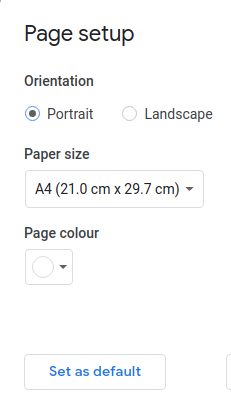
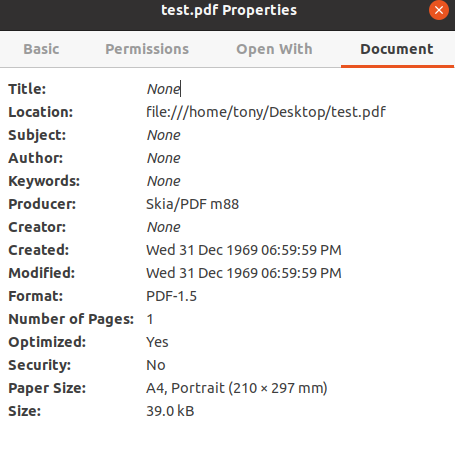
It looks like you're using the Google Drive V3 API. I attempted to reproduce this issue using the code below with a Google Docs file. I had a Google Docs file with size set to A4. I was able to successfully export the file as a PDF in A4 format. I also tried using a word file with '.doc' extension but I received this error "Export only supports Docs Editors files."
import os
import google_auth_oauthlib.flow
import googleapiclient.discovery
import googleapiclient.errors
from googleapiclient.errors import HttpError

scopes = ['https://www.googleapis.com/auth/drive']

api_service_name = "drive"
api_version = "v3"
client_secrets_file = "<json file>"

# Get credentials and create an API client
flow = google_auth_oauthlib.flow.InstalledAppFlow.from_client_secrets_file(
    client_secrets_file, scopes)
credentials = flow.run_console()
service = googleapiclient.discovery.build('drive', 'v3', credentials=credentials)


request =   service.files().export_media(fileId=<file_id>,   mimeType='application/pdf')

response = request.execute()
with open(<local path>, "wb") as wer:
    wer.write(response)
In Google Doc Setup:
Downloaded File Properties:
As a next step, please create a new Google Docs file in size A4, and use the code that I provided. Please let me know the result.
 parthea
on 11 Nov 2020
parthea
on 11 Nov 2020
Thank you very much @parthea Yes, indeed this is about the Drive api, sorry for the imprecise description.
Your example does yield an A4 version of the very same document i tried with.
I can't for the life of me see what the app I get the problem with is doing different.
It looks like super vanilla usage of the same api.
So i tried again "just because" - today it worked just fine, with no change at all.
(same installation of the app in question - document last updated Nov 9)
File from yesterday:
Producer:       Skia/PDF m88
Tagged:         no
UserProperties: no
Suspects:       no
Form:           none
JavaScript:     no
Pages:          2
Encrypted:      no
Page size:      612 x 792 pts (letter)
Page rot:       0
File size:      26092 bytes
Optimized:      yes
PDF version:    1.5
(yes, the letter conversion even yields an extra blank page - i guess to compensate for the size somehow, even if the document is just a few lines)
File from today:
Producer:       Skia/PDF m88
Tagged:         no
UserProperties: no
Suspects:       no
Form:           none
JavaScript:     no
Pages:          1
Encrypted:      no
Page size:      596 x 843 pts (A4)
Page rot:       0
File size:      25670 bytes
Optimized:      yes
PDF version:    1.5
I guess the server was just having a bad day? ¯\_(ツ)_/¯
attah
on 11 Nov 2020
I'm glad it's working! I'm going to close off this issue but please keep us posted if you encounter the problem.
parthea
on 12 Nov 2020
Related issues
 quasipedia
·
7Comments
quasipedia
·
7Comments
 ShadowLNC
·
4Comments
ShadowLNC
·
4Comments
 alirezastack
·
7Comments
alirezastack
·
7Comments
 ThreeSixes
·
7Comments
ThreeSixes
·
7Comments
 knusperkrone
·
7Comments
knusperkrone
·
7Comments