Google-api-php-client: Access Token is NULL for Firebase Messaging
I setuped WEB Firebace Cloud Messaging and collected tokens from clients.
I try to send first message by this instruction https://firebase.google.com/docs/cloud-messaging/js/first-message like this:
POST https://fcm.googleapis.com/v1/projects/myproject-b5ae1/messages:send HTTP/1.1

Content-Type: application/json
Authorization: Bearer ya29.ElqKBGN2Ri_Uz...HnS_uNreA

{
  "message":{
    "token" : "bk3RNwTe3H0:CI2k_HHwgIpoDKCIZvvDMExUdFQ3P1...",
    "notification" : {
      "body" : "This is an FCM notification message!",
      "title" : "FCM Message",
      }
   }
}
But I need Bearer
Content-type: application/json
Authorization: Bearer <valid Oauth 2.0 token for the service account of the Firebase project>
I need access_token to do it.
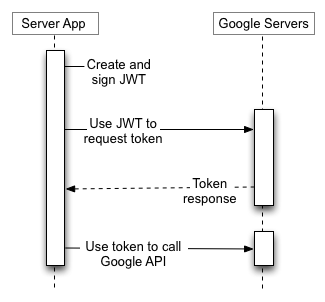
I found exampe on nodeJS, how to get access_token
I try to convert this nodeJS code to PHP (https://firebase.google.com/docs/cloud-messaging/auth-server#authorize_http_v1_send_requests)
function getAccessToken() {
  return new Promise(function(resolve, reject) {
    var key = require('./service-account.json');
    var jwtClient = new google.auth.JWT(
      key.client_email,
      null,
      key.private_key,
      SCOPES,
      null
    );
    jwtClient.authorize(function(err, tokens) {
      if (err) {
        reject(err);
        return;
      }
      resolve(tokens.access_token);
    });
  });
}
My code:
$SCOPE = "https://www.googleapis.com/auth/firebase.messaging";

$client = new Google_Client();
$client->setApplicationName('Play Cool Math Notifications');
$client->setAuthConfig("token/play-cool-math-notifications-firebase-adminsdk.json");
$client->setScopes($SCOPE);
$client->authorize();
$token = $client->getAccessToken();
echo $token;
But I got NULL, what did I do wrong?
 DenisSokoloff
All 5 comments
getting same issue……
 jaylin507
on 3 May 2018
jaylin507
on 3 May 2018
I found way to send w/o Access Token
private function sendNotification($_token, $_title, $_body, $_link)
    {
        $SERVER_KEY = "AAAA....";

        $data = array(
            "to" => $_token,
            //"content_available"   => false,
            "notification" => array
            (
                "title"         => $_title,
                "body"          => $_body,
                "icon"          => "https://...../icons/android-icon-192x192.png",
                "click_action"  => $_link."?".(new DateTime())->getTimestamp()
            )
        );
        $data_string = json_encode($data);

        $ch = curl_init('https://fcm.googleapis.com/fcm/send');

        curl_setopt($ch, CURLOPT_CUSTOMREQUEST,     "POST");
        curl_setopt($ch, CURLOPT_POSTFIELDS,        $data_string);
        curl_setopt($ch, CURLOPT_RETURNTRANSFER,    true);
        curl_setopt($ch, CURLOPT_HTTPHEADER,
            array(
                'Content-Type: application/json',
                'Authorization: key='.$SERVER_KEY
            ))  ;
        $result = curl_exec($ch);
        var_dump($result);
        curl_close ($ch);

        return $result;
    }
👎4
Thanks!
jaylin507
on 6 May 2018
Thanks for creating this issue.
 mattwhisenhunt
on 10 May 2018
mattwhisenhunt
on 10 May 2018
 MGerasimchuk
on 28 Aug 2018
MGerasimchuk
on 28 Aug 2018
Was this page helpful?
0 / 5 - 0 ratings
Related issues
 whatido1
·
3Comments
whatido1
·
3Comments
 upendtu
·
4Comments
upendtu
·
4Comments
 ghost
·
4Comments
ghost
·
4Comments
 Dresing
·
3Comments
Dresing
·
3Comments
 cmcfadden
·
5Comments
cmcfadden
·
5Comments