Google-api-nodejs-client: Impossible to set regional enpoint in google dataflow client
According to documentation, one can set the execution region of a template through the location parameter. I'm trying to send the following payload:
{
  projectId: 123,
  resource: {
    location: "europe-west1",
    jobName: `xxx`,
    gcsPath: 'gs://xxx'
  }
}
I get the following response:
The workflow could not be created, since it was sent to an invalid regional endpoint (europe-west1). Please resubmit to a valid Cloud Dataflow regional endpoint.
Even if I switch back to us-east1, I get the same error:
The workflow could not be created, since it was sent to an invalid regional endpoint (us-east1). Please resubmit to a valid Cloud Dataflow regional endpoint.
Doing the same in the API explorer seems to be working fine:
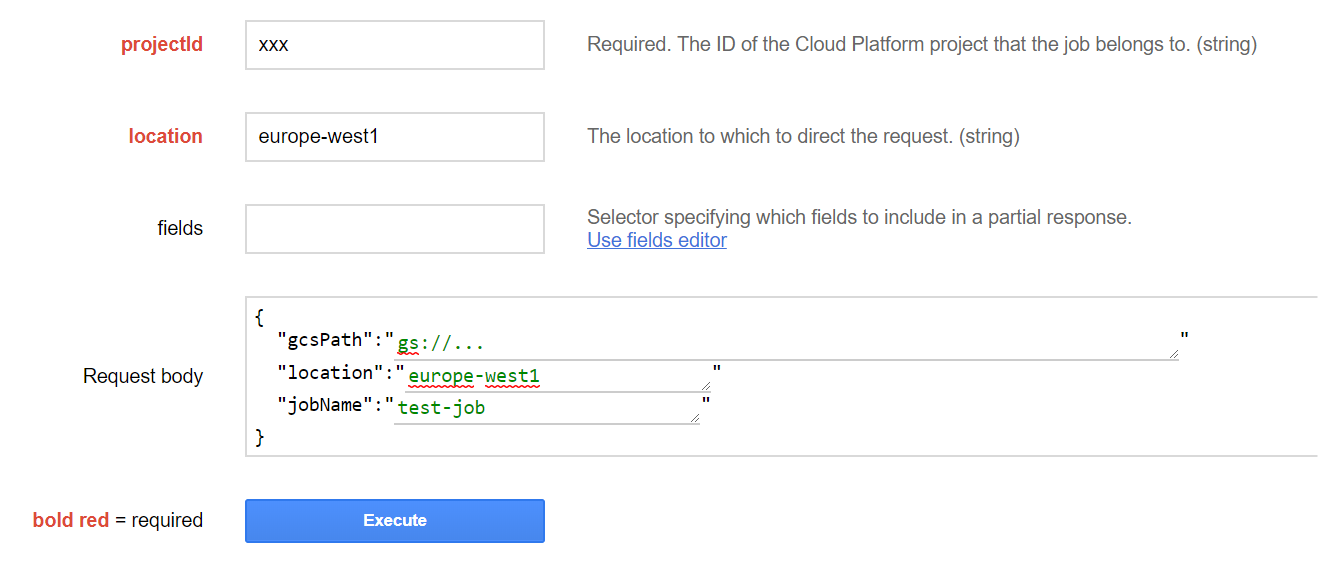
My template was created using Apache Beam Java SDK 2.3.0
I don't know if this is a bug or a misunderstanding on my side on how to run a template in a specific region.
Thanks
 bdahon
All 4 comments
I get the same error, too, with a template that allows regional endpoints using the console/API instead. Code snippet I used with just some dummy parameters:
var {google} = require('googleapis');
const project = "PROJECT_ID"

let result;
google.auth.getApplicationDefault(function(err, authClient, projectId) {
        if (err) {
            throw err;
        }
        if (authClient.createScopedRequired && authClient.createScopedRequired()) {
            authClient = authClient.createScoped([
                'https://www.googleapis.com/auth/compute'
            ]);
        }
        var dataflow = google.dataflow({
            version: "v1b3",
            auth: authClient
        });
        //just testing if it runs or not
        var launchParams = {
            "input": "gs://your-input-bucket/*.txt"
        };
        var env = {
           "tempLocation": "gs://your-staging-bucket/temp"
        }
        var opts = {
            projectId: project,
            location: "europe-west1",
            gcsPath: "gs://dataflow-templates/latest/GCS_Text_to_BigQuery",
            resource: {
                parameters: launchParams,
                environment: env
            }
        };
        dataflow.projects.templates.launch(opts, (err, result) => {
            if (err) {
                throw err;
            }
            res.send(result.data);
        });
});
 gxercavins
on 7 Mar 2018
gxercavins
on 7 Mar 2018
I confirm. I have the same problem too.
 aleguerrini
on 7 Mar 2018
aleguerrini
on 7 Mar 2018
I have the same problem but with the java client.
any solution for it ?
 mahmoudhanafy
on 12 Mar 2018
mahmoudhanafy
on 12 Mar 2018
I found the cause of this problem. You can see at the API explorer that there are 2 endpoints for launching a template.

so the problem we all have here is that we are trying to set the location for the first API dataflow.projects.templates.launch.
So if you change it to dataflow.projects.locations.templates.launch it will work fine.
mahmoudhanafy
on 13 Mar 2018
Related issues
 suparnavg
·
3Comments
suparnavg
·
3Comments
 ashishbajaj99
·
3Comments
ashishbajaj99
·
3Comments
 streamnsight
·
4Comments
streamnsight
·
4Comments
 Chethandsagar
·
4Comments
Chethandsagar
·
4Comments
 raapperez
·
3Comments
raapperez
·
3Comments
Most helpful comment
I found the cause of this problem. You can see at the API explorer that there are 2 endpoints for launching a template.

so the problem we all have here is that we are trying to set the location for the first API
dataflow.projects.templates.launch.So if you change it to
dataflow.projects.locations.templates.launchit will work fine.